---
title: "Best Thunderbolt 5 Docks 2026: Buying Guide & Comparison"
description: "Guide to Thunderbolt 5 docks with comparisons of budget and premium options, including specs, ports, and connectivity details."
date: 2026-04-29
categories: ["Gadgets"]
tags: ["thunderbolt","docks","connectivity","productivity","reviews"]
---
Thunderbolt 5 is available now, with speeds up to 120Gbps and support for multiple 8K displays. As more laptops get this technology, choosing the right Thunderbolt 5 dock matters for your productivity.
This guide covers Thunderbolt 5 docking stations, from budget options to premium models. Whether you're a content creator, developer, or business professional, there's a Thunderbolt 5 dock that works for you.
Some links in this guide are affiliate links. If you buy through them, we may earn a small commission at no extra cost to you. This helps us keep testing and updating these recommendations.
## Quick Comparison Overview
| **Category** | **Best Budget** | **Best Premium** | **Best Productivity** |
|--------------|----------------|------------------|---------------------|
| **Dock** | Kensington SD5000T5 | iVANKY FusionDock Ultra | OWC 11-Port TB5 |
| **Price Range** | ~$400-500 | ~$650-750 | ~$450-550 |
| **Best For** | Essential TB5 upgrade | Dual-chip, 26 ports, 10GbE | Professional workflows |
## Quick Pick: Choose in 30 Seconds
- Most ports + dual-chip + 10GbE → [iVANKY FusionDock Ultra](#1-ivanky-fusiondock-ultra-dual-chip-powerhouse--top-pick) (26 ports, 10GbE, quad display)
- Maximum ports + professional networking → [CalDigit TS5-Plus](#2-caldigit-ts5-plus-20-port-powerhouse) (20 ports, 10GbE)
- Best overall value → [OWC 11‑Port Thunderbolt 5 Dock](#2-owc-11-port-thunderbolt-5-docking-station)
- Content creators + dual card readers → [ASUS Master Thunderbolt 5 Dock DC510](#5-asus-master-thunderbolt-5-dock-dc510) (SD + microSD, 2.5GbE, M.2 slot)
- MacBook Pro/Max + highest charging → [iVANKY FusionDock Pro 3](#6-ivanky-fusiondock-pro-3-thunderbolt-5) (180W PD)
- Gaming, RGB, and internal SSD → [Razer Thunderbolt 5 Dock Chroma](#4-razer-thunderbolt-5-dock-chroma) (M.2 slot)
- Beautiful design + active cooling → [Anker Prime TB5](#3-anker-prime-tb5-docking-station-14-in-1)
- Business/enterprise + remote management → [Dell Pro SD25TB5](#7-dell-pro-thunderbolt-5-smart-dock-sd25tb5) (up to 300W PD on Dell)
- Lowest price with TB5 certification → [Kensington SD5000T5](#1-kensington-sd5000t5-thunderbolt-5-triple-4k-docking-station)
Tip: Tap a link to jump straight to the model.
## Understanding Thunderbolt 5 Technology
Before looking at specific models, it helps to know what makes Thunderbolt 5 different:
### **⚡ Thunderbolt 5 Key Benefits**
- **120Gbps Bandwidth**: 3x faster than Thunderbolt 4 (with Bandwidth Boost)
- **Multiple 8K Displays**: Support for dual 8K@60Hz or triple 4K@144Hz
- **Enhanced Power Delivery**: Up to 300W for high-performance laptops
- **Backward Compatibility**: Works with Thunderbolt 4, USB4, and USB-C devices
### **🔌 Port Technology Explained**
Thunderbolt 5 docks typically feature a mix of port types optimized for different use cases:
- **Thunderbolt 5 Downstream**: Full 80Gbps (120Gbps with Bandwidth Boost)
- **USB-A 3.2 Gen 2**: 10Gbps for legacy devices
- **USB-C**: Various speeds from 5Gbps to 10Gbps
- **2.5GbE/10GbE**: High-speed networking options
## Budget-Friendly Thunderbolt 5 Docks
### 1. Kensington SD5000T5 Thunderbolt 5 Triple 4K Docking Station

#### Specifications
| Feature | Details |
|---------|---------|
| **Thunderbolt Standard** | ✅ Thunderbolt 5 (Intel Certified) |
| **Total Ports** | 11 ports |
| **TB5 Downstream Ports** | 3x Thunderbolt 5 (80Gbps) |
| **USB Ports** | 3x USB-A 3.2 Gen2 (10Gbps) |
| **Video Output** | Native TB5 video support |
| **Display Support** | Triple 4K@120Hz / Dual 8K@60Hz |
| **Power Delivery** | 140W PD |
| **Ethernet** | 2.5GbE |
| **Card Reader** | Dual SD/MicroSD |
| **Audio** | 3.5mm combo jack |
| **Cooling** | Passive cooling |
#### Key Highlights
- **Intel Certified** Thunderbolt 5 technology for guaranteed compatibility
- **Triple 4K display support** at 120Hz for productive multi-monitor setups
- **Plug-and-play operation** with Windows 11 and macOS
- **Compact design** that fits well on any desk
- **Includes TB5 cable** for immediate setup
The Kensington SD5000T5 has the main Thunderbolt 5 features at a lower price, making it good for users upgrading from Thunderbolt 4.
> **Best For**: Users seeking reliable TB5 performance, triple display setups, professionals who need certified compatibility
---
### 2. OWC 11-Port Thunderbolt 5 Docking Station

#### Specifications
| Feature | Details |
|---------|---------|
| **Thunderbolt Standard** | ✅ Thunderbolt 5 |
| **Total Ports** | 11 ports |
| **TB5 Downstream Ports** | 3x Thunderbolt 5 (80Gbps) |
| **USB Ports** | 2x USB-A 10Gbps, 1x USB-A 5Gbps |
| **Video Output** | Native TB5 + DisplayPort 2.1 |
| **Display Support** | Triple 8K@60Hz / Quad 4K@60Hz |
| **Power Delivery** | 140W PD |
| **Ethernet** | 2.5GbE |
| **Card Reader** | SD/MicroSD 4.0 UHS-II |
| **Audio** | 3.5mm in/out jack |
| **Cooling** | Active cooling system |
#### Key Highlights
- **Premium build quality** with sleek aluminum design
- **Advanced display support** for up to three 8K displays
- **UHS-II card readers** for professional photography workflows
- **Compact footprint** despite powerful capabilities
- **Active cooling** ensures consistent performance under load
> **Best For**: Creative professionals, content creators needing 8K support, users wanting premium build quality at mid-range pricing
---
## Premium Thunderbolt 5 Docks
### 1. iVANKY FusionDock Ultra (Dual-Chip Powerhouse) ⭐ Top Pick

#### Specifications
| Feature | Details |
|---------|---------|
| **Thunderbolt Standard** | ✅ Thunderbolt 5 (Dual-Chip Architecture) |
| **Total Ports** | 26 ports |
| **TB5 Downstream Ports** | 4x USB-C 80/120Gbps downstream + 2x USB-C host |
| **USB Ports** | 4x USB-A 10Gbps, 7x USB-C 10Gbps (front) |
| **Video Output** | TB5 + DisplayPort 2.1 + HDMI 2.0 |
| **Display Support** | Quad 6K (Mac dependent) / Dual 8K@60Hz |
| **Power Delivery** | 140W PD + 45W front PD |
| **Ethernet** | 10GbE (10 Gigabit) |
| **Card Reader** | SD 4.0 UHS-II + microSD 4.0 UHS-II |
| **Audio** | 3.5mm combo + Optical Toslink in/out |
| **Power Supply** | 240W external adapter |
| **Cooling** | Intelligent dual-fan push-pull |
#### Key Highlights
- **Dual-chip architecture** splits workload between two Thunderbolt controllers — no bandwidth throttling under heavy load
- **26 pro-grade ports** — the most of any Thunderbolt 5 dock available
- **10 Gigabit Ethernet** built in for NAS and high-bandwidth networking
- **Quad display support** for Apple Silicon Max-chip Macs (Mac dependent)
- **Magnetic dual USB-C cable** adapts between MacBook Pro and Mac Mini/Studio
- **Whisper-quiet dual-fan cooling** — quieter than competing docks
#### Why I Chose This Dock
After two weeks of daily use, the FusionDock Ultra proved itself as the most capable Thunderbolt 5 dock I have tested. The dual-chip design means no bandwidth drops when running multiple monitors plus an SSD plus Ethernet simultaneously. The 10GbE port is a real differentiator — most docks max out at 2.5GbE. It is Apple Silicon only, but for Mac users running complex setups, nothing else comes close.
The FusionDock Ultra's dual-chip architecture eliminates the bandwidth bottlenecks that plague single-chip docks. Each chip handles its own set of ports and displays independently, so pushing four monitors, an external SSD, and 10GbE at the same time does not cause any slowdown.
> **Best For**: Apple Silicon power users, developers with multi-monitor setups, content creators needing 10GbE and quad displays, anyone frustrated by single-chip bandwidth limits
**Full Review**: [iVANKY FusionDock Ultra Review](https://www.bitdoze.com/ivanky-fusiondock-ultra-review/)
---
### 2. CalDigit TS5-Plus (20-Port Powerhouse)

#### Specifications
| Feature | Details |
|---------|---------|
| **Thunderbolt Standard** | ✅ Thunderbolt 5 with Bandwidth Boost |
| **Total Ports** | 20 ports |
| **TB5 Downstream Ports** | 3x Thunderbolt 5 (80Gbps/120Gbps) |
| **USB Ports** | 10x USB 10Gbps (dual controllers) |
| **USB-C Front Port** | 1x USB-C 36W PD |
| **Video Output** | TB5 + DisplayPort 2.1 |
| **Display Support** | Dual 8K@60Hz / Triple 4K@144Hz |
| **Power Delivery** | 140W PD |
| **Ethernet** | 10GbE (10 Gigabit) |
| **Card Reader** | SD 4.0 UHS-II |
| **Audio** | 3.5mm in/out |
| **Power Supply** | 330W external PSU |
#### Key Highlights
- **20 total ports** - the most comprehensive dock available
- **Dual USB controllers** for maximum bandwidth distribution
- **10 Gigabit Ethernet** for enterprise networking
- **36W front USB-C port** for power-hungry devices
- **330W power supply** handles the most demanding setups
#### Why I Chose This Dock
The CalDigit TS5-Plus has the most ports among Thunderbolt 5 docks. With 20 ports and dual USB controllers, it handles connectivity needs well. The 10GbE port and 330W PSU work for professional workflows.
The TS5-Plus has more ports than other docks and performs well, making it a good choice for power users, content creators, and professionals who need many connectivity options.
> **Best For**: Professional content creators, developers with complex setups, users needing 10GbE networking, and many port options
---
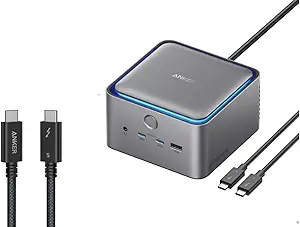
### 3. Anker Prime TB5 Docking Station (14-in-1)
#### Specifications
| Feature | Details |
|---------|---------|
| **Thunderbolt Standard** | ✅ Thunderbolt 5 |
| **Total Ports** | 14 ports |
| **TB5 Downstream Ports** | 2x Thunderbolt 5 (80Gbps) |
| **USB Ports** | 6x USB-A 10Gbps, 2x USB-C 10Gbps |
| **Video Output** | TB5 + HDMI 2.1 + DisplayPort 2.1 |
| **Display Support** | Dual 8K@60Hz / Single 8K@60Hz |
| **Power Delivery** | 140W PD |
| **Ethernet** | 2.5GbE |
| **Card Reader** | SD UHS-II |
| **Audio** | 3.5mm jack |
| **Special Features** | Built-in cooling fan, ambient lighting |
#### Key Highlights
- **Compact cube design** with premium build quality
- **Built-in active cooling** prevents thermal throttling
- **Ambient LED lighting** adds desk aesthetics
- **Multiple video outputs** with HDMI 2.1 and DP 2.1
- **140W fast charging** for high-power laptops
#### Unique Features
- **AnkerDock Manager software** for firmware updates and management
- **Mac Mini-inspired design** complements modern setups perfectly
- **Comprehensive video support** for Windows and Mac systems
> **Best For**: Users wanting premium design, built-in cooling, those who value aesthetics alongside performance
---
### 4. Razer Thunderbolt 5 Dock Chroma

#### Specifications
| Feature | Details |
|---------|---------|
| **Thunderbolt Standard** | ✅ Thunderbolt 5 |
| **Total Ports** | 11 ports |
| **TB5 Downstream Ports** | 4x Thunderbolt 5 (80Gbps) |
| **USB Ports** | 2x USB-A 10Gbps, 1x USB-C 10Gbps |
| **Video Output** | Native TB5 support |
| **Display Support** | Triple 4K@144Hz |
| **Power Delivery** | 140W PD |
| **Ethernet** | 1GbE |
| **Card Reader** | UHS-II SD slot |
| **Audio** | 3.5mm jack with 7.1 surround |
| **Special Features** | M.2 SSD expansion slot, Razer Chroma RGB |
#### Key Highlights
- **M.2 SSD expansion** for up to 8TB internal storage
- **Razer Chroma RGB lighting** with customizable effects
- **Active cooling system** with TB Share technology
- **Four TB5 downstream ports** for connecting multiple devices
- **Premium gaming-focused design** with matte black finish
#### Gaming-Focused Features
- **TB Share technology** for seamless device switching
- **Low-latency connectivity** optimized for gaming peripherals
- **Chroma RGB integration** with Razer ecosystem
> **Best For**: Gamers and enthusiasts, users needing internal storage expansion, RGB lighting enthusiasts
---
### 5. ASUS Master Thunderbolt 5 Dock DC510

#### Specifications
| Feature | Details |
|---------|---------|
| **Thunderbolt Standard** | ✅ Thunderbolt 5 |
| **Total Ports** | 13 ports |
| **TB5 Downstream Ports** | 3x Thunderbolt 5 (80Gbps) |
| **USB Ports** | 3x USB-A 10Gbps, 1x USB-A 5Gbps |
| **Video Output** | Native TB5 support |
| **Display Support** | Triple 4K@144Hz / Dual 8K@60Hz |
| **Power Delivery** | 140W PD |
| **Ethernet** | 2.5GbE |
| **Card Reader** | SD 4.0 (UHS-II) + microSD (UHS-II) |
| **Audio** | 3.5mm combo jack |
| **Special Features** | M.2 NVMe PCIe 4.0 slot, RGB ambient lighting, SSD cooling pad |
#### Key Highlights
- **M.2 NVMe PCIe 4.0 expansion** with toolless magnetic cover design
- **2.5 Gigabit Ethernet** for fast network transfers
- **Dual card readers** (SD + microSD UHS-II) for working with different card types
- **SSD cooling pad included** for optimal thermal performance
- **RGB ambient lighting** with professional aesthetic
- **180W power adapter** included with Thunderbolt 5 cable
#### Real-World Performance
Tested with MacBook M1 Pro and Mac Mini M4 Pro, achieving:
- Dual 4K displays at 144-165Hz
- SSD read speeds: 5,800 MB/s (with WD_BLACK SN850X)
- SSD write speeds: 4,300 MB/s
- Reliable performance with multiple peripherals
The ASUS DC510 excels for photographers and videographers with dual card readers, 2.5GbE networking, and impressive SSD performance. Active cooling can be noticeable under load.
> **Best For**: Content creators, photographers, professionals needing fast networking and dual card readers, users requiring SSD expansion
**Full Review**: [ASUS Master Thunderbolt 5 Dock DC510 Review](https://www.bitdoze.com/asus-thunderbolt-5-dock-dc510-review/)
---
### 6. iVANKY FusionDock Pro 3 Thunderbolt 5

#### Specifications
| Feature | Details |
|---------|---------|
| **Thunderbolt Standard** | ✅ Thunderbolt 5 (Intel DBF7052 Certified) |
| **Total Ports** | 11 ports |
| **TB5 Downstream Ports** | 3x Thunderbolt 5 (80Gbps/120Gbps) |
| **USB Ports** | 4x USB-A 10Gbps, 2x USB-C 10Gbps |
| **Video Output** | TB5 + HDMI + DisplayPort |
| **Display Support** | Single 8K / Dual 6K@60Hz (Mac) / Dual 8K@60Hz (Windows) |
| **Power Delivery** | 180W PD |
| **Ethernet** | 2.5GbE |
| **Card Reader** | SD/TF 4.0 |
| **Audio** | 3.5mm jack |
| **Cooling** | Advanced thermal design |
#### Key Highlights
- **180W Power Delivery** - highest in class for demanding laptops
- **Intel certified** DBF7052 chipset for guaranteed compatibility
- **Bandwidth Boost support** for 120Gbps performance
- **Mac-optimized** with excellent MacBook Pro/Max support
- **Premium aluminum construction** with compact design
> **Best For**: MacBook Pro/Max users, professionals needing high power delivery, users who want certified TB5 performance
---
### 7. Dell Pro Thunderbolt 5 Smart Dock (SD25TB5)

#### Specifications
| Feature | Details |
|---------|---------|
| **Thunderbolt Standard** | ✅ Thunderbolt 5 |
| **Total Ports** | 12+ ports |
| **TB5 Downstream Ports** | 2x Thunderbolt 5 (80Gbps) |
| **USB Ports** | 6x USB (mixed A/C) |
| **Video Output** | HDMI 2.1 + 2x DisplayPort 2.1 |
| **Display Support** | Up to 4x 4K@120Hz |
| **Power Delivery** | Up to 300W PD (Dell systems) |
| **Ethernet** | 2.5GbE with MAC pass-through |
| **Card Reader** | Not specified |
| **Audio** | 3.5mm jack |
| **Special Features** | Smart dock management, enterprise features |
#### Key Highlights
- **300W Power Delivery** for high-performance Dell workstations
- **Enterprise management** with remote monitoring capabilities
- **Four display support** at 4K@120Hz resolution
- **Dell ecosystem integration** with optimized compatibility
- **Professional build quality** designed for business environments
#### Enterprise Features
- **Remote management** capabilities for IT departments
- **MAC address pass-through** for network authentication
- **Enterprise-grade reliability** with extended warranty options
> **Best For**: Dell laptop users, enterprise deployments, professionals needing high power delivery and management features
---
## Complete Dock Specifications Comparison
### **Budget-Friendly Options ($400-$550)**
| **Specification** | [**Kensington SD5000T5**](#1-kensington-sd5000t5-thunderbolt-5-triple-4k-docking-station) | [**OWC 11-Port TB5**](#2-owc-11-port-thunderbolt-5-docking-station) |
|-------------------|----------------------------|---------------------------|
| **Thunderbolt Standard** | ✅ TB5 (Intel Certified) | ✅ TB5 |
| **Total Ports** | 11 ports | 11 ports |
| **TB5 Downstream** | 3x TB5 (80Gbps) | 3x TB5 (80Gbps) |
| **USB Ports** | 3x USB-A 10Gbps | 2x USB-A 10Gbps, 1x USB-A 5Gbps |
| **Video Output** | Native TB5 | TB5 + DisplayPort 2.1 |
| **Display Support** | Triple 4K@120Hz / Dual 8K@60Hz | Triple 8K@60Hz / Quad 4K@60Hz |
| **Power Delivery** | 140W PD | 140W PD |
| **Ethernet** | 2.5GbE | 2.5GbE |
| **Card Reader** | Dual SD/MicroSD | SD/MicroSD UHS-II |
| **Audio** | 3.5mm combo jack | 3.5mm in/out |
| **Cooling** | Passive | Active cooling |
| **Build Quality** | Professional plastic/metal | Premium aluminum |
| **Price Range** | ~$400-500 | ~$450-550 |
| **Best For** | Certified compatibility | Creative professionals |
### **Premium & Mid-Range Options ($350-$750)**
| **Specification** | [**iVANKY FusionDock Ultra**](#1-ivanky-fusiondock-ultra-dual-chip-powerhouse--top-pick) ⭐ | [**CalDigit TS5-Plus**](#2-caldigit-ts5-plus-20-port-powerhouse) | [**Anker Prime TB5**](#3-anker-prime-tb5-docking-station-14-in-1) | [**Razer TB5 Chroma**](#4-razer-thunderbolt-5-dock-chroma) | [**ASUS DC510**](#5-asus-master-thunderbolt-5-dock-dc510) | [**iVANKY FusionDock Pro 3**](#6-ivanky-fusiondock-pro-3-thunderbolt-5) | [**Dell Pro SD25TB5**](#7-dell-pro-thunderbolt-5-smart-dock-sd25tb5) |
| ------------------------ | :--------------------------------------------------------------------------: | :---------------------------------------------------------------: | :--------------------------------------------------------: | :--------------------------------------------------------: | :-------------------------------------------------------: | :---------------------------------------------------------------------: | :------------------------------------------------------------------: |
| **Thunderbolt Standard** | ✅ TB5 Dual-Chip Architecture | ✅ TB5 + Bandwidth Boost | ✅ TB5 | ✅ TB5 | ✅ TB5 | ✅ TB5 (Intel Certified) | ✅ TB5 |
| **Total Ports** | 🏆 **26 ports** | **20 ports** | 14 ports | 11 ports | **13 ports** | 11 ports | 12+ ports |
| **TB5 Downstream** | 4× USB-C (80/120 Gbps) + 2× Host | 3× TB5 (80/120 Gbps) | 2× TB5 (80 Gbps) | 4× TB5 (80 Gbps) | 3× TB5 (80 Gbps) | 3× TB5 (80/120 Gbps) | 2× TB5 (80 Gbps) |
| **USB Ports** | 4× USB-A + 7× USB-C 10 Gbps (Dual Chips) | 🔥 **10× USB 10 Gbps (Dual Controllers)** | 6× USB-A + 2× USB-C 10 Gbps | 2× USB-A + 1× USB-C 10 Gbps | 3× USB-A 10 Gbps + 1× USB-A 5 Gbps | 4× USB-A + 2× USB-C 10 Gbps | 6× USB (mixed) |
| **Front USB-C** | ✅ 45 W PD | ✅ 36 W PD | ❌ No | ❌ No | ❌ No | ❌ No | ❌ No |
| **Video Output** | TB5 + DP 2.1 + HDMI 2.0 | TB5 + DP 2.1 | TB5 + HDMI 2.1 + DP 2.1 | Native TB5 | Native TB5 | TB5 + HDMI + DP | HDMI 2.1 + 2× DP 2.1 |
| **Display Support** | Quad 6K (Mac dependent) / Dual 8K @ 60 Hz | Dual 8K @ 60 Hz / Triple 4K @ 144 Hz | Dual 8K @ 60 Hz | Triple 4K @ 144 Hz | Triple 4K @ 144 Hz / Dual 8K @ 60 Hz | Single 8K / Dual 6K @ 60 Hz | 4× 4K @ 120 Hz |
| **Power Delivery** | 140 W PD + 45 W front | 140 W PD | 140 W PD | 140 W PD | 140 W PD | 🔋 **180 W PD** | 🚀 **300 W PD** |
| **Ethernet** | 🌐 **10 GbE** | 🌐 **10 GbE** | 2.5 GbE | 1 GbE | 2.5 GbE | 2.5 GbE | 2.5 GbE + MAC pass-through |
| **Card Reader** | SD + microSD UHS-II | SD UHS-II | SD UHS-II | UHS-II SD slot | SD + microSD UHS-II | SD/TF 4.0 | Not specified |
| **Audio** | 3.5 mm + Optical Toslink | 3.5 mm in/out | 3.5 mm | 3.5 mm + 7.1 surround | 3.5 mm combo | 3.5 mm | 3.5 mm |
| **Special Features** | Dual-chip architecture, 10GbE, quad display, magnetic cable | Dual USB controllers, 330 W PSU | Built-in cooling, RGB lighting | M.2 SSD slot, Chroma RGB | M.2 SSD slot, SSD cooling pad, RGB | Mac optimization | Enterprise management |
| **Cooling** | ✅ Dual-fan intelligent push-pull | External PSU | Built-in active cooling | Active cooling + TB Share | Advanced thermal design | Not specified | — |
| **Build Quality** | Premium aluminum (2000-ton extrusion) | Premium aluminum | Premium cube design | Gaming-focused matte | Premium aluminum | Enterprise-grade | — |
| **Power Supply** | 🔌 **240 W External** | 🔌 **330 W External** | Internal | Internal | Internal | External | — |
| **Price Range** | ~$650–750 | ~$650–700 | ~$400 | ~$390 | ~$350 | ~$500–600 | — |
| **Best For** | 🍎 **Apple Silicon + Dual-chip + 10 GbE + Quad display** | 💼 **Maximum ports + 10 GbE** | 🎨 **Design + cooling** | 🎮 **Gaming + RGB** | 💻 **Mac users + 180 W PD** | 🏢 **Enterprise + 300 W PD** | — |
### **Quick Decision Matrix**
| **Category** | **Top Pick** | **Runner-Up** | **Budget Pick** |
|--------------|-------------|---------------|----------------|
| **Most Ports** | iVANKY FusionDock Ultra (26 ports) | CalDigit TS5-Plus (20 ports) | Anker Prime TB5 (14 ports) |
| **Best Display Support** | iVANKY FusionDock Ultra (Quad 6K) | OWC 11-Port TB5 (Triple 8K) | CalDigit TS5-Plus (Triple 4K@144Hz) |
| **Highest Power Delivery** | Dell Pro SD25TB5 (300W) | iVANKY FusionDock Pro 3 (180W) | Kensington SD5000T5 (140W) |
| **Best Networking** | iVANKY FusionDock Ultra (10GbE) | CalDigit TS5-Plus (10GbE) | ASUS DC510 (2.5GbE) |
| **Gaming Features** | Razer TB5 Chroma (RGB + M.2) | Anker Prime TB5 (Built-in cooling) | Kensington SD5000T5 |
| **Mac Optimization** | iVANKY FusionDock Ultra (Apple Silicon) | iVANKY FusionDock Pro 3 | ASUS DC510 (Tested M1/M4) |
| **Content Creation** | iVANKY FusionDock Ultra (Dual-chip + 10GbE) | ASUS DC510 (Dual card readers + 2.5GbE) | CalDigit TS5-Plus |
| **Enterprise Use** | Dell Pro SD25TB5 | CalDigit TS5-Plus | Kensington SD5000T5 |
| **Best Value** | OWC 11-Port TB5 | ASUS DC510 | Kensington SD5000T5 |
## Buy or Skip? Quick Bullets for Each Dock
- iVANKY FusionDock Ultra
- Buy if: you use Apple Silicon Macs with multi-monitor setups and need 26 ports, 10GbE, quad display, and zero bandwidth throttling from a dual-chip architecture.
- Skip if: you use Windows/Intel Macs, need a built-in NVMe slot, or want a power button.
- Kensington SD5000T5
- Buy if: you want the lowest-cost Intel‑certified TB5 dock with triple 4K support and 140W PD.
- Skip if: you need UHS‑II readers, active cooling, or more video outputs beyond native TB5.
- OWC 11‑Port Thunderbolt 5 Dock
- Buy if: you want active cooling, UHS‑II card readers, and excellent multi‑display options up to triple 8K.
- Skip if: you require 10GbE networking or more than 11 total ports.
- CalDigit TS5‑Plus
- Buy if: you need many ports, dual USB controllers, and 10GbE for pro NAS workflows.
- Skip if: you don't need 10GbE and prefer to save money or want RGB/internal SSD features.
- Anker Prime TB5
- Buy if: you value compact, premium design with a built‑in fan and HDMI 2.1 + DP 2.1 outputs.
- Skip if: you need 10GbE or more than 2 TB5 downstream ports.
- Razer Thunderbolt 5 Dock Chroma
- Buy if: you want M.2 SSD expansion, Chroma RGB, and four TB5 downstream ports.
- Skip if: you need 2.5/10GbE or extra dedicated DP/HDMI ports.
- ASUS Master Thunderbolt 5 Dock DC510
- Buy if: you need dual card readers (SD + microSD), 2.5GbE, M.2 SSD expansion, and excellent performance for content creation.
- Skip if: active cooling noise is a concern or you need quieter operation.
- iVANKY FusionDock Pro 3
- Buy if: you need 180W PD for demanding laptops and Mac‑optimized dual‑6K support with 120Gbps Bandwidth Boost.
- Skip if: you require 10GbE or more than 3 TB5 downstream ports.
- Dell Pro Thunderbolt 5 Smart Dock (SD25TB5)
- Buy if: you use Dell laptops/workstations and want up to 300W PD plus enterprise management.
- Skip if: you don't need enterprise features or want the lowest price.
## Key Feature Breakdown
### **Power Delivery Explained**
#### **🔋 140W Standard Power Delivery**
- **Compatible with**: Most laptops including 16" MacBook Pro
- **Supports**: Fast charging for all consumer laptops
- **Best for**: General users and most professional workflows
#### **⚡ 180W High Power Delivery (iVANKY)**
- **Compatible with**: High-performance laptops and gaming systems
- **Supports**: Fast charging for demanding mobile workstations
- **Best for**: Content creators with power-hungry laptops
#### **🚀 300W Enterprise Power Delivery (Dell)**
- **Compatible with**: Dell Precision workstations and high-end gaming laptops
- **Supports**: Desktop-replacement laptops and workstations
- **Best for**: Enterprise environments with mobile workstations
Choose 140W for most users, 180W for power-hungry laptops, and 300W only if you have Dell enterprise systems or ultra-high-performance mobile workstations.
### **Display Support and Multi-Monitor Setups**
#### **🖥️ Triple 4K Setup (Most Docks)**
Perfect for productivity workflows requiring multiple high-resolution displays.
#### **🎮 Dual 8K Support (Premium Docks)**
Ideal for content creators working with 8K footage or extreme detail work.
#### **⚡ Thunderbolt 5 Bandwidth Boost**
iVANKY FusionDock Ultra, CalDigit TS5-Plus, and iVANKY FusionDock Pro 3 support 120Gbps speeds for high display bandwidth.
All docks work with both Mac and Windows systems, but some offer optimized support for specific platforms. Mac users get dual 6K support, while Windows users can utilize dual 8K on compatible docks.
### **Networking Options**
#### **🌐 10 Gigabit Ethernet (iVANKY FusionDock Ultra & CalDigit TS5-Plus)**
- **Speed**: 10x faster than standard Gigabit
- **Use cases**: Large file transfers, NAS access, enterprise networks
- **Best for**: Video editors, professionals with high-bandwidth needs
#### **⚡ 2.5 Gigabit Ethernet (Most Docks)**
- **Speed**: 2.5x faster than standard Gigabit
- **Use cases**: General professional use, faster internet connections
- **Best for**: Most users upgrading from 1GbE networks
## Which Dock Should You Choose?
### For Maximum Productivity 💼
**iVANKY FusionDock Ultra** - With 26 ports, dual-chip architecture, 10GbE, and quad display support, it handles the most demanding Apple Silicon workflows without bandwidth compromise. **Alternative**: CalDigit TS5-Plus (20 ports, cross-platform).
### For Content Creators 📸
**iVANKY FusionDock Ultra** - Dual-chip performance with 10GbE, quad display, and no bandwidth throttling when running SSD transfers alongside multiple monitors. **Alternative**: ASUS DC510 (dual card readers + M.2 slot).
### For Mac Users 💻
**iVANKY FusionDock Ultra** - Purpose-built for Apple Silicon with dual-chip architecture, quad display, 10GbE, and magnetic cable for MacBook/Mac Mini. **Alternative**: iVANKY FusionDock Pro 3 (180W PD at lower price).
### For Gaming & Enthusiasts 🎮
**Razer Thunderbolt 5 Dock Chroma** - Features M.2 expansion, RGB lighting, and gaming-focused optimizations.
### For Enterprise Use 🏢
**Dell Pro Thunderbolt 5 Smart Dock** - Enterprise management features, 300W PD, and IT-friendly deployment.
### Best Value Overall 💰
**OWC 11-Port Thunderbolt 5 Dock** - Premium build quality and comprehensive features at mid-range pricing.
### For Budget-Conscious Users 🌟
**Kensington SD5000T5** - Intel-certified TB5 performance with essential features at the lowest price point.
### For Design-Focused Setups ✨
**Anker Prime TB5** - Beautiful cube design with built-in cooling and ambient lighting.
## Performance Rankings
### **Overall Performance Rankings**
1. **iVANKY FusionDock Ultra** - Dual-chip, 26 ports, 10GbE, quad display
2. **CalDigit TS5-Plus** - Maximum capability (cross-platform)
3. **Dell Pro SD25TB5** - Enterprise performance + 300W PD
4. **iVANKY FusionDock Pro 3** - Optimized performance + 180W PD
5. **Anker Prime TB5** - Balanced performance + design
6. **Razer TB5 Chroma** - Gaming performance + storage expansion
7. **OWC 11-Port TB5** - Solid performance + build quality
8. **Kensington SD5000T5** - Essential performance + affordability
### **Value for Money Rankings**
1. **OWC 11-Port TB5** - Premium features at fair pricing
2. **Kensington SD5000T5** - Essential TB5 at budget price
3. **iVANKY FusionDock Pro 3** - High-end features at competitive price
4. **Anker Prime TB5** - Premium design with good feature set
5. **Razer TB5 Chroma** - Gaming features justify the price
6. **iVANKY FusionDock Ultra** - Best-in-class performance at premium price
7. **Dell Pro SD25TB5** - Enterprise features at premium price
8. **CalDigit TS5-Plus** - Many features at high price
## Understanding Thunderbolt 5: Deep Dive
### Thunderbolt 5 vs Thunderbolt 4: What's the Difference?
#### Thunderbolt 5 Advantages
- **3x Higher Bandwidth**: 80Gbps standard, 120Gbps with Bandwidth Boost
- **Superior Display Support**: Dual 8K@60Hz or triple 4K@144Hz
- **Enhanced Power Delivery**: Up to 300W vs 100W on TB4
- **Future-Proofing**: Designed for next-generation workflows and devices
#### When Thunderbolt 4 Is Sufficient
- **Basic productivity**: Office work, web browsing, single 4K display
- **Budget considerations**: TB4 docks remain more affordable
- **Device compatibility**: If your laptop only supports TB4
Choose Thunderbolt 5 if you work with high-resolution displays, transfer large files regularly, or want future-proofing. Stick with TB4 for basic productivity and budget-conscious setups.
## Complete Comparison Table
| **Feature** | **iVANKY FusionDock Ultra** | **CalDigit TS5-Plus** | **Kensington SD5000T5** | **OWC 11-Port TB5** | **Anker Prime TB5** | **Razer TB5 Chroma** | **iVANKY FusionDock Pro 3** | **Dell Pro SD25TB5** |
|-------------|-------------------------|---------------------|-------------------------|---------------------|-------------------|---------------------|---------------------------|-------------------|
| **🔌 Total Ports** | **26** | **20** | 11 | 11 | 14 | 11 | 11 | 12+ |
| **⚡ Power Delivery** | 140W + 45W front | 140W | 140W | 140W | 140W | 140W | **180W** | **300W** |
| **🌐 Networking** | **10GbE** | **10GbE** | 2.5GbE | 2.5GbE | 2.5GbE | 1GbE | 2.5GbE | 2.5GbE |
| **🖥️ Max Displays** | Quad 6K (Mac) | 2x 8K | 3x 4K | 3x 8K | 2x 8K | 3x 4K | 2x 6K (Mac) | 4x 4K |
| **💾 Storage Expansion** | ❌ | ❌ | ❌ | ❌ | ❌ | ✅ M.2 Slot | ❌ | ❌ |
| **🎨 RGB Lighting** | ❌ | ❌ | ❌ | ❌ | ✅ Ambient | ✅ Chroma | ❌ | ❌ |
| **❄️ Active Cooling** | ✅ Dual-fan | External PSU | ❌ | ✅ | ✅ Built-in | ✅ | ✅ | ❌ |
| **🏢 Enterprise Features** | Consumer | Professional | Basic | Basic | Consumer | Gaming | Consumer | **Enterprise** |
| **🍎 Apple Silicon Only** | ✅ | ❌ | ❌ | ❌ | ❌ | ❌ | ❌ | ❌ |
| **💰 Price Range** | $650-750 | $650-700 | $400-500 | $450-550 | $400 | $390 | $350 | $500-600 |
## Step-by-Step Decision Framework
### Step 1: Identify Your Primary Use Case
#### **Content Creation & Video Editing** 🎬
- **Minimum Requirements**: 8K display support, UHS-II card readers, 180W+ PD
- **Recommended**: iVANKY FusionDock Ultra (Apple Silicon) or CalDigit TS5-Plus (cross-platform)
- **Key Features**: 10GbE for NAS access, good USB bandwidth for storage
#### **Software Development & Programming** 💻
- **Minimum Requirements**: Triple display support, reliable connectivity, good build quality
- **Recommended**: iVANKY FusionDock Ultra or OWC 11-Port TB5
- **Key Features**: Multiple TB5 ports for development devices, stable performance
#### **Gaming & Enthusiast Use** 🎮
- **Minimum Requirements**: Low-latency ports, expansion options, customization
- **Recommended**: Razer TB5 Chroma
- **Key Features**: M.2 expansion for game storage, RGB lighting, gaming optimizations
#### **Business & Productivity** 📊
- **Minimum Requirements**: Reliable connectivity, professional build, enterprise features
- **Recommended**: Dell Pro SD25TB5 or Kensington SD5000T5
- **Key Features**: Management capabilities, certified compatibility, business warranty
#### **General Home Use** 🏠
- **Minimum Requirements**: Essential ports, good value, simple setup
- **Recommended**: Kensington SD5000T5 or OWC 11-Port TB5
- **Key Features**: Plug-and-play operation, balanced feature set, reasonable pricing
### Step 2: Set Your Budget
#### **Budget Tier ($400-$550)**
- **Kensington SD5000T5**: Intel-certified, essential features
- **OWC 11-Port TB5**: Premium build, creative-focused features
- **Best for**: Users upgrading from TB4, essential TB5 features
#### **Premium Tier ($600-$750)**
- **iVANKY FusionDock Ultra**: Dual-chip, 26 ports, 10GbE, quad display (Apple Silicon)
- **CalDigit TS5-Plus**: Many ports and professional features (cross-platform)
- **Dell Pro SD25TB5**: Enterprise features and high power delivery
- **Best for**: Professionals who need many features
#### **Mid-Range Options ($350-$450)**
- **iVANKY FusionDock Pro 3**: Mac-optimized with 180W PD
- **Anker Prime TB5**: Design-focused with built-in cooling
- **Razer TB5 Chroma**: Gaming features with M.2 expansion
- **Best for**: Specific use cases and feature preferences
## Common Questions
### Will My Current Laptop Support Thunderbolt 5?
**Thunderbolt 5 Compatible Devices:**
- **2024+ MacBook Pro M4 Pro/Max**
- **2024+ Mac mini M4 Pro**
- **Select Intel 15th-gen laptops**
- **Razer Blade 18 (2024)**
**Backward Compatibility:**
All TB5 docks work with TB4, USB4, and USB-C devices, though at reduced speeds.
Even if your current laptop doesn't support TB5, these docks are excellent investments that will unlock full performance when you upgrade your computer.
### Do I Really Need 10 Gigabit Ethernet?
**You need 10GbE if you:**
- Transfer large video files regularly
- Access NAS storage frequently
- Work in enterprise environments with 10GbE infrastructure
- Edit 8K video content or RAW photography
**2.5GbE is sufficient for:**
- General professional use
- Home office environments
- Occasional large file transfers
- Most internet connections
### How Important is Active Cooling?
**Active cooling helps with:**
- **Sustained performance** under heavy loads
- **Thermal throttling prevention** during long transfers
- **Component longevity** in demanding environments
**Passive cooling works for:**
- **General productivity** tasks
- **Intermittent use** patterns
- **Quieter operation** preferences
### Do Thunderbolt 4 or USB‑C cables work with Thunderbolt 5?
Yes. TB5 is backward‑compatible with TB4/USB4/USB‑C. However, performance scales with the cable:
- TB4 40Gbps cables work but limit bandwidth and display capability to TB4 levels.
- USB‑C-only cables work for USB data/charging but won’t enable full TB5 display or PCIe performance.
### Which cable do I need for dual 8K or triple 4K?
- Use a certified Thunderbolt 5 cable (0.8 m passive for high performance) or a certified active TB5 cable (up to ~2 m).
- For the 120Gbps Bandwidth Boost scenarios, ensure your host, dock, and cable all support TB5. Actual display limits still depend on your GPU and OS.
### How long can my Thunderbolt 5 cable be?
- Passive TB5: typically up to ~0.8 m at full performance.
- Active TB5: up to ~2 m at 80Gbps. Longer cables may fall back to lower bandwidth/USB4 modes.
### Quick compatibility tips
- Macs with TB3/TB4 work with these docks but display counts/refresh rates may be lower than on TB5 hosts.
- If a display doesn’t light up at its full spec, test with a shorter certified TB5 cable and verify the display path (DP 2.1/HDMI 2.1 vs TB video).
## Final Recommendations
### 🏆 Overall Best: iVANKY FusionDock Ultra
**Why**: 26 ports, dual-chip architecture, 10GbE, quad display support, and zero bandwidth throttling make it the ultimate Apple Silicon dock.
**Price**: ~$650-750
**Best for**: Apple Silicon power users, developers, content creators with complex multi-monitor setups
**Read**: [Full FusionDock Ultra Review](https://www.bitdoze.com/ivanky-fusiondock-ultra-review/)
### 💰 Best Value: OWC 11-Port Thunderbolt 5 Dock
**Why**: Premium build quality with comprehensive features at competitive pricing.
**Price**: ~$450-550
**Best for**: Creative professionals wanting quality without premium pricing
### 🎮 Best for Gaming: Razer Thunderbolt 5 Dock Chroma
**Why**: M.2 SSD expansion, RGB lighting, and gaming optimizations.
**Price**: ~$390
**Best for**: Gamers and enthusiasts wanting storage expansion and customization
### 💼 Best for Business: Dell Pro Thunderbolt 5 Smart Dock
**Why**: Enterprise management, 300W PD, and business-grade reliability.
**Price**: ~$500-600
**Best for**: Enterprise deployments and Dell laptop users
### 📸 Best for Content Creators: ASUS Master Thunderbolt 5 Dock DC510
**Why**: Dual card readers (SD + microSD), 2.5GbE networking, M.2 SSD expansion with 5,800 MB/s speeds.
**Price**: ~€420 / $460
**Best for**: Photographers, videographers, and content creators needing fast storage and card reader versatility
**Read**: [Full ASUS DC510 Review](https://www.bitdoze.com/asus-thunderbolt-5-dock-dc510-review/)
### 💻 Best for Mac Users (Premium): iVANKY FusionDock Ultra
**Why**: Purpose-built for Apple Silicon with dual-chip architecture, quad display, 10GbE, and magnetic cable.
**Price**: ~$650-750
**Best for**: MacBook Pro/Max and Mac Mini/Studio users with demanding setups
### 💻 Best for Mac Users (Value): iVANKY FusionDock Pro 3
**Why**: Optimized for MacBook Pro/Max with 180W PD and Intel certification at a lower price.
**Price**: ~$350
**Best for**: MacBook Pro/Max users needing high power delivery without the Ultra price tag
### 🌟 Best Budget Choice: Kensington SD5000T5
**Why**: Intel-certified TB5 performance with essential features at lowest price.
**Price**: ~$400-500
**Best for**: Users upgrading from TB4 who need proven compatibility
## Where to Buy - Quick Links
### **Budget Options**
- [Kensington SD5000T5 Thunderbolt 5 Dock](https://amzn.to/46NpbgM) - Intel-certified, essential features
- [OWC 11-Port Thunderbolt 5 Dock](https://amzn.to/4mB1Zs1) - Premium build, creative focus
### **Premium Options**
- [iVANKY FusionDock Ultra](https://ivanky.com/products/fusiondock-ultra) - Dual-chip, 26 ports, 10GbE, quad display (Apple Silicon)
- [CalDigit TS5-Plus](https://www.caldigit.com/thunderbolt-5-dock-ts5-plus/) - 20 ports and professional features (cross-platform)
- [Anker Prime TB5 Docking Station](https://amzn.to/42cJK4L) - Design and cooling focus
- [ASUS Master Thunderbolt 5 Dock DC510](https://go.bitdoze.com/asus-dc510) - Content creator focus with dual card readers
### **Specialized Options**
- [Razer Thunderbolt 5 Dock Chroma](https://amzn.to/3IjvS20) - Gaming and RGB features
- [iVANKY FusionDock Pro 3](https://amzn.to/48G4WUB) - Mac optimization and 180W PD
- [Dell Pro Thunderbolt 5 Smart Dock](https://amzn.to/3VC3Q4L) - Enterprise features and 300W PD
Thunderbolt 5 docks are still relatively new products. Check availability and current pricing as stock levels and prices may vary significantly between retailers.
## Conclusion
Thunderbolt 5 brings high speeds and connectivity to modern workspaces. Whether you're a content creator working with 8K video, a developer managing multiple monitors, or a professional looking for better productivity, there's a Thunderbolt 5 dock that works for you.
**For Apple Silicon power users**, the **iVANKY FusionDock Ultra** stands out with its dual-chip architecture, 26 ports, 10GbE, and quad display support — no other dock eliminates bandwidth bottlenecks this effectively. **For most users**, the **OWC 11-Port Thunderbolt 5 Dock** offers a good balance of features, build quality, and pricing. **Cross-platform power users** should consider the **CalDigit TS5-Plus** for its 20 ports and 10GbE connectivity. **Mac users on a budget** will like the optimized performance and 180W PD of the **iVANKY FusionDock Pro 3**.
As Thunderbolt 5 adoption grows in 2026, these docks should work with your current devices and future upgrades. The speed, power, and features they provide will become standard for professional work.
Choose a dock that fits your needs and improve your workspace with Thunderbolt 5 technology.