
Astro 7 Benchmark: Build Times Cut in Half on a 743-Page Site
Astro 7 ships a Rust compiler and Vite 8. I rebuilt the same 743-page site on Astro 6 and Astro 7 and total build time dropped from 103s to 47s.

10 min read
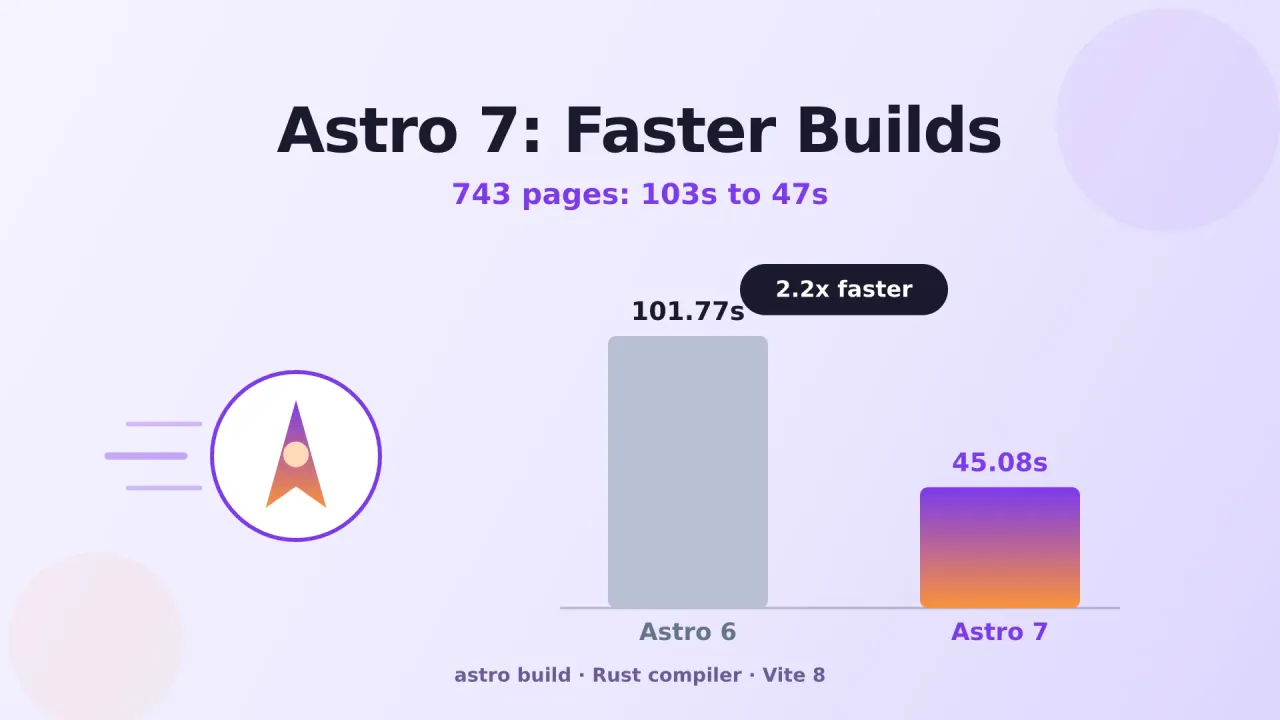
Astro 7 went stable on June 22, 2026, and for once the “faster” in the release notes isn’t marketing fluff. The .astro compiler, the piece that turns your components into HTML and JS, got rewritten from Go to Rust. I wanted a real number instead of a changelog promise, so I rebuilt this exact site, all 743 pages, on Astro 6 and again on Astro 7, right before and right after running the upgrade.
Total build time dropped from 103 seconds to 47 seconds. Same content, same machine, same astro.config.mjs. Here’s the actual CLI output, what’s behind the jump, and how I used the upgrade as an excuse to fix a few long-standing issues in my Astro blog theme too.
If you’re starting a blog from zero instead of upgrading an existing one, the free Astro + Cloudflare guide now assumes Astro 7 from the first npm install.
The benchmark
Both runs are bun run build:ci against the same repository, back to back, with only the dependency versions changed in between.
Astro 6.1.9:
08:32:14 [build] ✓ Completed in 101.77s.
08:32:14 [build] 743 page(s) built in 103.00s
08:32:14 [build] Complete!
Astro 7.0.4:
09:29:06 [build] ✓ Completed in 45.08s.
09:29:06 [build] 743 page(s) built in 46.92s
09:29:06 [build] Complete!| Metric | Astro 6 | Astro 7 | Change |
|---|---|---|---|
✓ Completed in |
101.77s | 45.08s | 2.3x faster |
page(s) built in (743 pages) |
103.00s | 46.92s | 2.2x faster |
| Pages per second | ~7.2 | ~15.8 | +120% |
Nothing else moved between the two runs. No new caching, no config tweaks, no fewer pages. The version bump alone cut the build in half.
It’s faster on Cloudflare Pages too
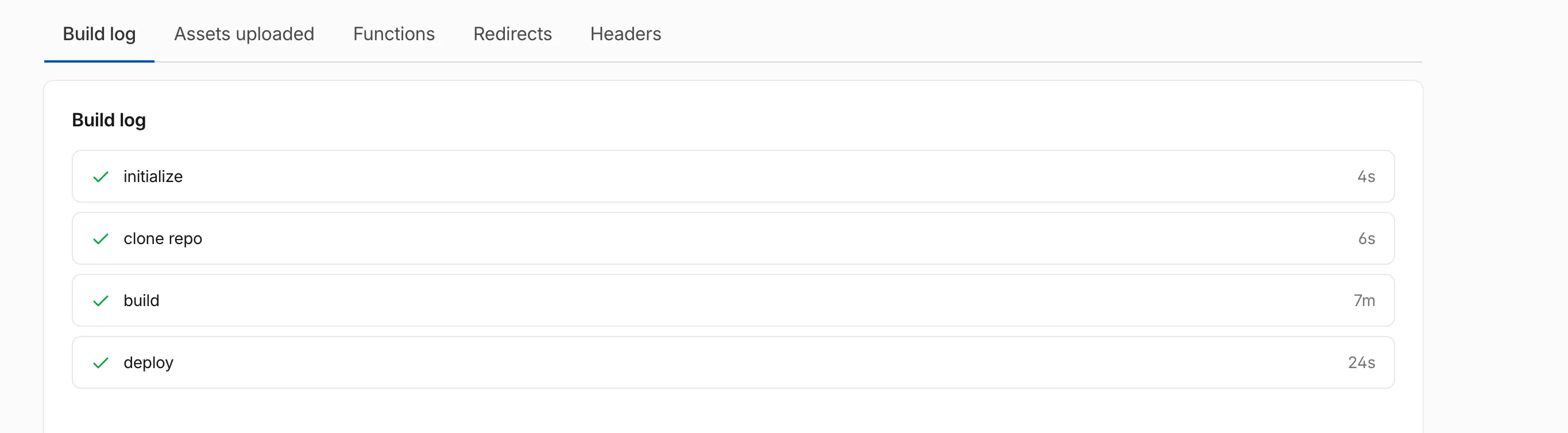
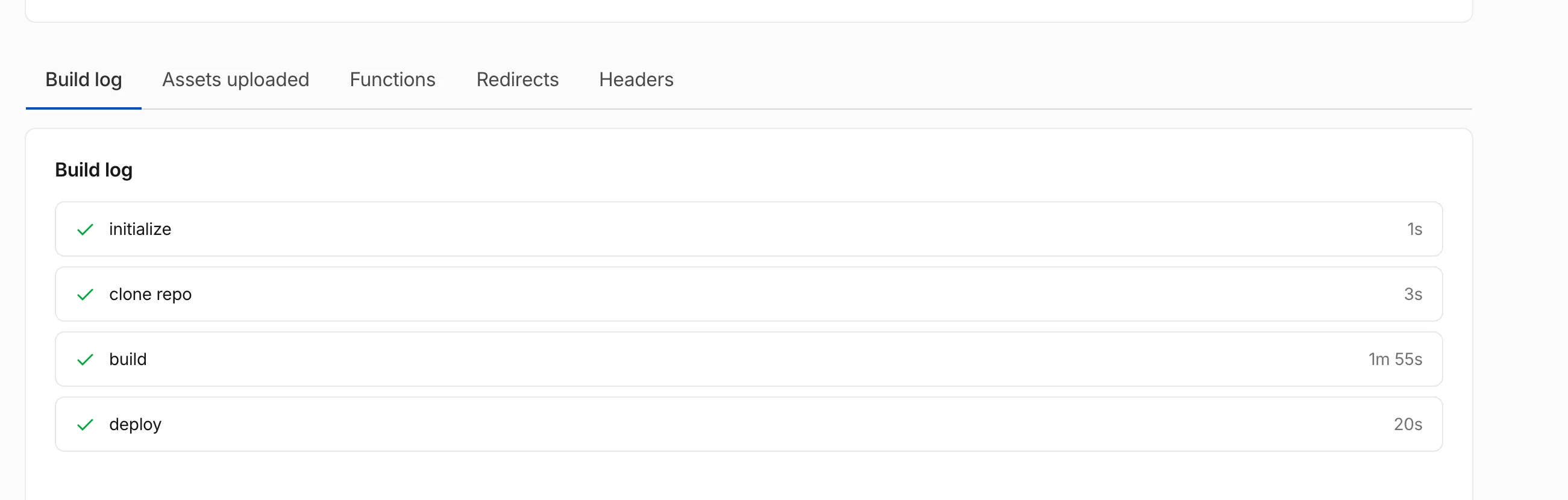
The CLI log above is the clean, controlled number. What you actually feel is how long a deploy takes, so I pulled the Cloudflare Pages build logs for this site from both versions too.
Astro 6, Cloudflare Pages:
Astro 7, Cloudflare Pages:
| Where | Astro 6 | Astro 7 |
|---|---|---|
Local astro build (743 pages) |
103.00s | 46.92s |
| Cloudflare Pages build | ~7 min | ~2 min |
Cloudflare’s number covers more than the compiler: cloning the repo, installing dependencies, running the build, then uploading and deploying the output. It still dropped from about 7 minutes to about 2 minutes, and that’s the number that actually matters, since Cloudflare Pages queues and bills builds by total time, not just the astro build step.
Why it’s actually faster
This isn’t a mystery once you look at what shipped:
- The compiler is now Rust. Astro’s
.astro-to-HTML/JS compiler was rewritten from Go to Rust and ships as@astrojs/compiler-rs. Paired with the Rust-based Markdown pipeline that already landed in Astro 6.4, content-heavy sites get the biggest win, and most of this site’s 743 pages are Markdown/MDX posts running straight through that pipeline. - Vite 8 underneath. Astro 7 runs on Vite 8, which keeps leaning on Rolldown, Vite’s Rust-based bundler, for more of the build.
- Nothing to configure. Both changes are internal to the toolchain. I didn’t touch a single option in
astro.config.mjsto get the speedup.
One breaking change to check before you upgrade
Astro 7’s compiler no longer silently fixes invalid HTML the way the old one did. Unclosed tags like <div>Hello and unterminated attributes now throw a build error instead of being auto-corrected. Run a full astro build locally right after upgrading. If something breaks, the error points at the exact file and line, and it’s almost always one stray tag the old compiler had been quietly patching over.
Upgrading your own project
Astro’s own tool does most of the work:
npx @astrojs/upgradeTwo things to check once it finishes:
- Node.js 22.12 or newer. Astro 7 raised the minimum Node version. Check this on your machine and on whatever CI or hosting platform actually builds your site, not just locally. A stale Node version on the host is the most common way a passing local build fails to deploy.
- Vite pins. If your
package.jsonhas anoverridesorresolutionsentry pinning Vite to v7, bump it to v8. Astro 7 requires Vite 8, and a stale pin will hold it back without a build error that obviously points at the real cause.
Then build once locally before you push. If the stricter parser flags anything, fix that one tag and you’re done.
What I changed on bitdoze.com
The 743-page benchmark above is this actual blog. The relevant part of the package.json diff:
| Package | Before | After |
|---|---|---|
| astro | 6.1.9 | 7.0.4 |
| @astrojs/mdx | 5.0.4 | 7.0.0 |
| @tailwindcss/vite | 4.2.4 | 4.3.2 |
| sharp | 0.34.5 | 0.35.2 |
| typescript | 5.9.3 | 6.0.3 |
I also flipped on dangerouslyProcessSVG: true in the image config. Every post on this blog uses an SVG for its hero image, this one included, and that setting lets Astro’s <Image> and <Picture formats={["webp"]} fallbackFormat="webp"> components run those SVGs through the same processing pipeline as raster images instead of passing them through untouched.
I updated the Bitdoze Astro Theme too
A lot of readers here start from the Bitdoze Astro Theme instead of a blank Astro project, so I moved it to Astro 7 as well and used the occasion to fix a few things that had been bugging me for a while:
- Dependency bump: Astro 6.1.9 → 7.0.3,
@astrojs/mdx5 → 7, Vite 7.3.2 → 8.1.0, Tailwind CSS 4.2.4 → 4.3.2. - A real test suite. Vitest now covers the slug and publication logic, and
npm run verifyrunsastro check, the tests, and a production build in one command. - One function decides what’s public. A new
isPublishedPost()helper centralizes the draft and future-date check that used to be copy-pasted across pages, RSS, and search. - Slugs no longer piggyback on canonical URLs. There’s now an explicit
slugfield in frontmatter. Previously the route was derived from thecanonicalURL, so changing your canonical could silently change your route too. - A stricter content schema.
description,date, and at least one author are required at build time now instead of quietly falling back to empty defaults. - A sitemap fix. Tag pages and the 404 page no longer sneak into the sitemap.
- Pinned to Node 22.12 with a
.node-versionfile, so CI and every contributor build against the runtime Astro 7 actually expects.
None of that shows up in a release title, but it’s the difference between a theme that happens to build and one where the routing and publishing rules are actually enforced. If you’re running the theme, pull the latest main and run npm run verify before you deploy.
Should you upgrade now?
For most content sites, yes. The performance gain is real and free, you don’t rewrite anything to get it. The only risk is the stricter HTML parsing, and that risk is self-limiting: it either builds clean or hands you a precise error to fix. Run the upgrade command, check your Node version and any Vite pin, build locally, then ship.