Best NAS for Plex & Jellyfin (2026): UGREEN vs Synology vs TerraMaster
The best NAS for Plex and Jellyfin comes down to Intel Quick Sync. The UGREEN DXP4800 Plus ($657) leads 4-bay picks, the DXP2800 ($340) wins on budget, the DS225+ ($364) is the cheapest Synology that transcodes, and the DS925+ has no iGPU at all.

21 min read
For most Plex or Jellyfin servers the answer is the UGREEN DXP4800 Plus: a Pentium Gold 8505 with Intel Quick Sync, four drive bays, two NVMe slots, 10GbE, and AV1 decode for about $657. On a tighter budget the 2-bay UGREEN DXP2800 gives you an Intel N100 and two NVMe slots for $340, while the Synology DS225+ ($364) is the cheapest way to get DSM with hardware transcoding. Skip the DS925+ and DS223j if anyone streams from outside your house. Neither has hardware transcoding for Plex or Jellyfin.
Affiliate disclosure
Some links below are Amazon affiliate links, including /go/ redirects that land on Amazon. Buying through them pays me a small commission at no extra cost to you. Prices were checked on October 23 and November 5, 2026 and move constantly, so always confirm on the product page.
Quick picks
| NAS | Price (checked) | CPU / iGPU | 4K Transcodes (est.) | Bays | Network | Rating | Buy it if |
|---|---|---|---|---|---|---|---|
| UGREEN DXP4800 Plus | $656.99 (Oct 23) | Pentium Gold 8505 / UHD (48 EU) | ~2-3 (QSV + AV1 decode) | 4 + 2 NVMe | 10GbE + 2.5GbE | 4.6★ (631) | The default 4-bay answer. |
| UGREEN DXP2800 | $339.99 (Oct 23) | Intel N100 / UHD (24 EU) | ~2 (QSV + AV1 decode) | 2 + 2 NVMe | 2.5GbE | 4.6★ (1,151) | Best budget NAS for Plex & Jellyfin. |
| Synology DS225+ | $364.29 (Nov 5) | Celeron J4125 / UHD 600 | ~1 (QSV, light duty) | 2 (no NVMe) | 2.5GbE + 1GbE | 4.6★ (261) | Cheapest Synology that transcodes. |
| TerraMaster F4-424 Pro | $730.99 (Sep 21) | Core i3-N305 / UHD (32 EU), 32GB | ~3-4 (QSV + AV1 decode) | 4 + 2 NVMe | 2x 2.5GbE | 4.2★ (62) | Most RAM out of the box; flash your own OS. |
| UGREEN DXP6800 Pro | $1,049.99 (Oct 23) | Core i5-1235U / Iris Xe (80 EU) | ~4-5 (QSV + AV1 decode) | 6 + 2 NVMe | 2x 10GbE + 2x TB4 | 4.5★ (90) | 6-bay server replacement. |
| Synology DS925+ | $742.62 (Sep 21) | Ryzen V1500B (no iGPU) | 0 HW (CPU software only) | 4 + 2 NVMe | 2x 2.5GbE | 4.2★ (156) | You want DSM storage, not remote streaming. |
| Synology DS223j | $209.99 (Nov 5) | Realtek RTD1619B (ARM) | 0 (Direct play only) | 2 (no NVMe) | 1GbE | 4.5★ (890) | Cheapest Synology; LAN direct play only. |
Transcode figures are my estimates from published Quick Sync benchmarks for each iGPU class. Read them as “about this many” simultaneous 4K HEVC 10-bit to 1080p streams with HDR tone mapping off. All of these boxes are diskless, so budget for drives on top.
The spec that decides everything: Quick Sync (and Plex vs Jellyfin)
A media server does one of two things with a video file. Direct play means it hands the file to the client untouched and the client decodes it, which costs the server almost nothing. Transcoding means the server re-encodes the video so a weaker client, a phone on hotel Wi-Fi, or a TV that can’t read HEVC 10-bit gets something it can play. Direct play is free. Transcoding is the job that costs you, and on a NAS it belongs to the integrated GPU, not the processor cores.
Two facts shape your hardware choice here:
- Plex charges for hardware transcoding; Jellyfin includes it for free. Plex gates Intel Quick Sync hardware acceleration behind an active Plex Pass (Plex support). Jellyfin’s QSV and VAAPI hardware transcoding, including 4K HDR-to-SDR tone mapping, is completely free under GPL-2.0. On a $340-$365 budget NAS, skipping the Plex Pass paywall is the single biggest reason people run Jellyfin in Docker instead. I went through the full feature trade-off in the mini PC Plex and Jellyfin guide and the self-hosted Jellyfin guide.
- Even on Jellyfin, the AMD and ARM NAS picks here cannot hardware-transcode. On mini PCs, Jellyfin users can buy an AMD Ryzen APU (like a Ryzen 7 8845HS) and transcode over VAAPI. On a NAS, you don’t get an APU:
- Synology DS925+ ships an embedded AMD Ryzen V1500B with no integrated GPU on the silicon at all. Unlike desktop Ryzen chips with Radeon graphics, the V1500B has zero GPU cores. Both Plex and Jellyfin are forced into software transcoding on four Zen 1 cores, where a single 4K HDR stream pushes the CPU to its knees.
- Synology DS223j runs an ARM Realtek chip with no video engine Plex or Jellyfin can use, plus 1GB of soldered RAM (below Jellyfin 12.x’s 2GB floor).
How many streams each NAS tier handles
Approximate simultaneous 4K HEVC 10-bit to 1080p transcodes in Plex or Jellyfin, extrapolated from published Quick Sync benchmarks for each Intel iGPU generation:
| NAS CPU / iGPU tier | Models | Without tone mapping | With HDR tone mapping | AV1 hardware decode |
|---|---|---|---|---|
| Celeron J4125 (UHD 600, 12 EU) | Synology DS225+ | ~1-2 | ~1 (borderline) | No |
| Intel N100 (UHD, 24 EU) | UGREEN DXP2800 | ~2-3 | ~1-2 | Yes |
| Pentium Gold 8505 (UHD, 48 EU) | UGREEN DXP4800 Plus | ~3 | ~2-3 | Yes |
| Core i3-N305 (UHD, 32 EU) | TerraMaster F4-424 Pro | ~3-4 | ~2-3 | Yes |
| Core i5-1235U (Iris Xe, 80 EU) | UGREEN DXP6800 Pro | ~4-5 | ~3-4 | Yes |
| Ryzen V1500B (No iGPU) | Synology DS925+ | 0 HW (~1-2 at 1080p on CPU) | 0 | No |
Two other details catch NAS buyers off guard once they start streaming 4K Blu-ray remuxes:
- Subtitle burn-in (PGS and ASS) still hits a single CPU thread. If a TV or browser client cannot direct-play image-based PGS subtitles (standard on Blu-ray rips) or complex ASS anime subtitles, Plex and Jellyfin have to burn those subtitles into the video frames on the CPU even while Quick Sync handles the video encode. That single-core bottleneck is where the Pentium Gold 8505 (DXP4800 Plus) and Core i3-N305 (F4-424 Pro) pull far ahead of the 2019 Celeron J4125 in the DS225+.
- M.2 NVMe slots matter for the Plex and Jellyfin database, not the movies. Your MKV files belong on spinning hard drives, but Plex’s
/configdirectory (Library/Application Support/Plex Media Server) and Jellyfin’s/config+/cachedirectories (SQLite database, poster art, and trickplay/chapter thumbnails) consist of hundreds of thousands of tiny files. Putting those paths on an M.2 NVMe SSD makes poster grids load immediately on an Apple TV or Shield and lets your hard drives spin down when nobody is watching. Every UGREEN and TerraMaster pick here includes dual M.2 NVMe slots; the Synology DS225+ and DS223j have none.
1. UGREEN DXP4800 Plus: the best NAS for Plex
$656.99 (Oct 23) · 4.6★, 631 ratings · shipped by Amazon, sold by UGREEN
This is the pick I’d hand most people. The Pentium Gold 8505 is a proper desktop-derived chip (1 performance core + 4 efficiency cores) with a 48-execution-unit UHD iGPU, which puts it a clear step above the N100 and J4125 boxes for both 4K HDR tone mapping and single-threaded PGS subtitle burn-in. Expect roughly two to three simultaneous 4K transcodes, plus hardware AV1 decode for newer encodes. You get four SATA bays, two M.2 NVMe slots for the Plex database and Docker stack, DDR5 expandable to 64GB, and networking nobody else matches at this price: 10GbE plus 2.5GbE.
For Plex specifically, the workflow is clean: drop a cheap 500GB or 1TB NVMe drive into one of the M.2 slots for your container volumes and Plex metadata, put your CMR hard drives in the four bays in RAID 5, and pass /dev/dri into the Plex Docker container. UGREEN also officially lets you install TrueNAS, Unraid, or Proxmox on an internal SSD instead of UGOS without voiding the hardware warranty.
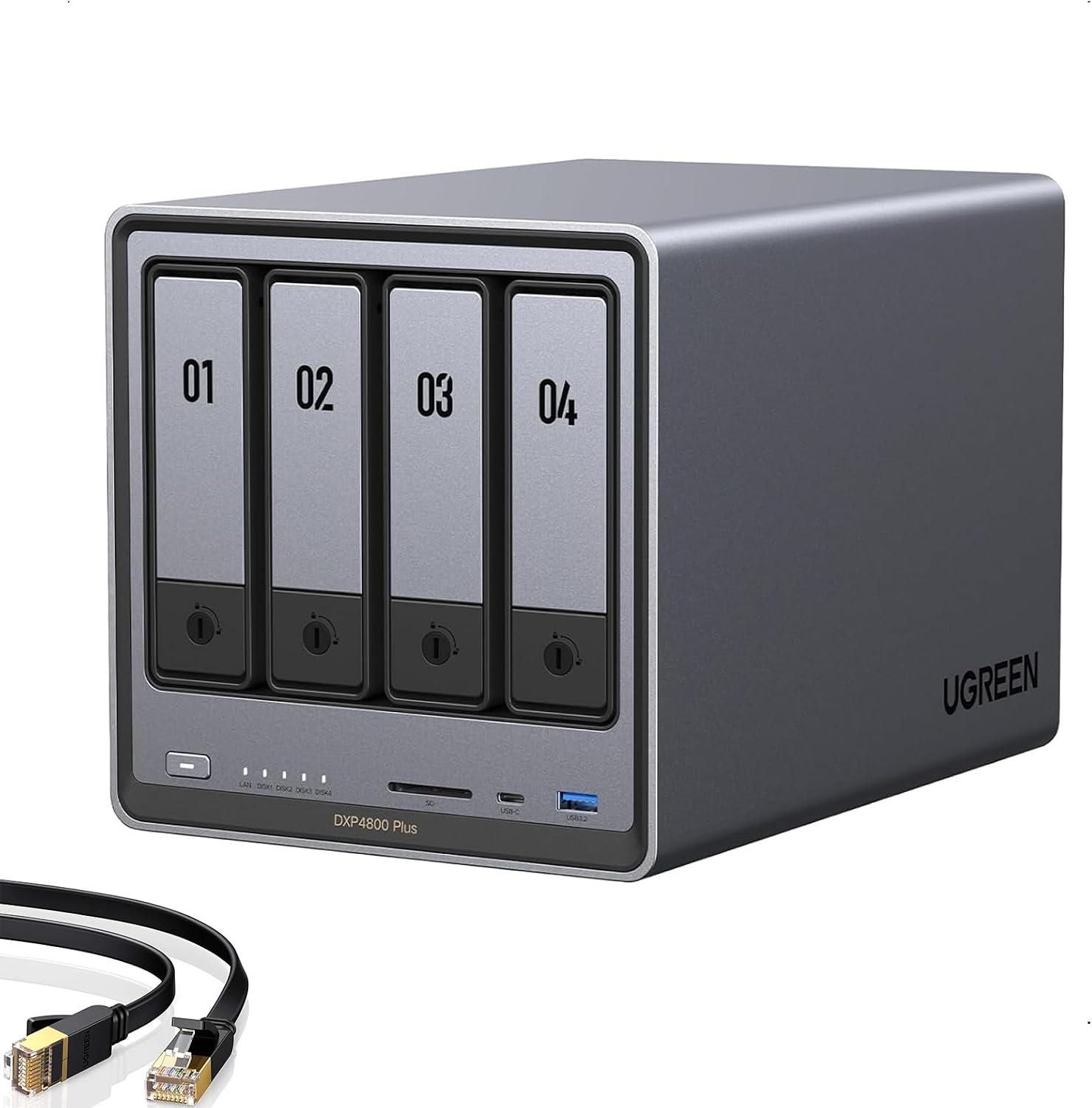
UGREEN NASync DXP4800 Plus
4-bay NAS with Pentium Gold 8505, Intel Quick Sync with AV1 decode, 10GbE + 2.5GbE, dual M.2 NVMe slots, and Docker support. The best all-round NAS for a Plex server.
Price & availability at Amazon.com
Key Features
- Pentium Gold 8505 (48 EU UHD iGPU) with Quick Sync and AV1 decode
- 4x SATA bays + 2x M.2 NVMe slots for Plex metadata/cache
- 10GbE + 2.5GbE networking onboard
- 8GB DDR5 included, expandable to 64GB
- UGOS runs Plex in Docker; TrueNAS/Unraid/Proxmox officially allowed
What we like
- 10GbE at $657 is unmatched
- Strongest single-core and iGPU headroom under $700 for HDR tone mapping and subtitles
- Four bays plus two NVMe slots keep Plex metadata off spinning disks
Watch out for
- UGOS app ecosystem is thinner than Synology's
- No HDMI output carries audio/video as a local TV player
Important Considerations
- •Diskless, so drives are extra and often cost more than the NAS
- •UGOS is younger and rougher than Synology DSM
- •It sells out around deal events; check stock before ordering
Disclosure: This post contains affiliate links. We may earn a commission if you purchase through these links at no additional cost to you.
2. UGREEN DXP2800: the best budget NAS for Plex ($340)
$339.99 (Oct 23) · 4.6★, 1,151 ratings · #1 Best Seller in NAS devices in September
If your budget stops around $350, the DXP2800 is not only $24 cheaper than the Synology DS225+ below, it is a whole generation ahead in hardware. Its Intel N100 carries 12th-gen UHD graphics with Quick Sync and AV1 decode (the same silicon class as the mini PCs in the Plex mini PC guide), 8GB of DDR5 RAM, a 2.5GbE port, and two M.2 NVMe slots. Those NVMe slots are the secret weapon at $340: put Plex’s database and poster cache on an NVMe stick so your library UI stays snappy and your two hard drives only spin up when a movie actually plays.
Two SATA bays do force a storage trade-off: RAID 1 for redundancy (where two 16TB drives give you 16TB usable) or two independent volumes for 32TB of raw capacity. For a media library that can be re-ripped, I’d take the capacity or keep a cold backup drive on a shelf. For a household under ~20TB that isn’t running three 4K HDR transcodes at once, this does the job for $317 less than the DXP4800 Plus.

UGREEN NASync DXP2800
2-bay NAS with Intel N100 Quick Sync (including AV1 decode), 8GB DDR5, 2.5GbE, and dual M.2 NVMe slots. The best budget NAS for Plex and Jellyfin.
Price & availability at Amazon.com
Key Features
- Intel N100 (4C, 24 EU UHD iGPU) with Quick Sync and AV1 decode
- 2x SATA bays + 2x M.2 NVMe slots
- 8GB DDR5 RAM (4x the base RAM of the DS225+)
- 2.5GbE LAN port
- Runs Plex and Jellyfin via Docker on UGOS or third-party OS
What we like
- Cheapest NAS here that hardware-transcodes 4K
- Dual NVMe slots keep the Plex database off the hard drives
- 8GB DDR5 out of the box handles Docker plus *arr containers easily
Watch out for
- Only two 3.5-inch bays limit long-term library growth
- UGOS is less polished than Synology DSM
Important Considerations
- •Two SATA bays mean RAID 1 halves your drive capacity
- •N100 handles ~2 4K transcodes (1-2 with HDR tone mapping)
- •Diskless; budget for SATA drives plus a small NVMe for app data
Disclosure: This post contains affiliate links. We may earn a commission if you purchase through these links at no additional cost to you.
3. Synology DS225+: the cheapest Synology that still transcodes
$364.29 (Nov 5) · 4.6★, 261 ratings · sold by Amazon
While Synology moved its 4-bay DS925+ to an AMD Ryzen chip without an iGPU, the 2-bay DS225+ kept the Intel Celeron J4125. As a raw CPU the J4125 is a 2019 part, but it carries Intel UHD 600 graphics with Quick Sync, so Plex hardware transcoding still works. You get two bays, 2.5GbE plus a 1GbE port, Synology Hybrid RAID (SHR), and DSM, which remains the most polished, set-and-forget NAS operating system you can buy.
Compare it with eyes open against the $340 UGREEN DXP2800 above, because the hardware limits are real:
- Weaker iGPU and single-core speed: The UHD 600 handles one comfortable 4K transcode (maybe two with tone mapping off), has no AV1 decode, and struggles if a client forces single-threaded PGS subtitle burn-in on a high-bitrate 4K remux.
- No M.2 NVMe slots: Every file, including the Plex SQLite database and poster cache, lives on the two spinning SATA disks.
- Tight base RAM and drive rules: It ships with 2GB of DDR4 (one slot, officially expandable to 6GB), and like the rest of Synology’s
x25+lineup, it enforces Synology’s drive compatibility list warnings on unverified third-party drives. Also note that DSM 7.2.2+ removed host-side HEVC/AVC thumbnail processing from Synology’s own apps, though Plex handles its own codecs inside Container Manager (Docker) or via the manual.spkdownload from plex.tv.
Buy the diskless unit only: the same NAS shows up in drive bundles at $981 and up on Amazon.

Synology DS225+ (diskless)
2-bay NAS with Celeron J4125 and Intel Quick Sync, 2.5GbE, and DSM. The only current budget Synology that can hardware-transcode Plex streams.
Price & availability at Amazon.com
Key Features
- Celeron J4125 with UHD 600 Quick Sync transcoding
- 2x 3.5"/2.5" bays with SHR/RAID 1 support
- 2.5GbE + 1GbE ports
- 2GB DDR4 RAM, expandable to 6GB
- DSM 7.2 with Container Manager (Docker) and Plex support
What we like
- Cheapest way to get both Synology DSM and hardware transcoding
- DSM backups, snapshots, and mobile apps are best in class
- Low power draw, around 15-18W idle
Watch out for
- Slower CPU/iGPU and 1/4 the RAM of the $340 UGREEN DXP2800
- No M.2 NVMe slots for Plex database caching
Important Considerations
- •J4125 transcodes about one 4K stream comfortably
- •2GB base RAM is tight; add a 4GB/8GB DDR4 SO-DIMM if running Docker
- •No NVMe slots; Plex metadata lives on the SATA drives
- •Check Synology's x25+ drive compatibility list before buying disks
- •Avoid the overpriced drive-bundle listings at $981+
Disclosure: This post contains affiliate links. We may earn a commission if you purchase through these links at no additional cost to you.
4. TerraMaster F4-424 Pro: the compute king, if you’ll flash it
$730.99 (Sep 21) · 4.2★, 62 reviews
The Core i3-N305 is the strongest 4-bay processor in this roundup: 8 cores, 32GB of DDR5 already installed, two M.2 NVMe slots, dual 2.5GbE, and a 32-EU UHD iGPU with Quick Sync that handles three to four 4K transcodes without sweating. If you plan to run Plex alongside twenty Docker containers (Radarr, Sonarr, Prowlarr, Overseerr, Immich, and a torrent client in a VPN container), having 32GB of RAM out of the box saves you an immediate $80-$100 upgrade.
The catch hasn’t changed since I covered it in the homelab NAS guide: TOS, TerraMaster’s operating system, is the weakest of the three and had documented Deadbolt ransomware vulnerabilities in 2022-2023. The community answer is to buy the hardware, pop the internal USB boot header or install to an M.2 stick, and flash TrueNAS SCALE or Unraid, which also happens to be the best way to run Plex on it anyway. If that plan appeals to you, this is your box. If you want a turnkey appliance, buy the UGREEN DXP4800 Plus or Synology.
Check F4-424 Pro price5. The Synology boxes that can’t transcode
Worth a section of their own, because “best NAS for Plex” searches keep landing people on these two models.
Synology DS925+ ($742.62, Sep 21). Four bays, dual M.2 NVMe slots, dual 2.5GbE, and DSM at its best. However, its AMD Ryzen V1500B has no integrated GPU, so every video transcode runs on four CPU cores in software. Plex will install and run, and direct play to an Apple TV 4K or Nvidia Shield on your LAN is flawless, but a single remote 4K stream will peg the CPU at 100% and buffer. Like the DS225+, it also enforces Synology’s x25+ drive compatibility list. Buy this for the appliance experience, file storage, or paired with a $369 Intel mini PC handling Plex duties, not as a standalone transcoder for phones outside your network.
Synology DS223j ($209.99, Nov 5). 4.5★ from 890 ratings, the cheapest entry into the Synology ecosystem, and ARM-based (Realtek RTD1619B), so no hardware transcoding and no upgrade path: 1GB of soldered RAM, gigabit Ethernet, done. If everyone who watches Plex is on your LAN with a client that direct-plays (Apple TV, Shield, Fire TV Stick 4K Max, or most recent smart TVs), it works as a pure network file server and costs less than dinner for two. The moment someone streams from a hotel, it can’t help them.
Check DS223j price6. UGREEN DXP6800 Pro: when the NAS is also the server
$1,049.99 (Oct 23) · 4.5★, 90 ratings
Six SATA bays, two M.2 NVMe slots, a 10-core Core i5-1235U with 80-EU Iris Xe graphics that transcodes four to five 4K streams comfortably, dual 10GbE, dual Thunderbolt 4, and a built-in 128GB OS SSD. This is the “one box does everything” option: Plex server, Docker host, Proxmox/VM box, and 140TB+ usable RAID 5/6 storage array. At $1,050 diskless it only makes sense if you are consolidating a whole homelab rack into one chassis; otherwise, the DXP4800 Plus or a mini PC plus DAS gets you there for hundreds less.
Check DXP6800 Pro priceHow many drives does a Plex library need?
More terabytes than people expect, and fewer bays than the spec sheets suggest. A 4K Blu-ray remux runs 50-80GB; a typical 1080p encode is 5-15GB. Twelve terabytes of usable space holds roughly 150-200 4K remuxes or well over a thousand 1080p titles. For most households, starting with two 12-20TB drives leaves plenty of room to grow.
The honest take on RAID for media: a Plex library is re-rippable data, not irreplaceable family photos. RAID 1 on a two-bay box gives you drive-failure uptime but halves capacity; a 4-bay box in RAID 5 (or Synology SHR) only costs one drive to parity instead of half your array. What never works in a NAS is SMR (shingled magnetic recording) drives in any RAID or ZFS pool, because rebuilds stall for days and that is when a second drive dies. Stick strictly to CMR lines: Seagate IronWolf / IronWolf Pro, Seagate Exos, WD Red Plus / Red Pro, or Toshiba N300.
Here are the CMR drives from the homelab NAS guide ranked by price per terabyte:
| Drive | Price (Oct 23, 2026) | $/TB | Condition & Warranty | Rating | Best for |
|---|---|---|---|---|---|
| Seagate IronWolf 12TB | $449.99 | $37.50 | New, 3-yr warranty + Rescue | 4.5★ (13,196) | Default quiet CMR pick for 2-bay and 4-bay living-room NAS units. |
| Seagate Exos X24 24TB (renewed) | $798.99 | $33.29 | Renewed, seller warranty | 4.3★ (29) | Cheapest per TB and huge density for 2-bay boxes, but louder enterprise seek noise. |
| Seagate IronWolf Pro 20TB | $879.99 | $44.00 | New, 5-yr warranty | 3.9★ (337) | Maximum new-drive capacity per bay with a 5-year warranty. |
Also budget $60-$120 for a 1TB M.2 NVMe SSD (such as the WD_BLACK SN850X 2TB if you also host VMs and heavy containers) in the UGREEN or TerraMaster M.2 slots so your Plex /config database and Docker volumes never touch the spinning disks.
NAS or mini PC plus DAS?
Before spending $650-$750 on a 4-bay NAS, compare the split architecture: a Beelink EQ14 mini PC at $369 (Intel N150 with Quick Sync, 16GB RAM, 500GB OS/metadata NVMe, dual 2.5GbE) paired with a 4-bay TerraMaster D4-320 USB-C DAS enclosure at $189.99. Together they cost ~$559 diskless, which is nearly $100 less than the 4-bay DXP4800 Plus and $183 less than the DS925+. The mini PC Plex guide and best DAS enclosure guide walk through that exact build.
Buy the turnkey NAS when you want the storage appliance part handled for you: web-GUI RAID management, scheduled snapshots, S.M.A.R.T. email alerts, and a single box that stays boring while your compute experiments happen elsewhere. Buy the mini PC + DAS when you want to upgrade your Plex CPU five years from now without re-buying the drive bays.
Turning on hardware transcoding (Plex & Jellyfin Docker Compose)
Whatever Intel NAS you buy, the fastest and cleanest way to run Plex or Jellyfin is in Docker with three storage paths separated: /config (and /cache for Jellyfin) on your NVMe SSD pool, /dev/shm (RAM disk) for temporary transcode chunks so they don’t wear out your SSD or thrash your hard drives, and /data/media on your spinning HDD array.
On UGREEN (UGOS Docker app), TerraMaster, or Synology Container Manager, pick the compose.yaml for your server:
Plex (Docker Compose)
services:
  plex:
    image: lscr.io/linuxserver/plex:latest
    container_name: plex
    network_mode: host
    environment:
      - PUID=1000
      - PGID=1000
      - TZ=Etc/UTC
      - VERSION=docker
      - PLEX_CLAIM= # optional: paste token from plex.tv/claim on first boot
    volumes:
      - /mnt/nvme/docker/plex-config:/config      # Put on NVMe SSD pool!
      - /dev/shm:/transcode                       # Transcode scratch in RAM
      - /mnt/storage/media:/data/media            # Bulk MKVs on HDD RAID pool
    devices:
      - /dev/dri:/dev/dri                         # Passes Intel Quick Sync iGPU through
    restart: unless-stopped
Once the container is up, open the Plex web UI (http://NAS-IP:32400/web) and go to Settings > Transcoder:
- Tick Use hardware acceleration when available and Use hardware-accelerated video encoding (requires an active Plex Pass).
- Tick Enable HDR tone mapping if your clients watch 4K HDR content on SDR screens. Leave it enabled on the DXP4800 Plus, F4-424 Pro, and DXP6800 Pro; on the DS225+ (J4125) test whether your typical stream count holds up.
- Set Transcoder temporary directory to
/transcodeso it uses the/dev/shmRAM mount above.
Jellyfin (Docker Compose)
services:
  jellyfin:
    image: jellyfin/jellyfin:12.1
    container_name: jellyfin
    user: 1000:1000
    group_add:
      - "105"                                     # Replace with your NAS 'render' group GID (getent group render)
    network_mode: host
    volumes:
      - /mnt/nvme/docker/jellyfin-config:/config  # Put database & metadata on NVMe SSD!
      - /mnt/nvme/docker/jellyfin-cache:/cache    # Trickplay & image cache on NVMe SSD
      - /dev/shm:/transcode                       # Transcode scratch in RAM
      - /mnt/storage/media:/data/media:ro         # Bulk MKVs on HDD RAID pool
    devices:
      - /dev/dri/renderD128:/dev/dri/renderD128   # Passes Intel Quick Sync render node
    restart: unless-stopped
Once the container is up, open the Jellyfin web UI (http://NAS-IP:8096) and go to Dashboard > Playback > Transcoding:
- Set Hardware acceleration to Intel QuickSync (QSV) and set the QSV Device to
/dev/dri/renderD128. - Tick hardware decoding for H264, HEVC, MPEG2, VC1, VP9,HEVC 10bit, VP9 10bit, and AV1 (skip AV1 on the Synology DS225+ Celeron J4125).
- Tick Enable Hardware Encoding and Enable Tone Mapping (plus Enable VPP Tone Mapping on Intel 11th-gen/N100 and newer).
- Set Transcode Path to
/transcodeso temporary HLS segments stay in/dev/shmRAM. Full reverse-proxy and backup steps are in the self-hosted Jellyfin guide.
(On the Synology DS225+ without NVMe slots, map /config to /volume1/docker/plex/config or /volume1/docker/jellyfin/config instead. If you prefer Synology’s native Package Center install for Plex over Docker, download the latest .spk with “Intel 64-bit” directly from plex.tv/media-server-downloads, as Synology’s built-in Package Center repo lags behind.)
One last thing: a media box transcoding for the household deserves a UPS so a brief power cut doesn’t corrupt a RAID array or SQLite database mid-write. The best UPS for a home server guide covers the ~$170 answer.
What I’d buy
- Best overall (4-bay): the UGREEN DXP4800 Plus at $656.99. Desktop-class Pentium 8505 Quick Sync, AV1 decode, 10GbE, four SATA bays, and two NVMe slots.
- Best budget (2-bay): the UGREEN DXP2800 at $339.99. Cheaper than the Synology DS225+, with an N100 iGPU, 8GB DDR5, and two NVMe slots for the Plex or Jellyfin database.
- Best Synology that still transcodes: the Synology DS225+ at $364.29 (diskless listing only). Pick it when you want turnkey DSM and only need one 4K transcode at a time.
- Most compute & RAM, willing to flash: the TerraMaster F4-424 Pro at $730.99. 8-core i3-N305 and 32GB DDR5 out of the box; install TrueNAS or Unraid on day one.
- 6-bay all-in-one server replacement: the UGREEN DXP6800 Pro at $1,049.99. Core i5-1235U, Iris Xe, dual 10GbE, six bays.
- Tightest budget, LAN direct play only: the Synology DS223j at $209.99 if every viewer is on your home network with an Apple TV, Shield, or modern smart TV.
- Skip for remote Plex or Jellyfin: the Synology DS925+. Great DSM storage appliance, wrong media transcoder. The Ryzen V1500B has no iGPU.
FAQ
Does a NAS need Plex Pass for hardware transcoding, or is Jellyfin free?
Plex requires an active Plex Pass for hardware-accelerated streaming, per its support article. Software transcoding works without it, but a NAS CPU will choke on 4K without Quick Sync. Jellyfin includes Intel Quick Sync (QSV) hardware transcoding and 4K HDR tone mapping for free on the exact same /dev/dri device, which makes it a natural pairing for budget NAS hardware like the $340 UGREEN DXP2800.
Should I buy the UGREEN DXP2800 or Synology DS225+ for Plex and Jellyfin?
For Plex or Jellyfin performance per dollar, buy the UGREEN DXP2800 ($339.99): its Intel N100 is faster than the DS225+’s Celeron J4125, supports AV1 decode, ships with 8GB DDR5 instead of 2GB DDR4, and includes two M.2 NVMe slots so your database, poster art, and Jellyfin trickplay cache don’t sit on slow hard drives. Buy the Synology DS225+ ($364.29) only if you specifically want Synology’s DSM operating system and apps (Synology Photos, Active Backup, SHR) and only need one 4K transcode at a time.
Can the Synology DS925+ run Plex or Jellyfin with hardware transcoding?
It installs and runs both fine, and direct play to local clients (Apple TV 4K, Nvidia Shield) works without a hitch. However, unlike AMD desktop APUs, the embedded Ryzen V1500B in the DS925+ has no integrated GPU on the silicon at all. Neither Plex nor Jellyfin (via VAAPI) can do hardware transcoding on it. Any video transcode runs in software on four CPU cores: enough for a single 1080p stream, not enough for 4K HDR. If you want a 4-bay NAS that transcodes, buy the UGREEN DXP4800 Plus ($657) or pair the DS925+ with an Intel N150 mini PC.
Why do M.2 NVMe slots matter on a Plex or Jellyfin NAS?
Movies and TV episodes stream sequentially and run fine from spinning hard drives. Plex’s /config directory and Jellyfin’s /config + /cache directories, however, contain a SQLite database and hundreds of thousands of tiny poster images, chapter thumbnails, and trickplay files. Putting those paths on an M.2 NVMe SSD makes library browsing feel instant on your TV and allows the mechanical hard drives to spin down when no media is playing.
Is a 2-bay NAS enough for Plex or Jellyfin?
For most libraries, yes. Two 12-20TB drives in RAID 1 give you 12-20TB usable, which holds roughly 150-300 4K Blu-ray remuxes or thousands of 1080p movies. The main trade-off on a 2-bay box is that RAID 1 costs 50% of your drive capacity for redundancy, whereas a 4-bay NAS in RAID 5 only uses 25% for parity.
Does Plex or Jellyfin on a NAS support AV1?
Hardware AV1 decode works in both Plex and Jellyfin on the newer Intel iGPUs here (the N100 in the DXP2800, Pentium 8505 in the DXP4800 Plus, i3-N305 in the F4-424 Pro, and i5-1235U in the DXP6800 Pro), so those boxes can transcode AV1 source files to H.264/HEVC for older clients. The Celeron J4125 in the Synology DS225+ does not decode AV1 in hardware.
Do I need 10GbE on a Plex or Jellyfin NAS?
No. Even an untouched 4K Blu-ray remux peaks around 100-120Mbps, so gigabit Ethernet has plenty of headroom for streaming. 2.5GbE speeds up moving rips onto the NAS, and the DXP4800 Plus’s 10GbE port earns its keep when the NAS also serves a Proxmox cluster or video editing workstation.