Best Thunderbolt 5 NVMe SSD Enclosures 2026: 80Gbps Picks Tested
The best 80Gbps Thunderbolt 5 NVMe enclosures in 2026 — OWC Express 1M2, Acasis TB501 Pro, UGREEN, TerraMaster D1.

10 min read
An 80Gbps NVMe enclosure is the cheapest way to give a laptop or mini PC near-internal storage speeds — roughly 6,000 MB/s real-world reads with a decent Gen4 drive. Fast enough to run VMs, keep a Photos/DaVinci library, or edit 4K footage directly off the enclosure. The catch: almost every sub-$200 80G enclosure on Amazon uses the same Intel JHL9480 controller, so the real differences are thermals, backward compatibility, and price.
Affiliate disclosure
Some links on this page are affiliate links. If you buy through them, I earn a small commission at no extra cost to you.
Quick picks
80Gbps tier (Thunderbolt 5 / USB4 v2) — ~6,000 MB/s:
| Enclosure | Price (Sep 21) | Cooling | TB3 support | Rating | Best for |
|---|---|---|---|---|---|
| OWC Express 1M2 80G | $169.99 | Fanless | Yes | 4.5★ (156) | Most people — quiet, proven, 5-yr warranty |
| Acasis TB501 Pro | $149.61 | Fan (auto at 55°C) | No | 4.2★ (288) | Cheapest real 80G option |
| UGREEN 80Gbps | $169.99 | Fan (at 40°C) | macOS 15+ only | 4.1★ (333) | Alternative when on sale |
| TerraMaster D1 SSD Pro | Out of stock | Fanless fins | Yes (TB5/4/3) | 4.6★ (52) | Silent pick — watch for restock |
| RayCue 80Gbps | ~$150 range | Fan | TB5/4/3 claimed | newer listing | M4-mini-style form factor |
40Gbps tier (USB4 / TB4) — ~2,800 MB/s, half the price:
| Enclosure | Price (Sep 21) | Cooling | Rating | Best for |
|---|---|---|---|---|
| Acasis TBU405 | $80.99 | Fanless | 4.4★ (492) | Budget pick — pocketable, TB3/4 hosts included |
| UGREEN 40Gbps | $75.99 | PWM fan | 4.0★ (1,254) | Sustained transfers on a budget |
Prebuilt (no assembly, drive included):
| Drive | Price (Sep 21) | Rating | Best for |
|---|---|---|---|
| OWC Envoy Ultra 2TB | $799.99 | 4.4★ (109) | Weatherproof IP67, integrated cable — pay 3x, touch no screws |
First: the JHL9480 reality check
Nearly every sub-$200 80Gbps enclosure uses Intel’s JHL9480 (“Barlow Ridge”) controller. Same chip, similar peak speeds. What you’re actually choosing between:
- Thermals. Sustained writes throttle a hot SSD. Fanless aluminum works for bursty use; fans matter for hour-long transfers.
- Backward compatibility. TB5 enclosures should work at 40Gbps on TB4/USB4 hosts — but TB3 support is spotty (details per product below).
- Your SSD. The enclosure is half the cost. You need a PCIe 4.0 x4 or faster NVMe to break 3,000 MB/s — a Gen3 drive caps around there regardless of enclosure. And on Gen5 drives, watch power draw: OWC recommends SSDs under 11W for bus-powered use.
Now the picks.
1. OWC Express 1M2 80G — the safe default

$169.99 (list $219) · 4.5★, 156 reviews · sold by OWC
The one I point people at first. Fanless solid aluminum, bus-powered, works with Macs, PCs, iPads, Chromebooks, and Surface devices. OWC quotes over 6,000 MB/s peak, and reviewers consistently report ~4.2 GB/s writes on Macs — these are numbers I trust, not bench marketing. Supports 2280 and 2242 NVMe, PCIe Gen3/4/5 (with the 11W Gen5 caveat), and it’s covered by a 5-year warranty — double what most of this category offers.
Also sold pre-populated (1TB–8TB) if you don’t want to source a drive, though DIY is cheaper.
Check OWC Express 1M2 price2. Acasis TB501 Pro — the budget pick
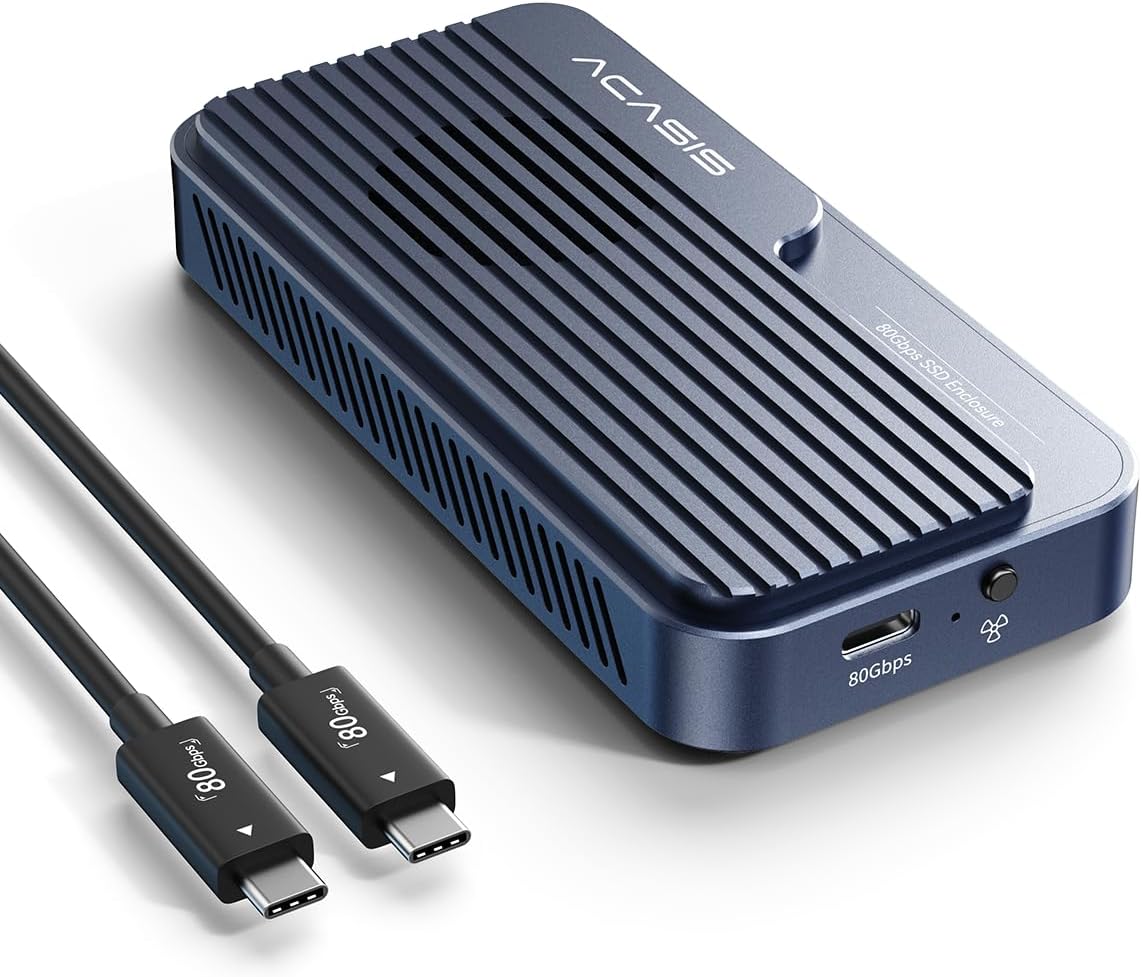
$149.61 (list $199.99, currently a limited-time deal) · 4.2★, 288 reviews
Same JHL9480 silicon, lowest real price, and an active fan that auto-starts at 55°C and stops at 40°C — better sustained-write behavior than any fanless box at this price. Tool-free install, thermal pads and a size adapter in the box.
Two caveats worth knowing: no Thunderbolt 3 support (TB4/USB4 and up only; older Intel Macs and TB3 laptops are out), and Acasis’s own listing says to avoid “long continuous transfers of large files,” which is an honest admission that sustained loads need the fan running.
Check Acasis TB501 Pro price3. UGREEN 80Gbps — the sale alternative

$169.99 (list $259.99, -35%) · 4.1★, 333 reviews
JHL9480 again, rated up to 7,000 MB/s theoretical. The built-in fan kicks in at 40°C, earlier than the Acasis, which keeps the SSD cooler under sustained load but means the fan runs more often. Comes with a silicone sleeve case; supports 2280 M-Key/M&B-Key NVMe up to 8TB.
Compatibility notes: full speed needs TB5, backward compatible with TB4/USB4/USB3. Thunderbolt 3 works only on macOS 15 or later. On Windows TB3 machines it’s a no-go.
Check UGREEN 80Gbps enclosure price4. TerraMaster D1 SSD Pro — the silent one (when stocked)

Currently unavailable · 4.6★, 52 reviews
The most interesting design here: a chunky CNC aluminum block (11.2 oz) with dual cooling fins, completely fanless, claiming 7,061 MB/s on a Samsung 990 Pro via AJA testing. It supports Thunderbolt 5/4/3 plus USB4/3.x — the widest host compatibility in this list — and has a clever LED that shows white for TB/USB4 high-speed mode and orange for standard USB.
The problem is availability: it’s been out of stock on Amazon US. If it returns near $150–180, it’s the best-built option here on pure hardware merit.
Check TerraMaster D1 stock5. RayCue 80Gbps — the M4-mini lookalike
RayCue’s 80Gbps enclosure is another JHL9480 build with a cooling fan, TB5/4/3 + USB4 compatibility, and a form factor that stacks neatly under a Mac mini — which is why it keeps showing up in “Mac mini storage expansion” threads (if you only need 10Gbps storage plus front USB/SD ports, see the best Mac mini dock with SSD enclosure guide instead). It’s a newer listing (went live mid-2025) with fewer reviews than the Acasis or UGREEN, so I’d treat it as the wildcard. If it’s meaningfully cheaper than the Acasis when you read this, it’s the same controller underneath and the form factor is a genuine draw for Mac mini setups.
6. Under $100: the 40Gbps tier
Here’s the honest question: do you need 6,000 MB/s? If the enclosure holds a photo library, Time Machine/backup target, or scratch media you copy to and from rather than work on directly, a 40Gbps USB4 enclosure does ~2,800 MB/s for half the money. It’s also the better pick if your laptop only has Thunderbolt 3 or 4 — you won’t see the 80G premium anyway.
Acasis TBU405 — $80.99, 4.4★/492 reviews
The fanless aluminum budget standard. JHL7440 controller, measured around 2,800/2,700 MB/s read/write on a MacBook Pro with a Samsung 980, pocketable at 100×60mm. Works on Thunderbolt 3/4, USB4, and falls back gracefully down to USB 2.0. One note from the review pool: a minority of buyers report disconnects on some TB4/TB5 hosts — at this price that’s a “test it in the return window” note, not a dealbreaker.
Check Acasis TBU405 priceUGREEN 40Gbps — $75.99, 4.0★/1,254 reviews
Same 40Gbps class but with a PWM-controlled fan for sustained writes. Two limitations worth knowing before buying: the listing caps support at 4TB SSDs (vs 8TB elsewhere) and explicitly excludes PCIe 5.0 drives — pair it with a Gen3/Gen4 stick. The 4.0★ rating across 1,254 reviews is lower than the Acasis; the recurring complaints are fan noise and finicky sleep behavior on some hosts.
Check UGREEN 40Gbps price7. The prebuilt option: OWC Envoy Ultra
If you’d rather not shop for a separate NVMe stick, the OWC Envoy Ultra is a sealed, prebuilt Thunderbolt 5 SSD: over 6,000 MB/s, fanless, IP67 weatherproof, integrated cable, 5-year warranty, and it maximizes whatever host you plug it into (TB3 through TB5). The 2TB was $799.99 at last check — roughly triple the cost of an enclosure plus your own 2TB Gen4 drive. You’re paying for the ruggedization, the warranty, and zero assembly. For a drive that lives in a camera bag, that’s defensible; for one that sits under a monitor, DIY wins on price.
Check OWC Envoy Ultra priceWhich SSD to put inside
The enclosure is half the purchase. Pair it with a midrange Gen4 NVMe — spending more on the SSD than the enclosure is the correct allocation.
| SSD | Capacity | Why | Price range |
|---|---|---|---|
| WD_BLACK SN850X | 1TB / 2TB / 4TB | The default pick — fast, efficient, widely available | $75–$230 |
| Samsung 990 Pro | 1TB / 2TB / 4TB | Slightly faster in benchmarks, runs a bit hotter | $90–$260 |
| WD SN770 | 500GB / 1TB / 2TB | Budget option — still Gen4, ~5,000 MB/s reads | $45–$120 |
Avoid Gen5 drives in bus-powered enclosures — they draw too much power (OWC recommends ≤11W sustained) and you won’t see the speed benefit since TB5’s PCIe tunnel caps around 64Gbps anyway. A good Gen4 drive already saturates that.
What speed should you actually expect?
| Host port | Realistic reads | Realistic writes | Notes |
|---|---|---|---|
| Thunderbolt 5 / USB4 v2 | ~6,000–7,000 MB/s | ~4,000–5,000 MB/s | Needs a Gen4/5 SSD to get there |
| Thunderbolt 4 / USB4 | ~3,800 MB/s | ~3,000 MB/s | Same 40Gbps ceiling as always |
| Thunderbolt 3 | ~2,800 MB/s | ~2,500 MB/s | Only if the enclosure supports TB3 — see table above |
| USB 3.2 Gen2x2 / Gen2 | 1,000–2,000 MB/s | 800–1,500 MB/s | Fallback mode, works everywhere |
Write speeds depend on your SSD’s cache and the enclosure’s thermals. This is where the fanned models earn their keep on 100GB+ transfers. An 80G enclosure on a 40G port works fine (it just runs at 40G), so buying ahead of a TB5 laptop upgrade isn’t wasted money.
Dock port or direct?
These enclosures work plugged into a Thunderbolt 5 dock’s downstream port — but on a shared dock you’re splitting bandwidth with displays and other devices. For a VM disk or video-scratch workload, plug the enclosure straight into the laptop. If you want a dock that can feed one properly, see my CalDigit TS5 vs Anker Prime TB5 comparison or the full Thunderbolt 5 docks guide. On a MacBook Pro desk, the MacBook Pro dock guide covers the charging and display side first.
Verdict
- Most people: OWC Express 1M2 80G — $169.99, fanless, proven, 5-year warranty. The one I’d buy.
- Tightest budget at 80G: Acasis TB501 Pro — $149.61 with active cooling, if you’re not on TB3.
- Tightest budget overall: Acasis TBU405 or UGREEN 40Gbps — ~$76–81 for 2,800 MB/s, which is plenty for backups and media libraries.
- Silence + TB3 support: TerraMaster D1 SSD Pro — when it’s back in stock.
- Zero assembly: OWC Envoy Ultra — expensive, rugged, done.
FAQ
Do I need Thunderbolt 5 on my computer to use these?
No — all of these fall back to 40Gbps on TB4/USB4 ports and run fine. You just won’t see the ~6,000 MB/s peak. TB3 support varies: Acasis doesn’t support it at all, UGREEN needs macOS 15+, OWC and TerraMaster handle it.
Will a Gen5 SSD make these faster?
Marginally, but watch power: bus-powered enclosures can’t always feed a hungry Gen5 drive (OWC recommends ≤11W sustained). A good Gen4 drive like the SN850X already saturates the ~64Gbps PCIe tunnel that TB5 provides, so Gen5 is mostly wasted money here.
Can I boot macOS or run VMs off these?
Yes — this is the main reason to buy 80G over a cheap 10G USB enclosure. At ~6,000 MB/s reads, a VM or a booted OS feels close to internal storage. Keep the enclosure plugged directly into the host rather than through a dock for consistent latency.
Fanless or fan — which is better?
Fanless (OWC, TerraMaster) for bursty everyday use and silence. Fan (Acasis, UGREEN, RayCue) for sustained writes — if you regularly move 100GB+ files, the active cooling prevents the SSD from thermal-throttling mid-transfer.
Why not just buy a prebuilt portable SSD?
You can — prebuilt TB5 drives like the LaCie Pro5 exist. But an enclosure plus your own NVMe is cheaper per TB, you pick the SSD, and when 4TB drives drop in price you can upgrade the enclosure’s capacity instead of replacing the whole unit.