
Breakdance Builder Review: Is It Still Worth It in 2026?
An honest Breakdance builder review covering the new 3.0 AI agent tools, WP-CLI, pricing, and how it compares to Elementor, Bricks, and Oxygen in 2026.
Updated Published 18 min read
Disclosure: this guide contains referral links. If you buy through them, I may earn a commission at no extra cost to you.
Breakdance Builder review, updated for version 3.0: the October 2026 release that lets AI agents build your site over MCP. The original version of this article went out in February 2026 at v2.6. Since then Soflyy shipped 2.7, 2.8, and the 3.0 major that changes what this builder is. The short answer is still yes, it’s worth it, but the reasons shifted. This update covers what changed, the new AI agent workflow, WP-CLI automation, current pricing, and how Breakdance now stacks up against Elementor, Bricks, and Oxygen. All three shipped AI building in 2026 too. If you’re not sure WordPress is the right platform, read the WordPress vs Astro cost and ops breakdown first.
What is Breakdance?
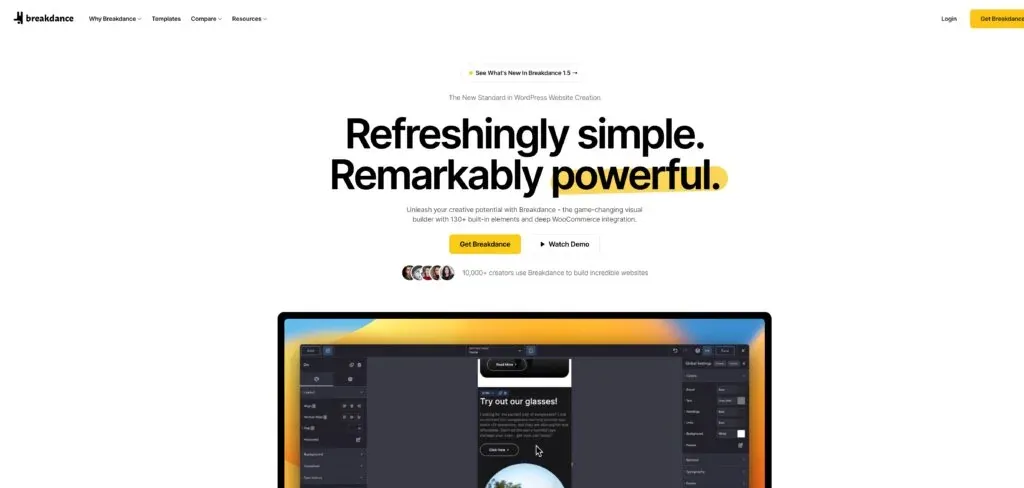
Breakdance is a full site builder from Soflyy, the same team behind Oxygen Builder and WP All Import. You control headers, footers, archive templates, blog layouts, and individual pages from one place. The editor runs on React, which keeps it snappy. Changes preview in real time without page reloads.
It works with any WordPress theme, but most people disable the active theme and let Breakdance handle everything. The Pro version ships 145 elements and connects to WooCommerce, ACF, and popular email marketing services. Soflyy has been building WordPress products for over 15 years, with 200,000+ active installations across their tools. Louis Reingold leads development. They built Oxygen first, then Breakdance as a more accessible version with a better UI and a flatter learning curve. Breakdance now has 100,000+ creators using it.

You can build pretty much anything with it: blogs, WooCommerce stores, membership sites, landing pages, portfolios. Dynamic data support means you can loop over posts, use ACF fields in templates, and display conditional content based on user roles or post categories. That’s where Breakdance pulls ahead of simpler builders.
- Blogs and content sites with custom archive and post templates
- WooCommerce stores with full product, shop, cart, and checkout control
- Membership sites with conditional content by user role
- Landing pages and marketing sites
- Portfolios with filterable Post Loops
What’s new in Breakdance 3.0: build with AI agents
Breakdance 3.0 shipped on October 26, 2026. The current maintenance release is 3.0.1 (October 28). The headline feature: you can now connect AI agents to your WordPress site over Model Context Protocol (MCP), the open standard that lets agents call external tools. If you’ve used MCP for connecting Codex or Claude Code to external tools, the mental model is the same, but here the “tool” is your WordPress site.
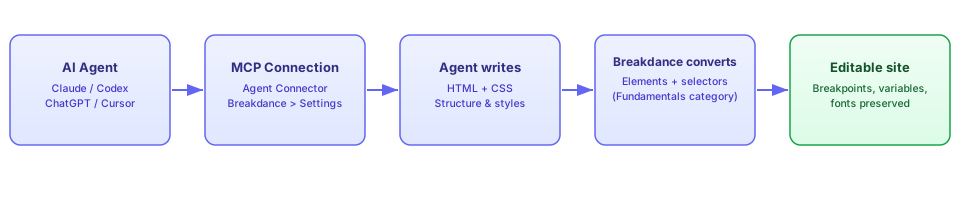
Here’s how it works. The agent writes HTML and CSS. Breakdance’s conversion layer turns that into native Breakdance elements and global selectors through a new Fundamentals element category. The output stays a real Breakdance site, fully editable in the builder with breakpoints, CSS variables, and fonts preserved. Not pasted code you can never touch again.
MCP agent building is included in Pro
Unlike the AI content writer (which is a separate paid add-on), the MCP agent-building feature ships with every Pro license at no extra cost. You don’t need a special AI bundle.
The flow looks like this:
Beyond agent building, 3.0 brought three more changes worth knowing about. The Selectors panel was overhauled: selectors now emit without the automatic .breakdance wrapper (a class like .card stays .card instead of becoming .breakdance .card), which means lower CSS specificity and cleaner output. Legacy selectors keep working in a separate panel with an optional one-click convert. Global CSS Variables now support any unit or string value. You can define --section-spacing: 96px and use it directly in Design controls, organized in collections. And click/hover/scroll Interactions are built in, so entrance animations no longer require custom code.
Setting up Agents & MCP
The setup path is short. In your WordPress admin: Breakdance > Settings > Agents & MCP. Install and activate the Agent Connector, then click Connect. The Connection Wizard walks you through picking your agent: Claude, Codex, ChatGPT, Cursor, or anything that supports MCP. The RC 2 release added a setup wizard that takes a fresh install to a connected agent in a few clicks.
- Admin access to the WordPress site
- A supported agent installed (Claude Code, Codex, Cursor, etc.)
- A backup or snapshot in place before the agent touches anything
- Preferably a staging copy rather than your production site
Verify it works: after connecting, ask the agent for a trivial page change (rename a heading, add a section). Open the Breakdance builder and confirm the change appears as editable Breakdance elements, not raw HTML blocks.
Agent can't connect?
Check the “Enable MCP Access” toggle in the same Agents & MCP settings screen. This is the documented first troubleshooting step. If that’s off, nothing else matters.
What the agents can (and can’t) do
Based on the official demos and documentation, here’s what agents handle well:
- Create pages and set the homepage
- Build headers and footers
- Content templates with display conditions
- Global Blocks for repeated sections
- Posts Loops wired to ACF or Meta Box fields
- Build and configure forms including Form Actions (email, store submissions, webhooks)
- Read and reuse your existing design system (breakpoints, selectors, variables, fonts)
- Recolor an entire site via CSS variables
- Add entrance animations without custom code
What they can’t do: agents produce what the conversion layer supports. Unusual layouts, complex interactions, or edge-case designs may still need manual work in the builder. Every output should be reviewed in the builder before you publish. Prompt quality and design taste still matter. Garbage in, garbage out. If you want to level up your prompting for design work, look at AI skills for web design.
The difference from code-gen tools: the output stays editable in Breakdance. You’re not stuck with uneditable markup after the agent finishes.
Can an agent break my site?
Only to the extent of the access you grant it. If Universal Abilities is installed (see security notes below), the agent can manage plugins, files, and site settings. Without it, the blast radius is smaller. Either way, test on staging first and keep a backup.
Security notes before you connect an agent
This is where the operator hat goes on. The Breakdance docs recommend installing Universal Abilities to give the agent full control of WordPress, including managing plugins, files, and site settings. That is a large blast radius. Some practical advice before you wire an agent into anything real:
Universal Abilities = full WordPress control
Installing Universal Abilities gives the agent access to plugins, files, and site settings. Treat this like handing someone root on your server. Only do it when you understand what the agent will touch.
Operator checklist before connecting
Connect agents to a staging copy first. Use a dedicated admin user for the agent (not your main account). Back up your WordPress site first before letting an agent run replace_url, soft_reset, or total_reset. MCP access runs through the WP admin of a public site, so standard hardening applies: HTTPS-only, restrict /wp-admin, and don’t expose the connector wider than needed.
The official Security Considerations page in the Breakdance docs is worth reading before you enable anything: breakdance.com/documentation.
Breakdance 2.7 and 2.8 in brief
The mid-year releases led up to 3.0. The short version:
2.7 (April 15, 2026): WCAG accessibility work: skip-to-content link on by default for new installs, reduced-motion support, ARIA fixes. Plugin download size cut by ~50%. WP-CLI commands (more on that next). Synced Swiper sliders and buttons that control any slider. WooCommerce regular/sale price dynamic fields.
2.8 (June 25, 2026): Multi-element selection (Cmd/Ctrl click). Variable fonts: upload your own or use Google Fonts, with a weight slider. Conditional form emails per template and a breakdance_form_validate_field PHP filter. Swiper 8 upgraded to 12 (fixes Flip and Coverflow, better touch/keyboard). PHP 8.4 support. Marquee Text as a beta element. Renameable color variables (--brand-primary instead of --color-1). Named CSS/JS entries in Global Settings > Code.
Version 2.6 (December 2025) added button presets and the CodeMirror 6 code editor. If you’re coming from that era, the jump to 3.0 is a big one.
WP-CLI and automation
If you run WordPress on a VPS, say Hetzner Cloud, WP-CLI is already part of your toolkit. Since 2.7, Breakdance ships its own set of commands. This matters for repeatable deploys, migration scripts, and cache invalidation from CI.
wp breakdance status                 # mode + directory checks
wp breakdance clear_cache            # clears generated CSS, regenerates Global Settings CSS
wp breakdance replace_url 'https://old.example.com' 'https://new.example.com'
wp breakdance export_settings --file=breakdance_settings.json
wp breakdance import_settings breakdance_settings.json
wp breakdance license <key>          # also: wp breakdance license clear
wp breakdance theme off              # disable themeless toggle from CLI
wp breakdance soft_reset             # refresh setup resources (mutates site)
wp breakdance total_reset            # destructive; asks for confirmation
Verify: run wp breakdance status after install or after a migration. It checks the current mode and directory health. If something’s off with permissions or paths, this is where you’ll see it.
If you’re self-hosting and need to install WordPress with Docker Compose, WP-CLI is native to the container and these commands slot straight into your deploy routine.
Exports are not backups, and some commands are destructive
The docs explicitly warn: “Exports are not full backups; protect license keys.” An export gives you settings, not your content or database. Also: soft_reset mutates the site (refreshes setup resources), and total_reset is destructive and prompts for confirmation. Never run total_reset on production as a “fix”. replace_url is the safe migration path vs. raw SQL search/replace.
Pricing
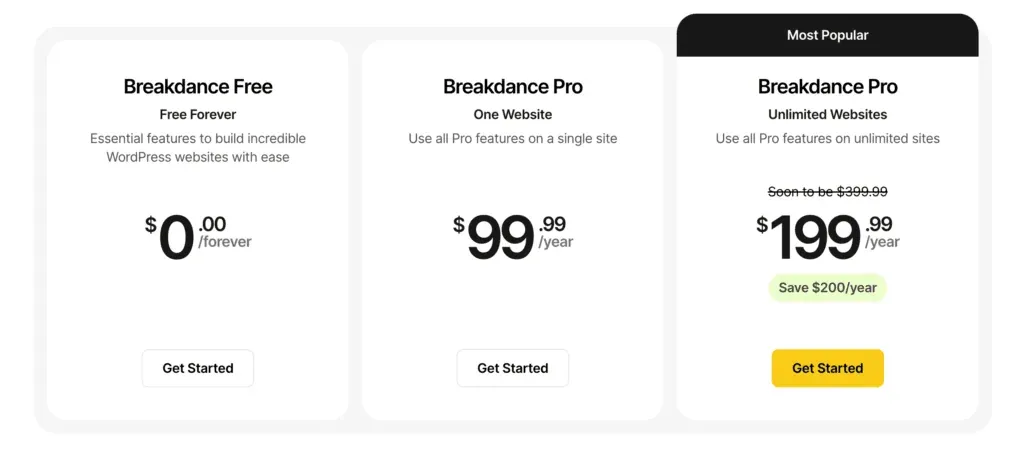
Current pricing (verified November 2026):
- Free: $0, unlimited sites, 80 elements, limited Design Library, basic WooCommerce, forms, popups, dynamic data
- Pro 1 site: $99.99/year, 145 elements, full everything
- Pro Unlimited: $199.99/year (marked “soon to be $399.99”, save $200/year by locking in now)
- 60-day money-back guarantee, no questions asked
Three facts the pricing page makes clear that matter for agencies and freelancers:
- Price lock. “The price you pay today is the price you renew at.” Your price is locked indefinitely, and the page warns that prices are going up.
- Client sites don’t need their own license. One license covers client work. The sites you build for others are included.
- Local, staging, and development installs don’t count toward license limits.
Pro Unlimited is going up to $399.99
The renewal price you lock in today is protected indefinitely. If you’re planning to use Breakdance on multiple sites, buying now at $199.99 is the obvious move.
AI content writer is separate, MCP agent building is not
The old “$249.99 Pro + AI Bundle” tier is no longer on the pricing page. The pricing FAQ now says the AI content writing service is a separate purchase. But the 3.0 MCP agent-building feature is included in every Pro license. Budget accordingly: don’t expect AI writing for free, but you do get AI site building.
On the Elementor comparison: Elementor restructured its plans in 2026. The Pro lineup is now Essential (1 site), Advanced Solo (1 site), and Expert (25 sites), and unlimited sites moved to the separate Elementor One Agency plan. Breakdance Pro Unlimited at $199.99/year, locked forever, is still the cheaper way to cover unlimited client sites. Elementor renders its prices with JavaScript, so open their pricing page and check the current numbers before you compare. If you build client sites, the math hasn’t changed.
Try Breakdance FreeHow it works
The building model is simple: themeless by default, everything is a template. Headers, footers, archives, singles: all built in Breakdance and assigned by conditions.
Setup
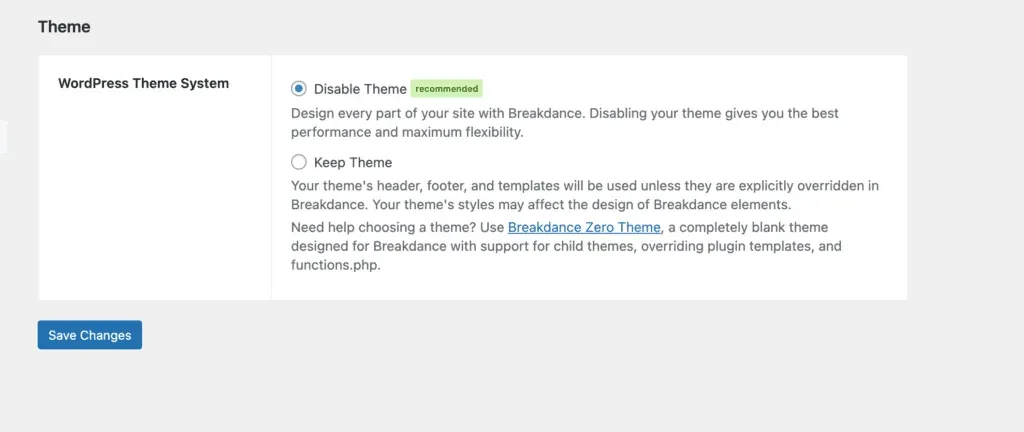
On first install you choose whether to keep your WordPress theme or disable it. Disabling it gives you a clean canvas and avoids CSS conflicts. For most people, disabling the theme is the right call. You can also do it from the CLI with wp breakdance theme off.
Global styles
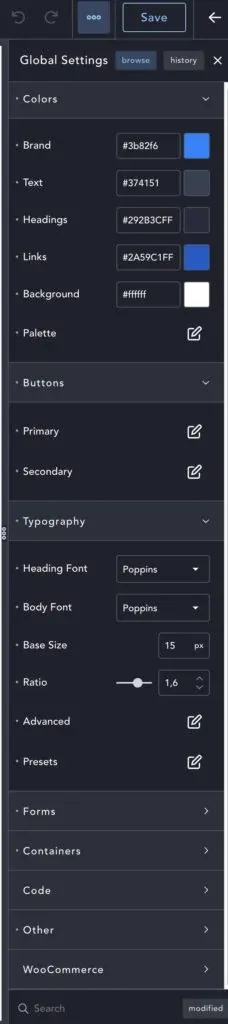
Set brand colors, typography, button styles, and container defaults once and they apply across the whole site. This is the right way to build: consistent design without manually touching every element. Version 2.8 added renameable color variables (call it --brand-primary instead of --color-1), and 3.0 extended this with Global CSS Variables that support any value type, so --section-spacing: 96px is usable directly in Design controls, organized in collections.
Headers and footers
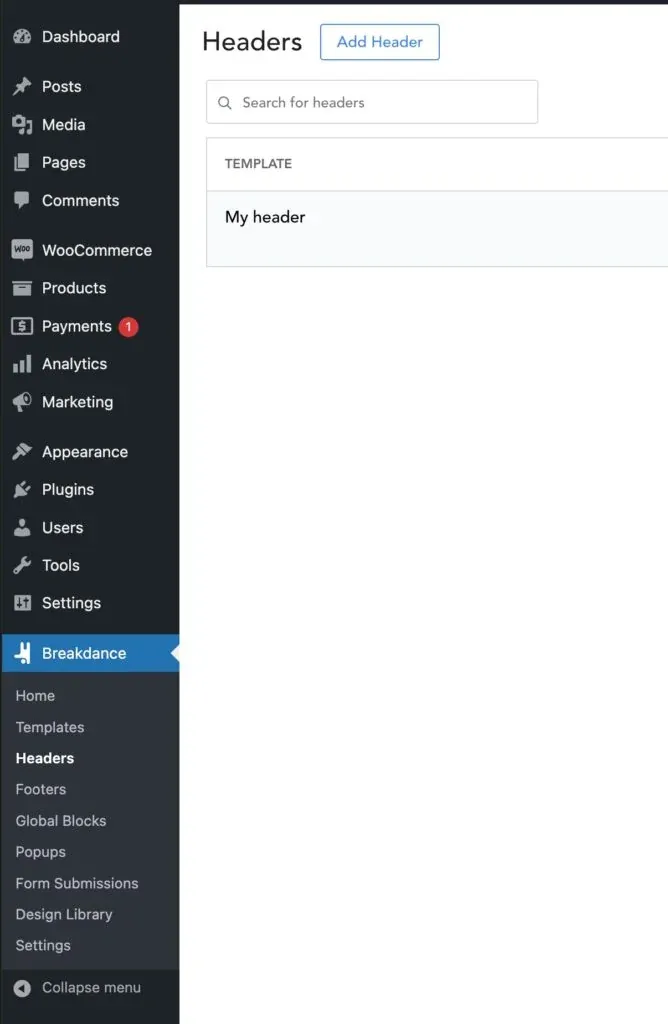
The header builder handles dropdown menus and mega menus without extra plugins. You can assign different headers to different page types. Building a multi-level nav takes minutes here.
Forms, popups, dynamic data
Built-in form builder with 14+ field types, conditional logic, spam protection, and direct integrations with Mailchimp, ConvertKit, and others. No need for a separate forms plugin on most sites. That alone saves $50-80/year vs. a forms SaaS. Popups are also built in.
Dynamic data comes from WordPress core fields, custom post types, and ACF. The Post Loop Builder displays grids, lists, masonry, or sliders of posts filtered by category, tag, or custom query. Version 2.8 added conditional form emails per template and the breakdance_form_validate_field PHP filter for custom validation.
Client editing
Breakdance has a “User Access” mode that lets clients edit content without touching styling. Works well for handing off a finished site without worrying that someone will break the design.
Integrations
- WooCommerce: full product, shop, cart, and checkout templates in Pro. For a deeper dive into customizing the admin side, see how to build a custom WooCommerce product admin dashboard.
- ACF, Meta Box, and custom fields (Meta Box fields work in agent-built loops since 3.0)
- Yoast SEO, Rank Math, SEOPress
- Mailchimp, AWeber, ConvertKit, ActiveCampaign
- Zapier/IFTTT via webhooks (Form Actions webhooks added in 3.0)
- WP Grid Builder for filtering
If you’re selling digital products instead of physical ones, SureCart is worth a look as a lighter-weight alternative to WooCommerce.
Performance
Breakdance only loads CSS and JS for the elements used on each page. The React editor is fast, images lazy-load, and the output is clean. The performance story improved through 2026: version 2.7 cut the plugin download size by ~50%, and 3.0 produces cleaner selectors (no .breakdance wrapper, so lower CSS specificity and less to override):
/* Before 3.0 */
.breakdance .card { padding: 24px; }

/* After 3.0 */
.card { padding: 24px; }
Legacy selectors keep working through the Legacy panel with an optional one-click convert, so existing custom CSS doesn’t break.
For self-hosters, after big design changes run wp breakdance clear_cache to regenerate CSS. Server-side caching is where the biggest gains land once the builder output is clean. You can stack Cloudflare, Varnish, and Redis on top of any WordPress install. If you want to take it further and deploy Breakdance as a static WordPress site, that’s the fastest path.
Cost order of magnitude: a small VPS runs ~$5-10/month, managed WordPress hosting ~$10-25/month, and a static deploy can hit free-tier pricing. If you’d rather not tune a server yourself, managed hosting like Cloudways handles the caching layer for you. For edge delivery, Bunny.net is a solid CDN that pairs well with any of these.
Cache clearing after design changes
Breakdance generates CSS per page. After major design or global-style changes, run wp breakdance clear_cache or use the built-in cache clear to make sure visitors see the updated styles immediately.
Breakdance vs the alternatives
Gutenberg
Gutenberg needs a block library, full site editing plugins, and developer time to reach what Breakdance does out of the box. For anything beyond a basic blog, Breakdance wins on speed of development. That said, if you only need a blog and don’t care about custom templates or design control, Gutenberg is genuinely fine, and it’s free.
Pick Gutenberg if you want a simple blog with minimal cost and no lock-in. Pick Breakdance if you need custom layouts, templates, or a site builder workflow.
Elementor
Elementor has a bigger ecosystem and more third-party addons. Breakdance produces cleaner code and costs less. Elementor’s plan structure changed in 2026: Essential (1 site), Advanced Solo (1 site), Expert (25 sites), and a separate One Agency plan for unlimited sites. Breakdance Pro Unlimited at $199.99, locked forever, covers every client site on one license.
Pick Elementor if you need a specific third-party addon that only exists for Elementor. Pick Breakdance if you want cleaner output, lower cost, and don’t depend on the Elementor addon ecosystem.
Oxygen
Oxygen is now at version 6.2, repositioned as “MCP Edition”: an AI website builder for WordPress, fully editable. It’s free to try with the full editor and AI tooling, and markets one-command local setup. Both Soflyy products now run the same MCP approach. The split is audience: Breakdance is polished, template-rich, and accessible to a wider range of users. Oxygen leans toward developer control.
Soflyy now sells two MCP-based builders. Same parent company, same core philosophy, different target users.
Pick Oxygen if you want maximum low-level control and a developer-centric workflow. Pick Breakdance if you want the same MCP power with a smoother UX and better templates.
Bricks
Bricks has a strong developer community and works as a theme, which adds migration friction: switching existing sites to Bricks means theme-level changes. Bricks is now at 2.4.5 and ships “AI Abilities” for building and managing sites with AI. Breakdance no longer has the AI-building lane to itself.
What still separates them: Breakdance runs as a plugin (easier to adopt on existing sites), has a growing template library, and the Pro Unlimited price is locked indefinitely. Bricks keeps its loyal developer following.
Pick Bricks if you prefer the theme-based model and value the developer community. Pick Breakdance if you want plugin-based adoption, a gentler learning curve, and price certainty.
My experience
I moved wpdoze.com to Breakdance and built the custom header, footer, and post layout from scratch. Took a few hours total. Posts stay in Gutenberg. Breakdance handles the site chrome and templates only. The separation works well.
I’ve also used it for a few client sites. Building goes fast once you have global styles set. The main thing I’d like to see is a bigger community template library. There’s a design library but it’s still smaller than Elementor’s. Everything else works well.
On the 3.0 MCP side, I haven’t wired an agent into a production site yet. The setup path and capabilities described above come from the official demos and documentation. When I run it on staging and see how it handles a real project, I’ll update this section. For now I’d rather be honest than pretend I’ve battle-tested it.
Breakdance FAQ
Is Breakdance worth it in 2026?
Yes. With version 3.0 adding first-party MCP agent building (included in Pro), WP-CLI support, and a locked $199.99 unlimited price, it’s one of the strongest WordPress builders available. The main caveats: the AI content writer costs extra, agent output needs human review, and the design library is still smaller than Elementor’s.
Does Breakdance include AI?
The 3.0 MCP agent-building feature is included in every Pro license at no additional cost. The AI content writer is a separate paid purchase. So you can use AI to build your site’s structure and design without paying extra, but AI-generated text content is billed separately.
Can I use one license on client sites?
Yes. Client sites don’t need their own license. One Pro license covers client work. Local, staging, and development installs don’t count toward license limits either. For freelancers and agencies, this means one $199.99/year Pro Unlimited license covers everything.
Will the price go up?
Yes. Pro Unlimited is marked “soon to be $399.99”. But the renewal price you lock in today is protected indefinitely. As the pricing page puts it, “the price you pay today is the price you renew at.” If you’re planning to use Breakdance on multiple sites, buying now saves $200/year versus waiting.
Does Breakdance work with WooCommerce?
Yes. Pro includes full product, shop, cart, and checkout template control. Version 2.7 added WooCommerce regular and sale price dynamic fields. You can build a complete custom store without touching theme files.
Do I need a theme with Breakdance?
No. Themeless mode is the default recommendation. It gives you a clean canvas and avoids CSS conflicts. Any WordPress theme works if you prefer keeping one, but for most sites disabling the theme is simpler.
Verdict: is Breakdance worth it?
Yes. Breakdance is fast, produces clean code, covers what a typical WordPress project needs, and as of 3.0 it’s the first mainstream WordPress builder with first-party MCP agent building included in Pro at a price-locked $199.99/year for unlimited sites.
The honest caveats: the AI content writer costs extra, agent output needs human review before publishing, and the design library is still behind Elementor’s. None of those are dealbreakers.
- Get it if you build client sites. The license math and client-site coverage are the strongest argument
- Get it if you self-host and value WP-CLI, clean output, and predictable costs
- Get it if you’re leaving Elementor and want something leaner
- Skip it if you run a single simple blog. Gutenberg handles that fine
- Skip it if you want total low-level developer control. Look at Oxygen or Bricks
The free tier (80 elements, no time limit) plus the 60-day money-back guarantee make it easy to evaluate before you spend anything. Start with the free version, build a real page, and upgrade when the limits bite.
Get BreakdanceRelated Posts
Did this guide work for you?

Written by Dragos
Dragos is the author of Bitdoze — practical DevOps, programming, and self-hosting guides.
More guides from Dragos →Need help with Astro, VPS, or a self-hosted app? View services →