
FluidVoice: Free Open-Source Dictation App for Mac & Windows
FluidVoice is a free, open-source dictation app for Mac, now in beta on Windows and iPhone, with local AI models and FluidMeet. Setup, comparisons, and honest limits.
Updated Published 18 min read
Disclosure: this guide contains referral links. If you buy through them, I may earn a commission at no extra cost to you.
A solo developer got frustrated with paying $15/month for Wispr Flow and decided to build his own dictation app. A year later, that project, FluidVoice, has 12,400+ GitHub stars, 350,000+ downloads, and an active Discord community. It’s also no longer Mac-only: a Windows beta and an iPhone TestFlight build are out, with Android and Linux still on the waitlist.
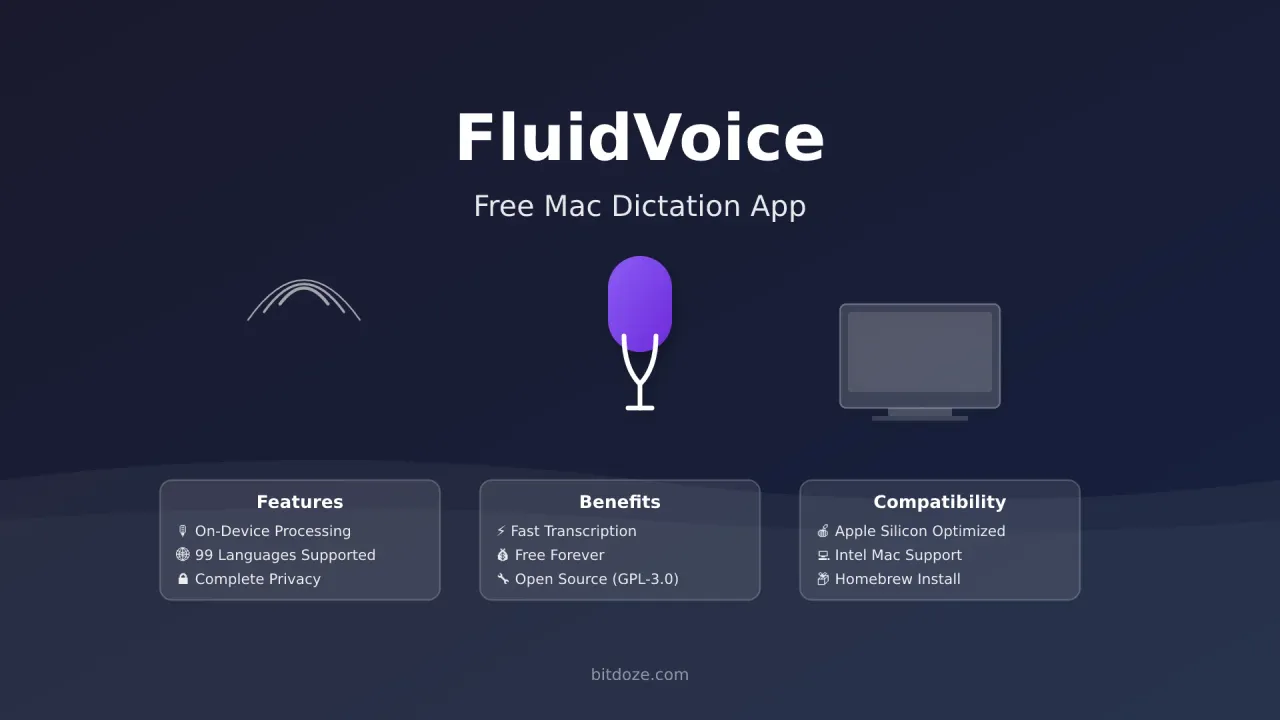
The pitch is simple: FluidVoice runs speech-to-text models directly on your machine. No cloud servers. No subscriptions. It supports 99 languages through Whisper, has a custom AI model called Fluid-1 for smart formatting, and it’s free under the GPL-3.0 license.
Since my first version of this guide in July, the app also grew a second product inside it: FluidMeet, a fully local meeting recorder that transcribes and labels speakers without a bot joining your calls. This update covers installation on Mac and Windows, the new models, FluidMeet, comparisons with Wispr Flow and other tools, and an honest assessment of where FluidVoice still falls short.
View on GitHubWhat is FluidVoice?
FluidVoice is a free, open-source dictation app for macOS built in Swift. It runs speech-to-text models entirely on your machine. Audio never leaves the device for transcription. The app supports Apple Silicon (all models) and Intel Macs (Whisper models only), and requires macOS 15.0 Sequoia or later. A Windows beta and an iPhone TestFlight build shipped in October 2026; Android and Linux are still waitlist.
The project launched in September 2025 and grew fast. It went from 300 stars to 12,400+ in about a year, with 350,000+ downloads across platforms. The developer (altic-dev on GitHub) maintains the project solo with community support through GitHub Sponsors.
Key specs: 99 languages via Whisper, fewer through other models (~40 via Nemotron, 30 auto-detected via Qwen3 ASR, 25 via Parakeet TDT v3, 14 via Cohere). Perceived latency is under 100ms on the fast models. The app inserts text directly into any application through the OS accessibility APIs.
Open source vs. private runtime
FluidVoice the app is GPL-3.0. You can read, audit, and modify the code. However, Fluid Intelligence (the AI enhancement model for smart formatting) is a privately maintained runtime and is not open source. This distinction matters if code auditability is a priority for you.
The local-first philosophy behind FluidVoice fits the same mindset as self-hosting: keep your data on hardware you control.
How to install FluidVoice
On Mac you have two install paths: Homebrew (fastest) or manual download from GitHub. On Windows, the beta ships as a direct download from the official site. If you want to contribute or audit the code, you can build the Mac app from source.
Watch out for the fake site
fluidvoice.org is not affiliated with FluidVoice and has been claiming to be the official site. The official domains are fluidvoice.com and altic.dev/fluid. For downloads, use the site or this repo’s GitHub Releases, never fluidvoice.org.
Install on Windows (beta)
The Windows build is in public beta. Grab it from the download section at fluidvoice.com (the “Windows beta” button). Onboarding walks you through the Windows-side permissions the same way the Mac version does for accessibility. The open-source code on GitHub is still the Mac app; the Windows build’s source isn’t published yet, so treat it as beta software and expect rough edges.
Install on Mac via Homebrew
If you use Homebrew in your terminal, this is the cleanest path:
brew install --cask fluidvoiceThat’s it. Homebrew handles the download, places the app in /Applications, and keeps it updated with brew upgrade.
For manual download, grab the latest .dmg from GitHub Releases.
To build from source:
git clone https://github.com/altic-dev/FluidVoice.git
cd FluidVoice
open Fluid.xcodeproj
This opens the project in Xcode. Build and run from there.
First-run setup and permissions
When you first launch FluidVoice, macOS will ask for several permissions:
- Microphone access. Required for speech capture. No way around this.
- Accessibility permissions. Required for FluidVoice to type into other applications. Go to System Settings → Privacy & Security → Accessibility and enable FluidVoice.
- Notification permissions. Optional, for status updates.
After permissions, you’ll see the onboarding flow. Pick a voice model:
- Parakeet Flash (Beta): Fast, English-focused, ~250 MB. Good starting point for English users.
- Fluid Speech Pro: New in v1.6.13, an on-device English model with trained-words support for custom vocabulary and pronunciations.
- Nemotron Speech 3.5: Better multilingual support, ~670 MB.
- Qwen3 ASR 1.7B: Auto-detects 30 languages, no language picker needed.
- Whisper Small/Medium: Works on Intel Macs too, but slower than the other models.
You can change models later in settings. Most models download in the 250 MB to 1.4 GB range.
If you want Fluid Intelligence (the AI formatting model), you can download it separately. It’s about 3.5 GB. It’s optional but makes a noticeable difference in output quality.
macOS 15 required
FluidVoice requires macOS 15.0 Sequoia or later. Users on older macOS versions cannot run it. Intel Macs get Whisper-only support. The faster models (Parakeet, Nemotron) require Apple Silicon.
Key features at a glance
FluidVoice has more features than most free apps.
Local speech-to-text models
All transcription runs on your Mac. No internet required. These are the available models:
| Model | Best For | Languages | Size |
|---|---|---|---|
| Fluid Speech Pro | English, custom vocabulary | English | On-device |
| Parakeet Flash (Beta) | Lowest-latency English dictation | English | ~250 MB |
| Parakeet TDT v3 | Fast default multilingual | 25 | ~500 MB |
| Parakeet TDT v2 | Fastest English-only | English | ~500 MB |
| Nemotron Speech 3.5 (Ultra Fast) | Streaming multilingual | ~40 | ~670 MB |
| Nemotron 3.5 Multilingual | Higher-accuracy multilingual | ~40 | ~530 MB |
| Qwen3 ASR 1.7B | Auto-detect, no language picker | 30 | Apple Silicon |
| Cohere Transcribe | High-accuracy multilingual | 14 | ~1.4 GB |
| Apple Speech | Zero-download system speech | System languages | Built-in |
| Whisper Tiny to Large | Broad compatibility, Intel Macs | 99 | ~75 MB to ~2.9 GB |
For most English users on Apple Silicon, start with Parakeet Flash. Switch to Nemotron if you need multilingual support.
What you need to get started:
- macOS 15.0 Sequoia or later
- Apple Silicon Mac (recommended) or Intel Mac (Whisper only)
- ~1 GB disk space for voice model
- Microphone access granted in System Settings
- Accessibility permissions enabled
Fluid Intelligence (Fluid-1)
Fluid-1 is a custom-trained local AI model based on Gemma. The developer trained it on 100,000+ real-world dictation examples. It handles smart formatting, capitalization, punctuation, and cleanup, turning raw speech-to-text output into polished text.
On the developer’s evaluation set of 10,000 examples, Fluid-1 scored 77.31%. For context, GPT-5.4 scored 56.73% and the base Gemma model scored 34.72%. These are task-specific benchmarks (dictation cleanup), not general LLM benchmarks, so take them with a grain of salt. In daily use, the difference is noticeable. Raw Whisper output reads like a transcript, while Fluid-1 output reads like something you’d actually send.
Size: ~3.5 GB download. Newer releases added Fluid 1.1 Splash, a research-preview multilingual cleanup model that can optionally read screen context to recognize names and terms (off by default, still local). Trained words, the custom-vocabulary feature, carries over across model reloads.
Fluid-1 is not open source
This is worth repeating: while FluidVoice itself is GPL-3.0, Fluid Intelligence is a private, separately maintained runtime. The developer hasn’t announced monetization plans, but keeping Fluid-1 closed-source leaves the door open for future commercial licensing.
Command Mode and Write Mode
FluidVoice has two advanced modes beyond standard dictation.
Command Mode
Voice-control your Mac. Press the hotkey and speak a command:
- “Open Safari and search for FluidVoice” launches Safari and performs the search
- “Create a new note in Bear” opens Bear with a new note
- “Send a Slack message to #team saying the deploy is done” composes and sends
- “Run my deployment script” triggers macOS Shortcuts or scripts
- “Ask Mastra to search for the latest GitHub stars” triggers AI agent workflows
Command Mode can launch apps, run macOS Shortcuts, trigger system actions, and automate multi-step workflows through voice alone.
Write Mode
Dictate new content or rewrite existing text in any application:
- Select text in any app (Slack, email, Cursor, Notion, anywhere)
- Press the global hotkey
- Say: “Make this more concise” or “Rewrite in a professional tone”
- FluidVoice replaces the selected text in place
Write Mode works with per-app prompt sets. You can configure different behavior for different apps: formal tone for email, concise for Slack, technical for code editors. This goes beyond Wispr Flow’s limited context-awareness.
Smaller additions worth knowing: a live-preview overlay that respects the notch (or Reduce Motion), Hold Space to Mute inside a dictation, today-usage stats in the toolbar, and auto-updates with an opt-in beta channel.
FluidMeet: meeting transcription without a bot
The biggest new feature since this guide first ran is FluidMeet, a meeting recorder built into the app. It records the call on your Mac, transcribes it with Parakeet v3 (or another local engine), and labels who said what using NVIDIA’s Nemotron 3 Diarization model. FluidVoice shipped day-zero support for it in September, one of the first apps to do so.
Everything runs on-device: the recording, the transcript and the speaker timeline. No bot joins your call, nothing uploads, no per-seat fee. Up to 8 speakers, unlimited recording length, works on any Apple Silicon Mac on macOS 15+.
What you get on top of the raw transcript:
- Live captions during the call, including a draggable floating caption window.
- Speaker editing: rename speakers, merge mislabeled turns, double-click to fix text in place, Cmd-Z to undo.
- Summaries: generated on-device or via your own AI provider with a custom prompt.
- Export: Markdown, plain text or JSON, with timestamps and speaker names.
- Call detection: notices when a Google Meet, Teams or Webex call starts and asks if the meeting ended.
- Agent integrations: Claude Code, Codex and other coding agents can read your saved meetings from the FluidMeet integrations settings, so you can ask an agent “what did we decide about the API redesign on Thursday’s call?”
This is the feature that turns FluidVoice from “dictation app” into a real Otter/Fireflies alternative, except the recorder is a local process instead of a bot that shows up in the participant list. For more tools that take this approach (and the cloud alternatives), see the free AI meeting note-takers roundup.
FluidVoice vs Wispr Flow
FluidVoice directly positions itself as the free alternative to Wispr Flow. The differences are real.
| Feature | FluidVoice | Wispr Flow |
|---|---|---|
| Price | $0 forever | $15/mo or $144/yr (Pro). Free tier: 2,000 words/week |
| Processing | On-device (local) | Cloud (OpenAI/Meta servers) |
| Open source | Yes (GPL-3.0) | No |
| Offline | Yes | No |
| Platforms | Mac (stable), Windows + iPhone (beta) | Mac, Windows, iOS, Android |
| Languages | Up to 99 (Whisper) | 100+ |
| AI enhancement | Fluid-1 local or BYOK cloud | Cloud AI (fine-tuned Llama) |
| Command Mode | Yes (free) | Yes (Pro only) |
| Per-app prompts | Full custom prompt sets | Limited context-awareness |
| Funding | Solo dev, GitHub Sponsors | $81M raised, $700M valuation |
| Team size | 1 developer | ~50 employees |
| Trustpilot | N/A (free) | 2.7/5 |
The fundamental tradeoff: Wispr Flow is multi-platform and has better cloud AI for some use cases. FluidVoice is local, free, and open source.
Wispr Flow’s Trustpilot rating (2.7/5) reflects common complaints about reliability after the trial period and aggressive upselling. FluidVoice has no paid tier to complain about.
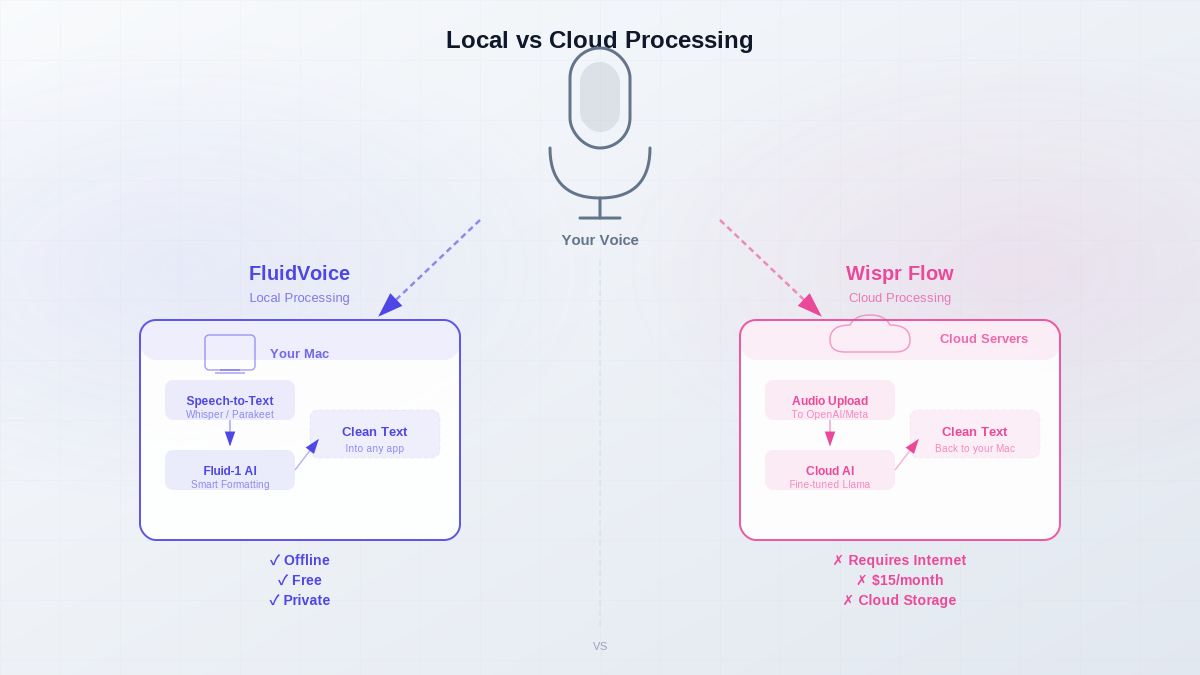
The data flow is straightforward. Wispr Flow sends your audio to cloud servers for processing. FluidVoice keeps everything on your machine. If you care about subscription fatigue and data privacy, FluidVoice is the better fit. If you need Android today or a mature Windows build, Wispr Flow is still ahead on platform coverage: FluidVoice’s Windows and iPhone apps are beta, Android isn’t out.
FluidVoice vs SuperWhisper and VoiceInk
Wispr Flow isn’t the only alternative. Two other tools compete in this space.
VoiceInk is the closest open-source competitor. GPL-3.0, ~6,900 GitHub stars, $25-49 one-time purchase (or free if you build from source). It runs on-device Whisper via whisper.cpp and uses Parakeet models too. The main gap: no Fluid-1 equivalent. VoiceInk needs external LLM API keys for AI enhancement, which means either paying for an API or running a local LLM separately. macOS 14+ minimum (one version older than FluidVoice).
SuperWhisper is the popular paid option. $84.99/year or $249.99 lifetime. It has deep customization with intelligent modes and multiple model choices. But it stores API keys in plaintext and saves audio recordings by default with no opt-out, which is concerning for a tool that captures everything you say. Rated 4.9/5 on Product Hunt.
| Feature | FluidVoice | VoiceInk | SuperWhisper |
|---|---|---|---|
| Price | $0 | $25-49 one-time (or free build) | $84.99/yr or $249.99 lifetime |
| License | GPL-3.0 | GPL-3.0 | Proprietary |
| macOS | 15.0+ | 14.0+ | 13.0+ |
| AI enhancement | Fluid-1 (included) | External LLM keys needed | External LLM keys needed |
| Offline | Yes | Yes | Yes (with local models) |
| API key storage | macOS Keychain | Varies | Plaintext |
| Audio recording | Local, optional | Local | Saved by default |
FluidVoice’s edge is Fluid-1. It’s the only free tool that includes a local AI model for smart formatting without requiring API keys or separate LLM setup.
Hex is the newest contender, built by the team behind OpenCode. MIT-licensed, written in Rust, and the only free option with equal builds for macOS, Windows, and Linux from day one. There’s no bundled cleanup model (rewrites route through a running OpenCode instance), but it adds custom vocabulary with sounds-like spellings, scriptable voice commands, a CLI, an MCP server, and a beta meeting recorder. If you’re not on an Apple silicon Mac, or you want dictation wired into agent workflows, read the Hex review. For the full field, see the free dictation apps comparison.
What about MacWhisper and Apple Dictation?
MacWhisper focuses on file transcription, turning audio files, podcasts, and meeting recordings into text. It’s a different use case from real-time dictation. If you need to transcribe a recorded meeting, MacWhisper is great. If you need to dictate emails and messages in real time, FluidVoice is the better tool.
Apple Dictation is the free baseline built into macOS. It works, but accuracy is lower, customization is minimal, and there’s no AI formatting. It’s fine for quick voice memos. For professional daily use, FluidVoice is a significant upgrade.
Real-world workflows for developers
Features are nice, but workflows matter more. These are five concrete ways developers use FluidVoice day-to-day.
Code Comments & Commits
Press your hotkey in VS Code or Cursor. Dictate commit messages, code comments, or documentation directly.
Set up a per-app prompt for your code editor to format output as conventional commits:
git commit -m "feat: add user authentication flow with OAuth2 support"Or dictate inline code comments without taking your hands off the keyboard for mouse navigation. FluidVoice inserts text at the cursor position in any text field.
Emails & Slack
Dictate long emails, Slack messages, or Notion notes. Fluid-1 handles formatting, punctuation, and professional tone automatically.
No more typing three-paragraph Slack messages. Press hotkey, talk for 30 seconds, get formatted text. The per-app prompt system lets you configure different tones: formal for email, concise for Slack, technical for Notion.
AI Agent Voice Control
Use Command Mode to trigger AI agent workflows. Voice-to-agent pipelines are becoming practical: speak a command, have an AI agent execute a multi-step task.
Example: “Search my notes for the deployment checklist and summarize it.” If you’ve built agent workflows with tools like Mastra, FluidVoice becomes a voice interface for those agents.
For the broader voice and audio tools ecosystem, Fish Audio’s AI voice cloning covers the text-to-speech side if you need output as well as input.
Meeting Notes
Use FluidMeet instead of dictating by hand: it records the call locally, transcribes with Parakeet, and labels speakers with Nemotron 3 Diarization. No bot joins the meeting.
After the call, export the transcript as Markdown with timestamps and speaker names, generate a summary on-device or with your own AI key, or let Claude Code/Codex read the meeting directly from FluidMeet’s integrations.
Text Rewriting
Select any text in any app. Press hotkey. Say “make this more concise” or “rewrite in a professional tone” or “fix the grammar.”
Fluid-1 processes the rewrite locally. No API calls, no latency, no data leaving your Mac. Works in Slack, email, documents, code editors, anywhere you can select text.
Cost comparison over time
This is where the cost difference gets hard to argue against.
| Tool | Year 1 | Year 2 | Year 3 |
|---|---|---|---|
| FluidVoice | $0 | $0 | $0 |
| VoiceInk | $39 | $39 | $39 |
| SuperWhisper (annual) | $84.99 | $169.98 | $254.97 |
| SuperWhisper (lifetime) | $249.99 | $249.99 | $249.99 |
| Wispr Flow (annual) | $144 | $288 | $432 |
| Wispr Flow (monthly) | $180 | $360 | $540 |
Over three years, FluidVoice saves you $432-$540 compared to Wispr Flow. Even compared to VoiceInk’s $39 one-time purchase, FluidVoice’s included Fluid-1 model adds value that VoiceInk can’t match without external API keys, which cost money per token.
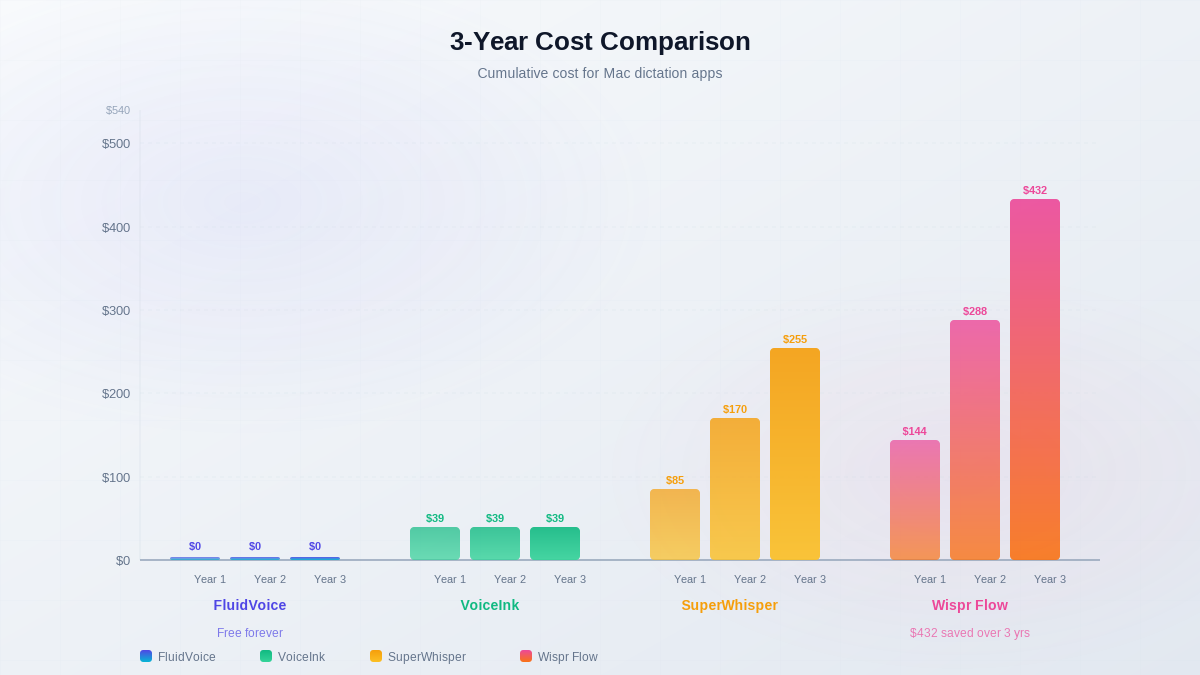
The “free” here isn’t a teaser. There are no paid tiers, no word limits, no feature gates, and no “upgrade to Pro” popups. Everything the app does is available at $0. If you’re tired of subscription fatigue, this is what the alternative looks like.
Privacy and data handling
If you handle sensitive information (client data, proprietary code, confidential communications), privacy isn’t optional. This is what FluidVoice does with your data.
Privacy checklist:
- On-device transcription: audio never leaves your Mac for STT
- Audio history stored locally with budget controls and ZIP export
- API keys stored in macOS Keychain (not plaintext)
- Optional anonymous analytics: can be fully disabled in settings
- No voice data or transcript data collected, ever
- GPL-3.0 auditable code: verify these claims yourself
Local-first by default
Unlike Wispr Flow, where your audio goes to cloud servers by default, FluidVoice processes everything on your Mac. You have to actively opt in to any cloud processing (OpenAI, Groq, or custom providers). The default is fully local.
Compare this to the competition:
- Wispr Flow sends audio to OpenAI and Meta cloud servers. No local processing option.
- SuperWhisper saves audio recordings by default with no opt-out and stores API keys in plaintext.
FluidVoice fits the same local-first philosophy that drives the self-hosting community. Keep your data on hardware you control.
Honest limitations and caveats
FluidVoice isn’t perfect. These are the tradeoffs to know before switching.
- Windows and iPhone are beta, Android and Linux aren’t out. The stable product is still the Mac app. The Windows beta works but expect gaps, and its source isn’t in the open repo yet. iPhone is TestFlight-only.
- Solo developer risk. One person maintains this. He’s responsive and shipping fast, but it’s a single point of failure. No SLA. Community Discord only.
- Fluid-1 is closed source. The most differentiated feature is not open source. Future monetization is unknown.
- macOS 15.0 requirement. Users on older macOS versions are locked out.
- Intel Mac degradation. Whisper-only support on Intel. Slower, less accurate than Apple Silicon models.
- 3.5 GB model download. Fluid Intelligence is substantial. Fluid 1.1 Splash adds more on top if you enable it.
- Language gaps. Parakeet Flash is English-only. Multilingual coverage varies by model. Not all 99 languages get the same quality.
- Competing with $81M. Wispr Flow has massive resources and 50 employees. FluidVoice has goodwill and GitHub Sponsors.
The solo-dev tradeoff
A solo developer means passionate, responsive, and building fast. It also means one person’s burnout, health issues, or career change could stall the project. The GPL-3.0 license means the code survives even if development stops. Someone could fork it. But active maintenance and feature development depend on one person. Go in with eyes open.
Should you switch to FluidVoice?
Switch if:
- You’re on a Mac with macOS 15+, or on Windows and happy to run a beta
- You want to save $144+/year on dictation
- Privacy matters: you don’t want audio going to cloud servers
- You want local AI enhancement without API keys
- You’re comfortable with a solo-dev project
- You value open-source transparency
Don’t switch if:
- You need a stable, shipping Windows or mobile app today (both of FluidVoice’s are beta)
- You need Android or Linux support at all
- You need enterprise support with an SLA
- You want the absolute best cloud AI accuracy (Wispr Flow’s fine-tuned Llama is still better for some use cases)
- You’re on macOS 14 or older
Try it if:
- You’re curious. It’s free. The only cost is your time. Install via Homebrew, use it for a week, and decide for yourself.
If you find FluidVoice useful, consider supporting the developer through GitHub Sponsors. A solo developer building a credible alternative to an $81M-funded product deserves support.
Frequently Asked Questions
Does FluidVoice work offline? Yes. All speech-to-text models run on-device. No internet connection required for transcription. Fluid Intelligence (the AI formatting model) also runs locally. The only time you need internet is for the initial model download and optional cloud AI enhancement (if you choose to enable it).
Can I use FluidVoice for coding? Yes. FluidVoice works in any text field, including VS Code, Cursor, and other code editors. You can dictate code comments, commit messages, documentation, and even code snippets. Set up per-app prompts to configure formatting behavior for your editor.
What languages does FluidVoice support? Up to 99 languages via Whisper, ~40 via Nemotron, 30 auto-detected via Qwen3 ASR, 25 via Parakeet TDT v3, and 14 via Cohere Transcribe. Apple Speech adds system language support. English gets the best performance across all models. Non-English users should test Nemotron, Qwen3 ASR or Whisper Medium/Large for their specific language.
How does the solo developer sustain this? GitHub Sponsors and community support. There are no paid tiers currently. Fluid Intelligence being privately maintained (not open source) leaves the door open for future monetization, possibly a hosted API, premium model tiers, or enterprise licensing. But nothing has been announced.
Get started with FluidVoice
FluidVoice is a genuinely free, local-first, open-source dictation app that makes subscription dictation feel overpriced. It’s not perfect: a solo developer, a 3.5 GB model download, and the non-Mac builds are still beta. But with FluidMeet handling local meeting transcription and Windows and iPhone finally in testing, it’s the best option available right now for anyone who values privacy and hates subscriptions.
On Windows or Linux instead of a Mac? Hex is the closest free equivalent, and the free dictation apps roundup covers every option. Pair it with other Mac tools like Shottr for screenshots and Screen Studio for screen recordings to round out your local-first Mac toolkit.
Install it. Use it for a week. See if it sticks.
Install FluidVoice via Homebrew View on GitHubDid this guide work for you?
Related Posts


Written by Dragos
DevOps engineer with 10+ years in IT. I write these guides while doing the installs in my Proxmox home lab and on real VPSes.
Need help with Astro, VPS, or a self-hosted app? View services →