Build Your Own AI Agent with Mastra (Files, Web, Browser)
A step-by-step guide to building a lean AI assistant with the Mastra framework: file tools, shell, live web search, browser automation, and persistent memory. Runs on OpenRouter with free model options. Full code on GitHub.
 Dragos31 min read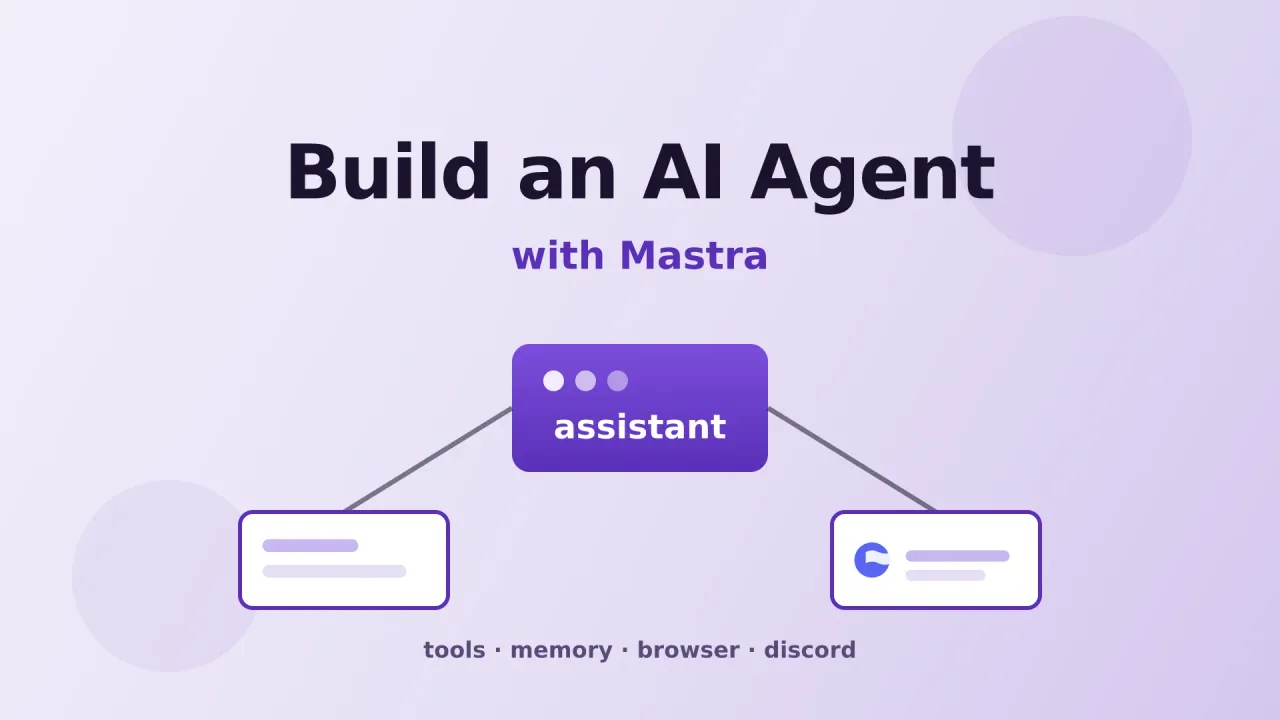
I have been building AI assistants on and off for the last year. I started with a Discord bot on Agno (wrote about that here), and it was fine, but I kept running into the same wall. Every framework wanted me to think in its terms. Define agents this way. Wire tools that way. Memory goes here, not there. The boilerplate kept getting heavier than the actual logic.
So when I found Mastra, I was curious more than convinced. Another TypeScript agent framework. But the pitch was different: one file to define an agent, tools are just functions with Zod schemas, memory and storage are pluggable, and there is a built-in Studio UI for chatting with your agent and inspecting traces. No YAML, no DAG editor, no 200-line config file.
I ported my assistant over and open-sourced it. The result is a lean, focused agent that can search the web, read and write files, run shell commands, browse JavaScript-heavy pages, and remember what you told it across sessions. No bloat, no 15-agent circus. This article walks through how I built it, step by step, so you can build your own or just clone mine and start tinkering.
View the Code on GitHubWhat the assistant actually does
Before the how, here is the what. The agent can:
- Read, write, edit, and search files in a local workspace, and run shell commands (with approval)
- Search the live web and fetch clean page content through TinyFish
- Drive a real Chromium browser to navigate JS-rendered pages, click, type, and extract data
- Fetch YouTube video metadata and transcripts for research
- Discover trending GitHub repos and pull repo details with README content
- Remember things across sessions using a local embedder (no embedding API key)
- Run on a schedule (a daily news digest workflow that researches AI, DevOps, self-hosting, and Hacker News, then writes a Markdown summary)
- Get edited at runtime through the Mastra Studio UI, no redeploy needed
No Discord bot, no video pipelines, no social posting. Just research and coding assistance. The repo on GitHub has the full picture.
Prerequisites
- Node.js 22+ installed
- An OpenRouter API key (hundreds of models, free tiers available)
- A TinyFish API key (free web search and fetch, no credit card)
- Chromium, only if you want browser automation
Let me break down the model layer, because you have real choices here.
The default is OpenRouter. It is a model gateway that gives you access to 300+ models behind one API key, including free options like Google Gemini 2.5 Flash, Meta Llama 3.3 70B, and Qwen 3 Coder. If you want to start without spending anything, that works. Paid models are pay-per-token and cheap. Browse the full list at openrouter.ai/models.
If you prefer flat-rate pricing, OpenCode Go is an alternative. For $10 a month you get 16 models behind one API key (Grok 4.5, Kimi K3, DeepSeek V4 Pro, GLM-5.2, MiniMax M3, and others). I covered it in detail in the OpenCode Go review. You can swap between providers by changing one environment variable.
Browse OpenRouter Models Try OpenCode Go ($5 First Month)The web layer is TinyFish. Search and fetch are free, and fetch renders pages in a real Chromium instance so JavaScript-heavy docs sites come back readable. I wrote a whole article on why this matters for coding agents. Short version: most modern docs are SPAs, and raw HTML fetching returns empty shells. TinyFish handles that for you.
Get a free TinyFish API keyQuick start
If you want to skip ahead and poke at a working version first, clone the repo and run the setup.
git clone https://github.com/bitdoze/mastra-assistant.git
cd mastra-assistant
npm install
cp .env.example .env
# fill in your keys, then:
npm run dev
Open http://localhost:4111 and you will see Mastra Studio. Click into the assistant agent and start chatting.
The rest of this article explains how that code is put together, so you can build your own from scratch or modify mine.
Step 1: Create the project
Scaffold a new Mastra project:
npx create-mastra@latest my-agent
cd my-agent
npm install
This gives you a working skeleton with a sample weather agent. Delete the sample files. We are going to build from a clean slate.
Step 2: Install the dependencies
Here is what the project depends on. You do not need all of these on day one, but I will explain what each does as we add the corresponding feature.
npm install @mastra/core @mastra/memory @mastra/libsql @mastra/fastembed \
  @mastra/agent-browser @mastra/observability @mastra/duckdb \
  @mastra/editor @mastra/loggers @mastra/evals \
  @tiny-fish/sdk ws zod
For browser automation, also install Chromium:
npx playwright-core install chromiumStep 3: Define the agent
This is the core of the whole project. One file, one agent. Here is the structure I use, adapted from my repo at src/mastra/agents/assistant.ts:
import { Agent } from "@mastra/core/agent";
import { memory } from "../memory";
import { workspace } from "../workspaces";
import { browser } from "../browsers";
import { tinyfishSearch } from "../tools/tinyfish-search";
import { tinyfishFetch } from "../tools/tinyfish-fetch";
import { fetchYoutubeMetadata } from "../tools/youtube-metadata";
import { fetchYoutubeTranscript } from "../tools/youtube-transcript";
import { githubTrendingRepos } from "../tools/github-trending";
import { githubRepo } from "../tools/github-repo";

const AGENT_MODEL =
  process.env.AGENT_MODEL ?? "google/gemini-2.5-flash";

export const assistant = new Agent({
  id: "assistant",
  name: "Assistant",
  instructions: () => {
    const now = new Date();
    const iso = now.toISOString().split("T")[0];
    const year = String(now.getUTCFullYear());
    return `TODAY IS ${iso}. THE CURRENT YEAR IS ${year}. Use ${year} in all web searches.

You are a general-purpose coding and research assistant.

You can read, write, and edit files, run shell commands, search the web,
fetch YouTube transcripts, browse GitHub repos, and drive a browser.
Prefer doing real work with tools over guessing.
Cite URLs when answering from the web.`;
  },
  model: AGENT_MODEL,
  memory,
  workspace,
  browser,
  tools: {
    tinyfishSearch,
    tinyfishFetch,
    fetchYoutubeMetadata,
    fetchYoutubeTranscript,
    githubTrendingRepos,
    githubRepo,
  },
});
A few things worth noting.
The instructions field is a function, not a string. It gets resolved on every call, so the current date injected into the system prompt is always fresh. I learned this the hard way after my agent kept searching for things using last year’s date and getting stale results. Models are bad at knowing what year it is. Tell them.
The model field takes a string in provider/model format. google/gemini-2.5-flash routes through OpenRouter. If you use OpenAI directly, it would be openai/gpt-4o. Mastra supports dozens of providers out of the box. You can also use OpenCode Go by setting AGENT_MODEL=opencode-go/glm-5.2 — see the OpenCode Go guide for the full model list.
memory, workspace, and browser are optional. You can start with just instructions, model, and tools, and add the rest as you go. I cover each one below.
Step 4: Wire up the Mastra instance
The agent is useless on its own. You need to register it with a Mastra instance, which is the thing that runs the server, the Studio UI, storage, and auth. Create src/mastra/index.ts:
import { Mastra } from "@mastra/core/mastra";
import { PinoLogger } from "@mastra/loggers";
import { LibSQLStore } from "@mastra/libsql";
import { assistant } from "./agents/assistant";
import { auth } from "./auth";

export const mastra = new Mastra({
  agents: { assistant },
  storage: new LibSQLStore({
    url: process.env.DATABASE_URL ?? "file:./mastra.db",
  }),
  logger: new PinoLogger({ name: "Mastra", level: "info" }),
  server: {
    host: "0.0.0.0",
    port: 4111,
    auth,
  },
});
That is the minimum. Storage uses LibSQL (SQLite), which means no external database to set up. The file is created automatically on first run. Run bun run dev and you have a working agent server with a chat UI.
Step 5: Add memory
Out of the box, the agent has no memory between conversations. Every thread starts fresh. For a real assistant, that is not good enough. Mastra’s Memory class handles two things: working memory (a persistent scratchpad of user facts) and semantic recall (vector search over past messages).
Here is my src/mastra/memory.ts:
import { Memory } from "@mastra/memory";
import { LibSQLVector } from "@mastra/libsql";
import { fastembed } from "@mastra/fastembed";

export const memory = new Memory({
  vector: new LibSQLVector({
    url: process.env.DATABASE_URL ?? "file:./mastra.db",
  }),
  embedder: fastembed,
  options: {
    semanticRecall: {
      topK: 3,
      messageRange: 2,
    },
    workingMemory: {
      enabled: true,
      scope: "resource",
      template: `# User Profile
## Identity
- Name:
- Timezone:
## Preferences
- Communication Style:
- Coding Conventions:
## Session State
- Active Task:
- Decisions Made:`,
    },
  },
});
The part I want to highlight is embedder: fastembed. This runs the embedding model locally through ONNX Runtime (bge-small-en-v1.5). No OpenAI embedding API key, no per-token cost, nothing leaving your machine. The model downloads on first use, about 130MB. After that, semantic recall is free.
Working memory is scoped to resource, which means it persists across all threads for a given user. The agent fills in that template over time: your name, your timezone, your preferences. Next time you talk to it, even in a new thread, it remembers.
If you want hosted embeddings instead
Swap fastembed for new ModelRouterEmbeddingModel('openai/text-embedding-3-small') and add an embedding provider key. Local is fine for me, but if you are running on a tiny VPS without CPU headroom, hosted embeddings are faster.
Step 6: Add web search, YouTube, and GitHub tools
This is where TinyFish comes in. Tools in Mastra are just functions with Zod input and output schemas. For when to keep tools native vs plug in MCP servers (and the RAM cost of stdio MCP), see Mastra tools vs MCP. Here is the search tool, from src/mastra/tools/tinyfish-search.ts:
import { createTool } from "@mastra/core/tools";
import { z } from "zod";
import { getTinyFish } from "./tinyfish-client";

export const tinyfishSearch = createTool({
  id: "tinyfish_search",
  description:
    "Search the live web and return ranked results (title, snippet, url). Use for factual questions or finding pages to read.",
  inputSchema: z.object({
    query: z.string().describe("Search query. site: and -site: operators supported."),
    location: z.string().optional().describe("Country code for geo-targeting, e.g. US, GB."),
  }),
  outputSchema: z.object({
    results: z.array(
      z.object({
        title: z.string(),
        snippet: z.string(),
        url: z.string(),
        domain: z.string(),
      }),
    ),
  }),
  execute: async (input) => {
    const client = getTinyFish();
    const res = await client.search.query({ query: input.query });
    return {
      results: res.results.map((r) => ({
        title: r.title,
        snippet: r.snippet,
        url: r.url,
        domain: r.site_name,
      })),
    };
  },
});
The fetch tool is similar but calls client.fetch.getContents() with up to 10 URLs and returns clean Markdown. The description field matters more than you think. That is what the model reads to decide whether to use the tool. Be specific about when to reach for it.
The shared client lives in tinyfish-client.ts and just wraps the SDK:
import { TinyFish } from "@tiny-fish/sdk";

let client: TinyFish | null = null;

export function getTinyFish(): TinyFish {
  if (!client) {
    client = new TinyFish(); // reads TINYFISH_API_KEY from env
  }
  return client;
}
Both tools are free. Search is rate-limited to 30 requests per minute, fetch to 150 URLs per minute. For a personal assistant that is more than enough.
YouTube tools
Two YouTube tools let the agent pull video metadata and transcripts without leaving the conversation. fetch-youtube-metadata grabs title, channel, duration, view count, and thumbnail from a URL. fetch-youtube-transcript pulls the full transcript or captions. Useful for research — the agent can watch a video summary and cite it in its answers.
GitHub tools
Two GitHub tools give the agent access to the open source ecosystem. github_trending_repos discovers trending repos from the last N days, filtered by language if you want. github_repo pulls repo details and the full README content. The agent uses these for research — finding new tools, checking what is popular, reading documentation without navigating away.
Step 7: Add a workspace for files and shell
The workspace field gives the agent a sandboxed filesystem and shell access. Mastra handles this through the Workspace class. Here is a simplified version of my src/mastra/workspaces.ts:
import {
  Workspace,
  LocalFilesystem,
  LocalSandbox,
  WORKSPACE_TOOLS,
} from "@mastra/core/workspace";

export const workspace = new Workspace({
  id: "default",
  name: "Default Workspace",
  filesystem: new LocalFilesystem({
    basePath: "./workspace",
  }),
  sandbox: new LocalSandbox({ workingDirectory: "./workspace" }),
  bm25: true,
  tools: {
    enabled: true,
    [WORKSPACE_TOOLS.FILESYSTEM.WRITE_FILE]: {
      requireApproval: true,
      requireReadBeforeWrite: true,
    },
    [WORKSPACE_TOOLS.FILESYSTEM.DELETE]: {
      enabled: false,
    },
    [WORKSPACE_TOOLS.SANDBOX.EXECUTE_COMMAND]: {
      requireApproval: true,
      maxOutputTokens: 5000,
    },
  },
});
This adds file tools (read, write, edit, grep, list) and a shell tool (run commands). Files written to the workspace are immediately executable because the filesystem and sandbox point at the same directory.
Notice the safety rails. Writes require approval and a read-before-write check. The delete tool is disabled entirely. Shell commands require approval by default. You can turn approvals off with REQUIRE_COMMAND_APPROVAL=false in .env for trusted local setups, but I would not do that on a shared server.
You can also grant the agent access to other directories on your machine through ALLOWED_DIRECTORIES. I use this to let the agent work across multiple projects. Containment stays on; it just gets a bigger yard.
Step 8: Add browser automation
The browser field enables a local Playwright instance that the agent can drive. Each conversation thread gets its own isolated browser. Sixteen tools: navigate, snapshot, click, type, scroll, screenshot, evaluate JavaScript, and more.
import { AgentBrowser } from "@mastra/agent-browser";

const headless = process.env.BROWSER_HEADLESS !== "false";
const cdpUrl = process.env.BROWSER_CDP_URL;

export const browser = new AgentBrowser(
  cdpUrl
    ? { headless, cdpUrl, scope: "shared" }
    : { headless, scope: "thread" },
);
The browser is optional. If you do not pass it to the agent, the browser tools simply do not exist. I keep it on because the agent sometimes needs to navigate a docs site that requires JavaScript, or click through a login flow to reach content behind auth.
There is a live screencast that streams to Studio over WebSocket, so you can watch the agent click around in real time. That is weirdly fun to watch.
Step 9: Add a research skill
Skills are reusable workflows that the agent picks up automatically. Create a folder under workspace/skills/research/ with a SKILL.md:
---
name: research
version: 1.0.0
---

# Research workflow
1. Search the web with `tinyfish_search` for the topic.
2. Pick the top 3-5 results.
3. Fetch each with `tinyfish_fetch` to get clean content.
4. Synthesize a summary with sources cited.
The agent reads skill files on the next request and applies them when relevant. You can add more skills for recurring tasks — code review checklists, content research patterns, whatever you find yourself repeating.
Step 10: Add a scheduled workflow
A daily news digest workflow runs on a schedule, researches the web, and writes a Markdown summary to the workspace. Mastra auto-registers it on boot.
import { createWorkflow, createStep } from "@mastra/core/workflows";
import { z } from "zod";

const digestStep = createStep({
  id: "generate-digest",
  inputSchema: z.object({ topic: z.string().optional() }),
  outputSchema: z.object({ ok: z.boolean(), path: z.string().optional() }),
  execute: async ({ inputData, mastra }) => {
    const today = new Date().toISOString().split("T")[0];
    const agent = mastra.getAgent("assistant");

    const result = await agent.generate(
      `Research today's top stories (${today}) on ${
        inputData.topic ??
        "AI news, DevOps updates, self-hosting, trending GitHub repos, and Hacker News"
      }. Summarize the top stories as markdown with sources.`,
      { memory: { thread: `digest-${today}`, resource: "workflow" } },
    );

    return { ok: true, path: `workspace/digests/news-${today}.md` };
  },
});

export const newsDigest = createWorkflow({
  id: "news-digest",
  inputSchema: z.object({ topic: z.string().optional() }),
  outputSchema: z.object({ ok: z.boolean(), path: z.string().optional() }),
  schedule: {
    cron: "30 7 * * *",
    timezone: process.env.AGENT_TIMEZONE ?? "Europe/Bucharest",
    inputData: {},
  },
})
  .then(digestStep)
  .commit();
You can pause and resume schedules from Studio or the API. The workflow reuses the same agent, so it has access to all the same tools. The digests land in workspace/digests/news-YYYY-MM-DD.md.
Step 11: Configure environment variables
Here is the .env file with the keys you need:
# Model provider (OpenRouter by default)
OPENROUTER_API_KEY=your-openrouter-key
AGENT_MODEL=google/gemini-2.5-flash

# Web search and fetch (free)
TINYFISH_API_KEY=sk-tinyfish-your-key

# GitHub API (recommended, raises rate limits)
GITHUB_TOKEN=your-github-token

# Storage
TURSO_DATABASE_URL=file:./mastra.db

# Auth tokens for Studio login
ADMIN_API_KEY=your-admin-token

# Optional
# AGENT_TIMEZONE=Europe/Bucharest
# ALLOWED_DIRECTORIES=/home/me/projects/other-app
# REQUIRE_COMMAND_APPROVAL=false
To use OpenCode Go instead, swap the provider variables:
OPENCODE_API_KEY=your-opencode-go-key
AGENT_MODEL=opencode-go/glm-5.2
Mastra detects the provider from the key prefix. You can mix and match — use OpenRouter for the main agent and OpenCode Go for a judge model, or whatever combination makes sense for your budget. The OpenCode Go guide has the full model list and pricing breakdown.
Step 12: Run it
npm run devOpen http://localhost:4111 to access Mastra Studio.
Studio gives you:
- A chat interface to talk to the agent
- A traces view to inspect every tool call, token count, and latency
- A workspace browser to see the files the agent has access to
- A schedules view to manage workflows
- An editor tab to modify the agent’s instructions and tools at runtime
The Editor tab is worth pausing on. It lets you change the agent’s system prompt and tool definitions through the UI, with draft, publish, and archived versioning stored in the database. No code changes, no redeploy. I use this to tweak the agent’s behavior during the day without restarting the server.
What does the Editor actually let me change?
The agent’s instructions (the system prompt) and its tool list. Saves create versioned drafts in the database. You can publish a draft to make it live, or roll back to an archived version. If you want to lock the agent down, set editor: false on the agent constructor. If you want to allow only prompt edits, use editor: { instructions: true }.
Deploy on a VPS
Running locally is fine for testing, but a real assistant should be available 24/7. I deploy mine on a Hetzner VPS behind Caddy as a reverse proxy.
Get €20 Hetzner Credit Try Hostinger VPSA CX22 (2 vCPU, 4GB RAM) handles this fine. The agent itself is not resource-heavy. The browser is the only thing that eats memory, and only when it is actively running.
Build and run with pm2
Build the production bundle:
npm run buildThis produces a self-contained server in .mastra/output/. Then use pm2 to keep it running:
npm install -g pm2
pm2 start .mastra/output/index.mjs --name mastra-assistant
pm2 save
pm2 startup
That last command generates the init script so pm2 starts on boot. Check logs with pm2 logs mastra-assistant.
Reverse proxy with Caddy
Caddy handles TLS automatically. Add this to your Caddyfile:
your-domain.com {
    reverse_proxy localhost:4111
}
One thing that tripped me up: behind a reverse proxy, set MASTRA_AUTO_DETECT_URL=true in your .env. Without it, Studio tries to call 0.0.0.0:4111 from the browser, which does not work. That flag makes Studio use the browser’s origin instead.
Run on macOS
Same build and pm2 steps work on a Mac Mini or MacBook. If you want to access Studio from other devices on your network without port forwarding, install Tailscale:
brew install tailscale
sudo tailscale up
Studio is then available at http://your-mac:4111 from any device on your tailnet.
What I learned
A few observations from running this for a while.
The single-agent approach works. The model picks the right tool on its own most of the time. You do not need five specialized agents to get useful work done. Start with one agent and a focused set of tools. Add complexity only when you actually need it.
Local embeddings are slower than hosted ones on the first run (the model has to download, about 130MB), but after that they work fine for a personal assistant. Free, nothing leaves your machine. If you are building something with many concurrent users, switch to hosted embeddings to keep latency down.
Browser automation is powerful but expensive in memory and time. I keep it on but the agent reaches for it rarely. Most web tasks are handled by search and fetch. The browser is for when a site needs JavaScript or interaction to render.
How TinyFish powers the whole pipeline
I want to spend more time on the web layer because it is the piece that made the biggest difference. Before TinyFish, I had written and discarded three different scraping setups. BeautifulSoup wrappers, Playwright scripts with custom selectors, even a half-finished DOM parser that tried to extract article text from raw HTML. Each one worked for about two weeks before a site changed its layout or added a bot wall and everything broke.
The real unlock was realizing that my agents did not need raw HTML at all. They needed clean, structured text they could reason over. TinyFish search returns ranked results with titles, snippets, and URLs. TinyFish fetch takes those URLs, up to 10 at a time, renders the pages in a real Chromium instance (so JavaScript-heavy docs sites actually work), strips out navigation, ads, scripts, and clutter, and returns clean Markdown. That is it. That is the whole interface.
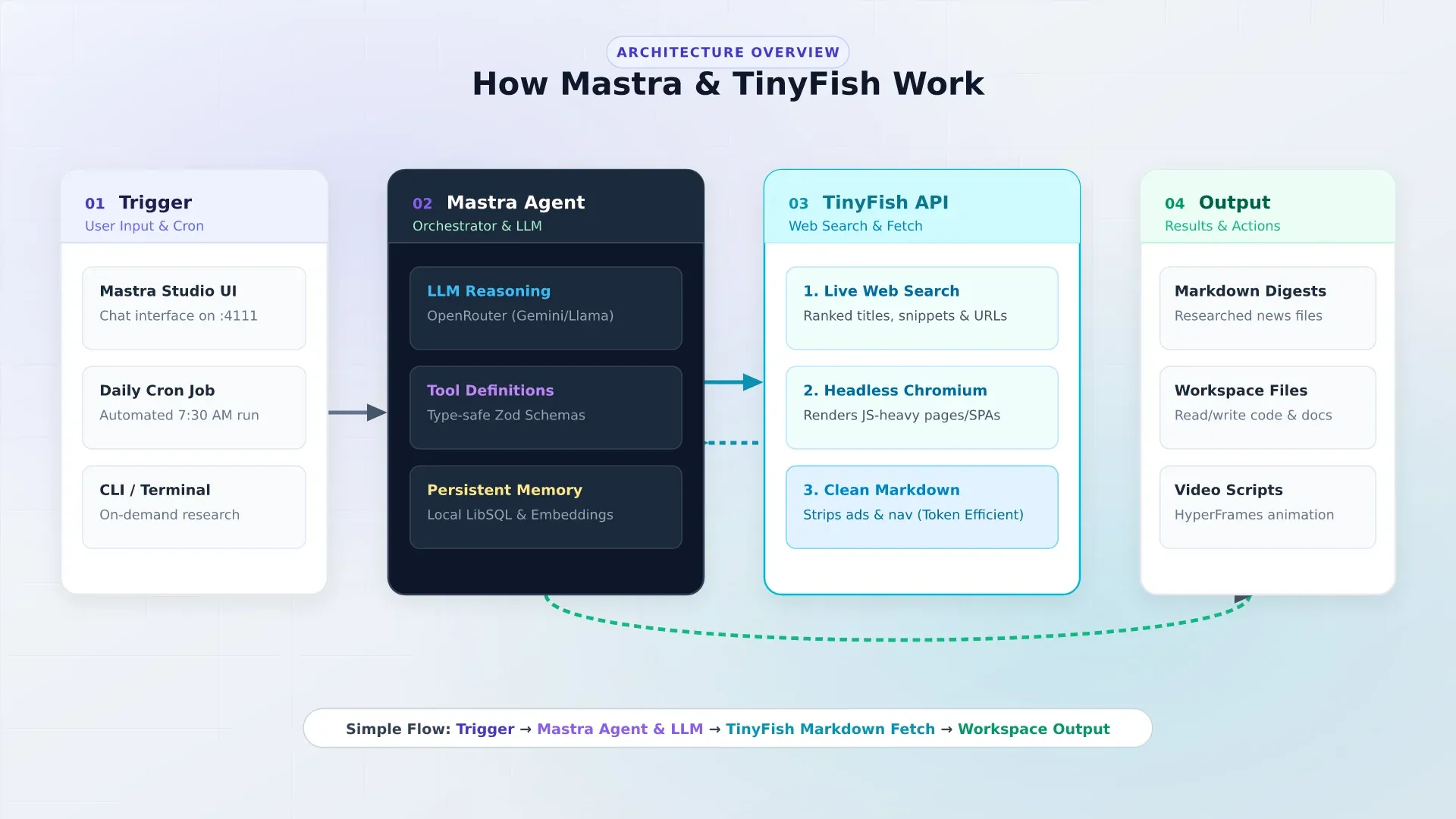
What the daily pipeline actually looks like
Every morning at 7:30 AM, a scheduled cron fires. It triggers research agents that scan for news across AI, DevOps, self-hosting, trending GitHub repos, and Hacker News. Each agent calls tinyfish_search with targeted queries, picks the top results, and passes those URLs to tinyfish_fetch for parallel retrieval. Within seconds, the agent has the full text of up to 10 live web pages sitting in its context window.
From there, the agents do real work with that content. They verify technical claims against live documentation before drafting articles. They pull release notes and changelogs to check if a tool’s feature list is current. They cross-reference multiple sources to catch inaccuracies. The daily digest lands in the workspace as a Markdown file with sources cited, and nobody touched a keyboard.
The video pipeline works the same way. A scheduled job fetches live documentation and release notes via TinyFish, verifies technical accuracy, and generates a fully animated video script that gets rendered through HyperFrames. The agent goes from a raw search query to a published article and rendered video with zero manual intervention.
Why this matters for agents specifically
Most web search APIs return snippets, 160 characters of context per result. That is enough to decide whether a link is relevant, but not enough to reason over. You end up in a loop: search, click, read, go back, search again. For a human that is normal. For an agent, it wastes tokens and time on navigation instead of thinking.
TinyFish fetch solves this by returning full-page Markdown in a single call. The agent gets the actual content, not a teaser. It can answer questions, summarize, fact-check, and synthesize across multiple sources without bouncing between pages. And because the output is Markdown, not HTML, you are not paying for navbars, footers, and cookie banners in your token budget.
The speed matters too. Fetching 10 pages in parallel keeps the agent loop latency low. A research task that would take me 30 minutes of tab-hopping takes the agent about 15 seconds. I measured it. The bottleneck is the LLM inference, not the web retrieval.
What I would tell someone building this
Do not write custom scrapers for AI agents. Scraping and web extraction are solved problems. Give your agents high-level primitives: search that returns ranked results, and fetch that returns clean text. Keep the tool definitions simple. It reduces prompt tokens, prevents agents from getting lost in raw HTML, and means you never have to debug a broken CSS selector at 2 AM.
I wrote a full article on why TinyFish matters for coding agents if you want the technical deep-dive on the API, the cookbook projects, and how to wire it into other frameworks.
Where to go from here
- Clone the full project and adapt it. The README covers all tools, workflows, skills, and deployment.
- Read the Mastra documentation for the full API. I covered the pieces I use, but there is more (evals, multi-agent workflows, RAG pipelines).
- Add media tools next: image agent with Kie.ai and voice cloning TTS with Fish Audio.
- Choosing native
createToolvs MCP servers: Mastra tools vs MCP. - Skills work in coding agents too: the best AI skills for web design compares 11
SKILL.mdpacks that fix generic AI-generated UI. - If you want a different take on building a Discord AI bot, my Agno guide covers a Python-based approach with team orchestration and a different memory system.
- For the web search layer, the TinyFish guide goes deeper into the API, the cookbook projects, and how to wire it into other agents like Hermes and Pi.
- For the model layer, OpenRouter has 300+ models including free tiers. The OpenCode Go review covers the flat-rate alternative with 16 models at $10/month.
- If you want to compare this approach to other always-on assistants, see the OpenClaw setup guide and the OpenCode setup guide.
- For the wider open-source AI map (frameworks, memory, gateways, assistants), see top AI GitHub repos.
You have an agent now
One file for the agent, a handful of tool functions, and a Mastra instance to tie it together. Clone the repo, fill in two API keys, and you are chatting with an assistant that can read your files, search the web, browse GitHub, and remember what you told it.