Executor.sh: Self-Hosted Open-Source Composio Alternative
Executor.sh is the open-source, self-hosted MCP gateway replacing Composio for AI agent tool calling. Feature comparison, pricing, and Docker deployment guide.

Updated Published 21 min read
Every AI agent needs tools. Whether it is sending Slack messages, querying a database, or calling a third-party API, the agent has to connect to external services somehow. Composio built a business around this: 1,500+ pre-built toolkits, managed OAuth, and a hosted runtime that handles everything for you. It works, and it works well for teams that want a fully managed platform.
But if you want to self-host, inspect the runtime, or avoid per-call pricing at scale, Composio’s story falls apart. The runtime is closed source. Self-hosting requires an Enterprise contract. And credentials flow through their cloud on self-serve plans.
That is where Executor.sh comes in. It is a fully open-source MCP gateway. Configure your integrations once, and every MCP-compatible agent shares them through one endpoint. You can run it on your own infrastructure with a single Docker command. No sales calls. No vendor lock-in. No per-call fees when self-hosted.
This article gives you a direct comparison between the two platforms, honest trade-offs, and a step-by-step guide to self-hosting Executor.sh with Docker.
First of its kind, updated 2026-09-25
Published July 2026 as the first direct Executor.sh vs Composio comparison on the web. Updated September 25, 2026: Executor repriced (Team is now $15/member/month with unlimited executions, free tier went from 10K to 100K execs/month), grew to ~3,982 GitHub stars, and the CLI became a durable background service. Composio moved to 1,500+ toolkits and a new usage-credit pricing model.
What is Composio?
Composio launched in 2024 and became the default platform for AI agent tool calling. It raised a $25M Series A from Lightspeed Ventures in July 2025 (total funding: ~$29M) and has roughly 30,300 GitHub stars as of September 2026. The pitch: give your AI agent access to 1,500+ pre-built, pre-authenticated SaaS toolkits (Gmail, Slack, GitHub, Notion, Jira, Salesforce, and hundreds more) without writing integration code.
The platform handles OAuth flows end-to-end, manages token refresh, and scopes credentials per user. It provides SDKs for 25+ frameworks (OpenAI, Anthropic, LangChain, CrewAI, Vercel AI SDK, and the Mastra AI agent framework), a Tool Router for intent-based discovery, a sandboxed workbench for remote Python/JS execution, triggers for event-driven work, and a Composio Bench leaderboard for measuring agents on real tool-use tasks. Custom MCP servers can now be registered for free, so the catalog extends past the pre-built list. For the full managed-side walkthrough, see my Composio MCP guide.
Composio is SOC 2 Type II and ISO 27001 certified. If your team needs compliance credentials out of the box, this is a real advantage.
Under the hood, Composio is a managed platform. The backend that stores credentials and executes tool calls is proprietary. The open-source GitHub repository contains SDKs and CLI tooling only, not the runtime. Your credentials and execution data flow through Composio’s cloud infrastructure on all self-serve plans.
Why look for a Composio alternative?
Composio is not bad software. But it has structural limitations that push developers to look elsewhere:
- Closed-source runtime. The GitHub repo contains SDKs only, not the platform that stores and executes tool calls
- Enterprise-only self-hosting. GitHub Issue #291 requesting self-serve self-hosting has been open since 2024 with no resolution
- Credentials pass through Composio’s cloud on self-serve plans, a non-starter for teams with compliance requirements
- Per-call pricing scales poorly. The $29/month plan is a usage credit, then $0.0003 per call: 500K calls lands around $150. Composio-managed OAuth apps make it worse, capping the free allowance at 20K of the 100K monthly calls
- Custom MCP servers are supported and free now, but you still cannot inspect, fork, or modify the runtime that executes them
- Context window bloat. Loading thousands of tool definitions consumes significant tokens even with the Tool Router
If any of these hit close to home, open-source alternatives deserve a serious look.
What is Executor.sh?
Executor.sh is an open-source MCP gateway built by Rhys Sullivan, a former OpenCode engineer. It went through Y Combinator’s S26 batch and has grown to 3,982 GitHub stars as of September 2026 (from ~2,600 in July). The entire platform is MIT licensed.
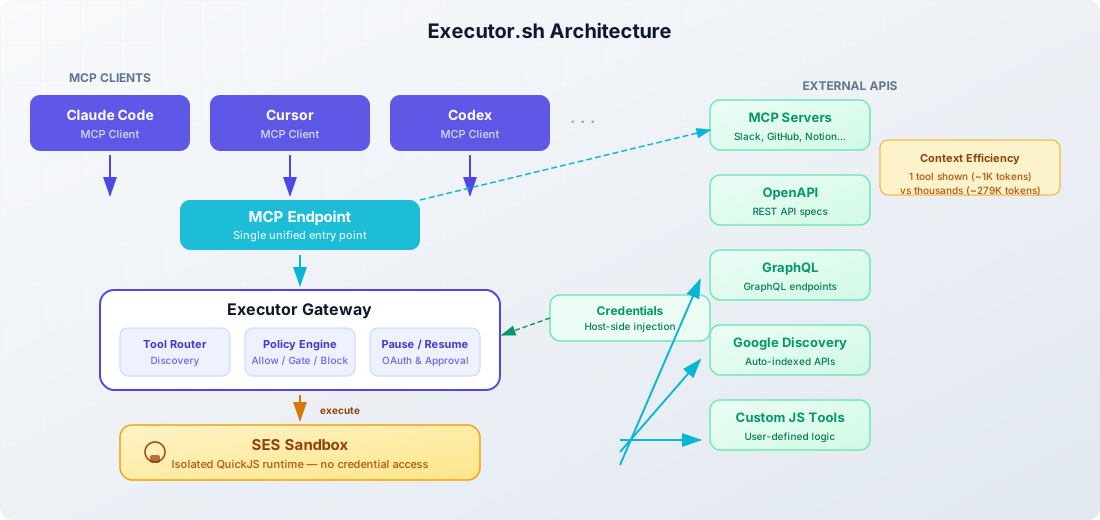
The core idea: configure your integrations once (MCP servers, OpenAPI specs, GraphQL endpoints, custom JS tools), and every MCP-compatible agent shares them through one endpoint. Claude Code, Cursor, Codex, VS Code extensions, anything that speaks MCP (Model Context Protocol) works out of the box. The model is integration → connection → policy: an integration can have many connections, and each tool inside is allowed, gated behind approval, or blocked.
Key differentiators
Context efficiency. Instead of showing an agent thousands of tool definitions (~278,800 tokens), Executor shows one tool (~1,044 tokens). Tool schemas load dynamically only when needed. This can cut API costs noticeably on long agent sessions.
Protocol-level depth. Native connectors for MCP, OpenAPI, GraphQL, and Google Discovery. Point Executor at any spec and it auto-indexes every endpoint as a typed tool.
Semantic tool discovery. Agents search for tools by intent rather than memorizing names:
tools.discover({ query: "send a slack message" })SES sandbox. Tool calls run in an isolated QuickJS sandbox. Credentials are injected host-side at call time and never enter the sandbox heap. This is a real security improvement over platforms where credentials live in the execution environment.
Pause/resume. Execution pauses for OAuth flows or human approval, then resumes cleanly with executor resume --execution-id exec_123. No hacky workarounds needed.
Policy engine. Each tool can be allowed, gated behind approval, or blocked. Policies are derived from spec semantics: GET vs DELETE for OpenAPI, destructiveHint for MCP.
Five deployment options: Cloud (hosted), Desktop app (Mac/Windows/Linux), CLI (npm i -g executor, then executor install runs it as a durable background service), Docker, and Cloudflare Workers. The plugin system is open to any integration type, and a TypeScript SDK (@executor-js/sdk, Promise and Effect-native APIs) embeds the runtime in your own code.
Fully open source
Every deployment option, including Docker and CLI self-hosting, is MIT licensed. You can inspect, modify, and fork the entire codebase.
You can add MCP server integrations like BrightData or any other MCP server to extend what your agents can do. And if you need to manage essential Docker commands for your deployment, we have a guide for that too.
Executor.sh vs Composio: head-to-head comparison
| Dimension | Executor.sh | Composio |
|---|---|---|
| License | MIT (fully open source) | MIT (SDK only); runtime closed |
| Self-hosting | Docker / Cloudflare (free, self-serve) | Enterprise only (sales-gated) |
| Architecture | MCP gateway / integration proxy | Managed toolkit platform |
| Tool sources | MCP, OpenAPI, GraphQL, Google Discovery, custom JS | 1,500+ pre-built SaaS toolkits + custom MCP servers |
| Context efficiency | Dynamic loading (1 tool shown) | Tool Router for catalog search |
| Security model | SES sandbox + host-side credential injection | Managed OAuth + sandboxed workbench |
| Custom integrations | Add any OpenAPI/GraphQL/MCP spec | Custom MCP servers (free); runtime stays closed |
| Framework support | Any MCP-compatible client + TS SDK | 25+ framework adapters |
| Pricing model | Flat per-member, unlimited executions | Usage credit + per-call overage |
| Free tier | 3 members, 100K execs/month | 100K tool calls/month, hard-capped (20K on managed OAuth apps) |
| Entry paid | $15/member/month | $29/month usage credit, then $0.0003/call |
| Stars | ~3,982 | ~30,300 |
| Maturity | Feb 2026 (7 months old) | 2024+ (2+ years) |
| SOC 2/ISO | On request (Enterprise) | SOC 2 Type II, ISO 27001 |
The most important differences are architectural. Composio gives you a curated catalog of pre-built integrations: you pick what you need and the platform handles auth, execution, and monitoring. Executor gives you a protocol-level proxy: you bring your own specs and it indexes, sandboxes, and exposes them as MCP tools.
Composio wins on breadth of pre-built integrations and framework adapter coverage. Executor wins on openness, self-hosting, context efficiency, security model (credentials never touching the sandbox heap), and price predictability.
Executor.sh pricing vs Composio
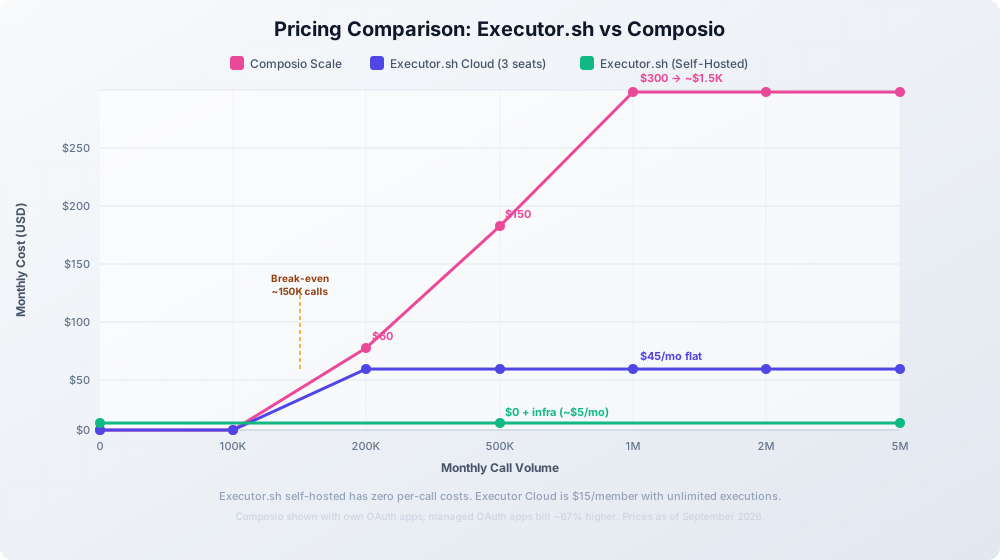
Executor repriced in the second half of 2026 and the new model is much friendlier: the Team plan dropped from $150/org/month to $15/member/month with unlimited executions, and the free tier went from 10K to 100K execs/month. Composio went the other direction: $29/month buys a usage credit, then every call bills at $0.0003.
Low usage (< 100K calls)
| Platform | Plan | Monthly Cost |
|---|---|---|
| Composio | Free | $0 (100K calls, hard-capped; 20K on managed OAuth apps) |
| Executor | Free | $0 (100K execs, 3 members) |
| Composio | Scale | $29/mo usage credit, then $0.0003/call |
| Executor | Team | $15/member/mo (unlimited execs, 14-day trial) |
Both free tiers cover a solo developer comfortably now. The Composio catch: if your connections run on Composio-managed OAuth apps, only 20K of the 100K free calls apply and the rest bills at $0.0005/call. Register your own OAuth apps to get the full allowance.
Scale (500K+ calls)
| Volume | Composio Scale | Executor Cloud (3 members) | Executor Self-Hosted |
|---|---|---|---|
| 100K calls/mo | $29 (credit roughly covers it) | $45/mo | $0 (infra only) |
| 500K calls/mo | ~$150/mo | $45/mo | $0 (infra only) |
| 2M calls/mo | ~$600/mo | $45/mo | $0 (infra only) |
| 5M calls/mo | ~$1,500/mo | Enterprise may make sense | $0 (infra only) |
Self-hosted Executor has zero per-call costs: you pay only for the server it runs on. Even on Executor Cloud, unlimited executions at $15/member means a 3-person team pays $45/month flat regardless of volume, while Composio grows linearly with every call. On managed OAuth apps Composio costs more still ($0.0005/call after the 20K managed allowance).
Pricing changes
Both platforms may update their pricing. Check the Executor pricing page and Composio pricing page for current numbers.
Self-hosting Executor.sh with Docker
This is the section that matters most. If you are reading this article, you probably want to run this on your own infrastructure. The good news: it is genuinely simple.
If you just want Executor on a laptop without Docker, the CLI got much nicer since July: npm i -g executor, then executor install registers a durable background service that survives restarts, and executor web opens the console (on http://127.0.0.1:4788). executor daemon status|stop|restart manages the service. For a server you still want the Docker route below, but for local use the CLI is the cleaner install.
Prerequisites
- Docker installed on your machine or VPS
- A VPS or local machine with 1GB+ RAM
- A domain name (optional, for reverse proxy with HTTPS)
If you need a VPS, Hetzner Cloud offers affordable European servers starting at around €4.49/month, more than enough for running Docker containers like this. Hostinger VPS is another budget-friendly option with NVMe SSD storage if you prefer a different provider.
VPS prices jumped across the board in 2026 — if you’re rethinking a rented box, see what changed and when a mini PC wins.
For managing your Docker deployments, Dokploy or Coolify give you a self-hosted PaaS experience with web dashboards and automatic HTTPS. You can also check our guide on self-hosted backends with Docker for more patterns.
Quick start with Docker run
One command gets you running:
docker run -d \
  --name executor-selfhost \
  -p 4788:4788 \
  -v executor-data:/data \
  ghcr.io/rhyssullivan/executor-selfhost:latest
That is it. Here is what each flag does:
-p 4788:4788: exposes the Executor web console and MCP endpoint on port 4788-v executor-data:/data: persists all data (SQLite database, credentials, config) in a named Docker volume- The image bundles everything: typed API, MCP server, authentication, QuickJS code execution, and web console
Open http://localhost:4788 in your browser. The first account you create becomes the owner. All subsequent users join via single-use invite links.
For headless setups (CI/CD, automated provisioning), pass bootstrap credentials:
docker run -d \
  --name executor-selfhost \
  -p 4788:4788 \
  -v executor-data:/data \
  -e [email protected] \
  -e EXECUTOR_BOOTSTRAP_ADMIN_PASSWORD=your-secure-password \
  -e EXECUTOR_WEB_BASE_URL=https://executor.yourdomain.com \
  ghcr.io/rhyssullivan/executor-selfhost:latest
Docker Compose setup
For a more maintainable setup, use Docker Compose:
services:
  executor:
    image: ghcr.io/rhyssullivan/executor-selfhost:latest
    container_name: executor-selfhost
    restart: unless-stopped
    ports:
      - "4788:4788"
    volumes:
      - executor-data:/data
    environment:
      - PORT=4788
      - EXECUTOR_DATA_DIR=/data
      # Optional: set your public URL
      # - EXECUTOR_WEB_BASE_URL=https://executor.yourdomain.com
      # Optional: headless bootstrap
      # - [email protected]
      # - EXECUTOR_BOOTSTRAP_ADMIN_PASSWORD=changeme

volumes:
  executor-data:
Save this as docker-compose.yml and run:
docker compose up -dBacking up is straightforward. Snapshot the data.db file inside the /data volume. That single SQLite database contains everything: config, credentials, tool definitions, and user accounts.
If you are looking for more Docker-based AI deployments to run alongside Executor, there are plenty of options.
Reverse proxy with Caddy
For HTTPS on a custom domain, put Caddy in front:
executor.yourdomain.com {
    reverse_proxy localhost:4788
}
Caddy automatically provisions and renews TLS certificates. No config needed beyond the reverse proxy line.
Deploying with Dokploy
If you want a web UI to manage your Executor.sh deployment instead of SSH-ing into a server and editing compose files manually, Dokploy is a solid option. It is an open-source, self-hostable PaaS that runs on top of Docker and Traefik. You get a dashboard for deployments, automatic HTTPS, monitoring, and database backups without touching the command line after initial setup.
If you do not have Dokploy installed yet, follow our Dokploy installation guide to get it running on your VPS first.
Step 1: Create a new project and compose service
In the Dokploy dashboard, create a new project, then add a Docker Compose service. Paste the following compose file:
services:
  executor:
    image: ghcr.io/rhyssullivan/executor-selfhost:latest
    container_name: executor-selfhost
    networks:
      - dokploy-network
    restart: unless-stopped
    volumes:
      - executor-data:/data
    environment:
      - PORT=4788
      - EXECUTOR_DATA_DIR=/data
    labels:
      - "traefik.enable=true"
      - "traefik.http.routers.executor.rule=Host(`executor.yourdomain.com`)"
      - "traefik.http.routers.executor.entrypoints=websecure"
      - "traefik.http.routers.executor.tls.certresolver=letsencrypt"
      - "traefik.http.services.executor.loadbalancer.server.port=4788"

volumes:
  executor-data:

networks:
  dokploy-network:
    external: true
Replace executor.yourdomain.com with your actual domain. The dokploy-network is created automatically when Dokploy is installed.
Step 2: Set environment variables
Switch to the Environment tab and add any bootstrap variables you need:
[email protected]
EXECUTOR_BOOTSTRAP_ADMIN_PASSWORD=your-secure-password
EXECUTOR_WEB_BASE_URL=https://executor.yourdomain.com
Step 3: Point your domain and deploy
Add an A record in your DNS pointing executor.yourdomain.com to your server IP. Then go to the Domains tab in Dokploy, add the domain, and enable HTTPS. Hit Deploy and Dokploy handles the rest: pulling the image, starting the container, and configuring Traefik with a TLS certificate.
For a full walkthrough on deploying Docker Compose apps in Dokploy, including domain setup and Traefik label configuration, see our guide on deploying a Docker Compose app in Dokploy.
Once deployed, open https://executor.yourdomain.com in your browser. The first account you create becomes the owner, just like the standalone Docker setup.
Keeping the deployment up to date is simple. Dokploy lets you redeploy from the dashboard whenever a new image is pushed. For detailed update strategies including automated updates with Tugtainer, see our guide on updating Docker Compose stacks in Dokploy.
Dokploy advantages
Dokploy gives you a web dashboard to manage deployments, view logs, monitor resource usage, and configure automatic backups. If you are running multiple self-hosted services alongside Executor, it keeps everything in one place. See our Dokploy backups with Cloudflare R2 guide for setting up automated backups.
Connecting AI agents
Once your instance is running, point any MCP client at it. The endpoint is streamable HTTP at /mcp. For Claude Code:
claude mcp add executor --transport http https://executor.yourdomain.com/mcpOr use the generic npx add-mcp command, which detects the client and writes its config for you:
npx add-mcp https://executor.yourdomain.com/mcp --transport http --name executorFor Cursor, add the MCP server URL in Settings → MCP Servers. Any client that supports the MCP protocol works. The Connect card in the web UI shows the exact command for your instance with the URL already filled in. The self-hosted endpoint behaves identically to the cloud version, and most clients only load MCP servers at startup, so restart the client or open a new chat if the Executor tools do not appear.
First user becomes owner
The first account created on your self-hosted instance becomes the organization owner. Invite team members through single-use invite links from the admin panel. The self-hosted version supports unlimited members, with no per-seat charges.
Self-hosting Executor.sh on Cloudflare Workers
If you do not want to manage a VPS, Executor also deploys to Cloudflare Workers. The architecture: a single Cloudflare Worker + D1 storage + Cloudflare Access for authentication.
git clone https://github.com/UsefulSoftwareCo/executor.git
cd executor/apps/host-cloudflare
bun run deploy:setup
The MCP endpoint lives at /mcp, gated by Cloudflare Access. No separate login app needed. Cloudflare handles authentication.
Zero infrastructure cost
Cloudflare’s free tier covers low-volume Executor deployments. No server to manage, no Docker to maintain. The trade-off is less control and a dependency on Cloudflare’s infrastructure.
This option works well for personal use or small teams. For production workloads where you need full control over the runtime environment, Docker is the better path.
Adding integrations to your self-hosted Executor
Deploying Executor is step one. Connecting it to actual services is where the value comes from.
OpenAPI
Point Executor at any OpenAPI spec and it auto-indexes every endpoint as a typed tool:
executor call executor openapi addIntegration '{
  "spec": "https://api.example.com/openapi.json",
  "namespace": "my-api",
  "baseUrl": "https://api.example.com"
}'
All GET, POST, PUT, DELETE endpoints become callable tools. The policy engine automatically gates destructive operations. Use baseUrl when the spec has relative servers entries, and confirm it is live with executor tools integrations.
MCP Server
Add any MCP server to your Executor instance:
executor call executor mcp addServer '{
  "name": "my-mcp-server",
  "command": "npx",
  "args": ["@my-org/mcp-server"]
}'
You can add MCP server integrations like BrightData for web data access, or any community MCP server from npm.
GraphQL
Connect a GraphQL endpoint and every query and mutation becomes a tool:
executor call executor graphql addIntegration '{
  "endpoint": "https://api.example.com/graphql",
  "namespace": "my-graphql-api",
  "headers": {"Authorization": "Bearer $TOKEN"}
}'
The schema introspection runs automatically, so no manual tool definitions needed.
Semantic tool discovery means agents do not need to know tool names. They describe what they want to do and Executor finds the right tool:
executor tools search "send email"        # find tools by intent
executor tools describe github issues     # show a tool's schema
executor resume --execution-id exec_123   # resume a paused execution
If you are creating your own AI agent or building with the Mastra framework, Executor gives you a single MCP endpoint that bundles all your integrations. For routing between multiple AI coding agents like Claude Code and Codex, Agent Router provides unified access alongside your Executor gateway. And for web data integrations, Bright Data offers structured data APIs you can connect via MCP.
When to choose Executor.sh (and when to stick with Composio)
This is not a “Composio bad, Executor good” article. Both platforms serve different needs. Here is an honest breakdown:
Choose Executor.sh
- You need self-hosting for compliance, cost, or data sovereignty reasons
- You want full source code access and the ability to modify the runtime
- You bring your own API specs (OpenAPI, GraphQL, MCP) rather than needing 1,500+ pre-built toolkits
- You want to minimize context window usage for your agents
- You are running multi-agent workflows at scale and per-call pricing is a concern
- You prefer the MCP protocol standard over framework-specific adapters
Choose Composio
- You need 1,500+ pre-built, pre-authenticated SaaS integrations out of the box
- You need managed OAuth handling for many third-party apps with zero config
- You require SOC 2 Type II / ISO 27001 compliance today (not on request)
- Your team uses LangChain, CrewAI, or other frameworks that need dedicated adapters
- You prefer a fully managed platform with no infrastructure to maintain
- You are a small team or solo developer who needs the cheapest entry point
Honest trade-offs
Executor.sh is about 7 months old (as of September 2026). It has a smaller community, fewer production deployments, and less battle-testing than Composio. The self-hosted Docker option is stable, but evaluate it for your specific workload before committing to production.
For teams exploring self-hosted AI infrastructure, guides on running AI agents on your own server can help you build the broader picture.
Frequently asked questions
Is Executor.sh really fully open source?
Yes. Every deployment option (Cloud, Desktop, CLI, Docker, and Cloudflare Workers) is MIT licensed. The full source code is on GitHub. You can inspect, modify, and fork any part of it.
Can I migrate from Composio to Executor.sh?
There is no direct migration tool. The integration models are different: Composio uses pre-built SaaS toolkits, while Executor uses spec-based integrations (OpenAPI, GraphQL, MCP). You would bring your own API specs and configure them in Executor. If your workflows depend heavily on Composio’s pre-built toolkits, migration takes more effort.
Does Executor.sh support MCP?
Yes. Executor is built as an MCP gateway. Any MCP-compatible client (Claude Code, Cursor, Codex, VS Code extensions) connects directly. See our beginner’s guide to MCP if you are new to the protocol.
How does Executor.sh handle credentials and secrets?
Credentials are stored in the SQLite database (encrypted). The SES sandbox uses host-side injection: credentials are injected into tool calls at execution time and never enter the sandbox heap. This is a real security boundary. Even if a tool call is compromised, the sandbox cannot access raw credentials.
Is Executor.sh production-ready?
It is young but backed by Y Combinator S26. Self-hosted Docker deployments are stable for small-to-medium workloads. The core functionality (MCP gateway, OpenAPI/GraphQL indexing, SES sandbox) works well. For critical production systems, run a thorough evaluation first. The project’s momentum (approaching 4,000 stars in about 7 months, with commits landing daily) suggests active development and growing adoption.
Can I self-host Composio instead?
Only on Enterprise plans through a sales process. The GitHub repository contains only SDKs and CLI tooling, not the platform runtime. GitHub Issue #291 requesting self-serve self-hosting has been open since July 2024 with no resolution.
Is Executor.sh the right Composio alternative for you?
If you are a self-hosting enthusiast, an open-source advocate, or a cost-conscious developer running multi-agent workflows, Executor.sh is worth a serious look. It solves the core pain points that push developers away from Composio: closed runtime, no self-hosting, and per-call pricing that scales poorly.
The self-hosted Docker deployment takes under a minute. You get a fully MIT-licensed MCP gateway with dynamic tool loading, sandboxed execution, and credential isolation, running entirely on your infrastructure.
Composio remains the stronger choice if you need 1,500+ pre-built integrations and managed OAuth without touching infrastructure. That is a valid need, and Composio fills it well.
But if you want control, transparency, and zero per-call costs at scale, Executor.sh is the open-source alternative worth trying.
Try Executor.sh Self-Hosted View on GitHub