How to Build a Discord AI Bot with Agno (Teams & Memory)
Learn to build a self-hosted Discord AI bot with Agno: streaming replies, agent memory, vector knowledge base, multi-agent teams, and the Agno 3 upgrade path.

26 min read
This guide walks through building a self-hosted Discord AI bot with Agno. It streams replies, remembers conversations, searches a knowledge base you control, and can hand work to specialized agents and multi-agent teams. If you are new to Agno, read the Agno getting started guide first, then come back here.
One version note up front, because it will bite you otherwise: the repo currently targets Agno 2.5.10 via its uv.lock, while PyPI ships Agno 3.1.10. Agno 3.0 is a breaking release that requires a database migration, so do not casually upgrade dependencies. The upgrade path is covered in Upgrading to Agno 3.
Agno version pin
The bot targets Agno 2.5.10. Agno 3.0+ (released 2026-08-24) is breaking and needs a DB migration. uv sync installs the locked 2.5.10 and is safe. uv lock --upgrade or uv sync -U jumps to 3.x and will break the bot until you migrate. Check what you are running with uv pip show agno.
What this bot does
- Responds when you
@mentionit in Discord - Streams responses, so the message updates as content generates
- Stores memories and learns your preferences over time
- Searches a knowledge base backed by LanceDb or PgVector
- Runs scheduled jobs via cron plus a 30-minute heartbeat
- Delegates complex work to agent teams, including a parallel fan-out pool
- Gates tools by role, channel, and user, with an audit log
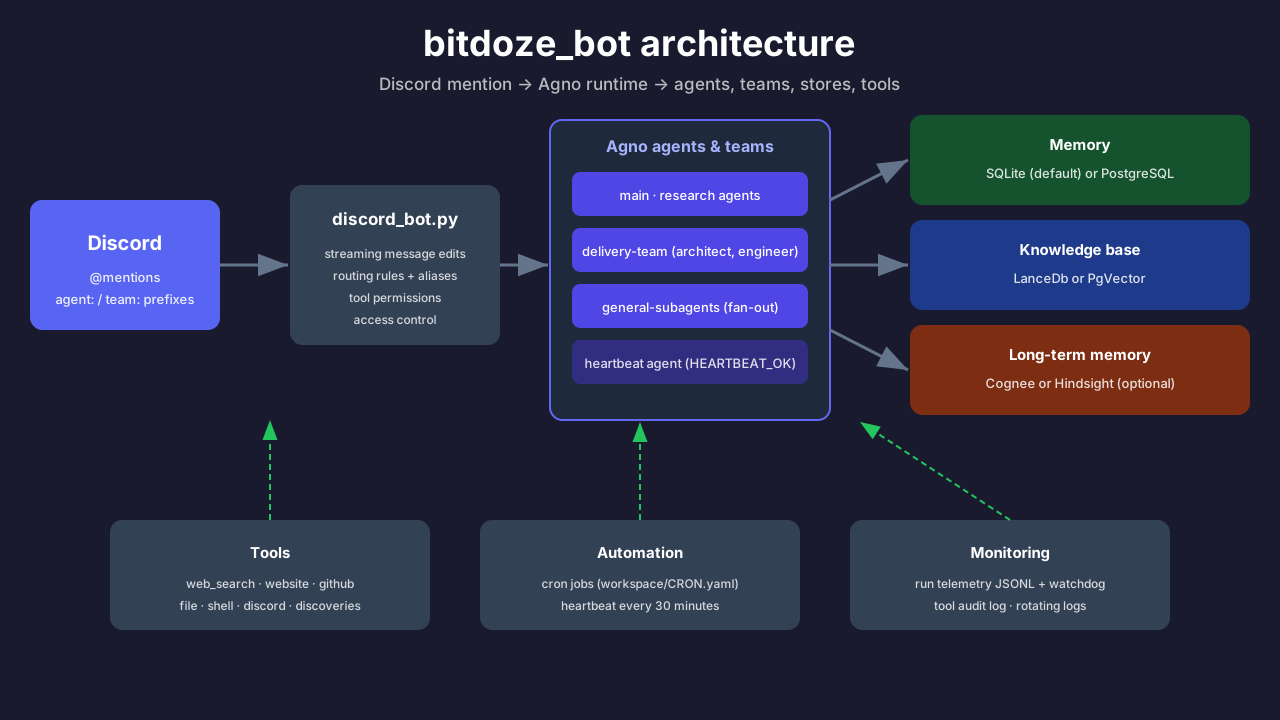
Under the hood there are five moving parts. The discord_bot.py runtime handles streaming edits, routing prefixes, and access control. Agno agents and teams do the actual thinking; the default setup ships a main agent, a research agent, a delivery-team, and a general-subagents pool for parallel chunks of work. State lives in three stores: SQLite or PostgreSQL for conversations and memory, LanceDb or PgVector for document search, and optional Cognee or Hindsight for long-term semantic memory. Cron and heartbeat keep the bot useful while idle, and run telemetry plus a watchdog tell you when something is stuck. Tool permissions decide which of these capabilities run where.
Prerequisites
- Python 3.12+ and UV Python package manager
- A Discord application with a bot token
- An OpenAI-compatible API key (OpenRouter works well)
- Optional: GitHub token for the GitHub tools
- Optional: Docker for PgVector and Cognee
- ~1 GB RAM VPS if you want it running 24/7
Cost floor before you start: a small VPS runs about $4-6/month (I host mine on a Hetzner Cloud VPS; a Hostinger VPS is the budget alternative). Model calls can hit a free tier, and the only non-free default dependency is the text-embedding-3-small embedder, which is cheap. LanceDb itself is local and free.
Quick start
git clone https://github.com/bitdoze/bitdoze_bot.git
cd bitdoze_bot
uv sync
python scripts/setup_bot.py
The setup wizard asks for your Discord token, API keys, and optional settings. It writes ~/.bitdoze-bot/ with config.yaml, .env, and the data directories.
What uv sync pins
The repo ships a uv.lock, so uv sync is reproducible: it installs Agno 2.5.10 plus the exact dependency set the bot was built against. That is the behavior you want. If you later run uv lock --upgrade or uv sync -U, you will pull Agno 3.x and need the migration in the upgrade section below.
Verify the install:
uv run pytest -q
uv run main.py
Tests should pass, and on first run you should see the bot come online in Discord. Check that logs/bitdoze-bot.log and logs/run-telemetry.jsonl are being written. If neither log grows, the process died early and the traceback is in your terminal.
Discord bot setup
- Go to discord.com/developers and create an application.
- Add a bot to the application and copy the token.
- Enable Message Content Intent in the bot’s privileged gateway intents. This is required, the bot cannot read
@mentiontext without it. - Invite the bot to your server. Minimum permissions: Send Messages, Embed Links, Read Message History, Attach Files.
- Put the token in
~/.bitdoze-bot/.envasDISCORD_BOT_TOKEN(or let the wizard do it).
Message Content Intent is the number one failure
If the bot comes online but ignores every message, the intent is off in the developer portal. Re-check the toggle, restart the bot, and try again. A 403 on the invite link means missing permissions, not a code problem.
Verify: @mention the bot in a channel it can read. You should get a streamed reply.
Project structure
bitdoze-bot/
  main.py
  config.example.yaml
  docker-compose.yml
  bitdoze_bot/
    agents.py                     # agent + team construction from config
    cognee.py / cognee_tools.py   # long-term memory client and tools
    config.py                     # config schema
    cron.py                       # CRON.yaml scheduler
    discord_bot.py                # discord.py runtime, streaming, routing
    discord_runtime_utils.py
    discord_tool_fallback.py      # parser-level denied-tool guard
    discovery_tools.py            # self-improvement / learned knowledge
    heartbeat.py                  # 30-minute heartbeat loop
    logging_setup.py              # rotating file logs
    run_monitor.py                # run telemetry + watchdog
    setup_wizard.py
    tool_permissions.py           # allow/deny rules + audit log
    utils.py
  scripts/
    setup_bot.py                  # interactive setup wizard
    generate_soul.py              # SOUL.md personality generator
    setup_knowledge.py            # ingest workspace/knowledge/
  tests/
The load-bearing modules are agents.py (how YAML becomes Agno objects), cognee.py (memory), run_monitor.py (telemetry), and tool_permissions.py (gates). The scripts/ helpers are the day-two tools: setup once, then re-run setup_knowledge.py whenever you change documents.
Configuration
Config lives in ~/.bitdoze-bot/config.yaml. Every key below exists in the repo’s config.example.yaml.
Environment variables
DISCORD_BOT_TOKEN=your_discord_token
OPENAI_API_KEY=your_api_key            # works for OpenRouter too
GITHUB_ACCESS_TOKEN=optional_github_token
GLM_API_KEY=optional_zai_key
MEMORY_DB_URL=optional_postgres_url    # memory backend: postgres
PGVECTOR_DB_URL=optional_pgvector_url  # knowledge backend: pgvector
COGNEE_API_TOKEN=optional_cognee_token
Secrets stay in .env, never in YAML. The bot reads env var names from config (api_key_env, token_env) and resolves values at runtime.
Basic config
model:
  provider: openai_like        # Agno's OpenAILike; Agno 3 also has a native openrouter provider
  id: <pick-a-currently-free-model>   # browse https://openrouter.ai/models?max_price=0
  base_url: https://openrouter.ai/api/v1
  api_key_env: OPENAI_API_KEY
  structured_outputs: false

discord:
  token_env: DISCORD_BOT_TOKEN

runtime:
  streaming_enabled: true
  streaming_edit_interval: 1.5
  agent_timeout: 600

memory:
  backend: sqlite              # sqlite | postgres
  db_file: data/bitdoze.db     # sqlite path
  # db_url_env: MEMORY_DB_URL  # postgres: falls back to PGVECTOR_DB_URL
  mode: automatic
  enable_session_summaries: true

learning:
  enabled: true
  mode: always
  stores:
    user_profile: true
    user_memory: true
    learned_knowledge: agentic   # the bot decides when to store insights
Memory is SQLite by default. Flip backend: postgres and set MEMORY_DB_URL (or PGVECTOR_DB_URL) when you already run PostgreSQL and want one datastore to back up. On Agno 3 the user-memory flag is renamed to update_memory_on_run, which is one of the small config-mapping changes the migration involves.
Free model IDs rotate
Free models on OpenRouter come and go. As of 2026-10-24 only 17 :free models remain of 469 total. If every message returns 401/404 model_not_found, your model ID is gone. Pick another from the free list and keep structured_outputs: false for free tiers. Free is a demo tier: plan on a paid model for anything you rely on.
Streaming
Set runtime.streaming_enabled: true and the bot edits its Discord message as content arrives, at streaming_edit_interval seconds. Team runs fall back to non-streaming, which is expected. runtime.slow_run_threshold_seconds: 45 makes the bot post a “still working” message on long runs so people do not assume it died.
Knowledge base
The knowledge base is vector search over documents in workspace/knowledge/. Pick the backend that matches your infra.
LanceDb (default)
Zero setup. Embeddings and vectors live on disk at data/lancedb.
knowledge:
  enabled: true
  backend: lancedb
  embedder: text-embedding-3-small
  lance_uri: data/lancedb
  table_name: bitdoze_knowledge
  learnings_table_name: bitdoze_learnings
Back up data/lancedb with the rest of ~/.bitdoze-bot/. Rebuilding it means re-embedding your documents, which costs money and time.
PgVector (PostgreSQL)
Use this when you already run PostgreSQL, for example the deploy PgVector with Docker setup.
knowledge:
  enabled: true
  backend: pgvector
  embedder: text-embedding-3-small
  db_url_env: PGVECTOR_DB_URL
  table_name: bitdoze_knowledge
  learnings_table_name: bitdoze_learnings
learnings_table_name holds learned knowledge, and it is searchable through the same KB as your documents.
After adding documents, ingest them:
python scripts/setup_knowledge.pyVerify: ask the bot something only your documents answer. Failure mode: if it answers from general knowledge instead, the KB is empty. Re-run setup_knowledge.py and check data/lancedb exists.
Cognee memory (optional)
Cognee adds semantic long-term memory: the bot can sync conversations and recall relevant context on its own.
memory:
  cognee:
    enabled: true
    base_url: http://localhost:8000
    auth_token_env: COGNEE_API_TOKEN
    auto_sync_conversations: true
    auto_recall_enabled: true
    auto_recall_limit: 5
    auto_recall_timeout_seconds: 10
    cognify_cooldown_seconds: 60
Recall has both a cap and a timeout, so memory lookups cannot blow up response latency. Start Cognee with docker compose up -d (see the Docker section below).
Alternative: Hindsight
For a more capable memory system, Hindsight with Docker has a direct Agno integration (hindsight-agno 0.4.20 on PyPI as of 2026-10-24). It replaces Cognee with vector-based memory that includes entity extraction, mental models, and four parallel search strategies. If you are choosing between the two, the Cognee vs Hindsight: which agent memory system to self-host comparison lays out the tradeoffs.
Agents and routing
agents:
  default: main
  workspace_dir: workspace/agents
  definitions:
    - name: main
      tools: [web_search, hackernews, website, github, youtube, file, shell, discord, discoveries, cognee]
    - name: research
      tools: [web_search, hackernews, website, github, youtube, shell, cognee]
      skills: [web-research]
  aliases:
    engineer: software-engineer
    worker: general-subagent
  routing:
    rules:
      - agent: delivery-team
        starts_with: ["team:"]
      - agent: research
        contains: ["research:"]
      - agent: main
        channel_ids: [123456789012345678]
        user_ids: [111111111111111111]
Routing rules match on contains and starts_with, and they can also gate on channel_ids, user_ids, and guild_ids. Aliases let people type agent:engineer instead of agent:software-engineer. The discovery tools are what make the self-improvement loop work: combined with learned_knowledge: agentic, the bot saves its own learnings and searches them later.
Teams
teams:
  definitions:
    - name: delivery-team
      members: [architect, software-engineer]
      respond_directly: true
      determine_input_for_members: true
      delegate_to_all_members: false
      add_team_history_to_members: true
      num_team_history_runs: 5
    - name: general-subagents
      members: [general-subagent, general-subagent-2, general-subagent-3]
      delegate_to_all_members: true
delivery-team is the classic pair: an architect plans, a software engineer implements, and the team answers directly. general-subagents is a broadcast pool for parallel independent chunks of work, useful when you can split a task into three pieces that do not need each other’s output.
Team modes and a config footgun
Do not set both delegate_to_all_members: true and respond_directly: true unless you want broadcast behavior. The bot warns when it sees this. On Agno 3 prefer mode: over the legacy toggles: mode: route replaces respond_directly: true, and mode: broadcast replaces delegate_to_all_members: true. The legacy flags still exist in Agno 3’s constructor, but determine_input_for_members and add_team_history_to_members are undocumented there and the bot’s config layer will need a mapping when it upgrades. For multi-agent patterns beyond this repo, see how to build an AI research squad with Agno.
Agno 3 preferred form:
teams:
  definitions:
    - name: delivery-team
      members: [architect, software-engineer]
      mode: route
Runtime and monitoring
These keys decide multi-user behavior and how much you spend.
runtime:
  max_concurrent_runs: 4
  slow_run_threshold_seconds: 45
  session_id_strategy: channel_user   # channel | user | channel_user

monitoring:
  run_telemetry: true
  telemetry_path: logs/run-telemetry.jsonl
  watchdog_enabled: true
  watchdog_threshold_seconds: 300

tool_fallback:
  denied_tools: [shell, discord]

logging:
  level: INFO
  file: logs/bitdoze-bot.log
  max_bytes: 10485760
  backup_count: 5

context:
  scope_workspace_context_by_tenant: true
  main_session_scope: dm_only
session_id_strategy and max_concurrent_runs are your token-spend dials. channel_user keeps each user’s conversations separate per channel; user merges everything a user says into one session. The watchdog reports runs stuck longer than watchdog_threshold_seconds. Rotating file logs (10MB x 5) capture tool-audit detail that journalctl misses. scope_workspace_context_by_tenant isolates workspace context files (USER.md, MEMORY.md, AGENTS.md, SOUL.md) per guild plus user, which is the multi-server isolation story. main_session_scope: dm_only keeps the main agent’s session out of public channels.
Tool permissions and access control
Three layers decide what runs where, and you want all three:
tool_permissions:
  enabled: true
  default_effect: deny
  rules:
    - effect: allow
      tools: [shell]
      role_ids: [123456789012345678]
      channel_ids: [987654321098765432]
  audit:
    enabled: true
    path: logs/tool-audit.jsonl

discord:
  token_env: DISCORD_BOT_TOKEN
  access_control:
    allowed_user_ids: [111111111111111111]
    allowed_role_ids: [123456789012345678]

tool_fallback:
  denied_tools: [shell, discord]
The story for “block shell in public, allow it in a private channel” is: a tool_permissions allow rule scoped to channel_ids, plus discord.access_control so only your roles can talk to the bot at all, plus routing gates for agent selection. tool_fallback.denied_tools is the parser-level backstop if a tool call slips through generated code.
Failure mode: with default_effect: deny and a missing allow rule, the bot silently refuses tools. Check logs/tool-audit.jsonl before you debug the agent.
Add new agents
Create a folder in workspace/agents/<name>/ with two files.
agent.yaml
name: product-manager
enabled: true
model:
  id: z-ai/glm-5.3-flash
  base_url: https://openrouter.ai/api/v1
  api_key_env: OPENAI_API_KEY
tools: []
skills: []
AGENTS.md
# Product Manager Agent

Focus on scope, priorities, and delivery risk.
Wire it into a team in config.yaml:
teams:
  definitions:
    - name: delivery-team
      members: [architect, software-engineer, product-manager]
The example uses GLM models from Z.ai on OpenRouter, which is the route I would keep: the model IDs are verified against OpenRouter’s catalog (z-ai/glm-5.3-flash, z-ai/glm-5.3, and the rest of the 5.x family as of 2026-10-24). If you prefer the direct z.ai coding endpoint (https://api.z.ai/api/coding/paas/v4) with GLM_API_KEY, verify it serves glm-5.x on your account before you commit to it; the OpenRouter IDs are the safe default.
If you want managed web search and fetch for your agent’s tools instead of hand-rolling scrapers, TinyFish web search and fetch APIs cover that. And if you would rather extend an agent with external tool servers, you can add MCP tools to an Agno agent the same way.
Use in Discord
Normal mention:
@YourBot help me design a migration planForce a specific agent or team:
@YourBot agent:research find papers on distributed systems
@YourBot agent:delivery-team Build and validate this feature
@YourBot team: implement the API with tests
Fan out parallel work and use aliases:
@YourBot agent:general-subagents summarize these three reports independently
@YourBot agent:engineer refactor the config loader
Verify: send one mention per routing path (default, agent:research, team:, agent:general-subagents) and confirm each lands in the right agent. Wrong agent answers usually mean a routing rule match you did not intend; check contains/starts_with patterns first.
Heartbeat and cron
workspace/CRON.yaml
enabled: true
timezone: Europe/Bucharest
channel_id: 123456789012345678
jobs:
  - name: daily-status
    cron: "0 9 * * *"
    agent: main
    message: "Send a daily status update."
    session_scope: isolated
The heartbeat runs every 30 minutes against workspace/HEARTBEAT.md. If it returns exactly HEARTBEAT_OK, the message is suppressed. There is a dedicated low-context heartbeat agent with memory and learning disabled for this, which exists to keep idle spend down.
Idle spend and silent heartbeats
Heartbeat and cron runs are real token spend even when nobody is chatting. session_scope: isolated keeps them out of main sessions so they do not pollute context. If the heartbeat never fires: confirm workspace/HEARTBEAT.md exists, and remember the quiet ack must be the exact string HEARTBEAT_OK.
Docker (PgVector + Cognee)
The compose file starts PostgreSQL with pgvector on port 5532 and a Cognee API on 127.0.0.1:8000.
docker compose up -d
curl http://127.0.0.1:8000/health
The curl should return a healthy response from your Cognee image. Treat that endpoint as verify-on-your-instance: image APIs change, and this bot’s cognee.py client expects a specific REST shape.
Pin your image tags
Do not run cognee/cognee:latest in anything you care about. Pin a version tag in docker-compose.yml (Cognee 1.6.5 exists as of 2026-10-24), and use docker compose pull for deliberate updates only. :latest removes your rollback path. Cognee data lives in ~/.bitdoze-bot/data/cognee and must be part of your backups alongside data/bitdoze.db and data/lancedb.
Rollback: docker compose down stops the stack. Add -v only if you intend to delete the named volumes, because that deletes your vectors and Cognee data.
For a fuller Cognee deployment with backups and upgrades spelled out, see how to self-host Cognee with Docker Compose.
Production (systemd)
~/.config/systemd/user/bitdoze-bot.service (the repo also ships bitdoze-bot.service):
[Unit]
Description=Bitdoze Bot
After=network.target

[Service]
WorkingDirectory=/home/you/.bitdoze-bot
ExecStart=/home/you/.local/bin/uv run main.py
Restart=always
RestartSec=5
Environment=PYTHONUNBUFFERED=1
EnvironmentFile=/home/you/.bitdoze-bot/.env

[Install]
WantedBy=default.targetsystemctl --user daemon-reload
systemctl --user enable --now bitdoze-bot
loginctl enable-linger $USER
journalctl --user -u bitdoze-bot -floginctl enable-linger matters: without it the user unit dies when you log out. Any small Linux VPS in the $4-6/month class works for this.
Verify: systemctl --user status bitdoze-bot shows active, journalctl --user -u bitdoze-bot -f shows the bot online, and a restart test (systemctl --user restart bitdoze-bot) brings it back. Rollback: systemctl --user disable --now bitdoze-bot.
Upgrading to Agno 3
Agno v3.0.0 (2026-08-24) is a breaking release. Runs move from a JSON blob inside sessions into their own agno_runs table, and new tables agno_jobs and agno_tool_results appear. Write amplification drops from O(N^2) to O(N), which is the reason for the migration. PyPI is at 3.1.10 (2026-10-23) at the time of writing. The bot itself targets Agno 2.5.10 and has not been verified end-to-end on 3.x, so treat this as an upgrade guide, not a compatibility claim.
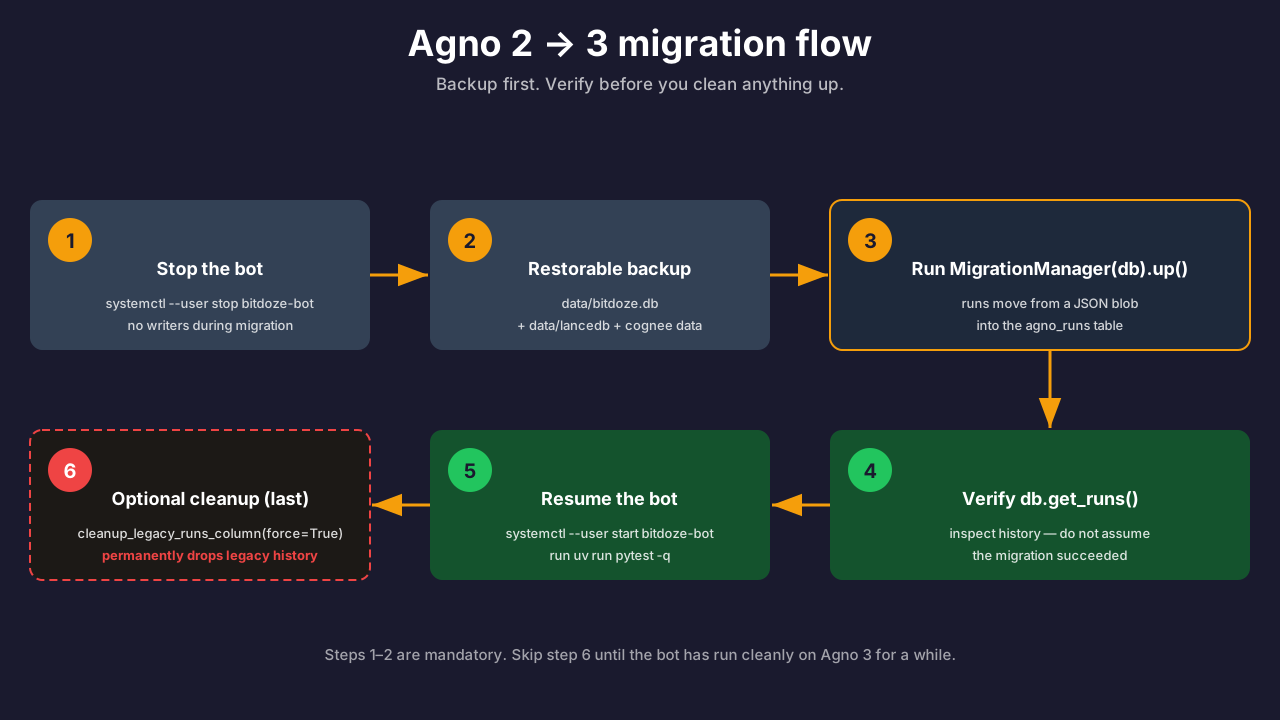
Backup first, clean up last
Stop all writers, and take a restorable backup of data/bitdoze.db (plus data/lancedb and ~/.bitdoze-bot/data/cognee) before you run the migration. cleanup_legacy_runs_column(force=True) permanently drops legacy history. It is optional, and it is last. Agno’s own v3 docs insist on the same order: backup, migrate, verify, only then clean.
Run the migration with the same DB config the app uses:
# migrate_to_v3.py: run with the bot STOPPED, after a restorable backup
import asyncio
from agno.db.sqlite import SqliteDb            # or PostgresDb
from agno.db.migrations.manager import MigrationManager

db = SqliteDb(db_file="data/bitdoze.db")
asyncio.run(MigrationManager(db).up())
print(db.get_runs(limit=5))                    # inspect, don't assume completion
SQLite and PostgreSQL are both covered. A “v3 learning re-key” runs as part of the migration and is non-transactional (read/copy/delete), which is another reason the backup comes first.
Gotchas after the migration
- Several agent params are renamed.
enable_user_memoriesbecomesupdate_memory_on_run,search_session_historybecomessearch_past_sessions,num_history_sessionsbecomesnum_past_sessions_to_search,num_past_session_runsbecomesnum_past_session_runs_in_search, andreasoning=Trueis replaced byreasoning_mode. The repo’sconfig.example.yamlstill uses the old names, which is itself proof of the 2.x codebase. Old names pass silently and memory features just stop working. - LanceDb dropped
use_tantivy. Passing it raisesTypeError. The repo still liststantivyinpyproject.toml; on 3.x that dependency is dead weight and any explicituse_tantivy=Truebreaks immediately. Pre-v3 vector tables queried withuser_idraiseValueErrorand need a vector-DB migration. - Workspace credential refusals are on by default. v3 agents refuse to read
.env*,*.pem,*.key,id_rsa*,.ssh/,.aws/,.kube/,credentials.json,*.tfvars, and similar. For a Discord bot withfile/shelltools this is a feature. Re-allow specific paths withWorkspace(..., allow_paths=[...])if you genuinely need them. - For teams, prefer
mode: route/mode: broadcastover the legacy toggles (see the Teams section above). - MCP tools are opt-in as of v3.1.0. If you add MCP tool servers later, default/lifecycle tools no longer load automatically.
- Filesystem migrations are separate. AgentOS Filesystem in v3.1.0 uses one-shot scripts (
migrate_filesystem_sqlite.py/migrate_filesystem_postgres.py), notMigrationManager.
Failure modes to expect: TypeError on use_tantivy, ValueError on old vector tables, and silent memory breakage from renamed params. Source of truth for the rest is Agno’s v3 migration and changelog pages; the v3 perks that matter here are offload_tool_results=True (tool results over 16,000 chars move to AgentFS with a handle, which tames the GitHub and website tools) and per-run rows that make run_monitor.py-style observability easier.
Verify: uv run pytest -q passes, db.get_runs(limit=5) returns real history, then start the bot and confirm streaming, memory recall, and knowledge search each work in a live Discord mention.
Troubleshooting
First-run checklist:
- Bot shows online in Discord
- A mention gets a streamed reply
logs/bitdoze-bot.logandlogs/run-telemetry.jsonlgrowuv pip show agnoreports 2.5.10uv run pytest -qpasses
| Symptom | Cause | Fix |
|---|---|---|
| Bot ignores mentions | Message Content Intent is off | Enable the privileged intent in the dev portal, restart the bot |
401/404 model_not_found on every message |
Free model ID rotated off OpenRouter | Pick another :free model, keep structured_outputs: false |
Unexpected Agno version after uv sync |
You ran uv lock --upgrade or uv sync -U |
Check uv pip show agno; re-lock to 2.5.10 or follow the Agno 3 migration |
| Knowledge base returns generic answers | Documents not ingested | Re-run python scripts/setup_knowledge.py |
| Heartbeat silent | workspace/HEARTBEAT.md missing, or ack not exact |
Create the file, return exactly HEARTBEAT_OK |
| Tools silently refused | default_effect: deny with no allow rule |
Read logs/tool-audit.jsonl, add the missing allow rule |
| Bot offline after reboot | Linger not enabled or unit not enabled | loginctl enable-linger $USER, systemctl --user enable bitdoze-bot |
| Invite link fails with 403 | Missing permissions | Re-invite with Send Messages, Embed Links, Read Message History, Attach Files |
FAQ
Does this bot work with Agno 3?
Not as-is. The repo targets Agno 2.5.10 via uv.lock, and Agno 3.0+ requires a database migration plus config and code changes. The Upgrading to Agno 3 section is the migration path. The legacy team flags still exist in 3.x’s constructor, but renamed agent params and the LanceDb use_tantivy removal mean the bot’s own glue has not been verified end-to-end on 3.x.
Which free model should I use?
Whatever openrouter.ai/models?max_price=0 lists today. The free list is small (17 :free models of 469 total as of 2026-10-24) and it rotates, so hardcoding a free ID is a maintenance burden. For anything you rely on, use a paid model; the cost per token on the small models is low enough that this is a rounding error against the VPS.
SQLite or PostgreSQL for memory?
SQLite is the right default for a single-server bot: fewer moving parts, one file to back up. Switch to PostgreSQL (memory.backend: postgres) when you already run PgVector for the knowledge base and want one database engine to operate. Do not run prod on SQLite and then wonder about concurrent writes; if you have multiple bot instances, you need Postgres.
What does it cost to run 24/7?
A small VPS is the floor: about $4-6/month order of magnitude. Model usage can be free-tier, and the only non-free default dependency is text-embedding-3-small for the knowledge base. The real ongoing cost is idle spend: heartbeat every 30 minutes and cron jobs run on tokens even when nobody chats. The dedicated heartbeat agent, session_scope: isolated, and session_id_strategy are the dials that keep that in check.
Related
- Top AI GitHub repos: Agno, Mastra, OpenClaw, and more
- Build Your Own AI Agent with Mastra, the TypeScript path if Python is not your stack
- run a 24/7 AI assistant on a VPS with OpenClaw, the assistant comparison if you want a packaged bot instead of building one
Ready to run
Clone the repo, run the setup wizard, and work through the first-run checklist in the Troubleshooting section before you invite anyone else to the server. When you move to Agno 3, take the backup first and follow the upgrade guide above.