Deploy Hindsight Agent Memory on Docker: Complete Setup Guide
Deploy Hindsight with Docker Compose and pgvector, then configure Retain, Observations and Reflect missions, run it on OpenCode Go, connect coding agents like…

Updated Published 35 min read
Most AI agents forget everything the moment a conversation ends. You tell them your preferences, correct their mistakes, feed them context, and the next session starts from scratch. Hindsight fixes that.
Hindsight is an open-source agent memory system built by Vectorize.io. It doesn’t just store conversation history like a glorified chat log. Instead, it extracts facts, builds mental models, and learns from interactions over time. On the LongMemEval benchmark (the standard test for agent memory), it outperforms every other solution currently available.
The core idea: agents should get better the more you use them, the same way a human assistant learns your preferences over weeks and months.
This guide walks through deploying Hindsight on Docker with a proper PostgreSQL backend, then covers everything I set up after installation: the Retain, Observations and Reflect missions that shape what it remembers, running the LLM on an OpenCode Go subscription, wiring coding agents into it (I run Pi, OMP and Droid against mine), and backing the whole thing up.
I also put together a full video walkthrough of the deployment:
What Hindsight actually does
Hindsight organizes memory into three categories:
- World facts - Things that are true (“The project uses PostgreSQL 17”)
- Experiences - Things that happened (“Last deployment broke because of a migration issue”)
- Mental models - Patterns formed by reflecting on facts and experiences (“This user prefers detailed error messages over brief summaries”)
When you add new information through the retain operation, Hindsight runs it through an LLM to extract entities, relationships, and temporal data. It stores these as a combination of vector embeddings, keyword indexes, and graph structures.
When you search with recall, it runs four retrieval strategies in parallel:
- Semantic search (vector similarity)
- Keyword matching (BM25)
- Graph traversal (entity and relationship links)
- Temporal filtering (time ranges)
Results get merged with reciprocal rank fusion and reranked for relevance.
The third operation, reflect, goes deeper. It pulls together related memories and generates new observations. Think of it as the agent thinking about what it knows, rather than just retrieving it.
Prerequisites
You’ll need:
- A VPS or home server running Linux. I recommend Hetzner or Hostinger for VPS hosting
- Docker and Docker Compose installed
- An LLM API key. OpenAI works out of the box, or use an OpenCode Go subscription like I do (covered below)
- At least 2 GB of RAM available (the slim image uses less, the full image needs more)
VPS prices jumped across the board in 2026 — if you’re rethinking a rented box, see what changed and when a mini PC wins.
DigitalOcean $100 Free Hetzner €20 Free Hostinger VPSDocker image variants
Hindsight publishes two image variants:
| Variant | Tag | Size (AMD64) | What it includes |
|---|---|---|---|
| Full | latest |
~9 GB | Local embedding model (BGE), local reranker (MiniLM), all dependencies |
| Slim | latest-slim |
~500 MB | No local models, requires external embedding and reranker providers |
The full image works out of the box but takes up significant disk and RAM. The slim image delegates embeddings and reranking to external services, which is what this guide uses since most people deploying on a VPS want to keep resource usage down.
With the slim image, you need:
- An embedding provider (OpenAI, Cohere, or a local TEI instance)
- A reranker provider (RRF algorithmic reranker works fine and is free, or use an external service)
Deploy Hindsight with Docker Compose
This setup uses two containers: PostgreSQL with pgvector for the database, and Hindsight itself. The pgvector extension enables the vector similarity search that powers semantic recall.
Create the project directory
mkdir -p ~/docker-apps/hindsight
cd ~/docker-apps/hindsight
Create the environment file
cat > .env << 'EOF'
# Hindsight Deployment
OPENAI_API_KEY=your-openai-api-key-here
DB_PASSWORD=choose-a-strong-password
HINDSIGHT_ACCESS_KEY=choose-an-access-key
EOF
Replace the values:
OPENAI_API_KEY- Your OpenAI API key (starts withsk-)DB_PASSWORD- A strong password for the PostgreSQL userHINDSIGHT_ACCESS_KEY- A key you’ll use to authenticate API calls and log into the web UI
Create the Docker Compose file
services:
  db:
    image: pgvector/pgvector:pg17
    container_name: hindsight-db
    restart: unless-stopped
    environment:
      POSTGRES_USER: hindsight
      POSTGRES_PASSWORD: ${DB_PASSWORD}
      POSTGRES_DB: hindsight
    volumes:
      - ./pgdata:/var/lib/postgresql/17/docker
    networks:
      - web

  hindsight:
    image: ghcr.io/vectorize-io/hindsight:latest-slim
    container_name: hindsight-app
    restart: unless-stopped
    ports:
      - "18888:8888"
      - "9999:9999"
    environment:
      # LLM
      - HINDSIGHT_API_LLM_PROVIDER=openai
      - HINDSIGHT_API_LLM_API_KEY=${OPENAI_API_KEY}
      - HINDSIGHT_API_LLM_MODEL=gpt-4o-mini
      # Embeddings
      - HINDSIGHT_API_EMBEDDINGS_PROVIDER=openai
      - HINDSIGHT_API_EMBEDDINGS_OPENAI_API_KEY=${OPENAI_API_KEY}
      # Reranker (algorithmic, no cost)
      - HINDSIGHT_API_RERANKER_PROVIDER=rrf
      # Database
      - HINDSIGHT_API_DATABASE_URL=postgresql://hindsight:${DB_PASSWORD}@db:5432/hindsight
      - HINDSIGHT_API_WORKER_ID=hindsight-prod
      # API Authentication (Bearer token required for all API calls)
      - HINDSIGHT_API_TENANT_EXTENSION=hindsight_api.extensions.builtin.tenant:ApiKeyTenantExtension
      - HINDSIGHT_API_TENANT_API_KEY=${HINDSIGHT_ACCESS_KEY}
      # Control Plane auth (login required for Web UI)
      - HINDSIGHT_CP_ACCESS_KEY=${HINDSIGHT_ACCESS_KEY}
      # Control Plane -> API auth
      - HINDSIGHT_CP_DATAPLANE_API_KEY=${HINDSIGHT_ACCESS_KEY}
    depends_on:
      - db
    networks:
      - web

networks:
  web:
    external: true
What each setting does
LLM configuration - Hindsight needs an LLM for fact extraction, entity resolution, and generating responses. The gpt-4o-mini model works well and keeps costs low. You can swap this for gpt-4o if you need better extraction quality, or use a different provider entirely (Anthropic, Gemini, Groq, Ollama).
Embeddings - These convert text into vector representations for semantic search. OpenAI’s embedding model is the easiest option with the slim image.
Reranker - The rrf (Reciprocal Rank Fusion) option uses an algorithmic approach that costs nothing. It merges results from the four retrieval strategies without needing a separate ML model. If you want better ranking accuracy, you can point this to an external cross-encoder service.
Worker ID - Set this to a stable value. Without it, Docker assigns the container hostname as the worker ID, which changes on every restart. Any task being processed when the container goes down stays parked under the old ID with no way for the new container to pick it up.
Authentication - Three related settings that all use the same access key:
HINDSIGHT_API_TENANT_API_KEY- Required as a Bearer token for all API callsHINDSIGHT_CP_ACCESS_KEY- Login password for the web UIHINDSIGHT_CP_DATAPLANE_API_KEY- How the web UI authenticates to the API
Network setup
This compose file assumes you have an existing Docker network called web. Create it with docker network create web if you haven’t already. If you’re running this standalone without Traefik or other reverse proxies, you can remove the networks section and the external: true line.
Start the services
docker compose up -dCheck that both containers are running:
docker compose psYou should see hindsight-db and hindsight-app both in the running state.
Check the logs if something isn’t right:
docker compose logs hindsightVerify the deployment
The API should be available at http://your-server-ip:18888 and the web UI at http://your-server-ip:9999.
Test the API with a quick health check:
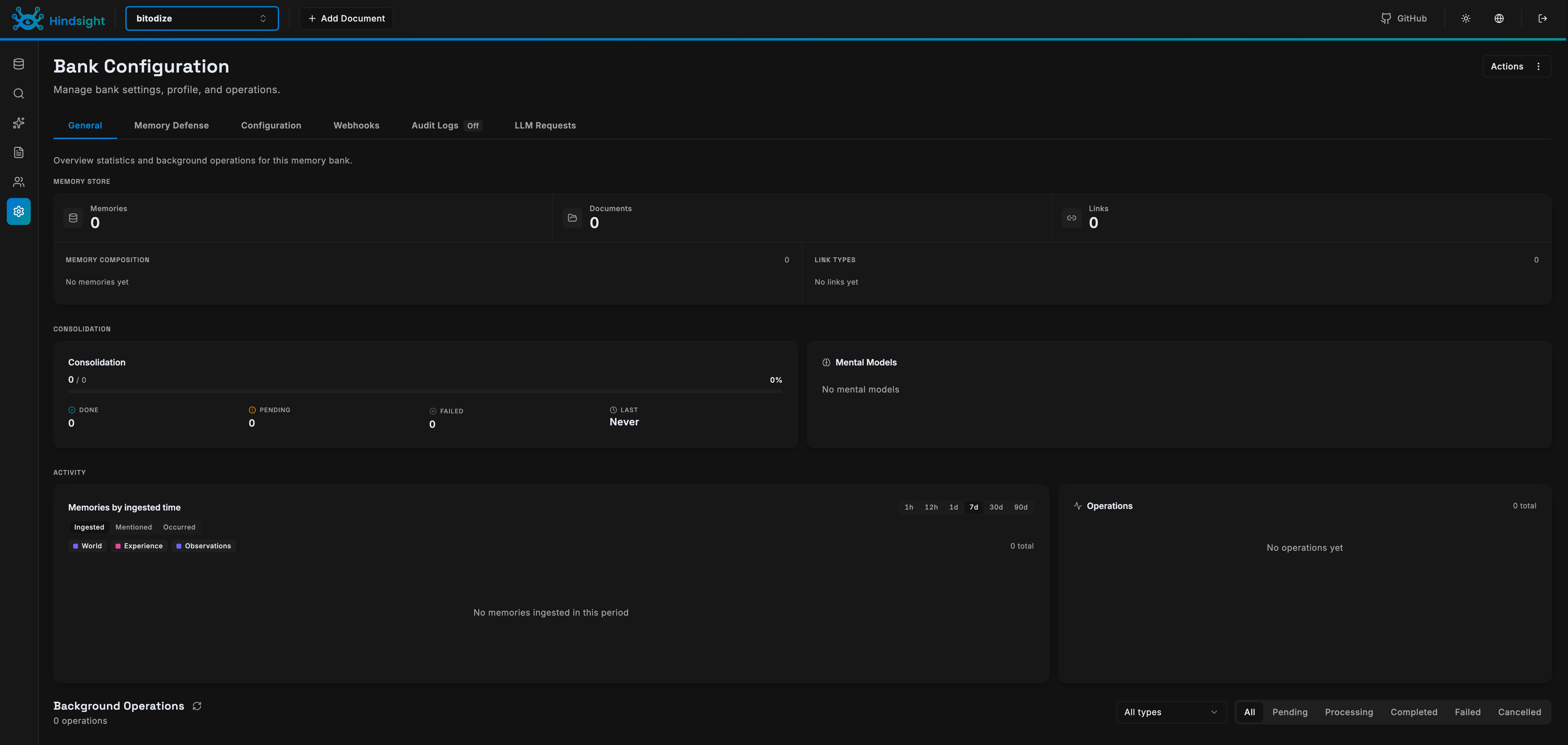
curl http://localhost:18888/v1/healthOpen the web UI in your browser and enter your access key when prompted. The Control Plane lets you manage memory banks, browse stored entities, and test queries without writing code.
Post-install: configure Retain, Observations and Reflect
A fresh Hindsight install works with defaults, but the defaults are generic. Three settings turn it from a fact dump into something that reasons the way you want: the retain mission (what gets extracted), the observations mission (how knowledge gets consolidated), and the reflect disposition and mission (how it answers). All of them are per memory bank, so you can tune each project differently.
You can set everything through the web UI (open your bank in the Control Plane and edit its settings), but I’ll use curl so each step is copy-paste ready. Every request needs your access key as a Bearer token. Export it once:
export HINDSIGHT_URL=http://localhost:18888
export HINDSIGHT_KEY=your-access-key
Step 1: Store a first memory
Banks are created automatically on the first retain, so store one fact to get started:
curl -X POST $HINDSIGHT_URL/v1/default/banks/my-project/memories \
  -H "Authorization: Bearer $HINDSIGHT_KEY" \
  -H "Content-Type: application/json" \
  -d '{"items":[{"content":"Production runs PostgreSQL 17 on a Hetzner CX22"}]}'
The call returns immediately. Fact extraction, entity resolution and embedding generation run in the background, which is why your LLM choice matters for ingest speed.
Step 2: Set the retain mission
By default, retain extracts all significant facts from whatever you feed it. The mission is a plain-language instruction injected into the extraction prompt that steers what the LLM keeps. This is the single highest-value setting in Hindsight: without it, banks fill up with noise; with it, extraction focuses on what you actually want recalled later.
Here’s the prompt I use on my personal bank:
Keep technical facts and decisions: commands that worked, configs, versions,
error messages together with their fixes, and URLs worth remembering.
Keep preferences about tools and workflows.
Ignore greetings, small talk, and throwaway debugging output that has no lasting value.
Apply it with a PATCH to the bank config:
curl -X PATCH $HINDSIGHT_URL/v1/default/banks/my-project/config \
  -H "Authorization: Bearer $HINDSIGHT_KEY" \
  -H "Content-Type: application/json" \
  -d '{
    "updates": {
      "retain_mission": "Keep technical facts and decisions: commands that worked, configs, versions, error messages together with their fixes, and URLs worth remembering. Keep preferences about tools and workflows. Ignore greetings, small talk, and throwaway debugging output that has no lasting value.",
      "retain_extraction_mode": "concise"
    }
  }'
The extraction mode controls how chatty the LLM gets:
| Mode | When to use |
|---|---|
concise (default) |
General purpose, selective, fast |
verbose |
Richer facts with full context and relationships |
custom |
You write complete extraction rules yourself |
If you’d rather set this server-wide instead of per bank, add HINDSIGHT_API_RETAIN_MISSION to the compose environment.
Step 3: Set the observations mission
After every retain, Hindsight consolidates related facts into observations: deduplicated beliefs backed by evidence, each tracking how many sources support it. Contradictions don’t overwrite history. If you switch from React to Vue, the observation ends up capturing the journey, not just the destination.
The observations mission defines what shape those beliefs should take. Default behavior is already good (durable facts, preferences, recurring patterns), but you can narrow it:
curl -X PATCH $HINDSIGHT_URL/v1/default/banks/my-project/config \
  -H "Authorization: Bearer $HINDSIGHT_KEY" \
  -H "Content-Type: application/json" \
  -d '{
    "updates": {
      "observations_mission": "Observations are durable facts about my projects, infrastructure, and preferences. Always include recurring problems together with their fixes. Ignore ephemeral state such as running processes or current session details."
    }
  }'
Consolidation runs automatically after each retain. If you’re importing months of history and want to batch first, set HINDSIGHT_API_ENABLE_AUTO_CONSOLIDATION=false in the compose file and trigger it manually with a call to /v1/default/banks/my-project/consolidate when the import finishes.
Step 4: Give reflect a personality
Recall retrieves facts. Reflect reasons about them, and its reasoning style comes from three disposition traits plus a mission. The traits sit on a 1-5 scale:
| Trait | Low (1) | High (5) |
|---|---|---|
| Skepticism | Trusts information at face value | Questions and doubts claims |
| Literalism | Reads between the lines | Takes things literally |
| Empathy | Detached, facts only | Weighs emotional context |
Recommended combinations from the docs: code review wants skepticism 4, literalism 5, empathy 2. Customer support wants skepticism 2, literalism 2, empathy 5. Research assistant sits in the middle at 4/3/3.
For my DevOps-flavored bank, I keep traits at 3/3/3 and let the mission do the work:
You are my DevOps and development assistant. You help manage Linux servers,
Docker services, and side projects. Prefer concrete commands over abstract
advice. Before recommending a risky change, state what breaks if it goes
wrong. Say so when the memories don't cover the answer.
Set the reflect mission and disposition from the bank settings in the web UI, or through the client SDK’s update_bank_config() method. Like the other missions, there’s an env var (HINDSIGHT_API_REFLECT_MISSION) if you want it server-wide.
Step 5: Add hard rules with directives
Disposition shapes tone; directives are rules the agent must follow. They get injected into every reflect response. Good candidates: compliance constraints, privacy guardrails, output requirements.
curl -X POST $HINDSIGHT_URL/v1/default/banks/my-project/directives \
  -H "Authorization: Bearer $HINDSIGHT_KEY" \
  -H "Content-Type: application/json" \
  -d '{
    "name": "Safety first",
    "content": "Never suggest destructive commands (rm -rf, drop database, force push) without warning about backups first.",
    "priority": 10
  }'
Rule of thumb from the docs: personality goes in the disposition, compliance goes in directives.
Step 6: Tune recall
Recall has two knobs you’ll actually touch:
budget: search depth.lowfor chatbot-speed lookups,midfor balanced queries,highwhen the question needs multi-hop reasoning across entities (“what did Alice’s manager’s team work on?”).max_tokens: how much memory content comes back, default 4096 tokens (about four pages). Drop to 2048 for focused answers, raise to 8192 for research-style questions.
Both are per-request parameters, not config, so pass them per call depending on the query. There’s also a types filter if you want only observations, or only raw world facts.
Step 7: Test the whole loop
Give it a minute after retaining (extraction and consolidation need time), then query:
# Recall: fast multi-strategy search
curl -X POST $HINDSIGHT_URL/v1/default/banks/my-project/memories/recall \
  -H "Authorization: Bearer $HINDSIGHT_KEY" \
  -H "Content-Type: application/json" \
  -d '{"query":"What database does production run?"}'

# Reflect: agentic reasoning over the bank
curl -X POST $HINDSIGHT_URL/v1/default/banks/my-project/reflect \
  -H "Authorization: Bearer $HINDSIGHT_KEY" \
  -H "Content-Type: application/json" \
  -d '{"query":"Summarize my production infrastructure"}'
If recall returns nothing at Step 7, check that extraction finished (look at the operations view in the web UI) and that your LLM key works. That’s also the moment you’ll be glad you set a cheap model for extraction.
Mental models and knowledge pages
Two more features worth knowing, both best added after a few weeks of real usage:
Mental models are standing answers to questions you ask often. You define the question once, Hindsight writes the answer, and rewrites it in the background as the bank learns. Fetching one is a database read: no retrieval, no LLM call, no latency. Create them from the web UI once you notice yourself asking the same thing repeatedly.
Knowledge pages are the same engine wearing a wiki costume: living documents organized in folders (“Architecture”, “Runbooks”, “Decisions”) that rewrite themselves as knowledge changes. The CLI can mirror a bank onto disk as real markdown files:
hindsight fs mount --bank my-bankFrom there, grep, fzf, and any editor work normally. Pages heal themselves: delete one and it re-projects from memory.
Small VPS performance tweaks
Hindsight does heavy LLM lifting during writes (extraction, consolidation) so reads stay fast: expect 100-600 ms for recall and under three seconds for reflect. On a small VPS, three environment variables help:
      # Don't saturate the LLM provider with parallel requests
      - HINDSIGHT_API_LLM_MAX_CONCURRENT=4
      # Skip reasoning-token overhead during extraction
      - HINDSIGHT_API_LLM_REASONING_EFFORT=low
      # Smaller consolidation batches = more reliable small-model responses
      - HINDSIGHT_API_CONSOLIDATION_LLM_BATCH_SIZE=4
Using the Hindsight API
Install the client
Python
pip install hindsight-clientNode.js
npm install @vectorize-io/hindsight-clientCLI
curl -fsSL https://hindsight.vectorize.io/get-cli | bashBasic operations
All three operations work on memory banks. A bank is a namespace for a set of related memories. You might have one bank per user, per project, or per agent, depending on your use case.
Python
from hindsight_client import Hindsight

client = Hindsight(
    base_url="http://your-server:18888",
    api_key="your-access-key"
)

# Store a memory
client.retain(
    bank_id="my-project",
    content="The production database runs PostgreSQL 17 with pgvector"
)

# Search for memories
results = client.recall(
    bank_id="my-project",
    query="What database does production use?"
)

# Deep analysis of existing memories
insights = client.reflect(
    bank_id="my-project",
    query="What do I know about the production infrastructure?"
)
Node.js
import { HindsightClient } from '@vectorize-io/hindsight-client';

const client = new HindsightClient({
  baseUrl: 'http://your-server:18888',
  apiKey: 'your-access-key'
});

// Store a memory
await client.retain('my-project',
  'The production database runs PostgreSQL 17 with pgvector'
);

// Search for memories
const results = await client.recall('my-project',
  'What database does production use?'
);

// Deep analysis
const insights = await client.reflect('my-project',
  'What do I know about the production infrastructure?'
);
CLI
# Store a memory
hindsight memory retain my-project \
  "The production database runs PostgreSQL 17 with pgvector"

# Search for memories
hindsight memory recall my-project \
  "What database does production use?"

# Deep analysis
hindsight memory reflect my-project \
  "What do I know about the production infrastructure?"
Adding context and timestamps
You can enrich memories with metadata:
client.retain(
    bank_id="my-project",
    content="Migrated from SQLite to PostgreSQL after hitting performance issues",
    context="database migration",
    timestamp="2026-06-15T10:00:00Z"
)
This helps Hindsight organize memories temporally and understand the context in which information was recorded.
Using the LLM wrapper
The fastest way to add memory to an existing agent is the LLM wrapper. It sits between your code and the LLM API, automatically storing and retrieving memories as you make calls:
from hindsight import HindsightLLMWrapper
from openai import OpenAI

openai_client = OpenAI(api_key="your-openai-key")
wrapped_client = HindsightLLMWrapper(
    client=openai_client,
    hindsight_url="http://your-server:18888",
    hindsight_api_key="your-access-key",
    bank_id="my-agent"
)

# Use it exactly like the OpenAI client
# Memories are stored and retrieved automatically
response = wrapped_client.chat.completions.create(
    model="gpt-4o-mini",
    messages=[{"role": "user", "content": "What did we discuss yesterday?"}]
)
LLM provider options
Hindsight supports several LLM providers. The choice affects both cost and quality:
| Provider | Models | Notes |
|---|---|---|
| OpenAI | gpt-4o-mini, gpt-4o | Good default choice. gpt-4o-mini is cheap and works well |
| Anthropic | Claude models | Strong extraction quality |
| Gemini | Gemini models | Google’s offering |
| Groq | Various | Fast inference, lower cost. Recommended by Hindsight for speed |
| OpenCode Go | 16 models, one key | Flat-rate subscription, covered below |
| Ollama | Local models | Self-hosted, no API costs, needs more hardware |
| LM Studio | Local models | Another local option |
To switch providers, change HINDSIGHT_API_LLM_PROVIDER and the corresponding API key environment variable. For example, to use Groq:
environment:
  - HINDSIGHT_API_LLM_PROVIDER=groq
  - HINDSIGHT_API_LLM_API_KEY=${GROQ_API_KEY}
  - HINDSIGHT_API_LLM_MODEL=gpt-oss-20b
Using OpenCode Go
My pick: OpenCode Go is a $10/month subscription that bundles 16 models behind a single OpenAI-compatible key. Grok 4.5, Kimi K3, DeepSeek V4 Pro, GLM-5.2, MiniMax M3, Qwen and more, no per-token billing. Hindsight ships native support for it as a provider:
Add the key to .env:
OPENCODE_GO_API_KEY=your-opencode-go-keyThen switch the LLM block in the compose file:
      # LLM - OpenCode Go
      - HINDSIGHT_API_LLM_PROVIDER=opencode-go
      - HINDSIGHT_API_LLM_API_KEY=${OPENCODE_GO_API_KEY}
      - HINDSIGHT_API_LLM_MODEL=deepseek-v4-flash
      # Embeddings stay on OpenAI (OpenCode Go covers chat models only)
      - HINDSIGHT_API_EMBEDDINGS_PROVIDER=openai
      - HINDSIGHT_API_EMBEDDINGS_OPENAI_API_KEY=${OPENAI_API_KEY}
Recreate with docker compose up -d and you’re done. This exact setup runs my production instance (I currently have hy3 in the model field).
Why flat-rate matters here specifically: fact extraction and consolidation are token-hungry background jobs. Every conversation your coding agents retain gets processed by this LLM around the clock, and with per-token pricing that shows up as a surprise line on next month’s invoice. With OpenCode Go the bill stays $10 regardless of how much memory churn happens.
Try OpenCode Go ($5 First Month)One caveat: it covers chat models only, so embeddings still need their own provider. Keeping the OpenAI key around just for embeddings costs pennies at typical volumes. For a deeper look at limits and benchmarks, see my OpenCode Go review.
Exposing Hindsight securely
Running Hindsight on port 9999 is fine for local access. If you need to reach it from the internet, put it behind a reverse proxy.
Cloudflare Tunnel
The easiest option if you already use Cloudflare. Add the tunnel container to your compose file and configure it to route traffic to the Hindsight services. No ports need to be exposed on the host.
Caddy
What I run. Two hostnames in the Caddyfile, certificates handled automatically:
hindsight.example.com {
    reverse_proxy localhost:9999
}

hindsight-api.example.com {
    reverse_proxy localhost:18888
}
The API hostname is what your coding agents point at, including the MCP endpoint at /mcp/your-bank/.
Traefik
Add labels to the hindsight service in your compose file for Traefik to pick up. You’ll need separate routers for the API (port 8888) and the web UI (port 9999).
Nginx
Set up a reverse proxy config that forwards requests to the Hindsight ports. Make sure to pass the Authorization header through for API calls.
Keep the access key
Always keep HINDSIGHT_API_TENANT_API_KEY set. Without it, anyone who can reach the API port can read and write memories. The access key protects both the API and the web UI.
Backup options
Everything lives in PostgreSQL inside ./pgdata. Lose that directory and every fact, observation and mental model is gone. Three ways to protect it, in increasing order of effort.
Option 1: nightly pg_dump (start here)
A logical dump stays consistent even while the container is running, compresses well, and restores into any PostgreSQL 17 instance. Save this as ~/scripts/hindsight-backup.sh:
#!/usr/bin/env bash
set -e
BACKUP_DIR=~/backups/hindsight
mkdir -p "$BACKUP_DIR"
docker exec hindsight-db pg_dump -U hindsight hindsight | gzip > "$BACKUP_DIR/hindsight-$(date +%F).sql.gz"
# keep two weeks
find "$BACKUP_DIR" -name "hindsight-*.sql.gz" -mtime +14 -delete
Make it executable and schedule it:
chmod +x ~/scripts/hindsight-backup.sh
crontab -e
# add:
15 4 * * * ~/scripts/hindsight-backup.sh >> ~/backups/hindsight/backup.log 2>&1
Restoring into a fresh database container:
gunzip -c hindsight-2026-08-24.sql.gz | docker exec -i hindsight-db psql -U hindsight -d hindsightOption 2: offsite copies
A backup on the same VPS survives most accidents, not all of them. Push the dump folder somewhere else with rclone (S3, Backblaze B2, any supported remote):
rclone copy ~/backups/hindsight remote:hindsight-backups --max-age 48hAppend that line to the script and your dumps leave the server within hours of being taken. If you prefer deduplicated snapshots over plain files, restic works the same way against the same folder.
Option 3: full backup tooling
For automated, versioned backups across many containers I use Pluton (Restic + Rclone under the hood); Zerobyte covers the same ground. Point a plan at the dump folder, not at pgdata itself. Copying live PostgreSQL data files while the database is running produces snapshots that may not restore cleanly. If you want file-level backups of pgdata anyway, stop both containers first (docker compose stop hindsight && docker compose stop db), snapshot, then start them again.
One habit worth stealing from production databases: test restores. A backup you’ve never restored is a theory. Once a quarter, spin up a throwaway postgres container on your laptop, load the latest dump, and check that recall still returns sensible answers.
Troubleshooting
Container won't start
Check the logs with docker compose logs hindsight. Common issues:
- Database connection failed - Make sure the db container is running and healthy. The hindsight container depends on it, but sometimes PostgreSQL takes a moment to initialize.
- Invalid API key - Verify your OpenAI key is correct and has credits available.
- Port conflict - Something else is using port 18888 or 9999. Change the host port in the compose file.
Memories aren't being recalled
- Make sure you’re using the same
bank_idfor retain and recall operations. - Check that the content you stored is relevant to your query. Hindsight uses semantic search, so exact keyword matches aren’t required, but the meaning needs to align.
- Try the
reflectoperation for more thorough analysis ifrecallreturns thin results.
High memory usage
The full image loads local embedding and reranker models that consume 1.5-2 GB of RAM. Switch to the slim image (which this guide uses) to drop to around 500 MB for the Hindsight process itself. PostgreSQL will use whatever you give it, but 512 MB is enough for most workloads.
Connecting coding agents
This is where Hindsight pays off. Your agents already produce the raw material (conversations, decisions, fixes that worked); the integrations below pipe it into memory automatically and inject relevant context back at session start. Three ways to wire an agent: the official integration package, native support in the agent itself, or the plain MCP server as a fallback.
The official package: Claude Code, Codex, opencode, Cursor CLI and friends
One npm package wires up twelve agents natively:
npx @vectorize-io/hindsight-coding-agents install claude-codeSupported targets: claude-code, codex, opencode, cursor-cli, copilot-cli, kilo, cline-cli, prime-agent, dsh (DeepSeek Harness), agy (Antigravity), devin-cli, grok-build. Or install all for every agent it detects on the machine. It asks where memory should live; since you’re self-hosting, answer with flags instead:
npx @vectorize-io/hindsight-coding-agents install claude-code \
  --server self-hosted --api-url http://localhost:8888
(If your instance sits behind a reverse proxy, pass its public URL and add your access key via apiToken in the config file.)
What you get is more than recall-on-prompt. The integration creates one bank per repository (coding-agent::{repo}) shared by every agent, seeds a cold repo from git history, runs a read-only codebase survey capped at $2 of tokens, keeps knowledge pages current, and writes completed sessions back into memory. Config lives in one file, ~/.hindsight/coding-agent.json:
{
  "optInOnly": true,
  "optInPaths": ["~/work/client-x", "~/oss"],
  "gitIngest": "full"
}
That example flips memory to opt-in only (nothing outside the listed paths gets remembered), and turns on full-diff git ingestion. Updating is the same install command again; uninstall removes exactly what was added.
Pi
Pi has a dedicated extension package:
pi install npm:@luxusai/pi-hindsightThen open Pi inside a repo and run /hindsight. It asks for your API URL (default http://localhost:8888) and a memory profile: Project + User, Project Only, User Only, or Recall Only. After setup it recalls relevant memory before each model call and retains session deltas after completed runs, redacting common secrets before anything is written.
OMP (Oh My Pi)
OMP ships Hindsight support natively, no plugin needed. Edit ~/.omp/agent/config.yml:
memory:
  backend: hindsight

hindsight:
  apiUrl: https://hindsight.example.com/
  apiToken: your-access-key
  bankId: my-bank
Point apiUrl at your instance (local or behind a proxy), set bankId to wherever you want OMP’s memories to land, and restart. Its autolearn feature rides on the same backend.
Droid (Factory)
Droid connects through Hindsight’s MCP server. Edit ~/.factory/mcp.json:
{
  "mcpServers": {
    "hindsight": {
      "type": "http",
      "url": "http://localhost:8888/mcp/my-bank/",
      "headers": {
        "Authorization": "Bearer YOUR_ACCESS_KEY"
      }
    }
  }
}
The bank name in the URL path selects single-bank mode, so everything Droid does lands in one place. For a remote instance, swap in your public URL; the Bearer header works the same way.
Anything else: the MCP server fallback
Any MCP-compatible client can connect directly:
# Connect Claude Code
claude mcp add --transport http hindsight http://localhost:8888/mcp/

# Or use single-bank mode for a specific memory bank
claude mcp add --transport http hindsight http://localhost:8888/mcp/my-bank/
The MCP server exposes 29 tools including retain, recall, reflect, mental model management, directive creation, and memory browsing. See the full integrations list for all supported clients.
Which integration should you use?
| Situation | Pick |
|---|---|
| Daily driver is Claude Code, Codex, opencode or Cursor CLI | Official package, let it manage per-repo banks |
| You want one shared brain across several different agents | Native config or MCP pointing all agents at one bank |
| Client or employer repos where mixing memories would be wrong | Official package with optInOnly / per-bank overrides |
| Agent not on any list above | MCP server |
My actual setup: OMP, Droid and Pi all talk to the same self-hosted instance. OMP and Droid share the single bitdoze bank because I want cross-project recall (“what did I decide about DNS last month?”). Pi keeps separate per-project banks through its profiles for client work where memories shouldn’t mix. If you run only one agent, use the official package and don’t think about banks at all; if you run several like me, decide early whether shared or separated memory fits how you work, because migrating banks later is manual work.
AI assistants and frameworks
OpenClaw - Hindsight integrates with OpenClaw to add memory capabilities to Claude-based agent workflows. The production memory infrastructure includes server-side access control and a plugin with auto-managed embeddings.
Hermes Agent - Hindsight serves as the memory backend for the Hermes multi-agent messaging framework. If you’re running Hermes, this replaces the built-in MEMORY.md and session search with a more capable vector-based system.
Agno - There’s a direct integration for Agno agents. Instead of SQLite-backed chat history, you get structured long-term memory with entity extraction and semantic search.
Zed - The Zed editor’s AI assistant gets long-term memory through Hindsight’s MCP server. Add it as an HTTP transport entry in Zed’s MCP configuration.
Obsidian - Through the MCP server, you can connect Obsidian’s AI plugins to Hindsight for persistent memory across your notes and research workflows.
n8n - A community node for n8n workflows adds retain, recall, and reflect operations. Drop it into any workflow alongside Slack, Sheets, OpenAI, and 400+ other integrations.
What’s next
Once Hindsight is running, here are some things to try:
- Set the three missions from the post-install section above; it’s the difference between a fact dump and a brain
- Wire in your coding agent using the official package or the Pi/OMP/Droid setups covered earlier
- Create separate memory banks for different projects or users to keep memories organized
- Add mental models for the questions you ask every week, and let knowledge pages grow into a self-maintaining wiki
- Schedule the nightly pg_dump before you forget (see the backup options above)
- Compare with Cognee if you also need knowledge extraction from documents and multimodal data
Hindsight is one of those tools that gets more valuable the longer you run it. The first few days of memories are useful. A few months in, the agent starts making connections you didn’t explicitly tell it about. That’s the mental models kicking in, and it’s where the real value shows up.