Add an AI Image Agent to Mastra with Kie.ai
Step-by-step guide to adding a Mastra image generation agent powered by Kie.ai. Cover Nano Banana, Flux-2, GPT Image, Seedream, uploads, async jobs, and local…

Updated Published 51 min read
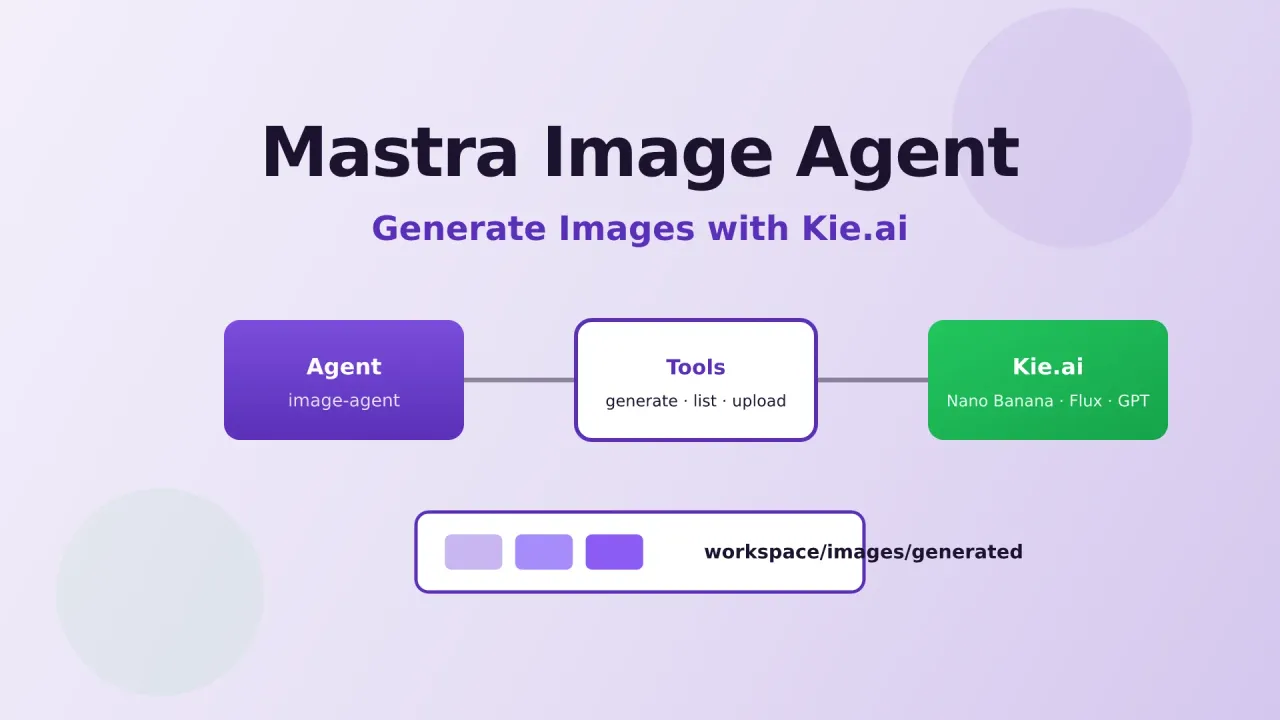
I already have a Mastra assistant that can search the web, read files, run shell commands, and remember context. That covers research and coding. It does not cover the other half of content work: covers, thumbnails, social graphics, and logo-aware edits.
So I added a dedicated image agent. You chat with it in Mastra Studio, it picks a model, writes a prompt, calls an image API, polls until the job finishes, and saves the PNG into the workspace. No separate design tab, no copy-pasting temporary URLs that disappear two weeks later.
The generation backend is Kie.ai. One API key, one async job format, and access to the models I actually use for blog covers and YouTube thumbnails: Google Nano Banana / Nano Banana 2, Seedream, Flux-2, GPT Image 2, Ideogram, Topaz upscale, Recraft background removal, and more.
This article walks through how I wired that agent into Mastra, from the Kie client up to the agent instructions. You can drop the same pattern into the mastra-assistant project or any existing Mastra app.
Try Kie.ai (API Key) Build a Mastra Agent FirstWhy Kie.ai for image generation
If you only need OpenAI’s image model, call OpenAI. The pain starts when you want several models behind one integration:
- Google Nano Banana 2 for fast, high-quality 16:9 covers
- Seedream Pro for photoreal product-style shots
- Flux-2 Pro for sharp commercial graphics
- GPT Image 2 when instruction following and text-in-image matter
- Ideogram when typography has to be readable
- Topaz / Recraft for upscale and background removal
Each official provider has its own auth, payload shape, polling story, and pricing page. Kie sits in the middle as a multimodel API layer: image, video, music, and LLM models behind one wallet and one task API.
Here is the practical picture from their platform and docs:
| Feature | What you get |
|---|---|
| Models | 100+ across image, video, audio, and chat (Nano Banana, GPT Image, Seedream, Flux, Veo, Kling, Seedance, Suno, Claude, Gemini, GPT, and more) |
| Pricing | Often ~30–50% below official APIs; some high-demand models much lower (platform claims up to ~80% on selected models) |
| Billing | Credit wallet; platform states failed generations are not charged |
| Credits | Do not expire; new accounts get free trial credits to test in the Playground |
| Auth | Authorization: Bearer YOUR_API_KEY against https://api.kie.ai |
| Jobs | Async: POST /api/v1/jobs/createTask → poll GET /api/v1/jobs/recordInfo?taskId=... or use a webhook |
| Rate limits | About 20 new requests / 10 seconds by default; concurrent running tasks are generous |
| Retention | Generated media ~14 days; logs ~2 months (download what you care about) |
| Ops | Logs UI, API key rate caps, optional IP allowlist, Discord/Telegram support channels |
For agent work, the async job model is the important part. Image generation is not a 200ms chat completion. Your tool must create a task, wait (or poll), then download the result before Kie’s temporary URL ages out. That is exactly what the Mastra tools below do.
Image pricing examples from their public pricing page (check kie.ai/pricing for live numbers):
- Nano Banana 2: roughly $0.04–$0.09 per image depending on resolution
- GPT Image 2: roughly $0.03–$0.08 per image at common sizes
- Official APIs: often 2–5x higher on the same model tier
I use Kie because I can switch model ids without rewriting the agent every time a new Google or OpenAI image model lands.
Open Kie.ai Market & Pricing Read Kie API DocsAffiliate disclosure
Some links to Kie.ai in this article are affiliate links (go.bitdoze.com/kie-ai). I use the product for image generation in my own Mastra setup. Pricing and model availability change; always verify on the official site.
What we will build
By the end you will have:
- A small Kie client (create task, poll, credits, file upload, download)
- Five Mastra tools: list models, generate, task status, credits, list assets
- An image agent with instructions for thumbnails, blog covers, and reference-image workflows
- Registration in
src/mastra/index.tsso Studio showsimage-agent
The agent can:
- Generate text-to-image assets at 16:9 for blog/YouTube
- Edit with logos or face references (image-to-image / edit models)
- Upscale or remove backgrounds
- Save files under
workspace/images/generated/ - Research visual references with TinyFish if you already have those tools from the Mastra assistant guide
Reference uploads are handled inside generate_kie_image via localImagePaths (upload local file → Kie URL → attach to the task). You do not need a separate prepare tool for the basic flow.
Prerequisites
- A working Mastra project (see Build Your Own AI Agent with Mastra)
- Node.js 22+ (or Bun, if that is how you run the app)
- An LLM API key for the agent brain (OpenRouter, OpenCode Go, etc.)
- A Kie.ai API key
Optional but useful: TinyFish for “research competitor thumbnails before generating” workflows.
Architecture
User (Studio chat)
    │
    ▼
image-agent  (LLM + instructions)
    │
    ├─ list_kie_image_models
    ├─ generate_kie_image  ──► Kie createTask + poll + download
    │                          (uploads localImagePaths first if needed)
    ├─ get_kie_image_task
    ├─ get_kie_credits
    └─ list_image_assets
            │
            ▼
    workspace/images/uploads/     (your logos & refs)
    workspace/images/generated/   (outputs)
The LLM never talks to Kie directly. It only chooses tools. That keeps auth, retries, path safety, and download logic in TypeScript where you can test it.
Step 1: Get a Kie API key
- Sign up at Kie.ai
- Open API Key management
- Create a key and store it only in server-side env (never in frontend code)
Add to .env:
KIE_API_KEY=your-kie-api-keyOptional overrides:
# Use a stronger/cheaper model just for the image agent
AGENT_IMAGE_MODEL=google/gemini-2.5-flash
AGENT_IMAGE_MAX_STEPS=25
Step 2: Kie client basics
Create src/mastra/tools/kie-client.ts. This is the low-level layer. Keep model catalog and HTTP here so tools stay thin.
Auth and bases
export const KIE_API_BASE = "https://api.kie.ai";
// File uploads use a separate host
export const KIE_UPLOAD_BASE = "https://kieai.redpandaai.co";

export function getApiKey(): string {
  const apiKey = process.env.KIE_API_KEY;
  if (!apiKey) {
    throw new Error(
      "KIE_API_KEY is not set. Add it to .env (from https://kie.ai/api-key).",
    );
  }
  return apiKey;
}

function authHeaders(json = true): HeadersInit {
  const headers: Record<string, string> = {
    Authorization: `Bearer ${getApiKey()}`,
  };
  if (json) headers["Content-Type"] = "application/json";
  return headers;
}
Create task + poll
Kie’s Market API is async. A 200 on create means “accepted,” not “image ready.”
export async function kieCreateTask(body: {
  model: string;
  input: Record<string, unknown>;
  callBackUrl?: string;
}): Promise<{ ok: true; data: { taskId: string } } | { ok: false; error: string }> {
  const res = await fetch(`${KIE_API_BASE}/api/v1/jobs/createTask`, {
    method: "POST",
    headers: authHeaders(),
    body: JSON.stringify(body),
  });
  const json = await res.json();
  if (!res.ok || json?.code !== 200) {
    return { ok: false, error: json?.msg || `createTask failed (HTTP ${res.status})` };
  }
  const taskId = json?.data?.taskId as string | undefined;
  if (!taskId) return { ok: false, error: "createTask succeeded but no taskId returned" };
  return { ok: true, data: { taskId } };
}

export async function kieGetTask(taskId: string) {
  const res = await fetch(
    `${KIE_API_BASE}/api/v1/jobs/recordInfo?taskId=${encodeURIComponent(taskId)}`,
    { method: "GET", headers: authHeaders(false) },
  );
  const json = await res.json();
  const data = json?.data;
  if (!data) return { ok: false as const, error: json?.msg || "No task data" };

  let resultUrls: string[] | undefined;
  if (data.resultJson) {
    const parsed =
      typeof data.resultJson === "string" ? JSON.parse(data.resultJson) : data.resultJson;
    if (parsed?.resultUrls) resultUrls = parsed.resultUrls;
  }

  return {
    ok: true as const,
    data: {
      taskId: data.taskId as string,
      model: data.model as string | undefined,
      // waiting | queuing | generating | success | fail
      state: data.state as string | undefined,
      resultUrls,
      failMsg: data.failMsg as string | undefined,
      creditsConsumed: data.creditsConsumed as number | undefined,
    },
  };
}

export async function pollTaskUntilDone(
  taskId: string,
  options?: { timeoutMs?: number; intervalMs?: number },
) {
  const timeoutMs = options?.timeoutMs ?? 10 * 60 * 1000;
  const intervalMs = options?.intervalMs ?? 3000;
  const start = Date.now();
  let delay = intervalMs;

  while (Date.now() - start < timeoutMs) {
    const result = await kieGetTask(taskId);
    if (!result.ok) return result;
    // Terminal states only. waiting / queuing / generating keep looping.
    if (result.data.state === "success" || result.data.state === "fail") return result;
    await new Promise((r) => setTimeout(r, delay));
    delay = Math.min(delay * 1.25, 15000);
  }
  return { ok: false as const, error: `Timed out waiting for task ${taskId}` };
}
Credits
export async function kieGetCredits() {
  const res = await fetch(`${KIE_API_BASE}/api/v1/chat/credit`, {
    method: "GET",
    headers: authHeaders(false),
  });
  const json = await res.json();
  if (!res.ok || json?.code !== 200) {
    return { ok: false as const, error: json?.msg || "credit check failed" };
  }
  return { ok: true as const, data: Number(json.data) };
}
Upload local files (for logos / face refs)
I2I and edit models need public or Kie-hosted image URLs. Upload local workspace files first:
export async function kieUploadLocalFile(absPath: string) {
  const buf = await Bun.file(absPath).arrayBuffer(); // or fs.readFileSync
  const bytes = Buffer.from(buf);
  const ext = absPath.split(".").pop()?.toLowerCase() ?? "png";
  const mime =
    ext === "png" ? "image/png" : ext === "webp" ? "image/webp" : "image/jpeg";
  const base64Data = `data:${mime};base64,${bytes.toString("base64")}`;

  const res = await fetch(`${KIE_UPLOAD_BASE}/api/file-base64-upload`, {
    method: "POST",
    headers: authHeaders(),
    body: JSON.stringify({
      base64Data,
      uploadPath: "images",
      fileName: absPath.split("/").pop(),
    }),
  });
  const json = await res.json();
  // Docs return downloadUrl and fileUrl
  const fileUrl =
    json?.data?.downloadUrl || json?.data?.fileUrl || json?.downloadUrl;
  if (!fileUrl) {
    return { ok: false as const, error: json?.msg || "Upload returned no URL" };
  }
  return { ok: true as const, data: { fileUrl: String(fileUrl) } };
}
Uploaded files on Kie’s host are temporary (docs: deleted after a few days; treat URLs as short-lived). Prefer downloadUrl or fileUrl from the response and pass them into the generation task right away.
Download results into the workspace
Kie media is temporary (~14 days; some docs also note result URLs can age out faster). Always pull to disk.
import { join } from "node:path";
import { mkdirSync, writeFileSync } from "node:fs";

export const IMAGES_GENERATED = join(process.cwd(), "workspace/images/generated");
export const IMAGES_UPLOADS = join(process.cwd(), "workspace/images/uploads");

export function resolveWorkspacePath(relativeOrAbs: string): string {
  if (relativeOrAbs.startsWith("/") || /^[A-Za-z]:\\/.test(relativeOrAbs)) {
    return relativeOrAbs;
  }
  // Accept "images/uploads/logo.png" or "workspace/images/uploads/logo.png"
  const cleaned = relativeOrAbs.replace(/^workspace\//, "");
  return join(process.cwd(), "workspace", cleaned);
}

export function findModel(modelId: string) {
  return KIE_IMAGE_MODELS.find((m) => m.id === modelId);
}

export async function downloadToGenerated(url: string, fileName?: string) {
  mkdirSync(IMAGES_GENERATED, { recursive: true });
  const res = await fetch(url);
  if (!res.ok) throw new Error(`Download failed HTTP ${res.status}`);
  const buf = Buffer.from(await res.arrayBuffer());
  const stamp = new Date().toISOString().replace(/[:.]/g, "-");
  const base = (fileName ?? `kie-${stamp}`).replace(/[^a-zA-Z0-9._-]/g, "_");
  const withExt = base.includes(".") ? base : `${base}.png`;
  const outPath = join(IMAGES_GENERATED, withExt);
  writeFileSync(outPath, buf);
  return { path: outPath, bytesWritten: buf.length };
}
Curated model catalog
Do not make the LLM invent model ids. Ship a curated list the agent can list and filter:
export type ImageMode =
  | "text-to-image"
  | "image-to-image"
  | "edit"
  | "upscale"
  | "remove-background";

export type KieImageModel = {
  id: string;
  name: string;
  family: string;
  mode: ImageMode;
  bestFor: string;
  supportsImageUrls: boolean;
  /** Kie input field for reference images (varies by model) */
  imageField?: "image_input" | "image_urls" | "input_urls" | "image";
  defaultAspectRatio?: string;
  notes?: string;
};

export const KIE_IMAGE_MODELS: KieImageModel[] = [
  {
    id: "nano-banana-2",
    name: "Google Nano Banana 2",
    family: "Google",
    mode: "text-to-image",
    bestFor: "Blog covers, social graphics, optional image refs",
    supportsImageUrls: true,
    imageField: "image_input",
    defaultAspectRatio: "16:9",
    notes: "Bare id nano-banana-2 (not google/nano-banana-2). resolution: 1K|2K|4K",
  },
  {
    id: "seedream/5-pro-text-to-image",
    name: "Seedream 5.0 Pro T2I",
    family: "Seedream",
    mode: "text-to-image",
    bestFor: "Photoreal thumbnails and product shots",
    supportsImageUrls: false,
    defaultAspectRatio: "16:9",
    notes: "Requires quality: basic|high in addition to aspect_ratio",
  },
  {
    id: "flux-2/pro-text-to-image",
    name: "Flux-2 Pro T2I",
    family: "Flux-2",
    mode: "text-to-image",
    bestFor: "Sharp commercial graphics",
    supportsImageUrls: false,
    defaultAspectRatio: "16:9",
  },
  {
    id: "gpt-image-2-text-to-image",
    name: "GPT Image 2 T2I",
    family: "GPT Image",
    mode: "text-to-image",
    bestFor: "Instruction following, text-in-image",
    supportsImageUrls: false,
    defaultAspectRatio: "16:9",
  },
  {
    id: "google/nano-banana-edit",
    name: "Google Nano Banana Edit",
    family: "Google",
    mode: "edit",
    bestFor: "Logo-aware edits and photo instructions",
    supportsImageUrls: true,
    imageField: "image_urls",
    defaultAspectRatio: "16:9",
  },
  {
    id: "gpt-image-2-image-to-image",
    name: "GPT Image 2 I2I",
    family: "GPT Image",
    mode: "image-to-image",
    bestFor: "Face lock / identity-preserving edits",
    supportsImageUrls: true,
    imageField: "input_urls",
    defaultAspectRatio: "16:9",
  },
  {
    id: "topaz/image-upscale",
    name: "Topaz Image Upscale",
    family: "Topaz",
    mode: "upscale",
    bestFor: "Final 2x/4x upscale",
    supportsImageUrls: true,
    imageField: "image_urls",
  },
  {
    id: "recraft/remove-background",
    name: "Recraft Remove Background",
    family: "Recraft",
    mode: "remove-background",
    bestFor: "Cut out product/logo backgrounds",
    supportsImageUrls: true,
    imageField: "image",
  },
];
Add more ids from docs.kie.ai as you need them. The agent only sees what you list.
Step 3: Mastra image tools
Create src/mastra/tools/kie-image.ts. Tools are createTool + Zod. The description field is the model-facing API docs, so write it carefully.
List models
import { createTool } from "@mastra/core/tools";
import { z } from "zod";
import { KIE_IMAGE_MODELS } from "./kie-client";

export const listKieImageModels = createTool({
  id: "list_kie_image_models",
  description:
    "List available Kie.ai image models for thumbnails, blog covers, and marketing graphics. Call this before generating if you are unsure which model id to use.",
  inputSchema: z.object({
    mode: z
      .enum([
        "text-to-image",
        "image-to-image",
        "edit",
        "upscale",
        "remove-background",
        "all",
      ])
      .optional(),
    family: z.string().optional(),
  }),
  outputSchema: z.object({
    count: z.number(),
    models: z.array(
      z.object({
        id: z.string(),
        name: z.string(),
        family: z.string(),
        mode: z.string(),
        bestFor: z.string(),
        supportsImageUrls: z.boolean(),
        notes: z.string().optional(),
      }),
    ),
  }),
  execute: async (input) => {
    let models = KIE_IMAGE_MODELS;
    if (input.mode && input.mode !== "all") {
      models = models.filter((m) => m.mode === input.mode);
    }
    if (input.family) {
      const f = input.family.toLowerCase();
      models = models.filter((m) => m.family.toLowerCase().includes(f));
    }
    return {
      count: models.length,
      models: models.map((m) => ({
        id: m.id,
        name: m.name,
        family: m.family,
        mode: m.mode,
        bestFor: m.bestFor,
        supportsImageUrls: m.supportsImageUrls,
        notes: m.notes,
      })),
    };
  },
});
Generate (create + poll + download)
import { existsSync } from "node:fs";
import {
  findModel,
  kieCreateTask,
  pollTaskUntilDone,
  kieUploadLocalFile,
  downloadToGenerated,
  getApiKey,
  resolveWorkspacePath,
} from "./kie-client";

export const generateKieImage = createTool({
  id: "generate_kie_image",
  description: `Generate or edit an image via Kie.ai. Creates an async task, polls until done, downloads into workspace/images/generated/, returns local paths.
Defaults:
- Blog/YouTube 16:9: nano-banana-2, seedream/5-pro-text-to-image, flux-2/pro-text-to-image
- Text-heavy graphics: gpt-image-2-text-to-image or ideogram/v3-text-to-image
- Logo/reference edits: google/nano-banana-edit or nano-banana-2 with localImagePaths
Important: Nano Banana 2 ids are bare: nano-banana-2 (NOT google/nano-banana-2).`,
  inputSchema: z.object({
    model: z.string().describe("Exact Market model id"),
    prompt: z.string().min(1).max(20000).optional(),
    aspectRatio: z.string().optional().describe("e.g. 16:9, 1:1, 9:16"),
    quality: z.string().optional().describe("Seedream: basic|high"),
    resolution: z.string().optional().describe("1K | 2K | 4K when supported"),
    imageUrls: z.array(z.string().url()).optional(),
    localImagePaths: z
      .array(z.string())
      .optional()
      .describe("Workspace paths under images/uploads/, uploaded to Kie first"),
    fileName: z.string().optional(),
    wait: z.boolean().optional().describe("Default true: poll + download"),
  }),
  outputSchema: z.object({
    success: z.boolean(),
    taskId: z.string().optional(),
    model: z.string().optional(),
    state: z.string().optional(),
    remoteUrls: z.array(z.string()).optional(),
    localPaths: z.array(z.string()).optional(),
    creditsConsumed: z.number().optional(),
    error: z.string().optional(),
  }),
  execute: async (input) => {
    try {
      getApiKey();
    } catch (e) {
      return { success: false, error: e instanceof Error ? e.message : String(e) };
    }

    const imageUrls: string[] = [...(input.imageUrls ?? [])];
    if (input.localImagePaths?.length) {
      for (const p of input.localImagePaths) {
        const abs = resolveWorkspacePath(p);
        if (!existsSync(abs)) {
          return {
            success: false,
            error: `localImagePath not found: ${p}. Do not generate without the reference.`,
          };
        }
        const uploaded = await kieUploadLocalFile(abs);
        if (!uploaded.ok) {
          return { success: false, error: `Upload failed for ${p}: ${uploaded.error}` };
        }
        imageUrls.push(uploaded.data.fileUrl);
      }
    }

    const meta = findModel(input.model);
    const taskInput: Record<string, unknown> = {
      prompt: input.prompt,
      aspect_ratio: input.aspectRatio ?? meta?.defaultAspectRatio ?? "16:9",
    };
    if (input.quality) taskInput.quality = input.quality;
    if (input.resolution) taskInput.resolution = input.resolution;
    // Seedream Pro requires quality even if the agent forgets it
    if (input.model.startsWith("seedream/") && !taskInput.quality) {
      taskInput.quality = "basic";
    }
    if (imageUrls.length) {
      // Field name is model-specific: image_input | image_urls | input_urls | image
      const field =
        meta?.imageField ??
        (meta?.id === "nano-banana-2" || meta?.id === "nano-banana-pro"
          ? "image_input"
          : meta?.id?.startsWith("gpt-image")
            ? "input_urls"
            : "image_urls");
      if (field === "image") {
        taskInput.image = imageUrls[0];
      } else {
        taskInput[field] = imageUrls;
      }
    }

    const created = await kieCreateTask({ model: input.model, input: taskInput });
    if (!created.ok) return { success: false, error: created.error, model: input.model };

    const taskId = created.data.taskId;
    if (input.wait === false) {
      return { success: true, taskId, model: input.model, state: "submitted" };
    }

    const done = await pollTaskUntilDone(taskId);
    if (!done.ok) return { success: false, taskId, error: done.error, model: input.model };
    if (done.data.state === "fail") {
      return {
        success: false,
        taskId,
        state: "fail",
        error: done.data.failMsg || "Generation failed",
        model: input.model,
      };
    }

    const remoteUrls = done.data.resultUrls ?? [];
    const localPaths: string[] = [];
    for (let i = 0; i < remoteUrls.length; i++) {
      const base =
        input.fileName && remoteUrls.length === 1
          ? input.fileName
          : input.fileName
            ? `${input.fileName}-${i + 1}`
            : undefined;
      const saved = await downloadToGenerated(remoteUrls[i], base);
      localPaths.push(saved.path);
    }

    return {
      success: true,
      taskId,
      model: input.model,
      state: done.data.state,
      remoteUrls,
      localPaths,
      creditsConsumed: done.data.creditsConsumed,
    };
  },
});
Credits, task status, and local assets
Keep these small. The agent uses them for “do I have budget?” and “where is my logo?”
export const getKieCredits = createTool({
  id: "get_kie_credits",
  description: "Check remaining Kie.ai account credits before bulk generation.",
  inputSchema: z.object({}),
  outputSchema: z.object({
    success: z.boolean(),
    credits: z.number().optional(),
    error: z.string().optional(),
  }),
  execute: async () => {
    try {
      getApiKey();
    } catch (e) {
      return { success: false, error: e instanceof Error ? e.message : String(e) };
    }
    const result = await kieGetCredits();
    if (!result.ok) return { success: false, error: result.error };
    return { success: true, credits: result.data };
  },
});

export const getKieImageTask = createTool({
  id: "get_kie_image_task",
  description:
    "Check status of a Kie image task by taskId. When success and download=true, save files under images/generated/.",
  inputSchema: z.object({
    taskId: z.string(),
    download: z.boolean().optional(),
    fileName: z.string().optional(),
  }),
  outputSchema: z.object({
    success: z.boolean(),
    taskId: z.string().optional(),
    state: z.string().optional(),
    remoteUrls: z.array(z.string()).optional(),
    localPaths: z.array(z.string()).optional(),
    error: z.string().optional(),
  }),
  execute: async (input) => {
    const result = await kieGetTask(input.taskId);
    if (!result.ok) return { success: false, taskId: input.taskId, error: result.error };

    const remoteUrls = result.data.resultUrls ?? [];
    const localPaths: string[] = [];
    if (result.data.state === "success" && input.download !== false) {
      for (let i = 0; i < remoteUrls.length; i++) {
        const base =
          input.fileName && remoteUrls.length === 1
            ? input.fileName
            : input.fileName
              ? `${input.fileName}-${i + 1}`
              : undefined;
        const saved = await downloadToGenerated(remoteUrls[i], base);
        localPaths.push(saved.path);
      }
    }
    if (result.data.state === "fail") {
      return {
        success: false,
        taskId: input.taskId,
        state: "fail",
        error: result.data.failMsg || "Task failed",
      };
    }
    return {
      success: true,
      taskId: input.taskId,
      state: result.data.state,
      remoteUrls,
      localPaths: localPaths.length ? localPaths : undefined,
    };
  },
});

export const listImageAssets = createTool({
  id: "list_image_assets",
  description:
    "List local images in workspace/images/uploads and workspace/images/generated. Use relative paths as localImagePaths.",
  inputSchema: z.object({
    subdir: z.enum(["uploads", "generated", "all"]).optional(),
  }),
  outputSchema: z.object({
    count: z.number(),
    assets: z.array(
      z.object({
        relativePath: z.string(),
        size: z.number(),
        modifiedAt: z.string(),
      }),
    ),
  }),
  execute: async (input) => {
    const { readdirSync, statSync, existsSync } = await import("node:fs");
    const { join } = await import("node:path");
    const dirs =
      input.subdir === "uploads"
        ? [IMAGES_UPLOADS]
        : input.subdir === "generated"
          ? [IMAGES_GENERATED]
          : [IMAGES_UPLOADS, IMAGES_GENERATED];
    const assets: { relativePath: string; size: number; modifiedAt: string }[] = [];
    for (const dir of dirs) {
      if (!existsSync(dir)) continue;
      for (const name of readdirSync(dir)) {
        if (name.startsWith(".")) continue;
        const full = join(dir, name);
        const st = statSync(full);
        if (!st.isFile()) continue;
        assets.push({
          relativePath: full.includes("/workspace/")
            ? full.slice(full.indexOf("images/"))
            : full,
          size: st.size,
          modifiedAt: st.mtime.toISOString(),
        });
      }
    }
    return { count: assets.length, assets };
  },
});
Wire exports:
export const kieImageTools = {
  listKieImageModels,
  generateKieImage,
  getKieImageTask,
  getKieCredits,
  listImageAssets,
};
Do not skip reference uploads
If the user provides a face or logo path, upload it and pass it into an I2I/edit model. Never fall back to pure text-to-image and invent the face. Fail the tool call instead.
Step 4: Define the image agent
Create src/mastra/agents/image-agent.ts. One agent, focused instructions, tools only for images (plus optional web research).
import { Agent } from "@mastra/core/agent";
import {
  UnicodeNormalizer,
  PromptInjectionDetector,
} from "@mastra/core/processors";
import { memory } from "../memory";
import { workspace } from "../workspaces";
import {
  listKieImageModels,
  generateKieImage,
  getKieImageTask,
  getKieCredits,
  listImageAssets,
} from "../tools/kie-image";

const IMAGE_AGENT_MODEL =
  process.env.AGENT_IMAGE_MODEL ??
  process.env.AGENT_MODEL ??
  "google/gemini-2.5-flash";

export const imageAgent = new Agent({
  id: "image-agent",
  name: "Image Agent",
  instructions: () => {
    const iso = new Date().toISOString().split("T")[0];
    const year = String(new Date().getUTCFullYear());
    return `TODAY IS ${iso}. THE CURRENT YEAR IS ${year}.

You are the Image Agent for YouTube thumbnails, blog covers, social graphics, product shots, and brand-aware edits.

## Capabilities
- List models with list_kie_image_models
- Generate/edit with generate_kie_image (async create + poll + download)
- Manage assets under images/uploads/ and images/generated/
- Check credits with get_kie_credits before bulk runs

## Workspace layout
- images/uploads/: logos, references, user sources
- images/generated/: Kie outputs

## Model defaults
| Use case | Preferred model |
|---|---|
| YouTube / blog 16:9 | nano-banana-2, seedream/5-pro-text-to-image, flux-2/pro-text-to-image |
| Fast draft | nano-banana-2-lite or seedream/5-lite-text-to-image |
| Readable text | gpt-image-2-text-to-image or ideogram/v3-text-to-image |
| Edit with logo/ref | google/nano-banana-edit, nano-banana-2 (+ localImagePaths) |
| Face lock | gpt-image-2-image-to-image (+ localImagePaths) |
| Upscale | topaz/image-upscale |
| Remove background | recraft/remove-background |

### Critical model IDs
- nano-banana-2, nano-banana-2-lite, nano-banana-pro: bare IDs (NOT google/nano-banana-2*)
- google/nano-banana, google/nano-banana-edit, google/imagen4: keep the google/ prefix
- Call list_kie_image_models when unsure; never invent prefixes

## Workflow
1. Clarify goal briefly (platform, aspect ratio, style). Prefer defaults: blog/YouTube → 16:9.
2. If logos/refs are needed, list_image_assets or ask the user to drop files in images/uploads/.
3. Write a strong prompt: subject, composition, lighting, style, palette, exact text, negatives.
4. Call generate_kie_image with a clear fileName.
5. Report local paths under images/generated/ and offer iteration.

## Prompt craft
- Be specific: camera angle, lighting, materials, mood, brand hex colors.
- Thumbnails: high contrast, large subject, 3–6 words of text, safe margins.
- Blog covers: readable at small size, match site aesthetic, avoid clutter.
- When using a logo: use an edit/I2I model and describe placement.

## Rules
- Prefer real tool work over guessing model ids.
- Do not invent file paths. List assets first.
- Kie remote URLs expire; always rely on local downloads.
- If KIE_API_KEY is missing, say so clearly.
- Keep responses concise: model, prompt used, output paths.`;
  },
  model: IMAGE_AGENT_MODEL,
  memory,
  workspace,
  inputProcessors: [
    new UnicodeNormalizer({
      stripControlChars: true,
      collapseWhitespace: true,
    }),
    // optional: PromptInjectionDetector with a cheap guard model
  ],
  tools: {
    listKieImageModels,
    generateKieImage,
    getKieImageTask,
    getKieCredits,
    listImageAssets,
  },
  defaultOptions: { maxSteps: Number(process.env.AGENT_IMAGE_MAX_STEPS ?? 25) },
});
A few design choices that matter:
instructionsis a function so the date stays current (same pattern as the assistant agent).- Model defaults live in the prompt, not only in your head. The LLM follows a table more reliably than a vague “pick a good model.”
workspaceis optional but useful so the agent can also list/read files if you enable workspace tools. The dedicated list/generate tools are enough for a minimal setup.maxSteps: 25is enough for list → generate → optional retry without runaway loops.
Step 5: Register the agent
In src/mastra/index.ts:
import { Mastra } from "@mastra/core/mastra";
import { assistant } from "./agents/assistant";
import { imageAgent } from "./agents/image-agent";

export const mastra = new Mastra({
  agents: {
    assistant,
    imageAgent,
  },
  // storage, logger, server (same as your existing app)
});
If you use domain flags (lighter deploys), gate it:
// ENABLE_IMAGE=false to skip registration
if (process.env.ENABLE_IMAGE !== "false") {
  agents.imageAgent = imageAgent;
}
Step 6: Run and try it
# .env must include:
# KIE_API_KEY=...
# OPENROUTER_API_KEY=...   (or your LLM provider)
# AGENT_MODEL=google/gemini-2.5-flash

npm run dev
# or: bun run dev
Open Studio at http://localhost:4111, select Image Agent, and try:
Create a 16:9 blog cover for an article about adding an image agent to Mastra.
Style: clean purple gradient tech illustration, subtle node graph, title text
"Mastra Image Agent", high contrast, no clutter. Save as mastra-image-cover.
What you should see in traces:
- Optional
list_kie_image_modelsor direct model choice (nano-banana-2/ Seedream / Flux) generate_kie_imagewithaspectRatio: "16:9"and a long prompt- Poll until
state: success - Local path like
workspace/images/generated/mastra-image-cover.png
Logo / face reference workflow
mkdir -p workspace/images/uploads
cp ~/Downloads/logo.png workspace/images/uploads/logo.png
Then in chat:
Use images/uploads/logo.png. Generate a YouTube thumbnail 16:9 for
"Self-Host Mastra on a VPS". Place the logo bottom-left, keep it crisp,
dark background, large bold title, high contrast.
The agent should pass localImagePaths: ["images/uploads/logo.png"] into an edit/I2I model such as google/nano-banana-edit or nano-banana-2, not invent the logo from text.
Model cheat sheet
| Goal | Model id | Notes |
|---|---|---|
| Default blog cover | nano-banana-2 |
Bare id; optional image_input refs; 1K/2K/4K |
| Photoreal | seedream/5-pro-text-to-image |
Needs quality: basic|high |
| Commercial sharp | flux-2/pro-text-to-image |
Marketing graphics |
| Text in image | gpt-image-2-text-to-image or ideogram/v3-text-to-image |
Typography |
| Edit / logo | google/nano-banana-edit |
Field: image_urls |
| Face lock | gpt-image-2-image-to-image |
Field: input_urls |
| Upscale | topaz/image-upscale |
Check docs for factor fields |
| Cutout | recraft/remove-background |
Often a singular image field |
Model ids change as Kie onboards new releases. Treat your catalog in kie-client.ts as the source of truth, and keep list_kie_image_models in the tool belt.
Prompt patterns that work
Blog cover (16:9)
Wide 16:9 blog hero image. Subject: abstract TypeScript agent nodes connected
by thin purple lines on a soft lavender gradient. Clean modern tech illustration,
flat with subtle depth, generous negative space on the right for title overlay.
No watermarks, no tiny unreadable text, no crowded UI mockups. High contrast.
YouTube thumbnail (16:9)
YouTube thumbnail 16:9, high contrast, large central subject (developer at laptop
with glowing purple AI node graph). Bold 4-word title "Build Image Agents" in
thick white sans-serif with dark outline. Leave safe margins. Punchy colors,
shallow depth of field, no busy background.
Logo composite
Place the provided logo in the bottom-left corner, keep proportions, do not
distort or recolor the logo mark. Dark navy background, soft bokeh lights,
product photography lighting, 16:9.
Production tips
- Download everything. Kie keeps media ~14 days. Your workspace is the durable store.
- Fail hard on missing refs. If upload fails, return an error. Silent T2I fallback ruins brand work.
- Watch credits. Call
get_kie_creditsbefore batch runs. - Separate agent from assistant. Image work burns steps and tokens on long prompts. A dedicated agent keeps the coding assistant focused.
- Rate limits. Default is about 20 new jobs per 10 seconds. For bulk covers, queue a short delay between creates.
- Keep secrets server-side.
KIE_API_KEYonly in.env/ host secrets. Never ship it to the browser. - Optional webhook. For long video models later, prefer
callBackUrlover long polls. Images are usually fine with 3–15s polling.
Troubleshooting
401 / “You do not have access permissions”
Missing or wrong Authorization: Bearer ... header, or empty KIE_API_KEY. Confirm the key at kie.ai/api-key and that the process actually loaded .env.
Model not supported / invalid model
Wrong id. Nano Banana 2 is nano-banana-2, not google/nano-banana-2. Call list_kie_image_models and copy the id exactly from your catalog / docs.kie.ai.
Task stuck in waiting / queuing / generating
Still running. Keep polling. Raise timeoutMs for heavy models. Check kie.ai/logs for the real state and fail message.
Upload succeeded but no fileUrl
Parse downloadUrl as well as fileUrl. Kie’s upload host may return either field depending on endpoint.
Image looks wrong / face not matching
You used a pure T2I model without refs, or the upload never attached. Confirm localImagePaths resolved, upload returned a URL, and the model supports image inputs (google/nano-banana-edit, nano-banana-2, gpt-image-2-image-to-image, Seedream I2I). Also check the image field name: image_input vs image_urls vs input_urls.
HTTP 429
Hit the create-rate limit. Back off and retry. Contact Kie support if you need higher limits for production volume.
Seedream task rejected on create
Seedream 5 Pro requires quality (basic or high) and aspect_ratio. The sample tool defaults quality to basic when the model id starts with seedream/.
Where this fits with the rest of Mastra
- Base assistant: Build Your Own AI Agent with Mastra
- Native tools vs MCP: Mastra tools vs MCP
- Voice cloning TTS: Add Voice Cloning TTS with Fish Audio
- Framework choice: Mastra vs Eve
- Web research tools: TinyFish for AI agents
- Kie product review (pricing, competitors, pros/cons): Kie.ai Review 2026
- Video generation with Veo 3.1, Kling 3.0, Seedance (same async pattern): Kie.ai Video Generation Guide
- Kie platform: go.bitdoze.com/kie-ai · docs at docs.kie.ai
Once image generation works, the same pattern extends to voice (Fish Audio) and video (Veo, Kling, Seedance on Kie). I keep those as separate agents so step budgets and instructions stay clean.
Get a Kie.ai API Key Mastra Assistant GuideNext step
Register the image agent next to your assistant, open Studio, and generate a cover into workspace/images/generated/. If something fails, check the Kie logs page and the tool error string first. Most issues are wrong model ids or missing KIE_API_KEY.