
Export WordPress Post URLs and Titles: 5 Free Methods
Export all WordPress post URLs and titles with SQL, WP-CLI, the REST API, the core sitemap, or a free plugin. Copy-paste commands that work on any site.
Updated Published 13 min read
Disclosure: this guide contains referral links. If you buy through them, I may earn a commission at no extra cost to you.
This guide shows how to export all WordPress post URLs and titles, whether you need them for a redirect map, an SEO audit, or a migration. There are five free methods: SQL in phpMyAdmin, WP-CLI, the REST API, the core XML sitemap, or a free plugin. Each one takes about a minute once you know which fits your access level. If you’re building a redirect map, export the URL list from the source site before DNS cutover. After a migration, the new database can’t tell you what the old URLs were.
I used this export as step one when migrating my WordPress site to Astro, and it’s the first thing I do when analyzing the exported URL list in an SEO analytics tool like SEO Gets. The “Gotchas” section at the bottom covers why exported URLs sometimes 404. Read it before you trust any export for redirects.
Everything here is free
Every method in this guide is free. No API keys, no SaaS tool, no paid tier. The SQL runs on your database, WP-CLI is open source, the REST API and XML sitemap ship with WordPress core, and the plugin is GPL.
Which export method should you use?
| Your situation | Method | Time |
|---|---|---|
| SSH access to the server | WP-CLI | ~10 seconds |
| Hosting control panel only | SQL in phpMyAdmin | ~1 minute |
| No SSH, no database access | REST API or XML sitemap | ~1 minute |
| Big site, need filters/JSON/diffs | Export All URLs plugin | A few minutes |
The “no SSH, no DB” row is common on budget PHP cloud hosting providers that lock you out of both. The REST API and sitemap work in a browser or with curl, with no credentials needed.
Export post URLs and titles with SQL in phpMyAdmin
The SQL method is the quickest if you have phpMyAdmin access from your hosting control panel.
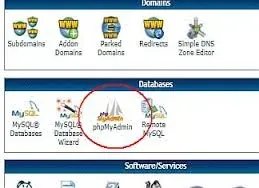
1. Open phpMyAdmin
Log in to your hosting control panel and click phpMyAdmin.
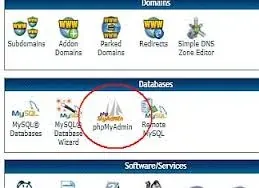
2. Select your database and open the SQL tab
Click your WordPress database in the left sidebar, then open the SQL tab.
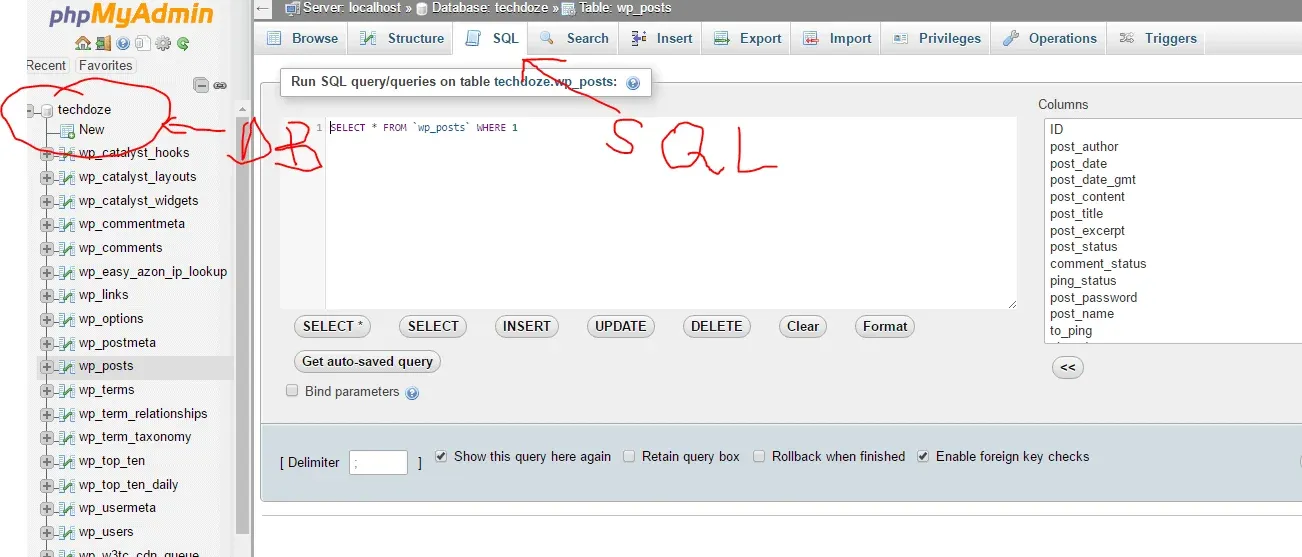
3. Run the query
Paste this SQL. It pulls the home URL from wp_options so you don’t hardcode your domain:
SELECT p.post_title,
       CONCAT((SELECT option_value FROM wp_options WHERE option_name = 'home'), '/', p.post_name)
FROM wp_posts p
WHERE p.post_status = 'publish' AND p.post_type = 'post';
If your table prefix isn’t wp_, adjust accordingly (check the left sidebar for the actual table name). On multisite, each site has its own tables (wp_2_posts, wp_3_posts, and so on), so query the right one.
Hit Go.
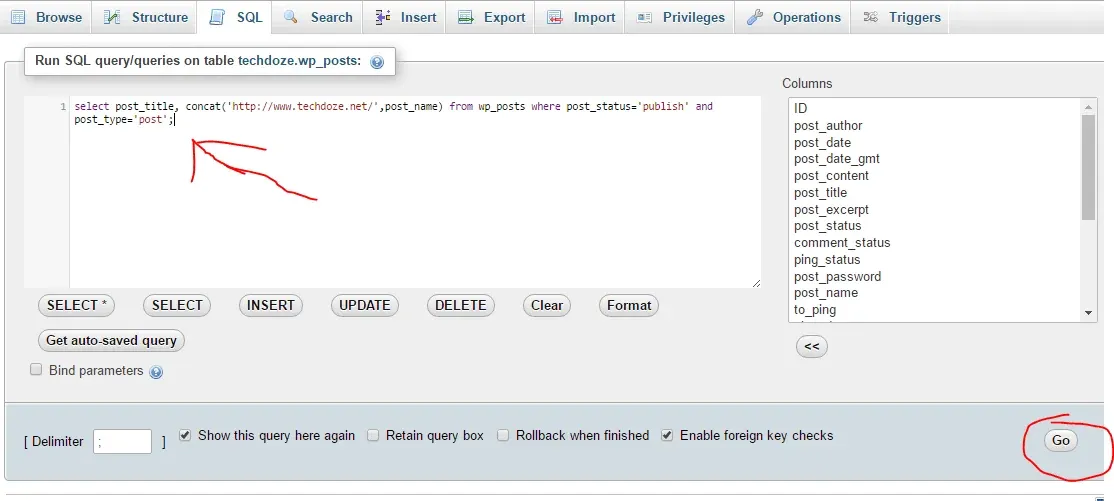
4. Export the results
A table of post titles and URLs appears. Click Export.
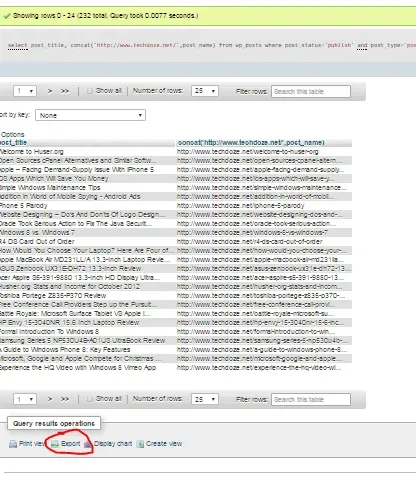
Choose your file format (CSV works well for spreadsheets), set the delimiter if needed, and hit Go.
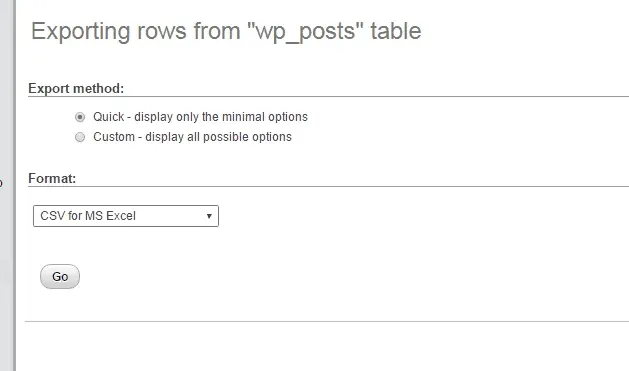
You’ll get a file with every published post title and its URL. To include pages or custom post types, change post_type = 'post' to post_type = 'page' or remove the post_type condition entirely to get everything.
For large sites, phpMyAdmin can hit PHP memory or time limits. Batch the query with LIMIT 1000 OFFSET 0, then LIMIT 1000 OFFSET 1000, and so on, or switch to WP-CLI or the plugin (which batches automatically).
The permalink-structure caveat (why exported URLs 404)
URLs are only exact with 'Post name' permalinks
The query above builds URLs as home + "/" + post_name. That’s only correct if your permalink structure is “Post name” (Settings → Permalinks). With date or category prefixes, every generated URL is a 404. If you need exact URLs for redirects, use WP-CLI’s url field, the REST API, or the sitemap instead.
The problem: post_name is only the last segment of a URL:
Real URL (date permalinks):
https://yourdomain.com/2024/03/my-post-slug
└───── home ─────┘└─yr─┘└mo┘└── post_name ──┘

SQL builds:
https://yourdomain.com/my-post-slug
└───── home ─────┘└── post_name ──┘  ← date segments missing → 404
The same applies to /%category%/%postname%/ structures, where the category segment disappears. And with “Plain” permalinks (?p=123) no pretty URL exists at all, so there’s nothing to export.
The home-option variant above fixes the scheme/domain problem (it won’t hardcode https:// or www.), but it still inherits the permalink-structure limitation. That’s the trade-off: SQL is fast but knows nothing about your rewrite rules.
Run the checks in Check your exported numbers before trusting the output.
Export WordPress post URLs with WP-CLI
If you have SSH access to your server (say, a Hetzner Cloud VPS), WP-CLI is the fastest path. It’s usually already installed on managed stacks; if your server runs WordPress on Ubuntu with CloudPanel, WP-CLI is one wget away. If you want to experiment safely first, install WordPress with Docker Compose and run the commands against a local copy.
Get full URLs with the url field (not guid)
wp post list --post_type=post --post_status=publish --fields=post_title,url --format=csv > posts.csvWP-CLI injects a url field computed by WordPress core’s get_permalink(). It’s permalink-structure-aware (respects /%year%/%postname%/, category bases, whatever you use) and domain/scheme-correct. This is the command I’d use for anything redirect-related.
Do not use guid in place of url. WordPress core is explicit about this: the GUID must not be used as a link. The get_the_guid() docs say the guid “will appear to be a link” but should not be used as one, because it breaks when you move the blog across domains. After a migration, guid still shows the old domain and scheme, so it is useless for building redirects. See the GUID trap below.
The post_name slug variant is still useful if you only need slugs (not full URLs):
wp post list --post_type=post --post_status=publish --fields=post_title,post_name --format=csv > posts.csvYou’d prepend your domain manually. Same permalink caveat as the SQL method.
Audit variant: IDs, dates, every post type
For a content audit, pull more fields:
wp post list --post_type=post --post_status=publish --fields=ID,post_title,post_date,url --format=csv > posts-audit.csvTo get everything, every status (drafts, pending, private, custom post types):
wp post list --post_type=any --post_status=any --fields=ID,post_title,post_status,post_type,url --format=csv > everything.csvDraft and private URLs may 404 for the public. Fine for an internal audit, wrong for a redirect map.
If you want the SQL output without opening phpMyAdmin, wp db query does it in one shot:
wp db query "SELECT post_title, post_name FROM wp_posts WHERE post_status='publish' AND post_type='post'" --csv > posts.csvVerify the count with wp post list --post_type=post --post_status=publish --count. It should match your exported row count. The WP-CLI post list documentation covers all available fields.
Export post URLs with the WordPress REST API (no plugin)
WordPress ships a public REST API (since 4.7) that returns permalink-accurate link values, computed by core the same way as get_permalink(). This works even on hosts that give you no SSH or database access.
curl -s 'https://yourdomain.com/wp-json/wp/v2/posts?per_page=100&_fields=link,title' | jq -r '.[] | [.title.rendered, .link] | @csv'This outputs CSV with title and URL. The title field is rendered HTML (title.rendered). Strip tags if your titles contain formatting, or use _fields=link for URLs only. For pages, swap in /wp/v2/pages. To discover custom post types, hit /wp/v2/types.
Paginate large sites
per_page accepts 1-100 (100 is the maximum). For sites with more than 100 posts, loop through pages:
curl -s 'https://yourdomain.com/wp-json/wp/v2/posts?per_page=100&page=2&_fields=link,title'The X-WP-Total and X-WP-TotalPages response headers tell you how many pages to fetch. A 10k-post site takes real minutes to loop through 100 pages, so don’t expect “one minute” here. See the REST API pagination documentation for details.
Some security plugins or hosts restrict or require authentication for /wp-json/. If you get a 401 or 404, the endpoint is blocked. Use another method. This isn’t a failure of your setup; it’s a deliberate hardening choice on that host.
Export all post URLs from the XML sitemap
The fastest answer for “just the URLs”: WordPress core has shipped XML sitemaps since 5.5 (2020). Open this in your browser:
https://yourdomain.com/wp-sitemap.xmlThat’s the sitemap index. Click through to the posts file (wp-sitemap-posts-post-1.xml) for your published post URLs. Sites with more than ~2,000 posts get chunked into multiple files (wp-sitemap-posts-post-2.xml, etc.).
To extract just the URLs from the XML:
curl -s 'https://yourdomain.com/wp-sitemap-posts-post-1.xml' | grep -o '<loc>[^<]*' | sed 's/<loc>//' > urls.txtSitemaps only include published, indexable content, which is what you want for redirect maps and SEO audits, but you won’t get titles or draft URLs. The WordPress core sitemaps announcement has the original design rationale if you want the details.
Export All URLs plugin
If you don’t want to touch SQL or the command line, the free Export All URLs plugin on wordpress.org does this through the WordPress admin. It’s been around since 2016 and has 50,000+ active installs. As of v6.0 (last updated October 2026, tested up to WordPress 7.1.4), it’s a solid pick.
Install it from Plugins → Add New, configure your filters (post type, status, date range, author), export, then deactivate it when you’re done. Keep it installed if you use the snapshot feature (more on that below).
What’s new in Export All URLs 6.0
Version 6.0 was a major rewrite. The useful additions:
- The URL column is a first-class export field, along with Category URLs, Tag URLs, Slug, Word Count, Excerpt, Featured Image URL, Comment Count, and Post Type.
- CSV and JSON output, or results as a paginated on-screen table.
- Batched exports, so large sites no longer hit timeouts and memory errors. This solves the phpMyAdmin large-site problem directly.
- Downloads stream to your browser, so nothing is left behind in
wp-content/uploads. Old export plugins were notorious for dropping world-readable CSVs there. - CSV formula-injection protection and hardened escaping/nonces. Worth a mention because this plugin had historical XSS issues patched in earlier versions.
- An “Exclude the domain from URLs” option, built for comparing pre/post-migration URL sets. Useful when you’re building a redirect map.
- Snapshots: fingerprint the site and diff two snapshots to see added, removed, or changed content. If you use this, keep the plugin installed instead of deactivating it.
- WPML and Polylang columns for Language and Translation URLs.
It’s free/GPL, no account, no API key. It runs on WP 3.6+ / PHP 5.4+ so it works anywhere WordPress does.
Check your exported numbers
Two minutes that prevent a broken redirect map
This step costs nothing and takes two minutes. Skipping it is how 404-ing redirect maps ship.
- Compare your exported row count against
wp post list –post_type=post –post_status=publish –count(WP-CLI) or the “All (N)” count in WP Admin → Posts. - Spot-check 2 or 3 URLs in the browser, including one with a date-based permalink if you use them (that’s where the SQL method silently breaks).
- Confirm the exported domain and scheme match the live site (
https://vshttp://,www.vs apex) before importing into a redirect tool. - Optionally, bulk-check the exported URLs with this URL checker script to find 404s before they reach production.
The redirect-map mini-workflow
If you’re building a 301 redirect map for a migration: export the URL list from the source site before cutover, normalize the scheme and www. prefix, import as a 301 map, then verify with curl -sI -o /dev/null -w '%{http_code}' on a sample. Back up the site first (free WordPress backup plugins cover this) before any bulk DB work or cutover. If you’re weighing a move off WordPress entirely, my Astro vs WordPress cost and ops comparison lays out the trade-offs.
Gotchas and why exported URLs break
Why do my exported URLs 404?
Two causes cover most cases:
Permalink structure mismatch. post_name is only the last URL segment. The SQL method builds home + "/" + post_name, which is only correct on “Post name” permalinks. With /%year%/%monthnum%/%postname%/ or /%category%/%postname%/, every URL is wrong. With “Plain” permalinks (?p=123) no pretty URL exists. Fix: use a permalink-accurate method (WP-CLI url, REST API link, or the sitemap), or match your structure manually.
Domain/scheme mismatch. Old exports might carry http:// or www. values baked in from a previous configuration. The SQL home-option variant helps here, but always confirm the exported domain matches the live site before importing.
The GUID trap after a migration
Never build redirects from the guid column
WordPress core says the GUID must not be used as a link. After a domain or HTTPS migration, stored GUIDs still show the old domain and scheme, which are exactly the wrong values for a redirect map.
The guid column in wp_posts stores a URL-looking value that WordPress uses as a unique identifier, not as a link. The get_the_guid() reference is clear: the guid should not be used as a link to the post, because of “moving the blog across domains.” After a migration, exporting guid gives you the old URLs, which is the opposite of what a post-migration audit needs. Use WP-CLI’s url field, the REST API link, or the sitemap instead.
Multisite, drafts, and custom post types
On multisite, each site has its own table prefix (wp_2_posts, wp_3_posts, and so on). Query or CLI the right site. Mixing them up gives you another site’s URLs.
Drafts, pending posts, and private posts have URLs that may 404 publicly. That is fine for an internal audit and wrong for a redirect map. Use --post_status=any (WP-CLI) or the plugin’s status filters for the audit case.
A post_type = 'post' filter misses custom post types entirely. Use --post_type=any (WP-CLI), the plugin’s post-type filter, or hit /wp/v2/types in the REST API to discover what’s registered.
FAQ
How do I export WordPress URLs without a plugin?
Two zero-dependency methods: the REST API (/wp-json/wp/v2/posts?_fields=link,title) or the core XML sitemap (/wp-sitemap.xml). Both are WordPress core features, so there is nothing to install and no SSH or database access needed. The REST API gives you titles and URLs; the sitemap gives URLs only. See the REST API section and the XML sitemap section for the commands.
Can I export pages and custom post types too?
Yes. In SQL, change post_type = 'post' to 'page' or remove the condition entirely. In WP-CLI, use --post_type=any to get everything or specify a single type. The Export All URLs plugin has a post-type filter dropdown. For REST API discovery of registered types, hit /wp/v2/types.
What's wrong with the guid column?
WordPress core says the GUID must not be used as a link. It stores the domain and scheme from when the post was first created, so after a domain migration or HTTPS switch, every guid value points to the old URL. Use WP-CLI’s url field (computed by get_permalink()), the REST API link, or the sitemap. All three respect your current permalink structure and domain.
Related Posts


Did this guide work for you?

Written by Dragos
Dragos is the author of Bitdoze — practical DevOps, programming, and self-hosting guides.
More guides from Dragos →Need help with Astro, VPS, or a self-hosted app? View services →