Sed Delete Lines: Advanced Techniques & Practical Examples
Master the sed delete line command: remove lines by number, pattern, and range, avoid GNU vs BSD pitfalls, and clean log files safely. Updated 2026 examples.

Updated Published 37 min read

The sed delete lines command (sed 'Nd') removes specific lines from text files in seconds. Delete a line by number, a range of lines, or any line matching a pattern. This guide covers every sed line-deletion technique, plus the GNU vs BSD sed gotchas and in-place editing traps that bite in production. Every command below was verified on GNU sed 4.9.
GNU sed vs BSD sed, and versions
All examples were verified on GNU sed 4.9, the version current Debian and Ubuntu stable ship. GNU sed 4.10 (April 2026) is the latest release: it fixes panics on lines longer than 2GB and a --follow-symlinks -i security race. macOS ships BSD sed, which has no ~ step addresses and different -i syntax:
- GNU sed:
sed -i.bak '...' file - BSD sed (macOS):
sed -i '.bak' '...' file(the backup suffix argument is required)
Run sed --version first. If it errors, you are on BSD sed. The in-place editing section below shows the portable temp-file approach that works everywhere.
What is sed and Why Use It for Line Deletion?
sed (Stream Editor) is a command-line utility for filtering and transforming text on Unix-like systems. It suits line deletion because it streams text line by line instead of loading whole files into memory.
Why it earns a place in your toolkit:
- Non-interactive: changes happen without opening an editor, which is what you want in scripts, cron jobs, and CI pipelines
- Flexible targeting: line numbers (
5d), ranges (10,20d), patterns (/error/d), or full regular expressions - Cheap on resources: constant memory regardless of file size, fast even on multi-GB logs
- Composable: plays well with pipes,
grep,awk, and redirects - Everywhere: available on virtually every Unix-like system
This guide is part of a four-part sed series:
- Delete lines using
dcommand (this guide) - Insert or append text with
iandacommands - Transform text case for standardization
- Search and replace text with pattern matching
Basic sed Syntax for Line Deletion
The structure combines an address (which lines to target) with the delete command (d).
sed 'ADDRESS d' filename- ADDRESS: specifies which lines to delete
- d: the delete command
- filename: target file (or stdin if omitted)
Addressing Methods
1. Line numbers:
sed '5d' file.txt          # Delete line 5
sed '1d' file.txt          # Delete first line
sed '$d' file.txt          # Delete last line
2. Line ranges:
sed '2,5d' file.txt        # Delete lines 2-5
sed '10,$d' file.txt       # Delete from line 10 to end
sed '1,3d' file.txt        # Delete first 3 lines
3. Pattern matching:
sed '/error/d' file.txt    # Delete lines containing "error"
sed '/^#/d' file.txt       # Delete lines starting with #
sed '/^$/d' file.txt       # Delete empty lines
4. Regular expressions:
sed '/^[0-9]/d' file.txt   # Delete lines starting with digits
sed '/\.log$/d' file.txt   # Delete lines ending with .log
Key Options
| Option | Function | Example |
|---|---|---|
-i |
Edit files in-place | GNU: sed -i '1d' file.txt / BSD: sed -i '' '1d' file.txt |
-i.bak |
Edit in-place with backup | GNU: sed -i.bak '1d' file.txt / BSD: sed -i '.bak' '1d' file.txt |
-n |
Suppress default output | Used with p command |
Before anything else, run sed --version. On GNU sed it prints the version (4.9 or 4.10 on current systems). On macOS it fails with an illegal option error, which tells you every GNU-only example in this guide needs the portable variant.
Execution Flow
sed operates in a simple cycle: read a line into the pattern space, apply commands, and output the result. The d command short-circuits that cycle: the line never reaches output and sed jumps straight to the next line.
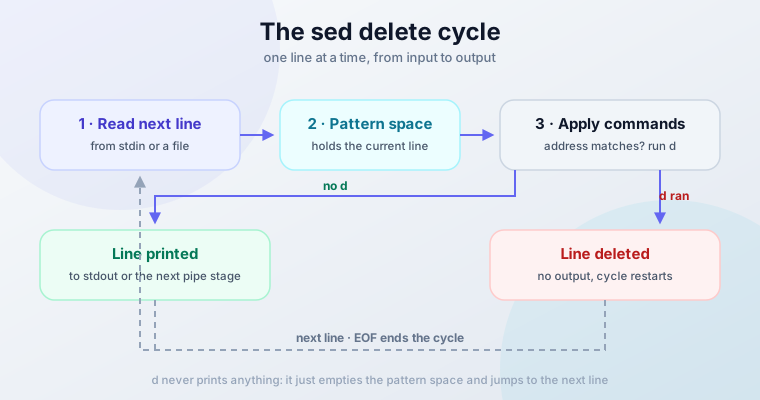
Because sed processes one line at a time, memory use stays constant no matter how big the file is. A multi-GB log gets the same treatment as a 10 KB config file.
Verify as you go: without -i, sed prints to stdout and touches nothing. That preview is your first safety check, and it’s free.
Deleting Specific Lines
sed targets specific lines through its addressing system.
Delete by Line Number
sed '2d' filename          # Delete line 2
sed '1d' filename          # Delete first line
sed '$d' filename          # Delete last line
Multiple specific lines:
sed '1d;3d;5d' filename    # Delete lines 1, 3, and 5
sed -e '2d' -e '5d' filename # Alternative syntax
Delete Line Ranges
sed '10,20d' filename      # Delete lines 10-20
sed '1,5d' filename        # Delete first 5 lines
sed '10,$d' filename       # Delete from line 10 to end
Practical examples:
sed '1d' config.txt        # Remove header line
sed '$d' data.txt          # Remove footer/last line
sed '2,4d' log.txt         # Remove lines 2-4
Delete the Last N Lines
sed has no $-2,$d syntax, so “delete the last 3 lines” needs a different tool or a trick:
head -n -3 file.txt                 # GNU coreutils head (Linux)
tac file.txt | sed '1,3d' | tac     # Portable: works on macOS/BSD too
head -n -3 prints everything except the last 3 lines, but negative counts are a GNU extension. The tac recipe reverses the file, deletes the (now) first 3 lines, and reverses it back. Both print to stdout, so redirect to a new file and compare before replacing the original.
Delete by Pattern Matching
Pattern-based deletion deserves its own section: see Pattern-Based Line Deletion with Regular Expressions below for the full treatment.
Safety and Testing
Preview changes first:
sed '2d' file.txt             # Shows output without modifying file
sed '2d' file.txt > new.txt   # Save to new file
In-place editing with backup:
# GNU sed (Linux)
sed -i.bak '2d' file.txt      # Creates file.txt.bak

# BSD sed (macOS)
sed -i '.bak' '2d' file.txt   # Creates file.txt.bak
The in-place section below covers the failure modes (-i is less innocent than it looks).
Test with line numbers:
nl file.txt | sed '2d' # Show line numbers to verify targetingPractical Use Cases
- Log cleaning:
sed '/DEBUG/d' app.log. If the logs live in Docker, redirect Docker logs to a single file first, then trim DEBUG and error lines with sed - Config files:
sed '/^#/d' nginx.conf - Data processing:
sed '1d' data.csv(remove CSV header) - Code cleanup:
sed '/^\/\//d' script.js(remove JS comments)
Pattern-Based Line Deletion with Regular Expressions
Pattern matching is where sed earns its keep: delete any line matching a pattern, not just lines at a fixed position.
Basic Pattern Matching
sed '/error/d' filename       # Delete lines containing "error"
sed '/warning/d' logfile.txt  # Delete lines with "warning"
sed '/DEBUG/d' app.log        # Delete debug messages
Matching is case-sensitive: /error/ does not match Error. See the case-insensitive section below for both the portable and the GNU shortcut.
Remove Empty Lines (Including CRLF Files)
The classic recipe:
sed '/^$/d' filename              # Delete empty lines
sed '/^[[:space:]]*$/d' filename  # Delete blank lines, including whitespace-only
Here’s the trap: if a file passed through Windows, “empty” lines often contain only a carriage return (\r). sed '/^$/d' will not delete those, because the line isn’t empty, it contains \r. The POSIX-class version catches them:
sed '/^[[:space:]]*$/d' win-file.txt # CRLF-safe: \r is in the POSIX space classGNU sed also accepts sed '/^\r$/d' for exactly the \r-only case, but that’s a GNU extension. Stick with the [:space:] class, it’s portable.
Verify what you’re dealing with: cat -A file.txt | head shows $ at line ends and ^M$ on CRLF lines.
Match Whole Words Only
Deleting every line containing err when you meant error is a bad afternoon. Word boundaries fix that, but the syntax differs between implementations:
GNU (Linux)
sed '/\berror\b/d' file.txt\b, \<, and \> all work as GNU extensions.
BSD (macOS)
sed '/[[:<:]]error[[:>:]]/d' file.txtBSD sed does not know \b but supports [[:<:]] and [[:>:]] as word-boundary brackets.
Portable anywhere
sed -E '/(^|[^[:alnum:]_])error([^[:alnum:]_]|$)/d' file.txtThis defines “word” as [A-Za-z0-9_] using only POSIX constructs. Verbose, but it runs unchanged on GNU, BSD, and other sed implementations. If you only care about whitespace boundaries, the shorter sed -E '/(^|[[:space:]])error([[:space:]]|$)/d' also works.
Case-Insensitive Deletion: /error/Id vs Portable
sed '/[Ee]rror/d' file.txt   # Portable: matches "Error" or "error"
sed '/error/Id' file.txt     # GNU only: cleaner, handles all casing
The I modifier after the pattern makes matching case-insensitive. GNU sed supports it; BSD sed does not. On macOS, either extend the bracket class (which gets ugly fast for full casing) or install GNU sed with brew install gnu-sed and use gsed.
Character Classes and Anchors
sed '/[0-9]/d' filename       # Delete lines containing any digit
sed '/[A-Z]/d' filename       # Delete lines with uppercase letters
sed '/^error/d' filename      # Delete lines starting with "error"
sed '/error$/d' filename      # Delete lines ending with "error"
Quantifiers:
sed '/[0-9]\{3\}/d' filename     # Delete lines with 3+ consecutive digits
sed '/^.\{80,\}/d' filename      # Delete lines longer than 80 chars
sed '/error.*critical/d' file    # "error" followed by "critical"
Comment Patterns
sed '/^#/d' config.txt            # Delete lines starting with #
sed '/^[[:space:]]*#/d' file.txt  # Delete comments with leading whitespace
sed '/^\/\//d' script.js          # Delete JavaScript comments
sed '/^\/\*/d' style.css          # Delete CSS comment starts
Complex Patterns
sed '/^[0-9]\{4\}-[0-9]\{2\}-[0-9]\{2\}/d' file.txt # Delete date lines (YYYY-MM-DD)Email-shaped lines: use -E and plain +:
sed -E '/^[a-zA-Z0-9._%+-]+@[a-zA-Z0-9.-]+\.[a-zA-Z]{2,}/d' file.txtYou’ll also see this written with \+ ([a-zA-Z0-9._%+-]\+@...). That’s a GNU BRE extension; the -E form is the portable one.
Negation: Keep Only Matching Lines
The ! inverts the address, so d deletes everything that does not match:
sed '/success/!d' filename    # Keep only lines with "success"
sed '/^#/!d' config.txt       # Keep only comment lines
sed '/error/!d' log.txt       # Keep only error lines
For keeping several log levels, use extended regex (portable) instead of BRE alternation (GNU-only):
sed -E '/INFO|WARN|ERROR/!d' log.txt   # Portable: keep only these levels
sed '/INFO\|WARN\|ERROR/!d' log.txt    # [GNU only] BRE \| alternation
Extended Regular Expressions
-E switches to ERE: no backslashes on +, ?, |, or groups. It’s portable across GNU and BSD; GNU also accepts the older -r alias.
sed -E '/^[0-9]{3}-[0-9]{3}-[0-9]{4}$/d' file.txt    # Delete phone numbers
sed -E '/^(http|https):/d' urls.txt                   # Delete HTTP URLs
sed -E '/^[A-Z]{2,}/d' file.txt                       # Lines starting with 2+ caps
Practical Examples
Log file cleanup:
sed '/INFO/d' app.log         # Remove info messages
sed '/^\[.*DEBUG.*\]/d' log   # Remove debug entries
sed '/^$/d' access.log        # Remove empty lines
Configuration files:
sed '/^#/d' nginx.conf        # Remove comments
sed '/^[[:space:]]*$/d' config.ini  # Remove blank lines
Data processing: if your source is a PDF, extract text from a PDF on the Linux command line with pdftotext, then pipe it through sed to strip blank and header lines before further processing:
pdftotext report.pdf - | sed -e '/^$/d' -e '/^Page [0-9]/d' > report.txtSafety and Testing
Preview what will be deleted:
grep 'pattern' filename | head    # See matching lines
sed -n '/pattern/p' filename      # Print matches without deleting
Check line numbers for context:
nl filename | sed '/pattern/d' | headCommon mistakes to avoid:
- Forgetting to escape special characters:
/./dmatches every non-empty line,/\./dmatches literal dots - Case sensitivity:
sed '/Error/d'misseserror. Use[Ee]rrorportably or/error/Ion GNU - Overly broad patterns:
/log/dalso killslogin,catalog,logger. Use word boundaries
Advanced Line Deletion Techniques
Beyond single-line matches, sed handles ranges, multi-line blocks, and decisions based on neighboring lines.
Range-Based Pattern Deletion
sed '/START/,/END/d' file.txt         # Delete from START to END markers
sed '/BEGIN/,/FINISH/d' config.txt    # Delete configuration blocks
sed '/<!--/,/-->/d' html.txt          # Delete HTML comments
sed '/ERROR/,10d' file.txt            # Delete from first ERROR to line 10
sed '5,/STOP/d' file.txt              # Delete from line 5 to first STOP after it
sed '/FOOTER/,$d' file.txt            # Delete from FOOTER to end
Ranges re-open, and unclosed ranges run to end of file
Two of these are easy to get wrong. Both are documented and verified on GNU sed:
1. Every later match of the start pattern re-opens the range. On a file with ERROR on lines 3 and 12, sed '/ERROR/,10d' deletes lines 3-10 and then line 12 on its own. The manual is explicit: if the second address is a number less than or equal to the line matching the first address, the range matches only that single line. So “delete the first ERROR block through line 10” silently deletes stray ERROR lines after it too.
2. An end pattern that never matches deletes through EOF. The end pattern is only checked after the range opens. If STOP appears before line 5, sed '5,/STOP/d' deletes line 5 to the end of the file. Same for sed '/<!--/,/-->/d' on an unclosed HTML comment: verified that it removes the rest of the file.
Sanity check before committing: run the range with p instead of d and count what it eats:
sed -n '/ERROR/,10p' file.txt | nl | headMulti-Line Pattern Deletion
sed '/^$/,/^$/d' file.txt             # Delete empty-line blocks
sed '/^function/,/^}/d' script.js     # Delete JavaScript functions
sed '/^def /,/^$/d' script.py         # Delete Python function definitions
More GNU Address Forms Worth Knowing
Three address forms that make surgical deletion easier. All are GNU extensions:
| Address | What it deletes | Verified example |
|---|---|---|
0,/re/d |
From line 1 through the first re, including a match on line 1 |
printf 'A\nB\nEND\nC\n' | sed '0,/END/d' → C |
5,+2d |
Line 5 plus the next 2 lines (5, 6, 7) | seq 8 | sed '5,+2d' → deletes 5, 6, 7 |
6,~4d |
From line 6 through the next multiple of 4 (6, 7, 8) | manual example |
The 0,/re/ form matters: with 1,/END/d, a match on line 1 ends the range at the second match instead, which is rarely what you want when stripping a leading banner.
Using Address Ranges with Steps
Delete every nth line:
sed '1~2d' file.txt                   # Delete every odd line (1st, 3rd, 5th...) [GNU only]
sed '2~3d' file.txt                   # Delete every 3rd line starting from line 2 [GNU only]
sed '0~5d' file.txt                   # Delete every 5th line [GNU only]
first~step is a GNU extension. On macOS it fails with sed: 1: '0~5d': invalid command code ~. For a portable nth-line delete, use awk: awk 'NR % 5 == 0 {next} {print}' file.txt.
Working with Hold and Pattern Space
sed has two buffers. The pattern space holds the current line (or several lines if you append with N). The hold space is a spare buffer you can copy to and from with h, H, g, G, and x. For deletion, multi-line techniques matter when the decision depends on adjacent lines or blocks.
The famous consecutive-duplicates one-liner:
sed '$!N; /^\(.*\)\n\1$/d' file.txt # Deletes duplicate pairs, NOT like uniqKnow what this does before using it: it joins each line with the next, and when they’re identical it deletes both. On input a\na\n the output is empty; on a\na\na\nb\nc\nc\n you get a and b, because the lone third a pairs with the b and both get printed. That’s usually not what people want from “dedup”.
For real duplicate removal, use uniq (it keeps one line of each run) or uniq -u (keeps only lines that never repeat). Sort first if duplicates might not be adjacent: sort file.txt | uniq.
Delete a Line Based on the Next Line
You’ll find this one-liner floating around:
sed '$!N; /error\n/d' file.txt # BROKEN: deletes nothing usefulIt doesn’t do what it claims. /error\n/ only matches when the first line of a joined pair ends in error, and then d removes both lines of that pair. On a realistic log (a1, ERROR, b1, c1), it deletes nothing. Verified.
Here are the two working patterns:
Delete a line containing ERROR plus the line after it:
sed '/ERROR/{N;d}' file.txtWhen a line matches ERROR, N appends the next line to the pattern space, and d deletes both. Verified: input a1, ERROR, b1, c1 → output a1, c1.
Delete a line only if the next line contains ERROR (a true lookahead). sed gets ugly here, and awk is honest about it:
awk 'NR>1 && $0 !~ /ERROR/ {print prev} {prev=$0} END {print prev}' file.txtVerified: input a1, ERROR, b1, c1, ERROR, d1 → output ERROR, b1, ERROR, d1 (the lines followed by ERROR are gone). awk keeps one line of lookahead in prev and only prints it once it knows the next line is safe.
Complex Multi-Command Operations
sed -e '/^#/d' -e '/^$/d' -e '/DEBUG/d' file.txt    # Remove comments, empty lines, debug
sed -f delete_script.sed file.txt                    # Or keep the logic in a script
Where delete_script.sed contains:
/^#/d
/^$/d
/DEBUG/d
Practical Advanced Examples
Clean log files:
sed -e '/DEBUG/d' -e '/^$/d' -e '/^\[.*\]$/d' app.logProcess configuration files:
sed -e '/^[[:space:]]*#/d' -e '/^[[:space:]]*$/d' nginx.confCode cleanup:
sed -e '/^$/d' -e '/^[[:space:]]*\/\//d' -e '/console\.log/d' script.jsAdvanced Safety Practices
Test complex commands step by step:
sed '/^#/d' file.txt | head -20                                  # Step 1
sed -e '/^#/d' -e '/^$/d' file.txt | head -20                    # Step 2
sed -e '/^#/d' -e '/^$/d' -e '/DEBUG/d' file.txt | head -20      # Step 3
Use intermediate files for layered operations:
sed '/START/,/END/d' file.txt > temp1.txt
sed '/ERROR/d' temp1.txt > temp2.txt
sed '/^$/d' temp2.txt > final.txt
Dated backups before risky in-place runs:
cp original.txt original.txt.backup.$(date +%Y%m%d-%H%M%S)
sed -i.bak 'complex_deletion_commands' original.txt
Untrusted input? GNU sed’s --sandbox disables the e, r, and w commands so a crafted file can’t make sed execute commands or write files:
sed --sandbox '/DEBUG/d' untrusted.log # [GNU only]GNU vs BSD sed: Portability Cheat Sheet
Half the sed one-liners on the internet are GNU-only, and they fail on macOS with confusing errors. This matrix maps each gap to a portable alternative:
| Feature | GNU sed (4.9 / 4.10) | BSD sed (macOS) | Portable alternative |
|---|---|---|---|
In-place -i with backup |
sed -i.bak '1d' f |
sed -i '.bak' '1d' f (suffix required) |
temp file + mv |
Step addresses first~step |
yes (1~2d) |
no: invalid command code ~ |
awk (NR % n) |
| alternation in BRE |
yes (GNU extension) | no | sed -E '/a|b/' (ERE pipe) |
\+ one-or-more in BRE |
yes | no | -E and plain + |
\b, \<, \> word boundaries |
yes | no | bracket-class trick or awk |
[[:<:]], [[:>:]] boundaries |
no | yes | bracket-class trick |
/I case-insensitive modifier |
yes | no | [Ee]rror character class |
0,/re/ address |
yes | no | 1,/re/ (ends at 2nd match) or awk |
addr,+N, addr,~N |
yes | no | awk |
-z (NUL-separated input) |
yes | no | awk with RS="\0" |
--sandbox, --follow-symlinks, --debug |
yes | no | manual pre-checks |
$ with multiple input files |
last line of last file (use -s for per-file) |
last line of each file | test with a two-file sample first |
--version |
prints version | errors: illegal option |
n/a |
Three habits that keep sed scripts portable:
1. Lint with --posix. Running sed --posix -f cleanup.sed file.txt makes GNU sed 4.10+ warn about backslash constructs that GNU accepts but other seds don’t. Cheap way to catch non-portable syntax before your script hits a macOS machine.
2. Pin the locale for machine-generated text. [A-Z] and [a-z] ranges follow locale collation, and in some locales unexpected characters fall inside a range. For logs and configs, prefix with LC_ALL=C:
LC_ALL=C sed '/^[A-Z]/d' app.logByte-wise matching is predictable, which is what you want for automated deletion.
3. Check the version in CI. Add sed --version || echo "BSD sed" to your pipeline’s debug output. Behavior differences (especially -i and $ across files) are much easier to debug when you know which sed ran.
One more edge: GNU sed preserves a missing final newline only while the last line survives. printf 'a\nb\nc' | sed '1d' outputs b\nc with no trailing newline (verified on 4.9). Delete that last line with $d instead, and the new final line gets a normal newline, so printf 'a\nb\nc' | sed '$d' outputs a\nb\n. If your pipeline hashes or diffs output byte-for-byte across platforms, test on the macOS version you run; BSD sed is widely reported to add newlines where GNU does not.
sed -i In-Place Editing: Gotchas That Bite in Production
-i looks like a convenience flag. It is a file-replacement operation, and it interacts badly with hard links, symlinks, and the -n flag.
What -i Does Under the Hood
GNU sed doesn’t edit the file. It writes the result to a temp file and renames it over your original. The filename stays, but the inode changes:
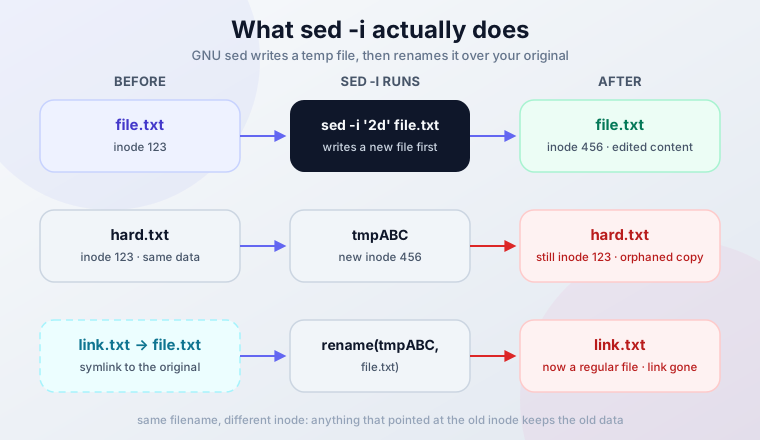
Hard links break silently. Verified behavior:
ln orig.txt hard.txt
sed -i '1d' orig.txt
ls -li orig.txt hard.txt
# Both now show link count 1. hard.txt still has the OLD content.
Symlinks get replaced by a regular file. Verified:
ln -s real.conf link.conf
sed -i '1d' link.conf
# link.conf is now a regular file with edited content.
# real.conf is untouched. The symlink is gone.
The GNU fix is --follow-symlinks, which edits the target in place and preserves the link:
sed -i --follow-symlinks '1d' link.confWorth knowing: --follow-symlinks -i had a time-of-check-to-time-of-use race that let an attacker swap the symlink between resolution and write, fixed in GNU sed 4.10. On multi-tenant boxes where users can write to your temp directories, that’s one more reason to know which sed version you’re running.
Multi-File Line Numbering and $
GNU sed counts lines continuously across all input files unless you pass -i or -s (in-place implies -s):
sed -n '2p' f1.txt f2.txt     # Prints line 2 OVERALL (from f1) only
sed -s -n '2p' f1.txt f2.txt  # Prints line 2 of EACH file
sed -s -i '$d' f1.txt f2.txt  # Deletes the last line of EACH file
Without -s, $d only hits the last line of the last file. BSD sed resets numbering per file by default, so the same command means different things on each platform. Verify with sed -s -n '$=' f1.txt f2.txt (prints each file’s line count) before trusting it.
sed -ni truncates your file to 0 bytes
This is the classic CI and Ansible data-loss bug:
sed -ni '/DEBUG/d' file.txt # file.txt is now 0 bytes-n suppresses output. -i writes whatever wasn’t printed back to the file. Nothing was printed, so the file becomes empty. Verified.
Make wc -c file.txt a reflex after any -i run. If you already did this to a file with a .bak, restore with mv file.txt.bak file.txt. No .bak? Restore from your backup system, this is not recoverable from the file itself.
Pre-Flight Checklist for In-Place Edits
- Preview without
-ifirst:sed '2d' file.txt | head - Always pass a backup suffix:
-i.bak, never bare-iin scripts - Check
ls -liwhen hard links or symlinks might be involved - Run
wc -c file.txtafter the edit to confirm the file isn’t empty - Keep the
.bakuntil you’ve diffed it against the result
The Right Way on Each Platform
GNU (Linux)
sed -i.bak '2d' file.txtCreates file.txt.bak alongside the edited file.
BSD (macOS)
sed -i '.bak' '2d' file.txtThe suffix is a mandatory argument on BSD sed. Leave it out and sed -i '2d' file.txt treats 2d as the backup suffix and file.txt as the script, which fails with invalid command code f.
Portable anywhere
sed '2d' file.txt > file.txt.new && mv file.txt.new file.txtNo -i at all: works identically on GNU, BSD, and everything else, and it’s atomic-ish when the temp file lands on the same filesystem. This is what I use in scripts that must run on both Linux and macOS.
Verify and Roll Back
diff file.txt.bak file.txt     # See exactly what was removed
mv file.txt.bak file.txt       # Roll back
The diff is the verification step: it should show only the lines you intended to delete, nothing else. For checking edits across a config tree, see how to compare two files or folders in the terminal. Keep the dated-backup habit (cp file.txt file.txt.$(date +%Y%m%d-%H%M%S)) for anything you can’t afford to lose.
Performance Considerations
sed is fast for a streaming editor, but pure line filtering is grep’s job, and the gap is wide.
Deleting every line containing DEBUG from a ~5 million line / 69 MB file, measured on one Linux box with GNU sed 4.9:
| Tool | Time | Relative |
|---|---|---|
grep -v DEBUG |
~4 ms | 1x |
sed '/DEBUG/d' |
~600 ms | ~150x slower |
awk '/DEBUG/{next} {print}' |
~1.1 s | slowest |
The absolute numbers depend on your hardware and I/O. The ordering doesn’t: grep -v was roughly two orders of magnitude faster because it does one thing, while sed carries its full addressing engine even when you don’t use it.
The decision rule:
| Job | Reach for |
|---|---|
| Remove lines matching a pattern, output to stdout | grep -v 'pattern' |
| Delete by line number, range, or multiple addresses; edit in place | sed |
| Field-aware logic, lookaheads, per-file counters | awk |
Huge single-line files
On GNU sed 4.9 and earlier, global operations on input lines longer than 2GB (minified JSON, one-line stack traces) hit a panic and sed exits with code 4. Fixed in GNU sed 4.10 (April 2026). If you process such files: check sed --version, or use grep -v/perl for the filtering, which don’t have the limit.
Conclusion
sed deletes lines by number, range, pattern, or any combination, streams files of any size with constant memory, and fits anywhere from one-off shell history to CI pipelines. The difference between a safe sed edit and a data-loss incident is usually one missing flag.
Key takeaways:
- Start simple: line numbers and basic patterns cover most daily needs
- Preview without
-ibefore every in-place edit, and diff the.bakbefore deleting it - Tag everything GNU-specific (
~,\|,\b,/I,0,/re/) and checksed --versionon any machine the script hasn’t met - Never combine
-nwith-i. That’s the 0-byte file trap - For pure filtering,
grep -vbeats sed by orders of magnitude
When to use alternatives:
- grep -v: pure pattern exclusion, fastest option for filtering
- awk: field-based processing, lookaheads, per-file line counting
- uniq / uniq -u: actual duplicate removal (the sed trick deletes both lines of a pair)
- A text editor: interactive deletion when you need visual confirmation
Master sed’s Complete Toolkit
The rest of the sed series:
- Insert or append text with
iandacommands - Transform text case for standardization
- Search and replace text with pattern matching
FAQ
Why is my file 0 bytes after sed?
Almost always sed -ni. The -n flag suppresses output and -i writes back only what was printed, so the file ends up empty. Restore from the .bak if you have one (mv file.txt.bak file.txt), otherwise from backups. See the in-place editing section for the full list of -i gotchas and the habit of running wc -c after edits.
Does sed work on minified one-line JSON?
For normal-size single lines, yes. But GNU sed 4.9 and earlier panic (exit code 4) on lines longer than 2GB during global operations, and minified files can get there. GNU sed 4.10 (April 2026) fixed it. For filtering one-line files, grep -v is both safe and ~150x faster anyway.
How do I test a sed delete safely?
Three steps. First, run the command without -i so it only prints to stdout. Second, pipe it through nl | head to check you’re targeting the right lines. Third, run it for real with -i.bak, then diff file.txt.bak file.txt to confirm the diff shows only your intended deletions. Delete the .bak only after that diff looks right.
Do hold space and multi-line tricks matter for deletion?
For adjacent-line decisions, yes: sed '/ERROR/{N;d}' deletes a line plus the next one, and the pattern space is what makes that work. The hold space only matters when state must survive across lines, which most deletion tasks don’t need. If a multi-line sed gets harder to reason about than the problem, awk is the honest tool.