Arcane vs Dockhand: Which Docker Manager Should You Choose?
A hands-on comparison of Arcane and Dockhand, two Docker management UIs. Licensing, features, security, and which one fits your setup in 2026.

Updated Published 17 min read
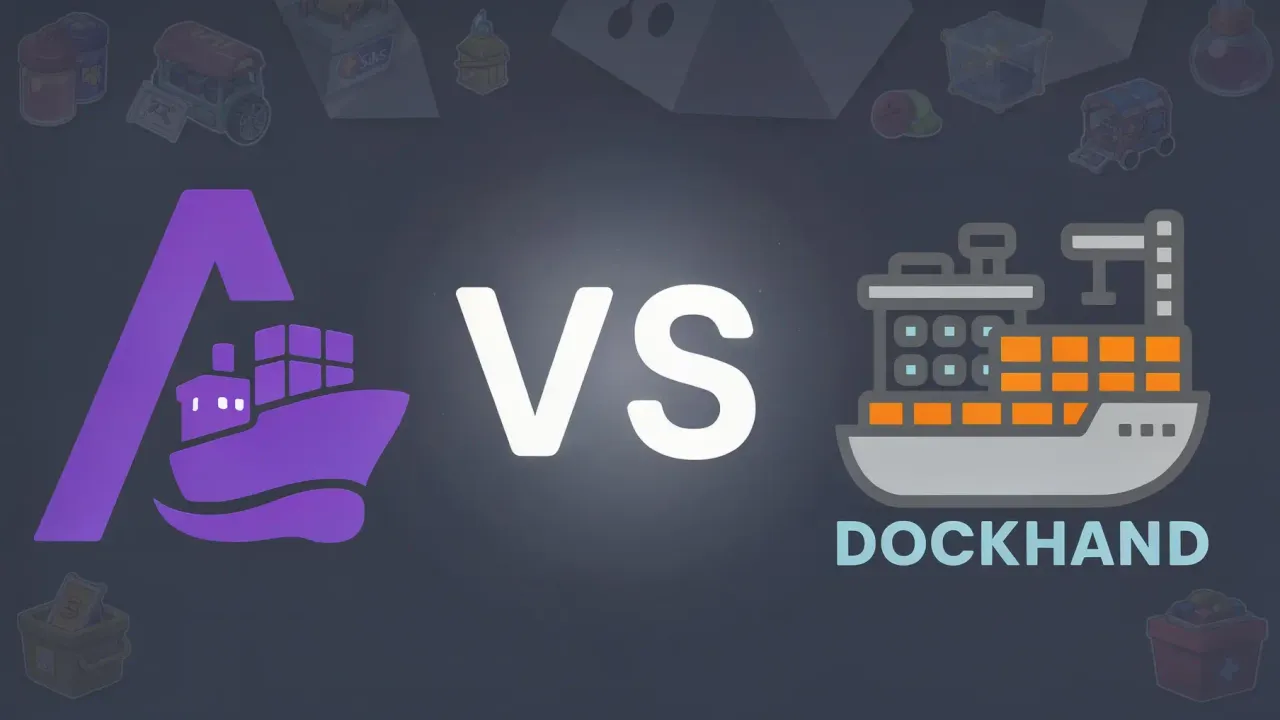
Managing Docker containers doesn’t have to mean Portainer. For years, Portainer was the only serious web UI for Docker, and it worked fine until the licensing changes started pushing people toward paid tiers for basic features. That opened the door for alternatives, and two of them have been getting real attention: Arcane and Dockhand.
I deployed both on the same VPS running a mix of compose stacks, and I still run Arcane on my own servers. This comparison comes from actually using them, not from reading feature lists. Both are solid, but they target different users and make different trade-offs that matter.
This article was re-checked on 2026-09-23. The earlier version claimed Arcane had no vulnerability scanning and no auto-updates. Both are wrong now: Arcane shipped Trivy scanning in v2.12.0 and tag-based container updates in v2.11.0. The gap that used to decide this comparison has narrowed, so the sections below were reworked.
Quick comparison
| Arcane | Dockhand | |
|---|---|---|
| License | BSD-3-Clause (fully open source) | BSL 1.1 (converts to Apache 2.0 in 2029) |
| Backend | Go | Bun + SvelteKit |
| Frontend | SvelteKit / TypeScript | SvelteKit 2 / Svelte 5 |
| GitHub stars | ~7.5k | ~6.3k |
| Repo created | April 2025 | December 2025 |
| Contributors | ~84 | ~35 |
| Commits | ~3,800 | ~470 |
| Releases | 100+ (v0.3.0 to v2.13.1) | 35 (v1.0.14 to v1.0.48) |
| Pricing | Free, always | Free (homelab), SMB $499/host/yr, Enterprise $1,499/host/yr |
| GitOps | Built-in | Git integration + webhooks |
| Vuln scanning | Trivy (since v2.12.0) | Grype/Trivy, safe-pull before swap |
| Auto-updates | Tag-based + scheduled | Scheduled with rollback on failure |
| Backups | S3, scheduled volumes, Git sync | restic, retention policies |
| SSO/OIDC | Yes, plus passkeys and MFA | Yes, free tier |
| RBAC | Access control built in | Enterprise tier |
| CLI tool | Yes | No |
| Multi-env agent | arcane-agent | Hawser (NAT traversal) |
Architecture
These two took very different paths under the hood.
Arcane
Arcane is written in Go. That matters because Go compiles to a single binary, so the whole thing runs lean. Memory footprint is small. The backend handles API requests, container management, and serves the SvelteKit frontend.
There’s a REST API you can hit directly, which is handy for scripting. Arcane also ships a CLI tool for people who want terminal access alongside the web UI.
For managing remote hosts, there are arcane-agent binaries for linux and darwin across amd64, arm64, armv7, and even riscv64. Agents connect back over an edge tunnel signed with ML-DSA-87 keys, and they can self-upgrade.
Dockhand
Dockhand runs on Bun (not Node) with SvelteKit handling both the API routes and the frontend. The database is SQLite by default, with PostgreSQL as an option if you need it.
What’s unusual is the OS layer. Dockhand builds its container image from scratch using Wolfi packages via apko. No base image with leftover packages you don’t need. The attack surface is smaller because of this.
For remote hosts, there’s Hawser, an agent that handles NAT and firewall traversal. You don’t need to open ports on the remote machine.
My take on architecture
Here’s what each UI looks like in practice:
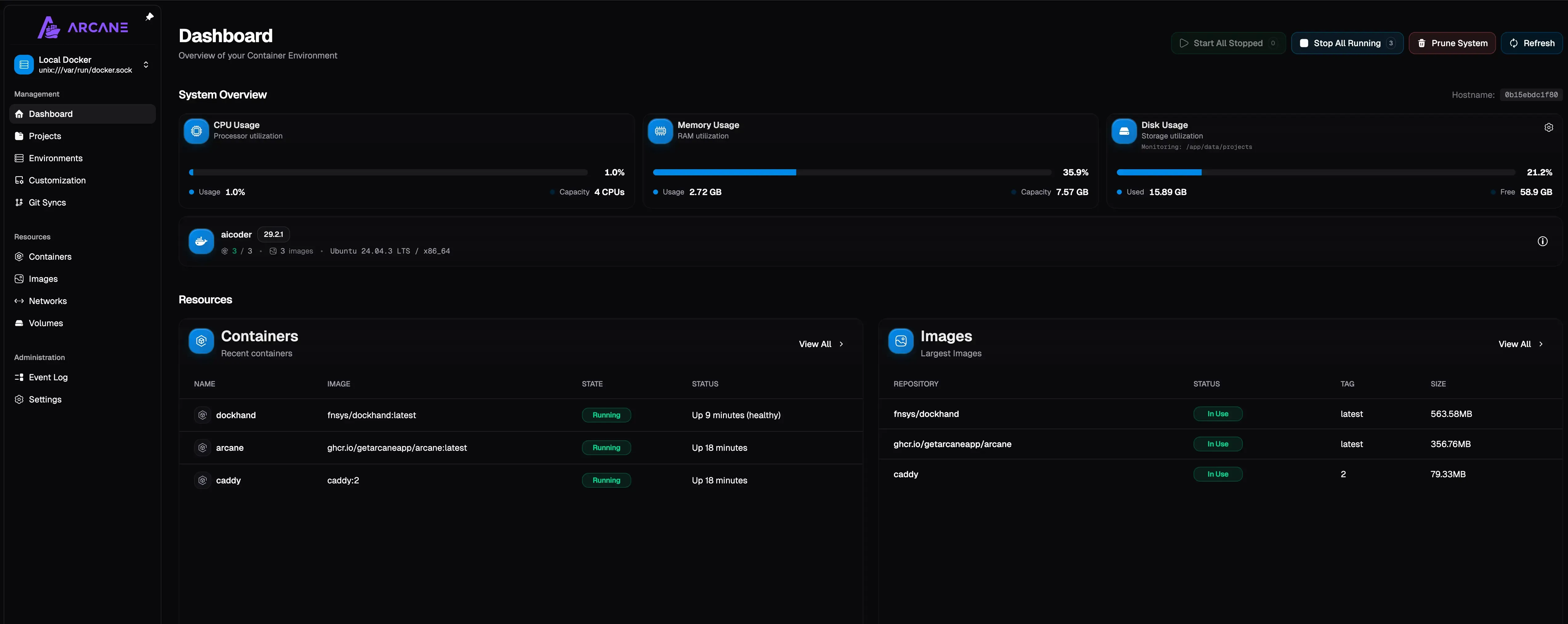
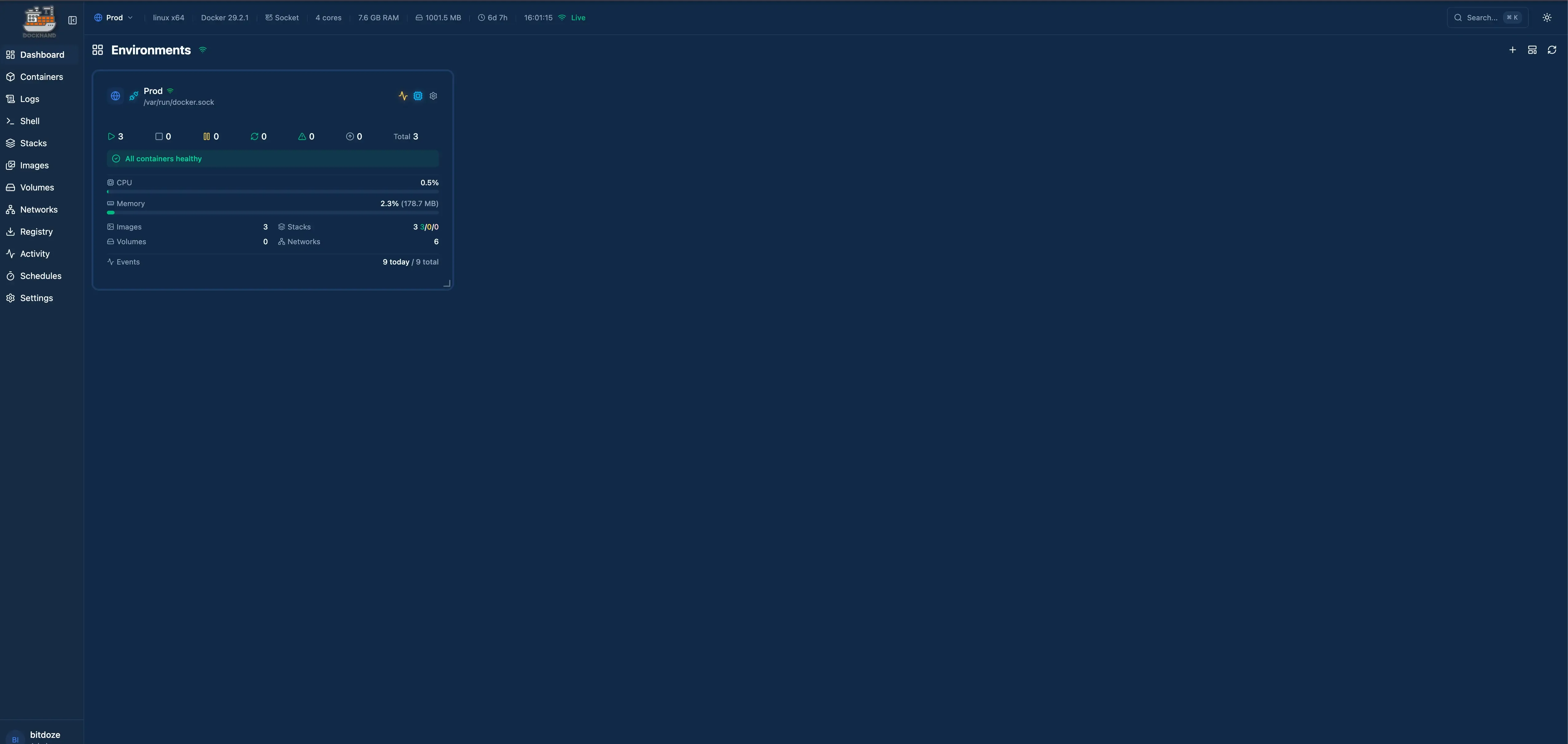
Arcane’s Go backend feels snappier for basic container operations. Page loads are fast, API responses come back quickly. Dockhand’s Bun-based stack is no slouch either, but you can feel the difference when clicking through lots of containers. It’s marginal, though. Both are faster than Portainer.
Licensing
This is where you really need to pay attention.
Licensing matters
Arcane is BSD-3-Clause. Fork it, modify it, use it commercially, sell it. No restrictions beyond keeping the copyright notice.
Dockhand uses BSL 1.1. You can use it freely for personal and internal business purposes. You cannot offer it as a commercial hosted service. The license converts to Apache 2.0 in 2029.
For most self-hosters, both licenses work fine. You’re running it on your own hardware for your own use. The BSL restriction on Dockhand only kicks in if you try to resell it as a service.
But if you’re building something on top of a Docker management UI, or you want to embed it in a product, Arcane gives you more freedom.
Features: where each one wins
Container and compose management
Both handle the basics well. You can start, stop, restart, and remove containers. You can view logs, inspect settings, and manage networks and volumes. Compose stack management works in both. You can deploy, update, and edit compose files from the web UI.
Where Arcane does it better
- The REST API is well-documented and easy to script against
- CLI tool gives you terminal access to everything the UI does
- GitOps is built in, not bolted on. Point it at a git repo and it syncs your stacks automatically
- “Back up to Git” mode syncs stack state to a repo
- “Convert to Compose” turns running containers into compose files
- Read-only Swarm access and an official mobile app
Where Dockhand does it better
- File browser inside containers. Browse the filesystem without exec-ing in
- Scheduled auto-updates with safe-pull protection (pulls new image, scans it, rolls back if it fails)
- Compose Validate linter runs preflight checks before you deploy
- Notifications via SMTP and Apprise, plus MQTT, Zabbix, Pushover, and Teams
docker loadsupport for air-gapped hosts- Prometheus /metrics endpoint for external monitoring
Security features
This used to be the easy part of the comparison: Dockhand had scanning, Arcane didn’t. Not anymore. Arcane v2.12.0 added Trivy scanning in the UI with per-image CVE counts, a “Fix available” filter, and CSV export, and v2.10.0 added Copacetic image patching for OS-level CVEs. Both tools scan now.
What still separates them:
- Dockhand scans before it swaps an image during auto-updates, with rollback if the new container fails. Arcane’s tag-based updates don’t gate on a scan result
- Dockhand plugs into external secret managers: 1Password, HashiCorp Vault, Infisical, Doppler, Bitwarden, Proton Pass, KeePassXC, Azure Key Vault
- Dockhand’s custom Wolfi-based OS layer means fewer packages, fewer CVEs, and it exports findings as SARIF
- Arcane signs sessions, OIDC flows, and edge mTLS with ML-DSA-87, which is post-quantum crypto. Unusual for this category
- Arcane has passkeys and MFA on the free tier. Dockhand has OIDC and MFA free, but LDAP and RBAC are Enterprise
- Zero telemetry on Dockhand. Arcane phones nothing home either
One more thing worth saying: these UIs are themselves attack surface. Dockhand v1.0.45 shipped as an “important security upgrade” with API hardenings, which is a reminder that whichever you pick, you keep it updated. For a homelab, the security gap between these two is now small. For a small business running production workloads, Dockhand’s scan-before-swap and secrets integration are still worth the trade-off of a more restrictive license.
GitOps and automation
Arcane's approach
GitOps is a first-class feature. You connect a git repository, and Arcane watches it for changes. When you push an updated compose file, Arcane pulls it and redeploys. There are lifecycle hooks for running tasks around deploys.
This works well if your workflow is already git-based. Push a change, see it deploy.
Dockhand's approach
Git integration exists but works differently. You connect repos and set up webhooks. When a push happens, Dockhand receives the webhook and acts on it.
The scheduled auto-update feature is separate and arguably more practical for most people. Set a schedule, and Dockhand checks for new images, scans them, pulls them, verifies they work, and rolls back if something breaks. I’ve had it catch a bad image update twice already.
Multi-environment management
Both let you manage containers on remote hosts, but the mechanisms differ.
Arcane uses arcane-agent, a lightweight binary you install on a remote machine. It connects back to your main instance over an mTLS edge tunnel and can upgrade itself. If you followed my older guides, this is what used to be called arcane-headless.
Dockhand uses Hawser, which has a trick up its sleeve: NAT traversal. If your remote machine is behind a firewall or NAT, Hawser can still connect without opening ports. That’s genuinely useful for managing machines in different networks.
Maturity and stability
The maturity story is different than it was in February.
| Metric | Arcane | Dockhand |
|---|---|---|
| Repo created | April 2025 | December 2025 |
| Total commits | ~3,800 | ~470 |
| Releases | 100+ | 35 |
| Contributors | ~84 | ~35 |
| Current version | v2.13.1 | v1.0.48 |
Two things stand out. First, the current Arcane repo is younger than people assume (the pre-rename history under ofkm/arcane is unconfirmed, so I’m counting from the repo that exists today), but it has shipped over a hundred releases since April 2025. Second, Dockhand went from 3 releases to 35 and from 7 to 35 contributors in seven months, roughly a release a week. Both projects move fast; Arcane has just had more runway.
Stability in practice
In my original three-week test back in February, Arcane didn’t crash once and Dockhand froze its UI once after a bulk container restart. Seven months and thirty-plus Dockhand releases later, that kind of rough edge is less representative. Arcane has been boring on my production servers since then, which is what you want.
Pricing
Arcane is free. No tiers, no paid features, no “community edition” with missing parts. BSD-3-Clause means you get everything.
Dockhand has a tiered model:
| Tier | Cost | What you get |
|---|---|---|
| Free | $0 | Full features for homelab use, including OIDC/SSO, MFA, scanning, backups, and external secrets |
| SMB | $499/host/year | Commercial support, priority updates |
| Enterprise | $1,499/host/year | RBAC, LDAP, audit logging, dedicated support |
The free tier is genuinely usable and wider than it used to be. OIDC/SSO, MFA, vulnerability scanning, restic backups, and the secrets-manager integrations are all included at $0, which is better than what Portainer offers. But if you need RBAC or LDAP, you’re paying enterprise prices.
Community and support
Arcane has the bigger community, but the gap is smaller than it was. Eighty-four contributors versus thirty-five, 7.5k stars versus 6.3k. Both repos were pushed to the day I checked.
Dockhand has picked up an ecosystem on its own: there’s a community MCP server that exposes 130+ API endpoints, a Home Assistant integration, and an iOS client, none of them official. When third parties start building against your API, that’s a good sign.
Both have active Discord/GitHub channels. Response times have been reasonable from both teams in my experience.
Installation
Both are Docker-based installs, which is appropriate for Docker management tools. I’ve written full install guides for both: install Arcane and install Dockhand.
Arcane
Create a compose.yaml:
services:
  arcane:
    image: ghcr.io/getarcaneapp/manager:latest
    container_name: arcane
    ports:
      - "3552:3552"
    volumes:
      - /var/run/docker.sock:/var/run/docker.sock
      - arcane-data:/app/data
      - /opt/docker:/opt/docker
    environment:
      - APP_URL=http://localhost:3552
      - PUID=1000
      - PGID=1000
      - ENCRYPTION_KEY=your-32-byte-encryption-key
    restart: unless-stopped
volumes:
  arcane-data:
Generate the key with:
openssl rand -hex 32Then docker compose up -d and open localhost:3552. Default login is arcane / arcane-admin. Two notes on things that changed: the image moved from getarcaneapp/arcane to getarcaneapp/manager, and JWT_SECRET is gone. Session tokens are now signed with an ML-DSA-87 key Arcane generates itself, so if you still have JWT_SECRET set, remove it.
One thing to watch: if you want Arcane to manage existing compose projects, mount the projects folder with matching paths inside and outside the container and set PROJECTS_DIRECTORY=/opt/docker. Relative paths in compose files break otherwise.
Dockhand
services:
  dockhand:
    image: fnsys/dockhand:v1.0.48
    ports:
      - "3000:3000"
    volumes:
      - /var/run/docker.sock:/var/run/docker.sock
      - dockhand_data:/app/data
    environment:
      - SECRET_KEY=change-this-to-something-random
volumes:
  dockhand_data:
Also quick. Dockhand asks you to set a secret key, which is good practice. First-run setup walks you through creating an admin account. Pin the version tag rather than running :latest.
Both require access to the Docker socket, which is standard for these tools. If that makes you uncomfortable, the better answer than a raw socket mount is a socket proxy in front of it. My Arcane install guide shows the tecnativa/docker-socket-proxy setup, and the same pattern applies to Dockhand or anything else that manages Docker.
Who should pick which
Pick Arcane if...
- You want something truly open source with no licensing concerns
- GitOps is part of your workflow
- You need a REST API or CLI tool
- You want the fastest release cadence in this category
- Budget is zero, including for RBAC-style access control and support
Pick Dockhand if...
- Scan-before-swap auto-updates with rollback are a requirement
- You manage hosts behind NATs and firewalls
- You already keep secrets in 1Password, Vault, Infisical, or similar
- You want the hardened Wolfi-based image and SARIF exports
- You’re okay with BSL 1.1 and a younger codebase
My honest take
The honest answer changed since February. Back then Dockhand’s security tooling was the reason to pick it, because Arcane didn’t scan at all. Now Arcane scans, patches with Copacetic, backs up to S3, and updates containers on tags, all while staying BSD-3-Clause and shipping a release roughly every week.
So: Arcane is still my default, and it’s what runs on my own servers. The case for Dockhand narrowed to the things Arcane doesn’t do: scan-before-swap rollbacks, LDAP (paid), external secret managers, and the restic backup setup. If any of those are hard requirements, Dockhand earns its license terms. If they’re not, Arcane is the easier recommendation.
And if you’re still shopping, the full Portainer alternatives comparison covers Sencho, Dockge, Komodo, and the rest of the field.
Related articles
- Best Portainer alternatives in 2026 - the full Docker management UI comparison
- Install Arcane - full Arcane setup guide with socket proxy and OIDC
- Install Dockhand - full Dockhand setup guide with vulnerability scanning and Hawser
- Install Dockge - another Docker management UI worth trying
- Best Docker containers for home server - what to run once you’ve picked a manager
- Best self-hosted panels - server management panels compared
- Podman vs Docker - the container engine comparison
- Docker auto-update with Tugtainer - keep containers updated automatically
- Server monitoring tools - monitoring your Docker host