
Deindexed from Bing and DuckDuckGo: How to Get Back In
Site deindexed from Bing and DuckDuckGo? Learn the exact Bing Webmaster Tools support ticket process, IndexNow setup, and checks that got this site reindexed.
Updated Published 20 min read
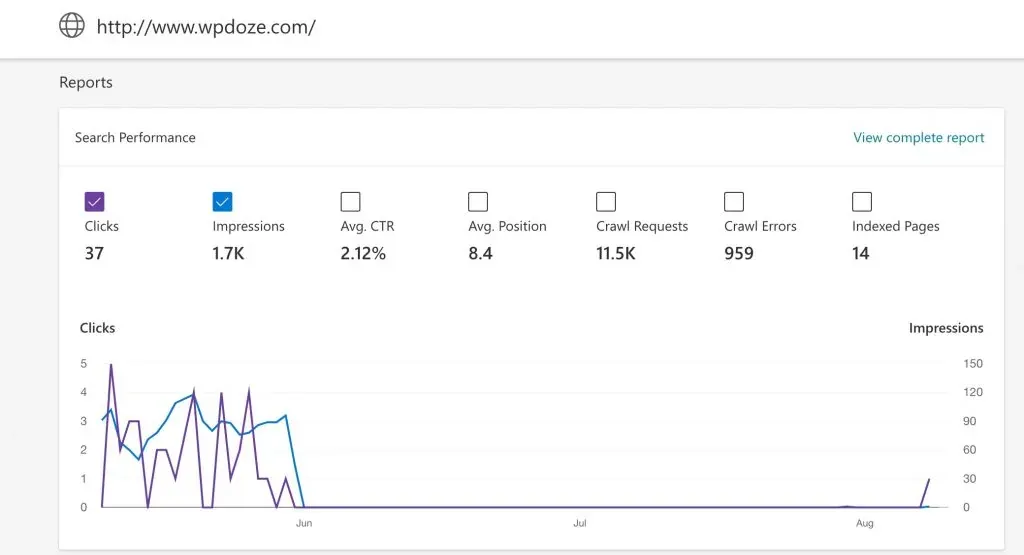
In June 2025 I found out wpdoze.com had been deindexed from Bing. Traffic from Bing and DuckDuckGo dropped to zero overnight while Google kept sending visitors as if nothing happened. Bing Webmaster Tools showed a deliberate manual exclusion, not a crawl error, not something I could fix in any report.
Being invisible in Bing now has a wider blast radius than it used to. DuckDuckGo results are largely sourced from Bing (plus its own DuckDuckBot crawler). Microsoft Copilot and Bing AI answers are grounded in Bing’s index. ChatGPT search is a separate problem: it runs its own crawler (OAI-SearchBot) and does not use Bing’s index, so a Bing fix will not restore ChatGPT citations.
Here’s exactly what I did to get the site back. Every step is free.
Is your site deindexed from Bing? Confirm it first
Before you open tickets or change anything, make sure you are actually deindexed and not just ranking lower. Two checks take five minutes.
- Run
site:yourdomain.comin Bing. If it returns zero results, the domain is out of the index. - Open Bing Webmaster Tools and inspect a known URL. A manual exclusion shows: “The inspected URL is known to Bing but has some issues which are preventing indexation.”
That message matters. “Known to Bing” means the crawler has seen the site. “Preventing indexation” means something or someone is keeping it out. This is not a crawl error. It is a deliberate exclusion.
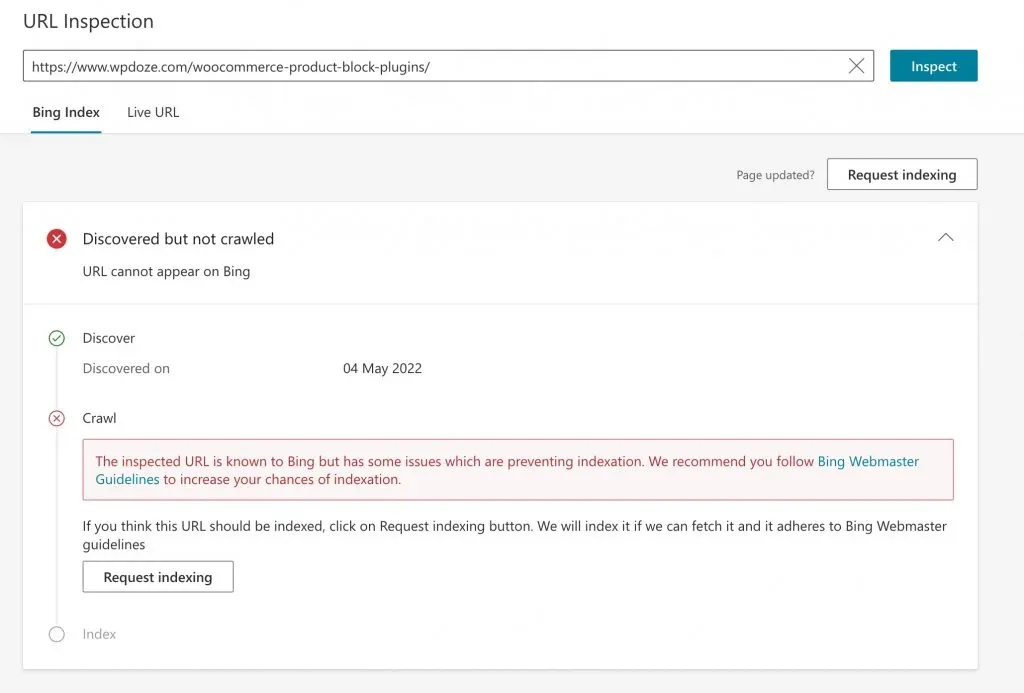
If site:yourdomain.com returns pages and URL inspection is clean, you have a different problem: a ranking drop, not a deindexation. Stop here and look at content quality and backlinks instead.
What doesn’t work: sitemaps, URL Submission, and IndexNow pings
The instinct when a site disappears is to resubmit everything. I tried that. I resubmitted the sitemap through RankMath, used Bing’s URL Submission tool (the quota-limited console feature for pushing individual URLs), and fired IndexNow pings directly. Nothing changed the next day. The site was known to Bing but excluded.
Resubmission does not lift a manual exclusion. IndexNow’s HTTP 200 response only means “received”, not “indexed” and certainly not “reincluded.” The protocol is a crawl-notification mechanism, not a reinclusion request.
HTTP 200 does not mean indexed
An IndexNow 200 response means Bing received your URL submission. 202 means key validation is pending. 400, 403, and 422 mean a host, key, or keyLocation mismatch. None of these mean the URL will be indexed or that a manual exclusion has been lifted.
Don’t burn days on sitemap resubmission. Go to the support ticket.
The fix: a Bing Webmaster Tools support ticket
The only documented escalation path out of a Bing manual exclusion is a support ticket through Bing Webmaster Tools. There is no public reinclusion request form. The ticket is it.
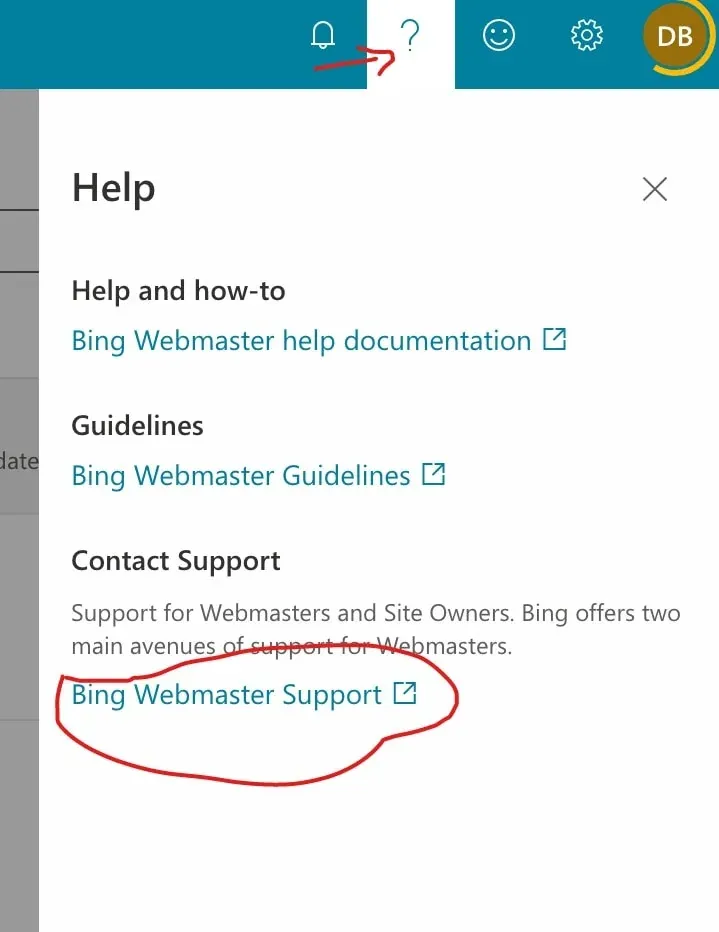
In Bing Webmaster Tools, click the ? icon and select “Bing Webmaster Support”:
Support ticket template
Keep it short and factual. Include the exact domain, the URL-inspection message, and the date traffic dropped:
Hello, My website yourdomain.com was deindexed from Bing. The website follows Bing’s webmaster guidelines and is available for indexing. Can you please investigate why it was removed? Thanks
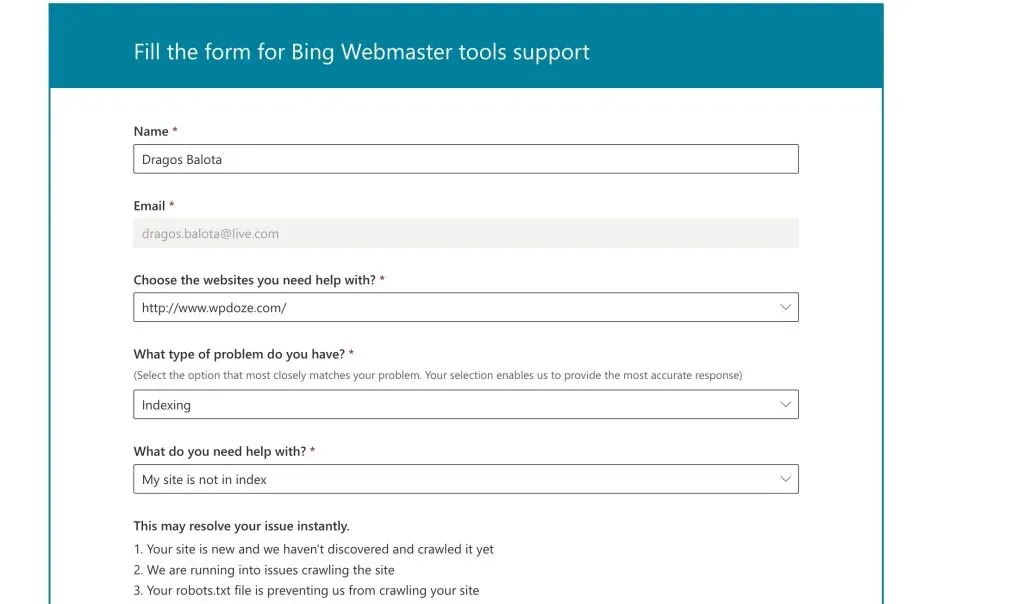
The Copilot assistant inside Bing Webmaster Tools (GA since March 2025) can help draft or sanity-check the wording, but it does not replace the ticket itself.
What to expect: 1 to 3 weeks
You’ll get an automated email confirming the ticket. Then wait. I submitted on July 25 and got a response on August 9, about 2 weeks. Microsoft confirmed the exclusion was a bug on their end and said it was resolved.
One data point, not an SLA
Expect 1 to 3 weeks. There is no paid fast lane or expedited reinclusion process. If you have not heard back in 3 weeks, follow up on the same ticket rather than opening a new one.
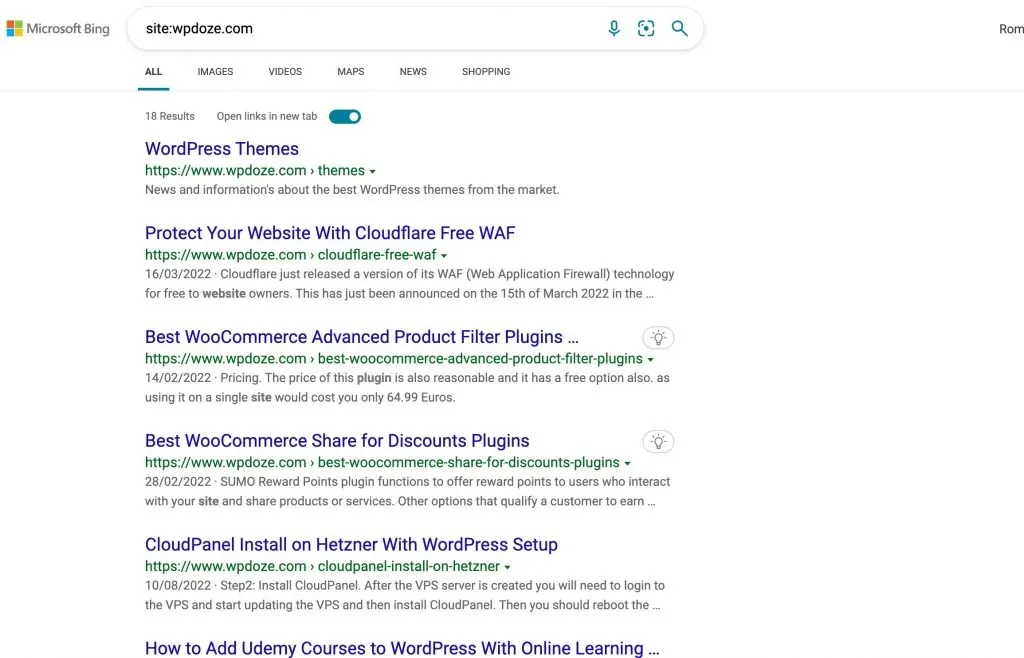
Microsoft recommended using IndexNow to speed up recrawling after the fix. After submitting all URLs via IndexNow, the site started appearing in Bing again:
Check these before you open a ticket
Since this happened to me, I’ve seen other cases where the deindexation turned out to be self-inflicted. Run these checks first so you don’t waste the ticket on a problem you can fix yourself.
robots.txt: bingbot, DuckDuckBot, and AI crawlers
Start with robots.txt. A common mistake is blocking user agents too broadly:
curl -sS https://yourdomain.com/robots.txt | grep -E "bingbot|OAI-SearchBot|GPTBot|DuckDuckBot"Also test from Bing’s perspective:
curl -A "bingbot" -sS -o /dev/null -w "%{http_code}\n" https://yourdomain.com/Misdiagnosis trap
If ChatGPT citations vanished but Bing traffic is fine, the problem is not a Bing deindexation. It is likely OAI-SearchBot being blocked in robots.txt or by an AI-firewall or CDN rule. OpenAI’s robots.txt refresh cycle is about 24 hours. This is a separate issue with a separate fix.
If you have rules meant to block AI crawlers, verify they are not accidentally blocking OAI-SearchBot or GPTBot. My guide on how to block AI crawlers covers the correct rules. The inverse problem (accidental over-blocking) is just as common as the one people set out to solve.
HTML validity
Bing’s crawl pipeline seems stricter about broken markup in practice. I could not verify an official policy behind this, but the pattern shows up across deindexation cases. Misplaced scripts, unclosed tags, and structural markup errors can cause indexing issues. Run your pages through the W3C Validator and fix any errors it reports.
For a quick sweep across the whole site, a bulk URL checker script helps find erroring or broken URLs before you escalate.
Server errors and duplicate content
Check your server logs for 5xx errors during Bing crawls. Intermittent server errors can trigger deindexation:
grep -c ' 5[0-9][0-9] ' /var/log/nginx/access.logIf you need ongoing visibility into 5xx errors, self-hosted uptime monitoring with Uptime Kuma catches intermittent failures that a one-time spot check will miss.
Duplicate content is the other trigger. If Bing detects a large amount of content that appears copied from other sites, it may drop the entire domain. This direction is supported by Bing’s December 2025 blog post on duplicate content and AI search visibility.
One more hygiene item: sitemap lastmod. Bing expects lastmod in ISO 8601 format with time (for example 2004-10-01T18:23:17+00:00) and wants it to reflect the actual last modification. If you stamp every URL with the build timestamp, Bing ignores the values and misprioritizes recrawl. Sitemaps are limited to 50,000 URLs per file, 50,000 children per sitemap index, and 2.5 billion URLs per index file (Bing blog, July 2025).
Does fixing Bing fix DuckDuckGo?
Mostly yes, but not instantly and not perfectly.
DuckDuckGo’s own help page says it “largely sources” traditional links and images from Bing. So when Bing reincludes your site, the bulk of DuckDuckGo visibility comes back with it. But DuckDuckGo also runs its own crawler, DuckDuckBot, user-agent DuckDuckBot/1.1, so some results come from DDG’s own index. Recovery follows Bing’s timeline with a lag. Don’t expect DuckDuckGo to mirror Bing the moment the ticket closes.
Speed up the recrawl with IndexNow
Once Microsoft confirms the exclusion is lifted, the next step is getting pages recrawled fast. Microsoft recommended IndexNow in my case, and it is the right tool for this.
IndexNow mechanics that matter
IndexNow is a crawl-notification protocol shared by several engines. Here is what matters operationally:
- Key file: a text file at your host root (for example
https://yourdomain.com/YOURKEY.txt) containing only the key. The key is 8 to 128 characters froma-z,A-Z,0-9, and dashes. - Batch limit: up to 10,000 URLs per POST in JSON format. HTTP and HTTPS URLs can be mixed in the same batch.
- Response codes: 200 means received (not indexed). 202 means key validation is pending. 400, 403, and 422 mean a host, key, or keyLocation mismatch.
- Participating engines: Bing, Naver, Seznam.cz, Yandex, and Yep. Google does not participate in IndexNow.
IndexNow will not help your Google traffic
Google does not accept IndexNow submissions. If your Google traffic also dropped, that is a separate investigation through Google Search Console.
Shopify and Milestone have been live with IndexNow since 2025, and Amazon began adopting the protocol in mid-June 2025. The ecosystem is real.
Single-URL ping:
# key file must already be at https://yourdomain.com/YOURKEY.txt containing YOURKEY
KEY="your-128-bit-hex-key"
curl -sS -o /dev/null -w "%{http_code}\n" \
  "https://api.indexnow.org/indexnow?url=https://yourdomain.com/&key=${KEY}"
Bulk submission (up to 10,000 URLs per request):
curl -sS -X POST "https://api.indexnow.org/indexnow" \
  -H "Content-Type: application/json; charset=utf-8" \
  -d '{
    "host": "yourdomain.com",
    "key": "your-128-bit-hex-key",
    "keyLocation": "https://yourdomain.com/your-128-bit-hex-key.txt",
    "urlList": ["https://yourdomain.com/", "https://yourdomain.com/post-slug/"]
  }'
If you need the URL list from a WordPress site, you can export all your WordPress post URLs and titles to build the batch. See the IndexNow documentation for the full protocol reference.
Verify your IndexNow submissions
Don’t assume the ping worked. Run the verification loop:
- Check the curl HTTP status code. 200 or 202 is good. 400, 403, or 422 means a host, key, or keyLocation mismatch.
- Open Bing Webmaster Tools, go to the IndexNow section, and confirm submitted-URL counts are increasing.
- Re-run
site:yourdomain.comover the next few days. Recrawl takes days, not hours. - Watch the BWT traffic chart for the recovery trend over the following week.
Common failure modes: a 200 response does not mean the URL is indexed. The key file must be reachable over HTTPS at the exact keyLocation URL you submit. Batches larger than 10,000 URLs will be rejected.
Automate it with Cloudflare Crawler Hints
If you use Cloudflare, you can automate IndexNow submissions through Crawler Hints.
Dashboard path changed
If you are following older guides that say “Speed > Optimization > Content,” that page no longer exists. The feature is now called Crawler Hints and lives under Caching > Configuration.
Enable it at: zone > Caching > Configuration > toggle Crawler Hints (direct link: dash.cloudflare.com/?to=/:account/:zone/caching/configuration). Cloudflare docs for this feature were last updated August 14, 2026.
How it works:
- Available on all plans, including Free.
- Zone-wide toggle. Crawler Hints uses cache-status MISS to detect likely-changed content and submits it to IndexNow automatically.
- Responses with an HTTP status code of 4xx or higher are never submitted, so broken URLs don’t get pushed to search engines.
- Per-page opt-out via the
X-Robots-Tag: noindexheader or<meta name="robots" content="noindex, nofollow">if a specific URL should not be pushed. - The toggle is zone-wide and instantly reversible. Nothing here is destructive.
Full reference: Cloudflare Crawler Hints docs.
After you’re back: monitor Bing and AI citations
Getting back in the index is step one. Confirming that traffic and AI citations actually recover is step two.
The recovery loop after Microsoft confirms the fix: submit all URLs via IndexNow and verify with the curl check plus BWT counts, re-run site:yourdomain.com over the following days, and watch the BWT traffic chart climb.
Then look at the newer Bing Webmaster Tools visibility reports:
- AI Performance (public preview, February 10, 2026): shows Total Citations, Average Cited Pages, grounding queries, and page-level citation counts across “Microsoft Copilot, AI-generated summaries in Bing, and select partner integrations.” This is the direct signal that AI citations have returned.
- Topics Portfolio (beta, October 13, 2026): thematic clusters of grounding queries with Top Opportunity Queries, useful for understanding what topics Bing’s AI surface associates with your site.
All of this lives inside the free Bing Webmaster Tools dashboard. For broader monitoring across GSC and GA4 alongside BWT, free SEO analytics dashboards like SEO Gets give you a single pane for tracking recovery.
Everything in this guide is free
Bing Webmaster Tools account: $0. Support ticket: $0. IndexNow protocol: $0. Cloudflare Crawler Hints on the Free plan: $0. The only cost is waiting 1 to 3 weeks.
FAQ
How long does it take to get back in Bing after a manual exclusion?
In my case it was about 2 weeks (ticket submitted July 25, response August 9). Expect 1 to 3 weeks. There is no paid fast lane or expedited reinclusion process. If you have not heard back in 3 weeks, follow up on the same ticket rather than opening a new one.
Does IndexNow work for Google?
No. Google does not participate in IndexNow. The protocol is supported by Bing, Naver, Seznam.cz, Yandex, and Yep. If your Google traffic dropped too, that is a separate problem. Investigate through Google Search Console.
Why was my site deindexed from Bing with no warning?
A manual exclusion can be a platform bug (as in my case, Microsoft confirmed it was their error) or a guideline issue (spam signals, cloaking, thin content). There is no notification either way. The support ticket is how you find out which one you are dealing with.
Will fixing Bing bring back DuckDuckGo and Copilot?
Mostly yes for both. DuckDuckGo results are largely sourced from Bing, so recovery follows with some lag. Copilot and Bing AI answers are grounded in Bing’s index. ChatGPT search is the exception. It uses its own OAI-SearchBot crawler, so you need to check robots.txt for that separately. A Bing fix does not restore ChatGPT citations.
Summary: Bing deindexation recovery checklist
- Confirm with
site:yourdomain.comin Bing and check the URL inspection message in Bing Webmaster Tools. - Triage robots.txt: make sure bingbot, DuckDuckBot, and OAI-SearchBot are not blocked, and that AI-firewall or CDN rules are not over-blocking.
- Fix HTML validity errors, 5xx server errors, duplicate content, and sitemap
lastmodhygiene before escalating. - Open a Bing Webmaster Tools support ticket. Do not waste days resubmitting sitemaps.
- Once resolved, submit all URLs via IndexNow and verify with the curl status check plus BWT IndexNow counts.
- Monitor AI Performance and Topics Portfolio in BWT to confirm that citations return.
Expect 1 to 3 weeks from ticket to resolution. There is no way to speed it up beyond opening the ticket and waiting. The total cost of the entire recovery process is $0.
Related Posts


Did this guide work for you?

Written by Dragos
Dragos is the author of Bitdoze — practical DevOps, programming, and self-hosting guides.
More guides from Dragos →Need help with Astro, VPS, or a self-hosted app? View services →