Clone Your Voice with Fish Audio in 2 Minutes (2026 Guide)
Clone your voice from 15 seconds of audio on Fish Audio's free tier. Step-by-step with recording tips, emotion tags, screenshots, and mistakes that ruined my…

Updated Published 8 min read
I clone my voice on Fish Audio for YouTube. First clean sample to working clone took about two minutes. The first attempt was trash because I recorded with a ceiling fan running. Here is the exact path that worked, plus what I would redo.
Try Fish Audio FreeWhat you need
- A Fish Audio account (free tier works)
- 10-15 seconds of clear audio of yourself speaking
- A quiet room (background noise hurts quality)
- A decent microphone (your laptop mic works, a USB mic is better)
Before you start
Fish Audio voice cloning is free on the free tier. You do not need a paid plan to clone your voice. The clone can speak in 83 languages once created.
Step 1: Record your voice sample
Record yourself reading a paragraph clearly for about 15 seconds. Here is what I used:
“The quick brown fox jumps over the lazy dog. I am recording this sample to create a voice clone that I can use for my video projects. Speaking naturally and clearly helps the AI capture my voice characteristics.”
Recording tips
Keep it clean. Record in a quiet room. Close windows, turn off fans, silence your phone. Background noise gets baked into the clone and makes it sound worse.
Speak naturally. Do not read in a monotone or try to sound like a news anchor. Talk like you normally would in a conversation. The clone will match your natural cadence, so give it your real voice.
Use a good microphone if you have one. A USB condenser mic like the Blue Yeti or Audio-Technica AT2020 produces cleaner results than a laptop microphone. That said, I tested with my laptop mic and the clone was still usable.
Aim for 15 seconds. Fish Audio needs at least 10 seconds, but 15 seconds gives the model more to work with. Do not record for five minutes thinking more is better. It is not. Short, clean samples produce better clones.
Avoid reading lists or numbers. Natural paragraph text works best. Lists and numbers have unusual prosody that can confuse the model.
Step 2: Upload to Fish Audio
- Go to Fish Audio and sign in
- Click on Voice in the left sidebar
- Click Create Voice or the + button
- Upload your audio file (MP3, WAV, or M4A)
- Add a name for your voice (I used “My Voice”)
- Add a description (optional, but helps you find it later)
- Click Create
The upload and processing takes about 30 seconds to 2 minutes. Fish Audio processes the audio, extracts your voice characteristics, and builds a model from it.
Step 3: Test your clone
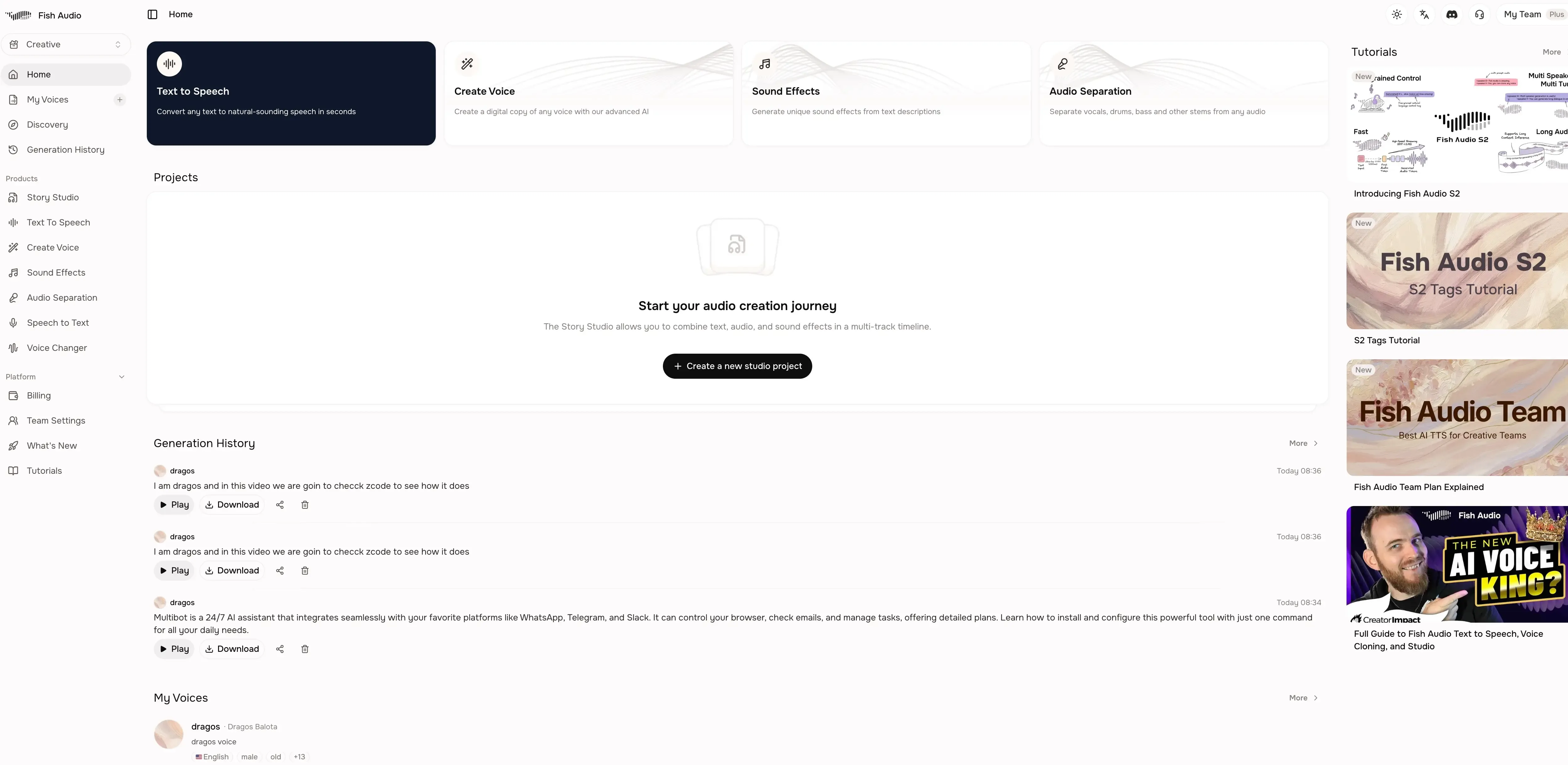
Once the clone is ready, go to the TTS generation page:
- Select your cloned voice from the voice dropdown
- Type a test sentence (something different from your recording)
- Click Generate
- Listen to the output
Test with a few different types of text:
- A normal sentence to check basic quality
- A question to check intonation rise
- A longer paragraph to check consistency
- Something emotional to check range
If the clone sounds off, re-record with a cleaner sample and try again. The quality of the input audio is the biggest factor in how good the clone sounds.
Step 4: Add emotion tags
Fish Audio’s emotion tags are what set it apart from other TTS tools. Once your clone is working, you can add tags to control delivery:
(excited)— upbeat, energetic(sad)— slower, lower pitch(whisper)— quiet, intimate(angry)— sharp, forceful(serious)— firm, measured(happy)— warm, positive
Place the tag at the start of the section you want to affect:
(excited) I just got the promotion I have been working toward for two years!
(serious) But I need to think carefully about whether to accept it.
(whisper) Between you and me, I already made up my mind.
Emotion tag tips
Do not overdo it. One or two tags per paragraph is enough. Too many tags make the output sound unnatural.
Place tags at natural break points. Put them at the start of sentences or clauses, not in the middle of a word.
Experiment. The same text with different tags produces very different results. Try a few variations before committing to a final version.
Combine with punctuation. Exclamation marks, ellipses, and question marks work with emotion tags to shape delivery.
Step 5: Generate and download
Once you are happy with the output:
- Click Generate to create the audio
- Listen to the full output
- If it sounds right, click Download to save as MP3 or WAV
- Import into your video editor, podcast tool, or project
You can generate as many variations as you want. Try different phrasings, different tag placements, and different texts until the output matches what you need.
How long does voice cloning take?
About 30 seconds to 2 minutes. Fish Audio processes your audio sample, extracts voice characteristics, and builds a model. The actual time depends on server load, but it is usually under two minutes.
Can I clone someone else's voice?
You should only clone voices you have permission to use. Fish Audio requires that you have the right to clone any voice you upload. Cloning someone else’s voice without consent may violate their terms of service and could have legal consequences.
Can I improve my clone after creating it?
You can create a new clone with a better audio sample. There is no way to “fine-tune” an existing clone. If the quality is not what you want, record a cleaner sample and create a new voice.
How many languages can my clone speak?
Fish Audio supports 83 languages. Your clone can generate speech in any of these languages. Quality varies by language. Major languages like English, Chinese, Japanese, French, and German work well. Less common languages may have some accent artifacts.
Is my voice data safe?
Fish Audio uses standard encryption for voice data. They do not claim perpetual rights over your voice (unlike some competitors). That said, read the terms of service before uploading sensitive audio. For commercial use, paid plans include proper licensing.
If a word keeps coming out wrong
Sometimes the clone is fine but one word gets mangled — a name, a brand, an acronym like SQL. The old fix was editing the script with phoneme tags every time. Fish Audio now has pronunciation dictionaries: define word-to-phoneme rules once in the web app (under Pronunciation Dictionary in the dashboard), publish a version, and it applies to every generation after that. English rules use CMU Arpabet, so Kubernetes becomes K UW2 B ER0 N EH1 T IY0 Z. Chinese and Japanese have their own phoneme formats. If you generate through the API, pass the published dictionary ID in the request, or send an inline dictionary for a one-off fix.
No mic? Use Voice Design instead
If recording a clean 15 seconds is the blocker, Voice Design builds a voice from a text description — age, accent, tone, pacing — in about 15 seconds, no audio required. It is free on the website during launch (normally 2,000 credits per generation). The result is a voice model you use exactly like a clone. It will not be your voice, which is the whole point of cloning, but for a character voice or a scratch narration track it is the faster path.
Common mistakes
Recording in a noisy room. Background noise, echo, and room reverb all get captured in the clone. Record in the quietest room you can find.
Speaking too slowly or unnaturally. If you read like a robot, your clone will sound like a robot. Speak the way you normally talk.
Using too many emotion tags. Two or three tags per paragraph is fine. Ten tags per paragraph makes the output sound choppy and unnatural.
Not testing enough. Generate several variations with different text before deciding the clone is good or bad. One bad output does not mean the clone is broken.
Expecting perfection. AI voice cloning is good, not perfect. The clone will sound like you on a good day, not exactly like you in every situation. For most content creation purposes, that is good enough.
What I would do differently
If I were starting over, I would:
- Record in a treated room or closet (less echo)
- Use my USB mic instead of the laptop mic
- Record a few different samples and test each one before picking the best
- Start with no emotion tags and add them gradually
The clone I have now works well for my YouTube videos. My wife could not tell the difference in a blind test, which is good enough for me. But the first attempt was not great because I recorded in a room with a ceiling fan running. Clean input matters.
Clone Your Voice FreeRelated articles
- Fish Audio review 2026 — pricing, free API, what is good and what is not
- Add voice cloning TTS to Mastra with Fish Audio — use your clone from a Mastra agent (
fish_ttstool) - Fish Audio vs ElevenLabs — if you are leaving ElevenLabs
- Fish Audio vs MiniMax comparison — another AI voice alternative
- Text-to-Speech with uv — run TTS locally from the command line
Lee en espanol: Resena Fish Audio | Fish Audio vs ElevenLabs | Clonar Tu Voz | Fish Audio vs MiniMax