
How to Use Hermes Agent with Free Models on the Nous Portal
Learn how to use Hermes Agent free models on the Nous Portal Free plan: current free-tier models, one-shot setup, VPS OAuth fixes, and free vs paid tiers.
Updated Published 17 min read
Hermes Agent free models on the Nous Portal used to mean chasing a rotating promotion with a countdown clock. That’s over. The Nous Portal now runs a standing Free plan with four no-cost models you can use indefinitely, and connecting your Hermes agent to them takes about five minutes. I’ve been running Hermes Agent on my VPS since the MIMO V2 Pro promotion days, and the setup has gotten simpler since then.
This guide covers the full path: creating a Free plan account, connecting Hermes on a VPS (including the headless OAuth headache), picking a :free model, verifying everything works, and deciding when the Free plan is enough versus when to spend $20/mo on Plus.
I recorded a walkthrough of the account creation, model configuration, Discord hookup, and the Hermes Workspace dashboard:
The portal UI has changed since recording
The video above was recorded during the earlier promotion era. The portal layout, model list, and account flow have changed since then. Use the steps in this article as the current reference and treat the video as a general orientation.
What you will learn
- What the Nous Portal Free plan gives you (and what it doesn’t)
- The current free models and how the
:freetag works - Creating a Free plan account on the Nous Research portal
- Connecting Hermes to the portal on a VPS, including headless OAuth
- Verifying the setup with
hermes portal info - Optional Discord hookup and the Hermes Workspace dashboard
- When to stay free vs when to upgrade to the $20/mo Plus plan
What the Nous Portal gives you now
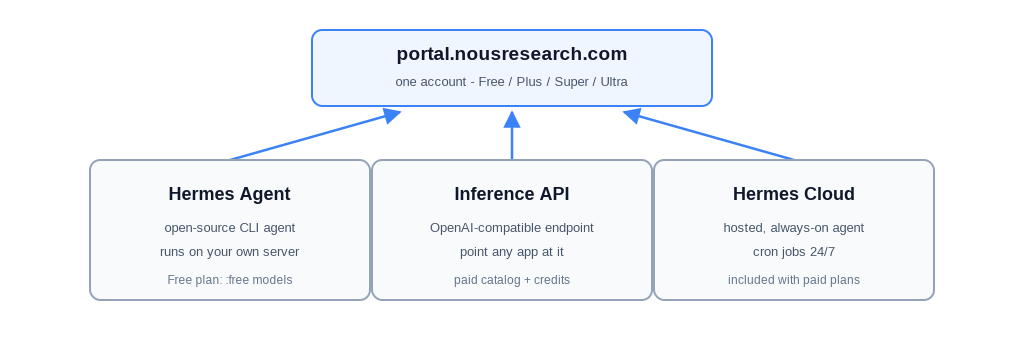
The Nous Portal used to be a model list with a free sample. Now it’s one account that covers three surfaces: Hermes Agent (the open-source CLI agent you run on your own server), the Inference API (an OpenAI-compatible endpoint you can point any app at), and Hermes Cloud (a hosted always-on agent included with paid plans). The portal’s tagline says it plainly: “one account for Hermes Agent, the Inference API, and Hermes Cloud.”
Here’s what’s behind that login:
- 300+ models in the catalog (351 listed on the models page as of November 2026), spanning Anthropic, Google, OpenAI, DeepSeek, and dozens of smaller labs.
- The Tool Gateway routes hosted tools through Nous: web search and extract, image generation (via FAL), text-to-speech (via OpenAI), cloud browser (via Browser Use), and a cloud terminal (via Modal, optional add-on).
- Hermes Cloud is a hosted, always-on agent that runs cron jobs 24/7. Included with paid plans.
- Portal MCP is a Model Context Protocol endpoint for connecting external tools.
- Subscription tiers run Free ($0), Plus ($20/mo), Super ($100/mo), Ultra ($200/mo).
There’s also a useful side door: ChatGPT plan sharing. If you have an eligible ChatGPT subscription, you can connect it to the Nous Portal for inference without paying for a Nous subscription. Tools and Hermes Cloud hosting are billed separately. Worth knowing if you’re already paying OpenAI.
The Free plan gives you access to the free models only. The paid catalog (Claude, GPT, Gemini, DeepSeek, and the rest) needs Plus included usage or credits, so “connect and get everything” is only true on paid tiers.
Current free models on the Nous Portal
As of November 2026, the Nous Portal lists four models under “Free Models” with a :free tag. These are the no-cost options on the Free plan:
| Display name | Model ID |
|---|---|
| LongCat-2.5:Free | meituan/longcat-2.5:free |
| StepFun: Step 3.7 Flash | stepfun/step-3.7-flash:free |
| Tencent: Hy4 flash | tencent/hy4-flash:free |
| Upstage: Solar Mini 4 | upstage/solar-mini4:free |
The selection rule matters: pick the exact :free variant (look for the “Free tier” badge in the model picker). That suffix is what maps to the no-cost plan. If you pick the non-free variant of the same model, you’re on the paid catalog.
One thing people confuse: the portal has an “Active Promos” section with discounted models (Hy4 at 50% off, for example). Those are paid models at a discount, not free. The :free tag is the only thing that means $0.
The free roster rotates
The free model list changes. Confirm the current set on the portal models page before you build a workflow around a specific model. The four listed above were live as of November 2026.
Step 3.7 Flash: the fast free default
If you want one recommendation for Hermes Agent, use Step 3.7 Flash (stepfun/step-3.7-flash:free). It’s the successor to Step 3.5 Flash (the model from the original version of this article), and it handles the usual Hermes workload well: code generation, web searches, file editing, multi-step tool use. It’s fast in practice, which matters when you’re driving an agent through a chain of tool calls.
The paid variant of Step 3.7 Flash lists at $0.20 input / $1.15 output per 1M tokens on the portal, so the free tier has real value. The other three free models are solid alternatives: Hy4 Flash if you want Tencent’s stack, Solar Mini 4 for lighter tasks, and LongCat-2.5 as the wildcard.
How Nous free offers work (rotating promos)
Nous runs rotating promotional partnerships on top of the standing free model list. Here’s the history so far:
- MiMo V2 Pro (Xiaomi) was free for about two weeks, ending before April 2026.
- Step 3.5 Flash was free for 10 days in April 2026. It was the original subject of this article.
- Nemotron 3 Ultra (NVIDIA) was free June 4-18, 2026, via a Nebius partnership.
The pattern: limited-time promos come and go, but the four :free models above are the standing no-cost list. Don’t build your workflow around a promo timer.
Prerequisites
You need Hermes Agent installed on a Linux VPS before any of this works. If you haven’t done that yet, the Hermes Agent setup guide covers installation, provider config, and messaging platform setup.
Affiliate disclosure
Some links below are affiliate links. They don’t change what I recommend or what you pay.
- A Linux VPS with SSH access (2 vCPU / 2 GB RAM is plenty; I run mine on Hetzner Cloud, a Hostinger VPS works as a budget alternative)
- Hermes Agent installed (v0.23.2 as of November 2026; install one-liner:
curl -fsSL https://hermes-agent.nousresearch.com/install.sh | bash) - A browser on your local machine (for the OAuth step)
- A Discord server if you want the optional Discord integration
The model cost for this entire guide is $0. Your only recurring spend is the VPS itself, which runs about $5-10/mo for the class of machine you need.
Hermes Setup / WorkspaceStep 1: Create a Nous Portal account (Free plan)
Go to the Nous Research Portal and sign up. The current flow:
- Create an account at portal.nousresearch.com/manage-subscription
- Pick the Free plan ($0)
- You’re done
That’s it. No credit card, no trial timer. The Free plan gives you access to the :free models with standard rate limits.
Free plan = free models only
On the Free plan you get the four :free models. The paid catalog (Claude, GPT, Gemini, etc.) requires a Plus subscription or purchased credits. This is the one semantic that trips people up from the old “every model after auth” wording.
The billing dashboard shows your token usage once you start chatting. As a historical data point, I burned through about 11 million input tokens in my first few days of testing during the earlier promotion era, all free. The Free plan’s standing models don’t have a trial expiration.
To re-open the subscription page later: hermes portal open.
Verify: log into the portal dashboard and confirm your plan shows “Free.” Once you start chatting through Hermes, the usage page will show token counts.
Step 2: Connect Hermes to the Nous Portal
There are two paths depending on whether you’re setting up fresh or connecting an existing install.
Fresh install
If you’re starting from scratch (or just installed Hermes), use the one-shot setup:
hermes setup --portalThis walks you through OAuth, model selection, provider config, and Tool Gateway in a single flow. When it’s done, your ~/.hermes/config.yaml looks like this:
# ~/.hermes/config.yaml
model:
  provider: nous
  default: stepfun/step-3.7-flash:free   # or whatever you picked
  base_url: https://inference-api.nousresearch.com/v1
The base_url points to the Nous Inference API. That’s all you need.
Existing install
If Hermes is already running with another provider, run:
hermes modelPick Nous Portal from the provider list. The first time, Hermes prints a URL. Paste it into your browser, authorize the device, and the models your plan covers become available (the :free models on Free, the paid catalog if you upgrade).
The hermes model flow is still documented in the official docs and works fine on current v0.23.x. If you prefer the one-shot path, hermes setup --portal works on existing installs too.
One credential, no API keys in .env
The portal integration stores a single refresh token in ~/.hermes/auth.json. Hermes mints short-lived JWTs per request. You won’t have a .env file full of API keys to manage or leak. This matters for blast radius, which we’ll cover in the troubleshooting section.
Headless VPS OAuth: SSH port forwarding and device codes
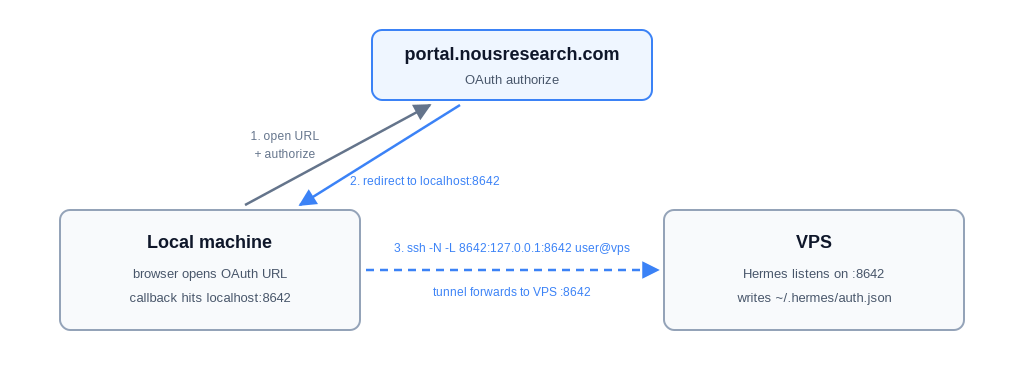
This is the failure mode that catches everyone running Hermes on a VPS. When Hermes prints the OAuth URL, it expects a callback to localhost:8642 on the machine where Hermes is running. On a VPS, that’s not your laptop. Here are the two official fixes:
SSH port forwarding (preferred)
From your local machine (not the VPS), open a tunnel:
ssh -N -L 8642:127.0.0.1:8642 user@remote-hostLeave that terminal running. Now on the VPS:
hermes setup --portalOpen the printed URL in your local browser. The OAuth callback hits your laptop’s port 8642, which is tunneled to the VPS. Authorization completes.
Note: if you use ProxyJump, mosh, tmux, or SSH ControlMaster, the tunnel may behave differently. The official docs have a dedicated OAuth over SSH / Remote Hosts page covering these gotchas.
Device-code login
For environments where SSH forwarding isn’t practical (Cloud Shell, Codespaces, EC2 Instance Connect), use the device-code flow:
hermes auth add nous --type oauthThen re-run hermes setup --portal. Hermes will show a device code to enter in your browser. Note that hermes portal (bare command) is an alias for hermes auth add nous --type oauth.
The whole flow looks like this: your local browser connects through an SSH tunnel to port 8642 on the VPS, where Hermes is waiting for the OAuth callback from portal.nousresearch.com.
Step 3: Select a free model
After auth, you pick your model. The model catalog is a remote manifest with search. Free variants are marked with the :free tag or “Free tier” badge.
Three ways to select:
# Option 1: Catalog picker (after auth or via hermes model)
hermes model

# Option 2: In-session picker (arrow keys or direct ID)
/model
/model stepfun/step-3.7-flash:free

# Option 3: Set directly in config
hermes config set model.default stepfun/step-3.7-flash:free
My default recommendation is Step 3.7 Flash (see the section above). Pick the exact :free variant, not the paid one with the same base name.
Verify: the selection is saved. Quick check in the next step.
Step 4: Verify with hermes portal info
The official docs have a real verification command. Use it:
hermes portal info(That’s an alias for hermes portal status.)
Expected output:
Nous Portal
───────────
Auth:    ✓ logged in
Portal:  https://portal.nousresearch.com
Model:   ✓ using Nous as inference provider
Tool Gateway
────────────
Web search & extract  via Nous Portal
Image generation      via Nous Portal
Text-to-speech        via Nous Portal
Browser automation    via Nous Portal
For per-tool routing detail (which tool goes through Nous vs a local provider):
hermes portal toolsAll checks green
If auth shows ✓ and the model line says “using Nous as inference provider,” you’re connected to the Nous Portal and running on free models. The Tool Gateway lines show which hosted tools route through Nous.
Final human check: start a chat and look for the model name in the response.
hermesThe model name appears in the reply, so you can confirm which model is active.
Troubleshooting and rollback
Three things that go wrong and how to fix them:
1. hermes portal info shows “not logged in”
The OAuth flow didn’t complete. Re-run hermes portal to restart the auth. On a headless VPS, use the SSH port forwarding or device-code path from Step 2. The callback has to reach port 8642 on the machine where Hermes runs.
2. “Model: currently openrouter” (provider drift) Hermes fell back to another provider. Fix it:
hermes config set model.provider nousThen re-check with hermes portal info.
3. Rate limit on a free model
Free plan models have “Standard” rate limits (the portal’s tier table doesn’t publish exact numbers). If you hit one, the response will surface an error or slow down. Your options: switch to another :free model (/model in-session), wait it out, or add credits. The four free models have independent limits, so rotating between them helps.
Rate limit specifics
I haven’t found published rate-limit numbers for the Free plan. The tiers say “Standard” vs “High” but no requests-per-minute figures. If you’re driving a heavy automation workload, test with your actual usage pattern before relying on it.
Rollback / blast radius: the whole Portal integration is one credential in ~/.hermes/auth.json. To kill it: revoke the token in the portal dashboard, then remove the file:
rm ~/.hermes/auth.jsonProvider drift is one hermes config set to reverse. Small blast radius. You can try this tonight without worrying about breaking anything permanent. If Hermes itself gets into a bad state, the Hermes Agent setup guide has the reinstall path.
Step 5: Link Hermes to Discord (optional)
I linked my Hermes agent to a Discord channel so I can message it without SSH-ing into the server. The Hermes Agent setup guide has the full walkthrough. Short version:
- Create a bot in the Discord Developer Portal
- Add the bot token to your Hermes config
- Invite the bot to your server
Messages in the linked channel go through Hermes and get answered by whichever model you selected. The model name shows up in the replies.
Hermes now supports 21+ messaging platforms (19 native, plus IRC and Teams via plugins), so Discord is just the default pick. If you want mobile access beyond Discord, there are ways to control your AI agent from your phone.
Hermes Workspace dashboard
Hermes Workspace is a third-party Docker-based web UI for managing your agent. It calls itself “your AI agent’s command center” and has 5,500+ GitHub stars. I run it on the same VPS as Hermes.
Install:
curl -fsSL https://hermes-workspace.com/install.sh | bashThe installer detects Node 22+, Python 3.11+, and pnpm, installs hermes-agent from PyPI, clones the workspace, and configures .env. It’s re-runnable if something gets tangled.
Run it (two daemons):
hermes gateway run          # Project Agent on :8642
cd ~/hermes-workspace && pnpm dev   # Web UI on :3000
Or use pnpm start:all to launch both.
What you get: browser-based chat sessions, memory viewer, skills management, scheduled jobs, a terminal, a file browser, and a dashboard page with session counts and token tracking.
Secure it before exposing to the internet
If the workspace is reachable from outside your VPS, put it behind a reverse proxy with authentication or set a password. Don’t leave port 3000 open to the world. For a full hardening walkthrough, see the Hermes dashboard guide.
If you want to browse dashboard options beyond Hermes Workspace, the best Hermes dashboards roundup covers the alternatives. And if you want task boards for multi-agent workflows, the Hermes Kanban setup guide covers that.
For official alternatives: Hermes Desktop is a local GUI app (macOS 12+, Windows 10/11) where you click Nous Portal, pick the Free plan, authorize, and select a :free model, all without touching a terminal. Hermes Cloud is a hosted always-on agent included with paid plans. There’s also a Subscription Proxy feature that turns your portal subscription into an OpenAI-compatible endpoint for other apps.
What should you know about free plan vs $20 Plus: when to upgrade?
Here’s the free vs paid breakdown as published on the portal (November 2026):
| Tier | Price | Models | Notable |
|---|---|---|---|
| Free | $0 | Free models only | Standard rate limits; $0 monthly credits |
| Plus | $20/mo | Any model | Included usage (daily/weekly/monthly resets), Tool Gateway, Cloud agent 4 GB / 25 GB |
| Super | $100/mo | Any | 5x Plus usage, Cloud 4 GB / 100 GB |
| Ultra | $200/mo | Any | 10x Plus usage, Cloud 8 GB / 100 GB |
Top-ups run $10 to $200 via Stripe. Important detail: API keys always burn credits (pay-as-you-go), not included usage. If you use the API directly with a key, you’re on the meter regardless of plan.
The $0 path
Free plan = $0 to run a VPS Hermes 24/7 on four free models. The moment you want Claude/GPT-class models or the hosted tools, Plus at $20/mo is the entry point. That’s the deal.
ChatGPT plan sharing is the cheap middle path: connect an eligible ChatGPT account for inference without a Nous subscription. Tools and Hermes Cloud are billed separately. If you already pay OpenAI, this is worth a look before subscribing to Plus.
For the paid-model side of the equation, the cheapest AI models for Hermes Agent guide covers budget options like MiniMax M3, MiMo V2.5 Pro, GLM 5.2, and DeepSeek V4 Pro. If you’d rather pay per token than subscribe, you can run any model in your own agent via OpenRouter.
FAQ
Which models are free right now?
Four models carry the :free tag as of November 2026: LongCat-2.5 (meituan/longcat-2.5:free), Step 3.7 Flash (stepfun/step-3.7-flash:free), Hy4 Flash (tencent/hy4-flash:free), and Solar Mini 4 (upstage/solar-mini4:free). Pick the exact :free variant in the model picker. The roster rotates, so check the live models page for the current list.
Do I need to pay anything to use Hermes Agent free models?
No. The Free plan is $0. You get access to the :free models with standard rate limits, with no credit card required and no trial expiration. The only cost is your VPS.
Can I still use MiMo models?
Yes, but not for free. Xiaomi’s MiMo models are on the portal as regular paid catalog entries: MiMo-V2.6-Pro ($0.44 input / $0.87 output per 1M), MiMo-V2.6-Flash ($0.14/$0.28), MiMo-V2.6-Pro-UltraSpeed ($4.35/$8.70), and MiMo-V2.5-Pro. They need Plus included usage or purchased credits. The old MiMo V2 Pro free promotion has ended. If you want to use MiMo models outside the Nous Portal, you can use MiMo models with the Codex app.
What are the Free plan's limits?
Free models only, standard rate limits (vs “High” on paid tiers), no included Cloud agent. You won’t get access to the paid catalog (Claude, GPT, Gemini, etc.) or the full Tool Gateway on Free. If your workload outgrows these constraints, that’s when Plus at $20/mo makes sense.
Can I use other models alongside the free ones?
Yes. Run hermes model to switch providers entirely (OpenRouter, Anthropic, etc.). Within the Nous Portal, use /model in-session to switch between available models. The paid catalog requires credits or a Plus subscription.
Do I need a VPS to run Hermes?
For an always-on agent, yes. Hermes runs on a Linux server and the Hermes Agent setup guide covers the full install. If you just want to try it locally without a server, the Hermes Desktop app (macOS 12+, Windows 10/11) runs on your own machine.
Is Hermes Workspace required?
No. It’s a nice-to-have web dashboard for sessions, memory, and jobs. Hermes works fine from the terminal or through Discord and Telegram without it. For other dashboard options, see the best Hermes dashboards roundup. The official alternatives are Hermes Desktop (local GUI) and Hermes Cloud (hosted, paid plans).
The Nous Portal Free plan is the cheapest way to run a real AI agent on real infrastructure. You get four free models with no trial clock and no credit card needed. Set it up once with hermes setup --portal, verify with hermes portal info, and you’ve got a 24/7 agent at $0/mo model cost.
For affordable models when you outgrow the free tier, see the cheapest AI models for Hermes Agent guide. For the full setup chain, start with the Hermes Agent setup guide, and for the built-in web dashboard, see the Hermes dashboard guide.
Hermes Setup / WorkspaceDid this guide work for you?
Related Posts

Written by Dragos
DevOps engineer with 10+ years in IT. I write these guides while doing the installs in my Proxmox home lab and on real VPSes.
Need help with Astro, VPS, or a self-hosted app? View services →