
Transcribe a YouTube Video to Text and SRT with AssemblyAI
yt-dlp plus AssemblyAI turns a YouTube video into a transcript, SRT, VTT, speaker-labelled subtitles, and chapters. Tested on a 9-minute video: 47 s, 4 cents.
takes about 10 min
Tested on: Ubuntu 24.04 · yt-dlp 2026.08.19 · ffmpeg 6.1.1 · AssemblyAI STT-3.7
Quick result
./aai-srt.sh VIDEO_URL → transcript.txt, subtitles.srt, subtitles.vtt, speakers.srt, chapters.txt (9-minute video: 47 s end to end, about 4 cents)
Disclosure: this guide contains referral links. If you buy through them, I may earn a commission at no extra cost to you.
Download the audio with yt-dlp, send it to AssemblyAI, and fetch the transcript, the SRT, and the VTT. On a 9-minute public-domain film the whole run took 47 seconds and about 4 cents.
The script also writes a speaker-labelled SRT and a chapter list. On the six-file accuracy test behind my AssemblyAI vs Deepgram comparison, this model made 3 errors in 562 words.
One thing to know before the commands. YouTube refused yt-dlp from my test server with a “Sign in to confirm you’re not a bot” error. So I ran everything on a public-domain film hosted on the Internet Archive, which yt-dlp downloads with the same command. The fix for the YouTube error is in step 1, and I mark the two other YouTube-only steps that I could not run from here.
What you need
yt-dlpto download the video. I ran release 2026.08.19.ffmpegto pull the audio track and to burn subtitles in.jq,curl, andpython3for the script.- An AssemblyAI API key. New accounts get $50 in credit with no card, which is about 238 hours of video at the rate this guide uses.
pip install -U yt-dlp          # or run it without installing: uvx --from yt-dlp yt-dlp
sudo apt install ffmpeg jq curl python3
export ASSEMBLYAI_API_KEY=your_key
Step 1: download the video with yt-dlp
yt-dlp -f "bv*[height<=720]+ba/b[height<=720]/b" --merge-output-format mp4 \
  -o "%(id)s/%(id)s.%(ext)s" VIDEO_URL
The format string asks for the best video up to 720p plus the best audio, merged into an MP4. Subtitles do not need 1080p, and a smaller file uploads faster. -o "%(id)s/%(id)s.%(ext)s" puts each video in a folder named after its YouTube id, which keeps the outputs of a batch run apart.
If YouTube answers with “Sign in to confirm you’re not a bot”, the check is tied to your IP address. Datacenter and VPN addresses hit it often. Add --cookies-from-browser chrome (or firefox) so yt-dlp reuses the session from a browser where you are signed in.
Step 2: extract a small audio track
ffmpeg -nostdin -y -i VIDEO.mp4 -vn -ac 1 -ar 16000 -c:a libmp3lame -b:a 64k audio.mp3The 9-minute test film is a 58 MB MP4. Its mono 16 kHz MP3 is 4.4 MB, and speech recognition does not benefit from stereo or from 44.1 kHz. -nostdin matters when you feed the script from a file: without it ffmpeg reads the next line of your URL list as a keyboard command and fails.
You can skip this step and upload the MP4 itself. I tried it with the 58 MB file and the job finished in 12 seconds, but on a slow connection the upload dominates the run.
Step 3: upload the audio and start the job
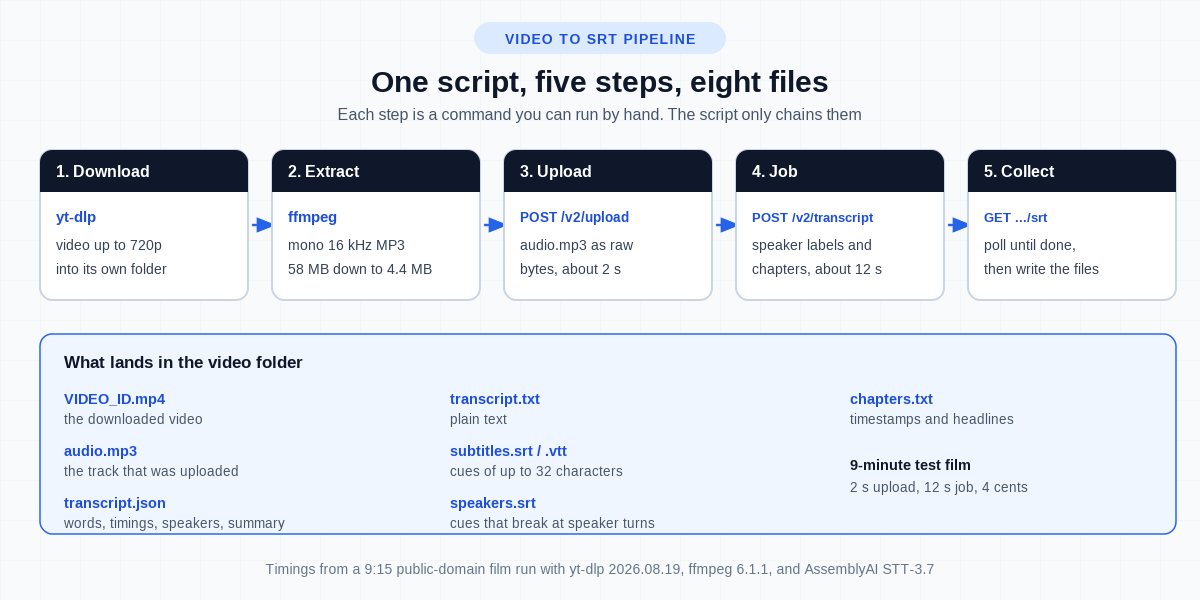
AssemblyAI’s pre-recorded API is a job queue: upload the file, submit the job, then poll until the status is completed. jq -n --arg builds the JSON body, which avoids the escaped quotes you need inside curl -d strings:
api=https://api.assemblyai.com/v2
auth="authorization: $ASSEMBLYAI_API_KEY"

url=$(curl -s -X POST "$api/upload" -H "$auth" --data-binary @audio.mp3 \
  | jq -r '.upload_url // empty')
job=$(jq -n --arg url "$url" '{
  audio_url: $url,
  speech_models: ["assemblyai-stt-3-7"],
  speaker_labels: true,
  speech_understanding: {request: {summarization: {summary_type: "paragraph"}}}
}')
tid=$(curl -s -X POST "$api/transcript" -H "$auth" -H "content-type: application/json" \
  -d "$job" | jq -r .id)
Three settings do the work:
| Setting | What it does |
|---|---|
speech_models |
Names the model. AssemblyAI’s docs say the default can differ between free and paid accounts, so set it |
speaker_labels |
Adds a letter per speaker to every word, which the speaker SRT needs |
speech_understanding.request.summarization |
Splits the video into sections with a timestamp, a headline, and a paragraph |
Step 4: collect the transcript, SRT, and VTT
while :; do
  curl -s "$api/transcript/$tid" -H "$auth" > transcript.json
  case "$(jq -r .status transcript.json)" in
    completed) break ;;
    error) jq -r .error transcript.json >&2; exit 1 ;;
  esac
  sleep 3
done

jq -r .text transcript.json > transcript.txt
curl -s "$api/transcript/$tid/srt?chars_per_caption=32" -H "$auth" > subtitles.srt
curl -s "$api/transcript/$tid/vtt" -H "$auth" > subtitles.vtt
On the 9-minute film the upload took 2 seconds and the job finished 12 seconds later. The transcript is plain text with punctuation. The SRT endpoint writes cues of up to 32 characters:
11
00:00:34,680 --> 00:00:37,190
Duck and cover.

12
00:00:39,020 --> 00:00:40,700
Be sure and remember what Bert
Change chars_per_caption for longer or shorter lines. The VTT file is the same text in WebVTT, the format HTML players want.
Speaker-labelled subtitles: stop cues from cutting across turns
The plain SRT breaks lines by character count, so a cue can hold the end of one speaker’s sentence and the start of the next. On a two-voice test clip it produced staging? Yes, but the smoke, where the first word belongs to speaker A and the rest to speaker B.
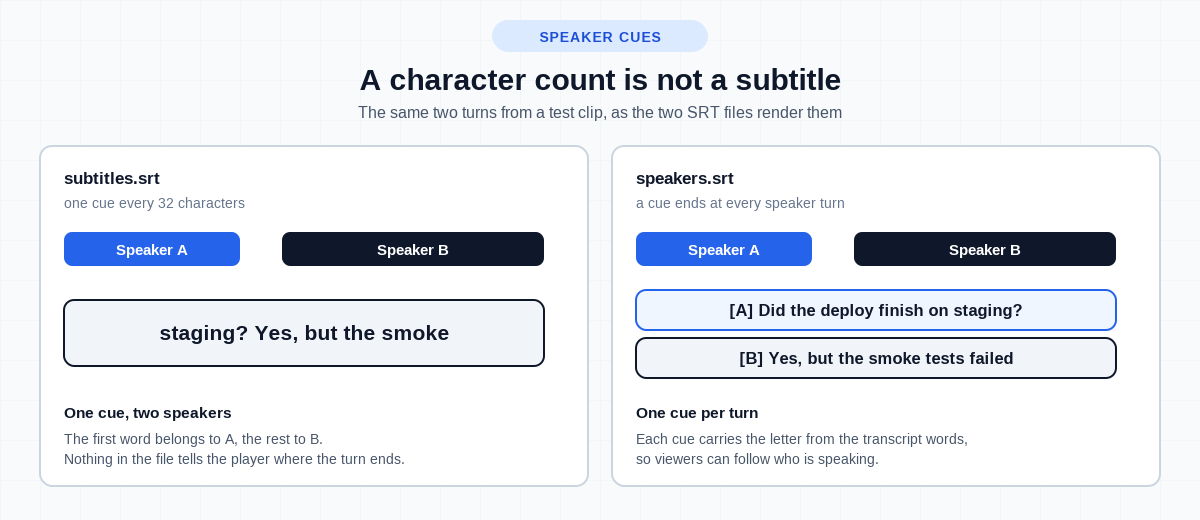
The transcript JSON already has a speaker letter on every word, with millisecond timings. This script turns those words into cues that break at each speaker change and at sentence ends:
# usage: python3 speaker_srt.py transcript.json > speakers.srt
import json
import sys
import textwrap

transcript = json.load(open(sys.argv[1], encoding="utf-8"))
cues, current = [], []


def flush():
    if current:
        cues.append(list(current))
        current.clear()


for word in transcript.get("words") or []:
    text = " ".join(w["text"] for w in current)
    if current and (
        word.get("speaker") != current[0].get("speaker")
        or word["end"] - current[0]["start"] > 7000
        or len(text) > 84
        or (len(text) >= 70 and current[-1]["text"].endswith((".", "?", "!")))
    ):
        flush()
    current.append(word)
flush()


def stamp(ms):
    seconds, ms = divmod(int(ms), 1000)
    minutes, seconds = divmod(seconds, 60)
    hours, minutes = divmod(minutes, 60)
    return f"{hours:02d}:{minutes:02d}:{seconds:02d},{ms:03d}"


for index, cue in enumerate(cues, 1):
    speaker = cue[0].get("speaker") or "?"
    lines = textwrap.wrap(" ".join(w["text"] for w in cue), width=42) or [""]
    print(index)
    print(f"{stamp(cue[0]['start'])} --> {stamp(cue[-1]['end'])}")
    for line in [f"[{speaker}] " + lines[0]] + lines[1:]:
        print(line)
    print()
Four rules build each cue. A speaker change ends it. So do 7 seconds and more than 84 characters. A sentence end also ends it once the cue holds 70 characters. On the test film it wrote 95 cues that ran 3 to 7 seconds each:
4
00:00:21,140 --> 00:00:27,230
[A] He'd duck and cover, duck and cover.

5
00:00:27,770 --> 00:00:30,780
[B] He did what we all must learn to do.
Drop the [{speaker}] prefix if your video has one speaker. On a five-speaker test file the labels were right on all ten turns, so the prefix is safe to show viewers.
Chapters and a summary for the video description
The summarization add-on returns sections with a start time, a headline, and a paragraph. One jq line turns them into the format YouTube reads:
jq -r '(.speech_understanding.response.summarization.summary // [])[] |
  "\(.start / 60000 | floor | tostring | if length < 2 then "0" + . else . end):" +
   "\(.start / 1000 | floor % 60 | tostring | if length < 2 then "0" + . else . end) \(.headline)"' \
  transcript.json > chapters.txt
For the test film it wrote:
00:00 Bert Introduces The Need To Prepare For Atomic Danger
02:10 Recognizing The Atomic Flash And Practicing Protective Cover
03:53 Following Warnings And Acting Quickly Wherever The Flash Appears
05:46 Everyday Demonstrations Teach Children To Duck And Cover
07:38 Stay Covered And Remember The Essential Safety Response
Paste that at the top of the description and YouTube turns it into clickable chapters. YouTube asks for at least three timestamps in order, the first one at 00:00, and chapters of at least 10 seconds. Check the first line: on a second film the earliest section started at 00:25, so I added a 00:00 Intro line by hand. The headlines come from an LLM, so three runs on the test film gave 4, 5, and 5 sections with different wording while the boundaries stayed close. Read them before publishing. Each section’s text field in transcript.json holds a paragraph summary you can use for the rest of the description.
Burn the subtitles in or upload the SRT to YouTube
For a player or a platform that does not read sidecar files, burn the speaker SRT into the video:
ffmpeg -nostdin -y -i VIDEO.mp4 \
  -vf "subtitles=speakers.srt:force_style='FontName=DejaVu Sans,FontSize=18,Outline=2'" \
  -c:a copy subbed.mp4
That re-encodes the video and copies the audio. The 9-minute film at 480p took 40 seconds, and a frame grab showed [C] Be sure and remember what Bert the Turtle just did at the bottom.
For your own YouTube upload, keep the video clean and attach the file. Per YouTube’s help page, open YouTube Studio, choose Subtitles, pick the video, click ADD LANGUAGE, then under “Subtitles” click ADD and choose Upload file with timing. I did not run this step from my test session.
Run it on a playlist or a list of videos
Save one URL per line and loop:
while read -r url; do ./aai-srt.sh "$url"; done < urls.txtFor a YouTube playlist, list its video ids first and rebuild the URLs:
yt-dlp --flat-playlist --print "%(id)s" \
  "https://www.youtube.com/playlist?list=PLAYLIST_ID" \
  | sed 's#^#https://www.youtube.com/watch?v=#' > urls.txt
I ran the loop on two Internet Archive cartoons of 9 and 9.5 minutes. Both finished in 117 seconds including one download, and the second came back with five speakers across 89 cues. The playlist command is standard yt-dlp usage that I could not run from this server.
The whole script
#!/usr/bin/env bash
# Turn a video into a transcript, SRT, VTT, speaker-labelled SRT, and chapter list.
# Usage: ./aai-srt.sh VIDEO_URL
set -euo pipefail
: "${ASSEMBLYAI_API_KEY:?export ASSEMBLYAI_API_KEY first}"
api=https://api.assemblyai.com/v2
auth="authorization: $ASSEMBLYAI_API_KEY"

# 1. Download the video, 720p or lower, into a folder named after its id
id=$(yt-dlp -q --no-warnings --no-update --no-simulate --print "pre_process:%(id)s" \
  -f "bv*[height<=720]+ba/b[height<=720]/b" --merge-output-format mp4 \
  -o "%(id)s/%(id)s.%(ext)s" "$1")
dir="$id"
video=$(find "$dir" -maxdepth 1 -type f -name "$id.*" | head -n 1)

# 2. Keep a small mono audio track for the upload
ffmpeg -nostdin -y -loglevel error -i "$video" -vn -ac 1 -ar 16000 \
  -c:a libmp3lame -b:a 64k "$dir/audio.mp3"

# 3. Upload the audio and start one job with speaker labels and chapter summaries
url=$(curl -s -X POST "$api/upload" -H "$auth" --data-binary @"$dir/audio.mp3" \
  | jq -r '.upload_url // empty')
[ -z "$url" ] && { echo "upload failed" >&2; exit 1; }
job=$(jq -n --arg url "$url" '{
  audio_url: $url,
  speech_models: ["assemblyai-stt-3-7"],
  speaker_labels: true,
  speech_understanding: {request: {summarization: {summary_type: "paragraph"}}}
}')
tid=$(curl -s -X POST "$api/transcript" -H "$auth" -H "content-type: application/json" \
  -d "$job" | jq -r '.id // empty')
[ -z "$tid" ] && { echo "submit failed" >&2; exit 1; }

# 4. Wait for the job
while :; do
  curl -s "$api/transcript/$tid" -H "$auth" > "$dir/transcript.json"
  case "$(jq -r .status "$dir/transcript.json")" in
    completed) break ;;
    error) jq -r .error "$dir/transcript.json" >&2; exit 1 ;;
  esac
  sleep 3
done

# 5. Collect the outputs
jq -r .text "$dir/transcript.json" > "$dir/transcript.txt"
curl -s "$api/transcript/$tid/srt?chars_per_caption=32" -H "$auth" > "$dir/subtitles.srt"
curl -s "$api/transcript/$tid/vtt" -H "$auth" > "$dir/subtitles.vtt"
jq -r '(.speech_understanding.response.summarization.summary // [])[] |
  "\(.start / 60000 | floor | tostring | if length < 2 then "0" + . else . end):" +
   "\(.start / 1000 | floor % 60 | tostring | if length < 2 then "0" + . else . end) \(.headline)"' \
  "$dir/transcript.json" > "$dir/chapters.txt"
python3 speaker_srt.py "$dir/transcript.json" > "$dir/speakers.srt"
ls -la "$dir"
Two details in step 1 cost me a failed batch each. --print on its own puts yt-dlp into simulate mode, so nothing downloads; --no-simulate turns the download back on. And pre_process prints the id before the download, which matters when you rerun a video that is already on disk.
The run ends with eight files in the video’s folder:
| File | Contents |
|---|---|
VIDEO_ID.mp4 |
The downloaded video |
audio.mp3 |
The mono track that was uploaded |
transcript.json |
Full result: text, words with timings and speakers, summary sections |
transcript.txt |
Plain transcript |
subtitles.srt, subtitles.vtt |
32-character cues in both formats |
speakers.srt |
Cues that break at speaker turns, with an [A] style prefix |
chapters.txt |
Timestamps and headlines for the video description |
How much does it cost to transcribe a video?
About 4 cents for a 9-minute video with speaker labels and chapters, or $0.25 per hour of video. The script runs three billable parts: transcription at $0.21 per hour, speaker labels at $0.02, and summarization at $0.02. Turn summarization off and drop $0.02 an hour.
| Video length | Transcript only | With speaker labels and chapters |
|---|---|---|
| 9 minutes (the test film) | $0.03 | $0.04 |
| 30 minutes | $0.11 | $0.13 |
| 60 minutes | $0.21 | $0.25 |
| 5 hours | $1.05 | $1.25 |
AssemblyAI bills you per hour of audio, so the 58 MB video and its 4.4 MB audio track cost the same.
Troubleshooting
yt-dlp: Sign in to confirm you're not a bot
Add --cookies-from-browser chrome or firefox. The check follows your IP address, so a VPN exit node can trigger it too.
upload failed or submit failed
Check echo "$ASSEMBLYAI_API_KEY" in the same shell and run curl -s -X POST "$api/upload" -H "$auth" --data-binary @audio.mp3 by hand. A 401 means the key. The upload endpoint takes files up to 2.2 GB, so a longer video goes in as a public URL in audio_url or as the extracted audio track.
language_detection cannot be performed on files with no spoken audio
The audio has no speech. A 1937 newsreel in my batch failed this way. With language_code set to en the same file completed with an empty transcript, which shows there was nothing to transcribe.
Songs and intros become lyrics
The test film opens with a jingle, and the transcript starts Dum, dum, dum, diddle dum dum. Skip it with ffmpeg -ss 00:00:21 -i audio.mp3 -c copy lead-in.mp3, then upload that file.
Frequently asked questions
Does YouTube transcribe videos automatically?
For spoken English and several other languages, yes. YouTube adds automatic captions a while after upload and shows them in the player and in Studio. They have no speaker labels, and the text carries the usual recognizer mistakes. For anything you want to reuse, run your own transcription.
How do I get an SRT file from a YouTube video?
Download the audio with yt-dlp, send it to a speech-to-text API, and fetch the SRT. This guide does it with AssemblyAI, whose transcript endpoint returns SRT and VTT directly. A free route is YouTube’s own captions: yt-dlp --write-auto-subs --sub-langs en --sub-format srt --skip-download VIDEO_URL saves them as a file. I could not test that command from my server for the reason in step 1, and the text quality is whatever YouTube’s recognizer produced.
How do I convert a YouTube transcript to SRT?
A transcript with timestamps converts directly. AssemblyAI’s /srt and /vtt endpoints do it for a finished transcript, or use the speaker_srt.py script above when you want speaker labels in the cues. A plain transcript without timestamps cannot become an SRT without aligning it to the audio again.
How do I upload an SRT file to a YouTube video?
In YouTube Studio, open Subtitles for the video, click ADD LANGUAGE, then under “Subtitles” click ADD and choose Upload file with timing. Pick the .srt file and save. The captions then show as an option in the player.
How accurate is the transcript?
On my six-file test set the same model made 3 errors in 562 words, against 13 for Deepgram. It kept DevOps tool names such as kubectl and /var/log/syslog in their written form and labelled all five speakers on a multi-voice file. Details are in the AssemblyAI vs Deepgram comparison.
How long can the video be?
Up to 10 hours per file on AssemblyAI’s pre-recorded API. The catch is the upload. The upload endpoint caps files at 2.2 GB, so long videos are easier to send as the extracted audio track or as a public URL in audio_url.
Does this work for languages other than English?
Yes. The script leaves language detection on, which is the default, so the model detects the language of each video. The current model covers 32 languages natively, and adding universal-2 to speech_models covers 99. On a 47-word Spanish test clip it detected Spanish and returned zero errors.
Related articles
- AssemblyAI review: accuracy, pricing, and the parts of the API this guide does not use
- AssemblyAI vs Deepgram: the six-file test quoted above, plus pricing and limits
- OpenAI Whisper alternatives tested: the same kind of test for local and hosted speech-to-text
- Add YouTube videos to an Astro blog: what to do with the video once the captions are ready
Did this guide work for you?
Related Posts

Written by Dragos
DevOps engineer with 10+ years in IT. I write these guides while doing the installs in my Proxmox home lab and on real VPSes.
Need help with Astro, VPS, or a self-hosted app? View services →