How to Add YouTube Videos to Your Astro Blog (SSG + SSR)
Learn how to add YouTube videos to your Astro blog with Content Layer loaders (SSG) and server:defer islands (SSR), plus caching, thumbnails, troubleshooting.

Updated Published 41 min read
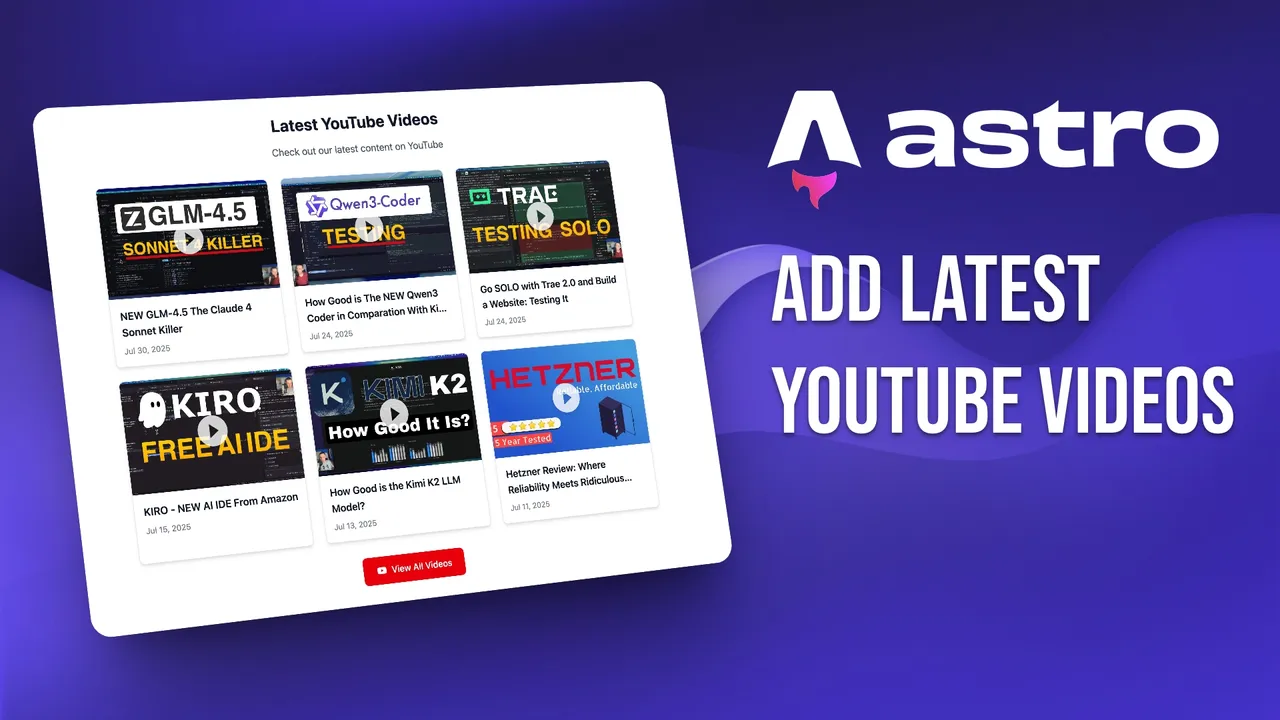
Want to add YouTube videos to your Astro blog without updating anything by hand? This guide shows how to automatically pull a channel’s latest videos into your Astro 7 site at build time with Content Layer loaders (SSG) or on demand with server:defer server islands (SSR).
Both approaches use YouTube’s free RSS feed (no API key needed), and I’ll cover the real-world gotchas: why the RSS endpoint sometimes 404s, why maxresdefault.jpg can break your build, and how to upgrade to the YouTube Data API when you need more resilience.
Whether you’re using the free Astro blog theme or your own setup, this guide has copy-pasteable code for both methods.
🎯 What You’ll Learn
- SSG with Content Layer custom loader: the recommended build-time approach with type safety
- SSR with
server:deferserver islands: on-demand rendering for real-time updates - YouTube RSS feed: how it works, why it can 404, and how to build resilience
- Thumbnail optimization:
hqdefault.jpgfallback to avoid broken images - YouTube Data API upgrade path: still free at blog scale, more reliable than RSS
- Troubleshooting: RSS outages, missing thumbnails, island failures
🛠️ Prerequisites
- Node.js 22.12.0+. Astro 6+ dropped Node 18 and 20. Pin it in
.nvmrc:text 22.12.0 - Astro 7.x. This guide targets the current stable (7.2.10 as of Aug 2026). If you’re starting fresh, check the free Astro blog guide.
- Basic JavaScript/TypeScript knowledge
- A YouTube channel with the channel ID (see below)
- An adapter (Node or Cloudflare). Only required for the SSR/server islands method.
Astro 7 brings stricter HTML
Astro 7 uses a Rust-based compiler and Vite 8. Build times drop 15-61%, but unclosed HTML tags now error the build instead of silently correcting. If you’re copy-pasting code blocks, double-check your markup. See what changed in Astro 7 for the full breakdown.
Find your YouTube channel ID from an @handle
Channel URLs now show @handles, not IDs
YouTube channel URLs look like youtube.com/@yourchannel. That’s a handle, not the UC... ID the RSS feed needs. Here’s how to find the real ID:
- Go to your channel page in a browser
- Right-click → View Page Source
- Search (Ctrl+F) for
"channelId":"UCor"externalId":"UC - Copy the
UC...string
Alternatively, open any video from the channel and search the page source the same way. The RSS feed only returns the ~15 most recent videos per channel.
Companion video
📡 How the YouTube RSS Feed Works (and Why It Can 404)
Both methods in this guide use the same zero-cost endpoint:
https://www.youtube.com/feeds/videos.xml?channel_id=YOUR_CHANNEL_IDNo API key, no authentication, no quota. It returns an Atom XML feed with the ~15 most recent videos from the channel: video ID, title, published date, thumbnail URL, and more.
RSS feed reliability
YouTube’s RSS endpoint has documented intermittent 404 and 500 errors. These outages tend to cluster around 09:00-12:00 UTC, affect different channels randomly, and can last hours. A browser User-Agent header does not reliably fix it.
This means a naive build-time fetch can fail on a normal deploy. The mitigation: use AbortSignal.timeout() for bounded fetch time, add a retry with backoff, and for SSG keep a last-good JSON snapshot committed in the repo so a YouTube hiccup never bricks your build.
Why RSS over API?
RSS is free and keyless, but it’s not SLA’d and limited to ~15 videos. The YouTube Data API is the resilient, pro-grade path, and it stays free at blog scale (1-3 API units per refresh out of 10,000/day). I cover the upgrade path in the Data API section below.
🏗️ Method 1: SSG with Content Layer Loader (Recommended)
The modern SSG approach uses Astro’s Content Layer API with a custom loader. This replaces the old pattern of fetching RSS in a component’s frontmatter with regex parsing. Benefits: type safety via Zod, data-store caching, astro sync types, and the component stays presentation-only.
Step 1: Create the YouTube content loader
Install the XML parser:
npm install fast-xml-parserCreate the loader at src/loaders/youtube.ts:
// src/loaders/youtube.ts
import type { Loader } from 'astro/loaders';
import { z } from 'astro/zod';
import { XMLParser } from 'fast-xml-parser';

export function youtubeVideosLoader(options: {
  channelId: string;
  maxVideos?: number;
}): Loader {
  return {
    name: 'youtube-videos-loader',
    load: async ({ store, parseData, logger }) => {
      const url = `https://www.youtube.com/feeds/videos.xml?channel_id=${options.channelId}`;
      const res = await fetch(url, { signal: AbortSignal.timeout(10_000) });

      if (!res.ok) {
        logger.error(`YouTube feed returned ${res.status}`);
        return; // keeps prior data in store, build won't fail
      }

      const xml = new XMLParser({ ignoreAttributes: false }).parse(
        await res.text()
      );
      const entries = (xml.feed?.entry ?? []).slice(0, options.maxVideos ?? 6);

      store.clear();
      for (const entry of entries) {
        const id = entry['yt:videoId'];
        const data = await parseData({
          id,
          data: {
            id,
            title: entry.title,
            published: new Date(entry.published),
            thumbnail: `https://i.ytimg.com/vi/${id}/hqdefault.jpg`,
            url: `https://www.youtube.com/watch?v=${id}`,
          },
        });
        store.set({ id, data, digest: JSON.stringify(data) });
      }
    },
    schema: z.object({
      id: z.string(),
      title: z.string(),
      published: z.date(),
      thumbnail: z.string(),
      url: z.url(),
    }),
  } satisfies Loader;
}
Why a Content Layer loader?
A Content Layer loader gives you type safety (Zod schema), data-store caching (prior data survives a failed fetch), and astro sync generates collection types. The component that renders the videos stays dumb, it just calls getCollection(). This is the pattern Astro recommends for external data at build time.
Step 2: Register the loader in content.config.ts
// src/content.config.ts
import { defineCollection } from 'astro:content';
import { youtubeVideosLoader } from './loaders/youtube';

export const collections = {
  youtube: defineCollection({
    loader: youtubeVideosLoader({
      channelId: import.meta.env.YOUTUBE_CHANNEL_ID,
      maxVideos: 6,
    }),
  }),
};
Add your channel ID to .env:
YOUTUBE_CHANNEL_ID=UCGsUtKhXsRrMvYAWm8q0bCgThen generate the collection types:
npx astro syncRun astro sync after wiring the loader
npx astro sync generates TypeScript types for your collections. Run it after any change to content.config.ts. The types give you autocomplete and catch errors at build time.
Step 3: Render the videos with <Image>
The component now just calls getCollection('youtubeVideos') and renders. No fetching, no parsing, that’s the loader’s job.
---
// src/components/YouTubeVideosSSG.astro
import { Icon } from "astro-icon/components";
import { Image } from "astro:assets";
import { getCollection } from "astro:content";

const videos = await getCollection("youtubeVideos");
const channelId = import.meta.env.YOUTUBE_CHANNEL_ID;
---

<section class="py-8 bg-white dark:bg-gray-900 rounded-lg">
  <div class="max-w-5xl mx-auto px-4 sm:px-6">
    <div class="text-center mb-8">
      <h2 class="text-2xl md:text-3xl font-bold text-gray-900 dark:text-white mb-4">
        Latest YouTube Videos
      </h2>
      <p class="text-lg text-gray-600 dark:text-gray-300">
        Check out our latest content on YouTube
      </p>
    </div>

    {videos.length === 0 ? (
      <div class="text-center py-8">
        <p class="text-gray-600 dark:text-gray-400">
          No videos found.
        </p>
      </div>
    ) : (
      <div class="grid grid-cols-1 md:grid-cols-2 lg:grid-cols-3 gap-6">
        {videos.map((video) => (
          <div class="bg-white dark:bg-gray-800 rounded-lg shadow-md hover:shadow-lg transition-all duration-300 transform hover:-translate-y-1 border border-gray-200 dark:border-gray-700">
            <div class="relative">
              <a href={video.data.url} target="_blank" rel="noopener noreferrer">
                <Image
                  src={video.data.thumbnail}
                  alt={video.data.title}
                  width={320}
                  height={180}
                  class="w-full h-48 object-cover rounded-t-lg"
                  loading="lazy"
                  format="webp"
                />
              </a>
              <a href={video.data.url} target="_blank" rel="noopener noreferrer">
                <Icon
                  name="mdi:play-circle"
                  class="absolute top-1/2 left-1/2 transform -translate-x-1/2 -translate-y-1/2 text-white w-16 h-16 drop-shadow-lg opacity-80 hover:opacity-100 transition-opacity"
                />
              </a>
            </div>
            <div class="p-4">
              <a href={video.data.url} target="_blank" rel="noopener noreferrer">
                <h3 class="text-lg font-semibold text-gray-900 dark:text-white line-clamp-2 mb-2 hover:text-blue-600 dark:hover:text-blue-400 transition-colors">
                  {video.data.title}
                </h3>
              </a>
              <p class="text-sm text-gray-500 dark:text-gray-400">
                {video.data.published.toLocaleDateString("en-US", {
                  year: "numeric",
                  month: "short",
                  day: "numeric",
                })}
              </p>
            </div>
          </div>
        ))}
      </div>
    )}

    <div class="text-center mt-8">
      <a
        href={`https://www.youtube.com/channel/${channelId}`}
        target="_blank"
        rel="noopener noreferrer"
        class="inline-flex items-center px-6 py-3 bg-red-600 hover:bg-red-700 text-white font-medium rounded-lg transition-colors duration-300"
      >
        <Icon name="mdi:youtube" class="w-5 h-5 mr-2" />
        View All Videos
      </a>
    </div>
  </div>
</section>

<style>
  .line-clamp-2 {
    display: -webkit-box;
    -webkit-line-clamp: 2;
    -webkit-box-orient: vertical;
    overflow: hidden;
  }
</style>
Add the component to any page:
---
// src/pages/index.astro
import YouTubeVideosSSG from '../components/YouTubeVideosSSG.astro';
---

<html>
  <body>
    <YouTubeVideosSSG />
  </body>
</html>
This works with the free Astro blog theme, drop the component into your layout or index page.
🚀 Method 2: SSR, server:defer Server Islands
The SSR approach uses server:defer to create a server island. The page loads instantly with static HTML, and the YouTube component renders on demand on the server. No client-side JavaScript needed.
Step 1: Install an adapter
server:defer requires a server adapter. You do not need output: 'server', keep the default 'static' output and only the island renders on demand. This is lighter than server-rendering every page.
Node Adapter
npx astro add nodeThis configures astro.config.mjs:
// astro.config.mjs
import { defineConfig } from 'astro/config';
import node from '@astrojs/node';

export default defineConfig({
  adapter: node({
    mode: 'standalone',
  }),
});
Build and run:
astro build && node dist/server/entry.mjsFor production, deploy the SSR build to a VPS, an affordable VPS like Hetzner or Hostinger works well for this.
VPS prices jumped across the board in 2026 — if you’re rethinking a rented box, see what changed and when a mini PC wins.
Cloudflare Adapter
npx astro add cloudflareCloudflare adapter changes in Astro 6+
The Cloudflare adapter has breaking changes since Astro 6: the dev server now runs on workerd for parity, and you need Wrangler ^4.125.0. Check the generated compatibility_date in your wrangler.toml. See deploying your Astro blog to Cloudflare Pages for the full setup.
Step 2: Create the SSR component with server:defer
---
// src/components/YouTubeVideosSSR.astro
import { Icon } from "astro-icon/components";
export interface Props {
channelId: string;
maxVideos?: number;
}
const { channelId, maxVideos = 6 } = Astro.props;
let videos: Array<{
id: string;
title: string;
published: Date;
thumbnail: string;
url: string;
}> = [];
let error: string | null = null;
try {
const response = await fetch(
`https://www.youtube.com/feeds/videos.xml?channel_id=${channelId}`,
{ signal: AbortSignal.timeout(10_000) }
);
if (!response.ok) {
throw new Error(`HTTP error! status: ${response.status}`);
}
const xmlText = await response.text();
// Parse XML to extract video data
const videoRegex =
/<entry>.*?<yt:videoId>(.*?)<\/yt:videoId>.*?<title>(.*?)<\/title>.*?<published>(.*?)<\/published>.*?<\/entry>/gs;
let match;
while (
(match = videoRegex.exec(xmlText)) !== null &&
videos.length < maxVideos
) {
const [, videoId, title, published] = match;
videos.push({
id: videoId,
title: title
.replace(/&/g, "&")
.replace(/</g, "<")
.replace(/>/g, ">")
.replace(/"/g, '"')
.replace(/'/g, "'")
.replace(/'/g, "'"),
published: new Date(published),
thumbnail: `https://i.ytimg.com/vi/${videoId}/hqdefault.jpg`,
url: `https://www.youtube.com/watch?v=${videoId}`,
});
}
} catch (err: any) {
console.error("Error fetching YouTube videos:", err);
error = err.message;
}
---
<section class="py-8 bg-white dark:bg-gray-900 rounded-lg">
<div class="max-w-5xl mx-auto px-4 sm:px-6">
<div class="text-center mb-8">
<h2 class="text-2xl md:text-3xl font-bold text-gray-900 dark:text-white mb-4">
Latest YouTube Videos
</h2>
<p class="text-lg text-gray-600 dark:text-gray-300">
Check out our latest content on YouTube
</p>
</div>
{error ? (
<div class="text-center py-8">
<p class="text-red-600 dark:text-red-400">
Unable to load YouTube videos. Please try again later.
</p>
</div>
) : videos.length === 0 ? (
<div class="text-center py-8">
<p class="text-gray-600 dark:text-gray-400">
No videos found.
</p>
</div>
) : (
<div class="grid grid-cols-1 md:grid-cols-2 lg:grid-cols-3 gap-6">
{videos.map((video) => (
<div class="bg-white dark:bg-gray-800 rounded-lg shadow-md hover:shadow-lg transition-all duration-300 transform hover:-translate-y-1 border border-gray-200 dark:border-gray-700">
<div class="relative">
<a href={video.url} target="_blank" rel="noopener noreferrer">
<img
src={video.thumbnail}
alt={video.title}
width={320}
height={180}
class="w-full h-48 object-cover rounded-t-lg"
loading="lazy"
/>
</a>
<a href={video.url} target="_blank" rel="noopener noreferrer">
<Icon
name="mdi:play-circle"
class="absolute top-1/2 left-1/2 transform -translate-x-1/2 -translate-y-1/2 text-white w-16 h-16 drop-shadow-lg opacity-80 hover:opacity-100 transition-opacity"
/>
</a>
</div>
<div class="p-4">
<a href={video.url} target="_blank" rel="noopener noreferrer">
<h3 class="text-lg font-semibold text-gray-900 dark:text-white line-clamp-2 mb-2 hover:text-blue-600 dark:hover:text-blue-400 transition-colors">
{video.title}
</h3>
</a>
<p class="text-sm text-gray-500 dark:text-gray-400">
{video.published.toLocaleDateString("en-US", {
year: "numeric",
month: "short",
day: "numeric",
})}
</p>
</div>
</div>
))}
</div>
)}
<div class="text-center mt-8">
<a
href={`https://www.youtube.com/channel/${channelId}`}
target="_blank"
rel="noopener noreferrer"
class="inline-flex items-center px-6 py-3 bg-red-600 hover:bg-red-700 text-white font-medium rounded-lg transition-colors duration-300"
>
<Icon name="mdi:youtube" class="w-5 h-5 mr-2" />
View All Videos
</a>
</div>
</div>
</section>
<style>
.line-clamp-2 {
display: -webkit-box;
-webkit-line-clamp: 2;
-webkit-box-orient: vertical;
overflow: hidden;
}
</style>Use it with server:defer and a fallback slot:
---
// src/pages/index.astro
import YouTubeVideosSSR from '../components/YouTubeVideosSSR.astro';
---

<html>
  <body>
    <!-- The server:defer directive makes this a server island -->
    <YouTubeVideosSSR
      server:defer
      channelId="UCGsUtKhXsRrMvYAWm8q0bCg"
      maxVideos={6}
    >
      <!-- Fallback content shown while the island loads -->
      <div class="text-center py-8">
        <p class="text-gray-500">Loading videos...</p>
      </div>
    </YouTubeVideosSSR>
  </body>
</html>
Serializable props
Props passed to a server:defer island must be serializable. If the serialized props URL exceeds 2048 bytes, the island switches to POST and loses browser caching. For a channelId string and a maxVideos number, you’re well under the limit.
Step 3: Operator notes and caching
A few production concerns for server islands:
Rolling deploys need ASTRO_KEY. If you deploy to multiple regions or do rolling restarts, the encrypted props and slot content (encrypted since Astro 6) need a stable key:
npx astro create-keySet the output as the ASTRO_KEY environment variable in your CI or hosting platform.
Inside an island, Astro.url points at /_server-islands/..., not the real page URL. If you need the actual page URL, read it from the Referer header.
Astro 7 route caching is now stable. You can cache the island response at the CDN or memory level:
// astro.config.mjs
import { defineConfig, memoryCache } from 'astro/config';

export default defineConfig({
  cache: { provider: memoryCache() },
  routeRules: {
    '/': { maxAge: 300, swr: 60 },
  },
});
This is more idiomatic than a hand-rolled Map cache (which silently breaks on serverless/edge because it’s per-process only).
🔑 YouTube Data API Upgrade Path (Resilient and Still Free)
When RSS isn’t enough, you need deeper history, view counts, durations, or just more reliability, the YouTube Data API v3 is the upgrade. At blog scale, it’s effectively free.
The call chain:
channels.list→ get the uploads playlist ID (1 unit)playlistItems.list→ get video IDs from the uploads playlist (1 unit)videos.list→ get titles, thumbnails, durations, view counts (1 unit)
Total: 2-3 units per refresh out of a 10,000 unit/day default quota. You’d need to refresh thousands of times a day to hit the limit.
Still free at blog scale
One channel, a couple API calls per build = 1-3 units out of 10,000/day. You’ll never hit the limit. There’s no pay-for-quota option, only a manual audit form if you need more.
Manage the API key with astro:env:
// astro.config.mjs
import { defineConfig, envField } from 'astro/config';

export default defineConfig({
  env: {
    schema: {
      YOUTUBE_API_KEY: envField.string({
        context: 'server',
        access: 'secret',
      }),
      YOUTUBE_CHANNEL_ID: envField.string({
        context: 'server',
        access: 'public',
      }),
    },
  },
});
Then in your loader or server code:
import { YOUTUBE_API_KEY, YOUTUBE_CHANNEL_ID } from 'astro:env/server';

const res = await fetch(
  `https://www.googleapis.com/youtube/v3/channels?part=contentDetails&id=${YOUTUBE_CHANNEL_ID}&key=${YOUTUBE_API_KEY}`
);
const data = await res.json();
const uploadsPlaylistId =
  data.items[0].contentDetails.relatedPlaylists.uploads;
How does YouTube API quota work?
The default quota is 10,000 units per day per Google Cloud project, resetting at midnight Pacific time. Cheap calls: playlistItems.list, videos.list, and channels.list each cost 1 unit. Expensive call: search.list costs 100 units per call (or, per newer docs, gets its own bucket of 100 calls/day at 1 unit each, the quota model has some ambiguity). If you get a 403 with quotaExceeded, you’ve hit the daily limit. For this article’s use case (one channel, 2-3 calls per build), you’ll never come close.
🖼️ Thumbnails and Image Optimization
maxresdefault can break your build
maxresdefault.jpg (1280px) is not available for every video. Older uploads, low-res originals, and some live/restricted content return a 404. In the SSG path with Astro’s <Image> component, a missing remote thumbnail can fail the build because <Image> fetches the remote image at build time.
Use hqdefault.jpg (480px) as your safe default, it’s always present. Also available: mqdefault.jpg (320px) and default.jpg (120px).
Which YouTube thumbnail size should I use?
| Size | Resolution | Always available? | Use case |
|---|---|---|---|
default.jpg |
120×90 | Yes | Tiny previews, not recommended |
mqdefault.jpg |
320×180 | Yes | Small cards, mobile |
hqdefault.jpg |
480×360 | Yes | Recommended default |
sddefault.jpg |
640×480 | Usually | Good balance, rare 404s |
maxresdefault.jpg |
1280×720 | No | Only if you verify availability |
For the SSG path, use <Image format="webp" loading="lazy"> for automatic optimization at build time. For the SSR island path, a plain <img loading="lazy"> with i.ytimg.com is simpler since remote optimization happens at request time. See speed up your Astro builds for more on build performance.
⚖️ When to Use SSG vs Server Islands
Use SSG when:
- Performance is critical, static HTML loads instantly
- You don’t need real-time updates, videos update when you rebuild
- You want zero server costs, no runtime, just static files
- SEO matters, static content is easily crawlable
- You prefer simplicity, no adapter, no server infrastructure
Use server islands when:
- Real-time updates matter, videos appear right after publishing
- You already have server infrastructure, Node.js server or Cloudflare Workers
- You want per-component caching,
Cache-Controlon the island endpoint - You need the latest data without rebuilding, no CI/CD trigger needed
🖼️ Embedding Single Videos in MDX
This guide covers displaying a channel’s video grid. If you need to embed a single YouTube video inside a blog post, use @astro-community/astro-embed-youtube, it wraps lite-youtube-embed for privacy-friendly, performance-optimized embeds (iframe loads only after click, ~229K weekly downloads).
npm install @astro-community/astro-embed-youtubeimport { YouTube } from '@astro-community/astro-embed-youtube';
<YouTube id="x6pjyeQ_6V0" />For a full walkthrough on responsive single-video embeds in Astro MDX, see embed individual videos in your Astro MDX with astro-embed.
🔍 Troubleshooting Common Issues
RSS feed not loading (404/500)
This is the #1 production issue
YouTube’s RSS endpoint has documented intermittent outages, not a CORS problem. The real risk is a 404 during your build or island render.
Mitigation:
- Use
AbortSignal.timeout(5000)to bound fetch time - Add a retry with exponential backoff (1s, 2s, 4s)
- For SSG: keep a last-good JSON snapshot in the repo; fall back to it when the feed fails
- Verify the feed is live before deploying:
curl "https://www.youtube.com/feeds/videos.xml?channel_id=UC..."
Videos not displaying / broken thumbnails
- Check your channel ID, use the page-source method from the prerequisites. A wrong ID returns an empty feed, not an error.
- Check thumbnail URLs, grep your built HTML for
hqdefaultormaxresdefault. If you seemaxresdefault404s, switch tohqdefaultin your loader. - Check build logs, the Content Layer loader logs errors via
logger.error(). Look forYouTube feed returned 4xx/5xx. - Check the RSS feed directly, open the URL in a browser. If it 404s, wait and retry (outage windows are typically short).
Server island not rendering
- Adapter not installed,
server:deferrequires an adapter. Runnpx astro add nodeornpx astro add cloudflare. ASTRO_KEYnot set, on rolling deploys or multi-region, encrypted props can’t decrypt without a stable key. Runnpx astro create-keyand set the env var.- Props too large, if serialized props exceed 2048 bytes, the island switches to POST and loses browser caching. Keep props small (channel ID + max count is fine).
- Check the endpoint directly, visit
/_server-islands/YouTubeVideosSSR(or your component name) to see if the island responds.
YouTube API quotaExceeded
A 403 with quotaExceeded means you’ve hit the daily 10,000-unit limit. At blog scale (1-3 units/build), this shouldn’t happen. If it does, check for accidental search.list calls (100 units each). There’s no pay-for-quota, only a manual audit form for extensions.
✅ Verification Checklist
curl "https://www.youtube.com/feeds/videos.xml?channel_id=UC...", confirm 200 and inspect the XML fieldsnpx astro syncafter wiring the loader, confirm types are generated without errorsastro build, confirm no build errors, check output for thumbnail 404s- Run the standalone server locally, confirm
/_server-islands/<Component>returns HTML - Grep built HTML for
hqdefault/maxres, catch any broken thumbnail URLs - Open the deployed page in a browser, videos render, thumbnails load, fallback slot swaps out
🎉 Conclusion
The SSG approach with a Content Layer loader is the recommended path for most blogs, it’s fast, type-safe, and the component stays clean. Server islands via server:defer are the right call when you need real-time updates without rebuilding.
Both approaches work with the free Astro blog theme, so you can add YouTube videos to your Astro blog right away.
Pro tip
Combine both approaches: use the Content Layer loader for your main video showcase page and a server:defer island for a “Latest Video” widget in your sidebar that updates in real-time!
Want to take it further? Check out headless CMS options for your Astro blog or host video without YouTube using Bunny Stream. For faster thumbnail delivery at scale, consider a CDN like Bunny.net.
FAQ
Do I need a YouTube API key?
No, the RSS feed (/feeds/videos.xml) works without any authentication. You only need an API key if you upgrade to the YouTube Data API v3 for deeper history, view counts, or better reliability. At blog scale, the Data API is free (1-3 units out of 10,000/day).
How many videos does the RSS feed return?
The RSS feed returns the ~15 most recent videos per channel. If you need more, use the YouTube Data API’s playlistItems.list endpoint, which can paginate through the full uploads playlist.
Can I use this with Cloudflare Pages?
Yes, install the Cloudflare adapter with npx astro add cloudflare. Since Astro 6, the dev server runs on workerd for parity. You need Wrangler ^4.125.0 and should verify the generated compatibility_date. See deploying your Astro blog to Cloudflare Pages for the full guide.
What Astro version do I need?
Content Layer loaders work since Astro 5.0 (Dec 2024). Server islands also work from Astro 5. This guide targets Astro 7 (current stable). From Astro 6 onward, Node 22.12.0+ is required.
Will this work with Astro 5?
Content Layer loaders work since Astro 5.0. Server islands are also supported. However, Astro 6+ requires Node 22.12.0+ and introduced breaking changes to the Cloudflare adapter. If you’re on Astro 5, the code works but you won’t get the build speed improvements from Astro 7’s Rust compiler.