
Modern Web Guidance Review: I Ran the Browser-Vendor Agent Skill on My Astro Blog
Hands-on review of Modern Web Guidance, the agent skill shipped by Chrome, Firefox and Edge: install steps, the legacy-scan audit, the 5 real findings on my Astro blog, and the fixes I applied.

Quick result
npx modern-web-guidance@latest install → Installed 1 skill → .agents/skills/modern-web-guidance
Coding agents write frontend code fast, but fast is not the same as current. Ask Claude Code or Cursor for a modal and you can still get a <div> with click-outside JavaScript where the platform has had <dialog> for years. Ask for a scrollbar style and you get ::-webkit-scrollbar rules that ignore Firefox and the standard properties entirely.
On November 10, Chrome, Firefox, Edge and MDN shipped Modern Web Guidance 1.0. It is a free agent skill that injects 200+ expert-vetted web platform guides, with Baseline compatibility data baked in, directly into whatever coding agent you use. It hit the Hacker News front page the same day.
I installed it and ran its built-in modernization scan against this site’s own codebase. Here is what the command actually does, what it found in bitdoze.com, and what I changed because of it.
What Modern Web Guidance actually is
Despite the name, it is not an app, a linter, or a VS Code extension. It is an agent skill: a folder of markdown guides plus a small CLI that your coding agent reads when it touches HTML, CSS, or client-side JavaScript. The installer detected my agent and dropped it into .agents/skills/modern-web-guidance/ non-interactively, which is the same directory format other agent skills use.
Three things make it different from “just another prompt”:
- Baseline-aware recommendations. Every guide carries browser compatibility data, so it can tell your agent whether a feature is safe to use unprefixed or needs a fallback, instead of guessing from training data that is always a year stale.
- A deterministic audit mode.
legacy-scanstatically checks your existing code for known-legacy patterns, independent of any model’s judgment. - Vendor maintenance. The guides are reviewed by browser engineers and accessibility specialists, and the corpus updates as the platform does. On their published eval dashboard, agents went from a 55% to a 92% pass rate on 200 web-platform tasks when the skill was present.
The repo lives at github.com/GoogleChrome/modern-web-guidance, and the docs cover installation for every major agent harness.
Install: what the command actually does
npx modern-web-guidance@latest installRun from the project root, the installer clones the guidance repo, inventories the skills inside it (it found 2, I selected modern-web-guidance), runs third-party security assessments on them (the output showed Gen “Safe”, Socket “1 alert”, Snyk “Low Risk”), and copies the skill into your agent’s skills directory. On my machine that was:
✓ modern-web-guidance (copied)
  → ~/projects/bitdoze.com/.agents/skills/modern-web-guidance
Two practical notes from the install output itself:
- It collects anonymous usage telemetry by default. Opt out with
DISABLE_TELEMETRY=1in your shell profile if that bothers you. - Because it is a skill and not a dependency, it adds no packages to
package.jsonand nothing to your build. Delete the folder and it is gone.
legacy-scan: auditing an existing codebase
For an existing project, which is most projects, the relevant command is the modernization scan:
npx modern-web-guidance@latest legacy-scan src --jsonI pointed it at src/. The JSON output reported totalFindings: 5 across 4 guides, and ended with an honest caveat worth quoting:
"activeRuleCount": 35,
"activeGuideCount": 33,
"note": "Checked 33 guides (35 deterministic rules; ~20% of the guidance corpus).
        Finding 5 items here only reflects deterministic legacy patterns;
        use 'search <topic>' for the rest of the catalog."
So legacy-scan is a smoke alarm, not a full inspection. It only covers the ~20% of guides that have deterministic rules. The other 80% (accessibility patterns, UX behaviors, security practices) are reachable through search/retrieve, which the agent calls on demand while writing code.
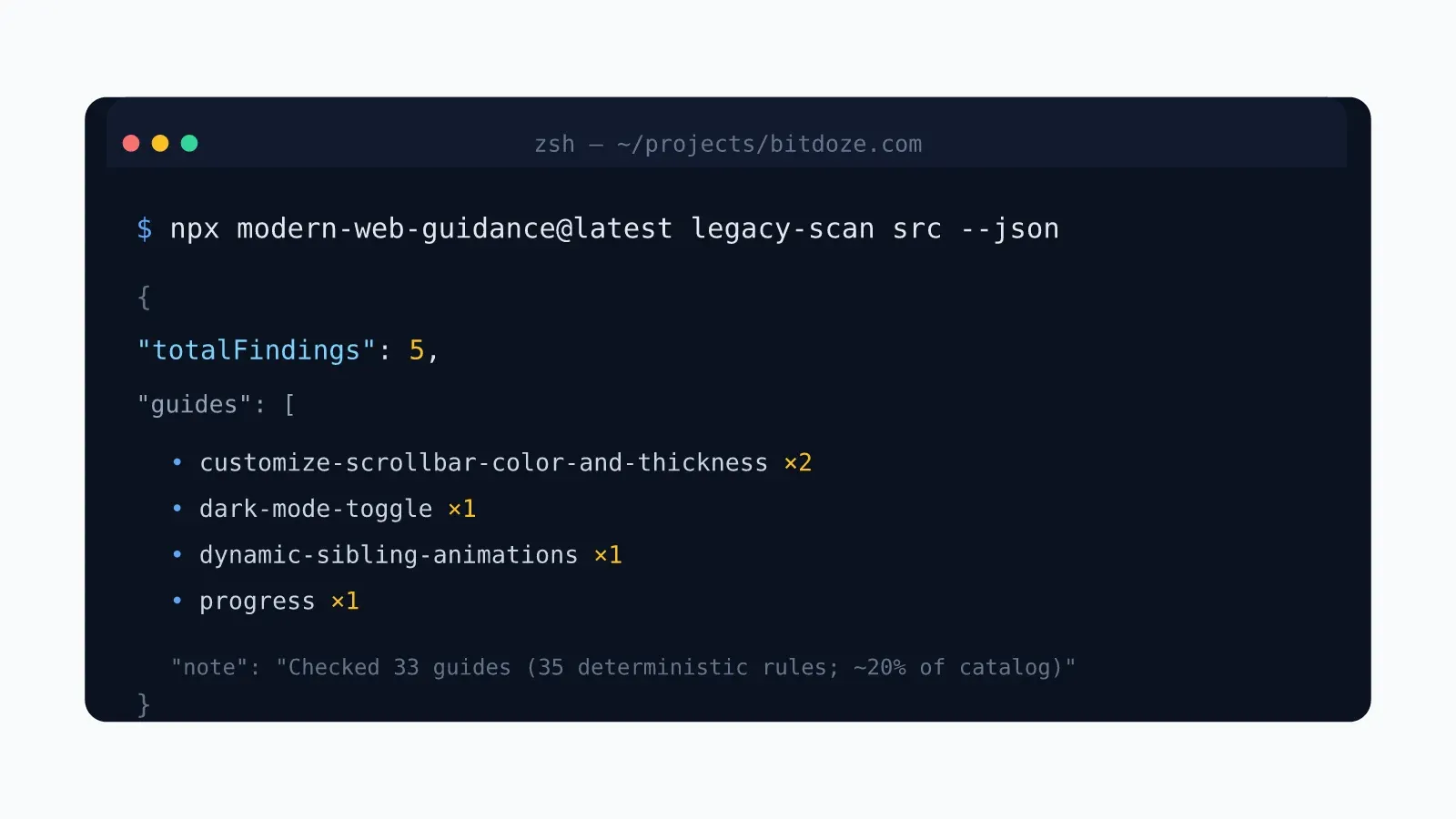
What it found in bitdoze.com
Five findings. I verified each one against the guide’s own keep/drop rubric before writing this. Two of them needed a second look: one was partially mitigated already, and one turned out to be dead code. That is the kind of nuance you should expect from any scanner.
1. Vendor scrollbar pseudo-elements, src/styles/global.css:314-326
The stylesheet styled the scrollbar on prose tables with WebKit-only pseudo-elements:
.prose .table-scroll::-webkit-scrollbar {
  height: 6px;
}
.prose .table-scroll::-webkit-scrollbar-thumb {
  background-color: var(--color-border-base);
  border-radius: 3px;
}
::-webkit-scrollbar does nothing in Firefox, so Firefox users got the default scrollbar on horizontally scrolling tables while Chrome and Safari got the thin styled one. The guide’s fix is the standard pair, scrollbar-width and scrollbar-color on the container, with the WebKit rules kept as a fallback inside @supports not (scrollbar-color: auto). The nuance the guide adds: scrollbar-color only reached Baseline in December 2025 (Safari 26.2), so deleting the WebKit rules outright would regress older Safari. “Modern” here means standard first, vendor fallback second, not vendor code deleted.
2. Dark mode toggle not syncing <meta name="color-scheme">, src/layouts/Layout.astro:121
The theme bootstrapper toggled a .dark class on <html> and persisted the choice in localStorage:
const isDark = stored === "dark" || (!stored && prefersDark);
root.classList.toggle("dark", isDark);
root.style.colorScheme = isDark ? "dark" : "light";
The scanner flagged the missing <meta name="color-scheme"> update. To be fair to the existing code: the inline style.colorScheme assignment does propagate the scheme to native UI like scrollbars and form controls, so this was a partial mitigation, not a bug. Where the guide’s model is still better: it drives everything off the meta element, which makes light-dark() colors and the early-paint path for native UI correct too.
3. Dead stagger-animation CSS, src/components/views/ResourcesView.astro:117-150
The stylesheet defined a fadeIn keyframe, an .animate-fade-in class, and six :nth-child rules staggering animation-delay from 0.1s to 0.6s, precisely the pattern sibling-index() would collapse into calc(sibling-index() * 0.1s). But here is where verification matters: no element on the page actually carried animate-fade-in. The grid children were plain <div class="h-full"> wrappers around ResourceCard, and a repo-wide search found the class defined only there. The whole block, keyframes included, was dead CSS, probably left behind by a refactor.
So the scanner’s suggested fix was technically correct and practically wrong. Modernizing dead code is still dead code. The real fix was deleting the block, or, if the staggered fade-in was the intended design, putting animate-fade-in back on the cards and then using sibling-index(), which also makes grids of any size stagger correctly instead of stopping at six items.
4. Custom <div role="progressbar">, src/components/courses/CourseSidebar.astro:40-54
The course sidebar built its progress track from two divs:
<div class="h-1.5 w-24 overflow-hidden rounded-full bg-gray-200 ..."
     role="progressbar" aria-valuemin="0" aria-valuemax="100" aria-valuenow="0"
     data-progress-track>
  <div data-progress-fill class="h-full rounded-full bg-blue-600 ..." style="width: 0%">
A native <progress value max> gives you the same visual with the accessibility semantics built in. Screen readers announce it without the ARIA scaffolding. The styling gotcha the guide warns about: once you go past accent-color, you must set appearance: none and target ::-webkit-progress-value and ::-moz-progress-bar, and you must not group those two pseudo-elements in one rule, because the whole rule gets dropped as invalid. That is the kind of detail that separates a guide written by people who shipped browser engines from generic LLM advice.
search and retrieve: the other 80%
legacy-scan only covers deterministic rules. For everything else, the agent workflow is search then retrieve. I ran a real query while writing this:
npx modern-web-guidance@latest search "dark mode toggle"It returned ranked guide IDs with descriptions (dark-mode-toggle, dark-mode, component-specific-light-dark-theme, selector-atrule-combinations, and more), and retrieve "<id>" fetches the full guide. Large guides (mine saved 25 KB) go to a temp file instead of stdout so they do not get truncated. The skill’s own instructions tell the agent to search before writing UI code, judge results by description, and only retrieve what matches, which is a reasonable guard against context bloat.
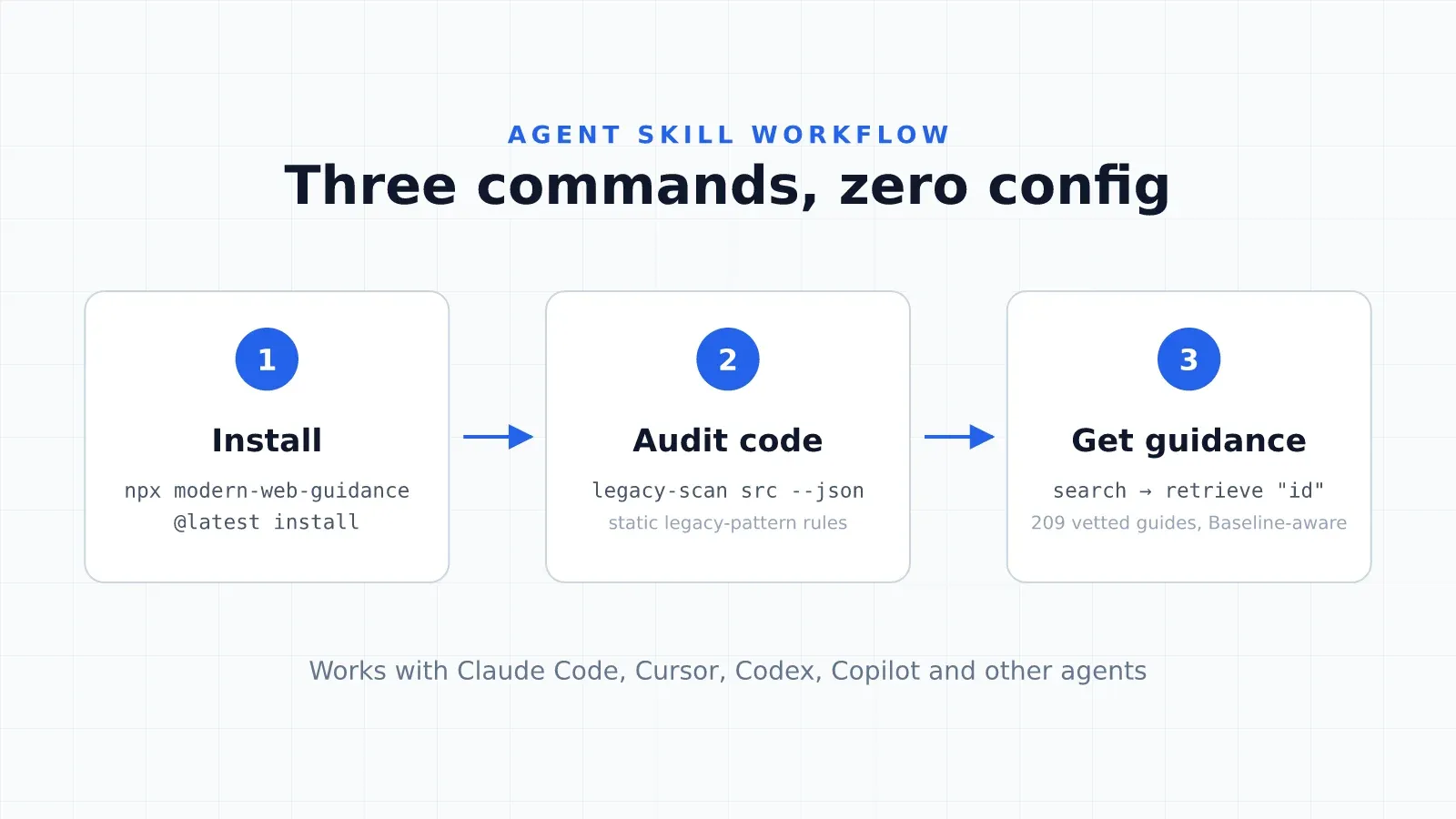
If your agent supports skills, installing this means its next modal, form, or animation task pulls from browser-engineer-reviewed guidance instead of stale training data. That is the actual product.
What the fixes actually do for readers
Worth being honest here: none of these were broken pages. They were polish, consistency, and payload issues. This is what each change does for someone visiting bitdoze.com:
| Finding | Reader-facing effect | Cost of the fix |
|---|---|---|
| Vendor scrollbars | Firefox users saw a default scrollbar on table scroll areas; now every browser gets the same thin styled one | Two standard properties + @supports wrapper, ~10 lines |
color-scheme meta |
Native UI (scrollbars, form controls, overscroll) picks the right theme at first paint, before CSS finishes loading; light-dark() colors and the no-JS path become correct |
One meta tag + three lines in the theme bootstrapper |
| Dead animation CSS | Nothing visible, but 34 lines of CSS shipped to /resources/ on every view doing nothing |
Deleted the whole <style> block |
| Div progressbar | Screen readers already announced it correctly (the ARIA was there), so the gain is less markup and semantics that cannot drift | Swapped two divs for one <progress> + pseudo-element CSS |
The bigger payoff is not any single fix. It is that the skill stays installed, so the next time an agent writes a modal, form, scrollbar, or animation for this site, it pulls from browser-engineer-reviewed guidance instead of stale patterns. Prevention beats cleanup.
The fixes I applied
Scrollbar: standard properties first, WebKit as fallback
.prose .table-scroll {
  scrollbar-width: thin;
  scrollbar-color: var(--color-border-base) var(--color-bg-muted);
}

@supports not (scrollbar-color: auto) {
  .prose .table-scroll::-webkit-scrollbar {
    height: 6px;
  }
  /* ...existing track/thumb rules... */
}
Firefox gets scrollbar-width: thin and scrollbar-color today; browsers without scrollbar-color support fall back to the WebKit rules. Same colors, wider coverage.
Dark mode: meta tag synced in the bootstrapper
<meta name="color-scheme" content="light dark" />And inside applyTheme():
document
  .querySelector('meta[name="color-scheme"]')
  ?.setAttribute(
    "content",
    stored === "dark" ? "dark" : stored === "light" ? "light" : "light dark"
  );
light dark means “follow the system”, a stored light or dark pins the override. The meta sits before the theme script in <head>, so it exists before applyTheme() first runs.
Dead CSS: deleted, not modernized
Removed the entire <style> block from ResourcesView.astro: the fadeIn keyframes, .animate-fade-in, and all six :nth-child delay rules. If the staggered animation ever comes back, sibling-index() is the right tool for it, with the --sibling-index custom-property fallback the guide prescribes for pre-Baseline browsers.
Progress bar: native element, split pseudo-elements
<progress
  class="course-progress h-1.5 w-24 rounded-full bg-gray-200 dark:bg-gray-700"
  max="100"
  value="0"
  aria-label="Course progress"
  data-progress-track
></progress>.course-progress {
appearance: none;
border: 0 solid;
overflow: clip;
}
.course-progress::-webkit-progress-bar { background: transparent; }
.course-progress::-webkit-progress-value { background: #2563eb; border-radius: 9999px; }
.course-progress::-moz-progress-bar { background: #2563eb; border-radius: 9999px; }Note the two fill pseudo-elements in separate rules. Group them and browsers drop the whole thing. The progress JS now sets bar.value instead of animating a width, which also means the fill updates instantly rather than transitioning — a fair trade for semantic markup.
bun run build:ci passes with all four changes in place.
Verdict: worth installing?
- Free, open source, and maintained by the browser vendors themselves, not a wrapper around an LLM.
- Baseline compatibility data means recommendations match your actual browser targets instead of “works in Chrome” guesswork.
- Zero runtime cost: it is prompt-side guidance, nothing ships to your users.
- The
legacy-scanaudit is useful even if you ignore the rest. Five findings on a codebase I know well is a good hit rate, and verifying them caught one false positive and one dead-code case.
The honest caveats:
legacy-scancovers ~20% of the catalog by design. Treat it as a first pass, then letsearch/retrievehandle feature work.- Findings are leads, not verdicts. Verify against the guide’s rubric. Two of my five needed a second look.
- Guides assume a “Baseline Widely Available” target. If you ship to restricted runtimes (Electron, older Safari), say so in
AGENTS.mdor the agent will apply fallbacks you do not need. - It is two days old. v1.0 shipped November 10; expect the corpus and the CLI to move fast.
If you use a coding agent on frontend work, install it. If you only write backend or infra, skip it. The skill itself says it does not trigger for those tasks. For more agent tooling comparisons, see my guide to the best AI skills for web design and the Pi coding agent setup guide if you are still picking a harness.
Related Posts



Did this guide work for you?

Written by Dragos
Dragos is the author of Bitdoze — practical DevOps, programming, and self-hosting guides.
More guides from Dragos →Need help with Astro, VPS, or a self-hosted app? View services →