VibeProxy: Use Your Claude, Codex & Gemini Subscriptions with Any AI Coding Tool
Learn how to use VibeProxy to leverage your existing Claude Code, OpenAI Codex, Gemini, and Antigravity subscriptions with Factory AI Droids, Amp Code, Zed…

Updated Published 21 min read
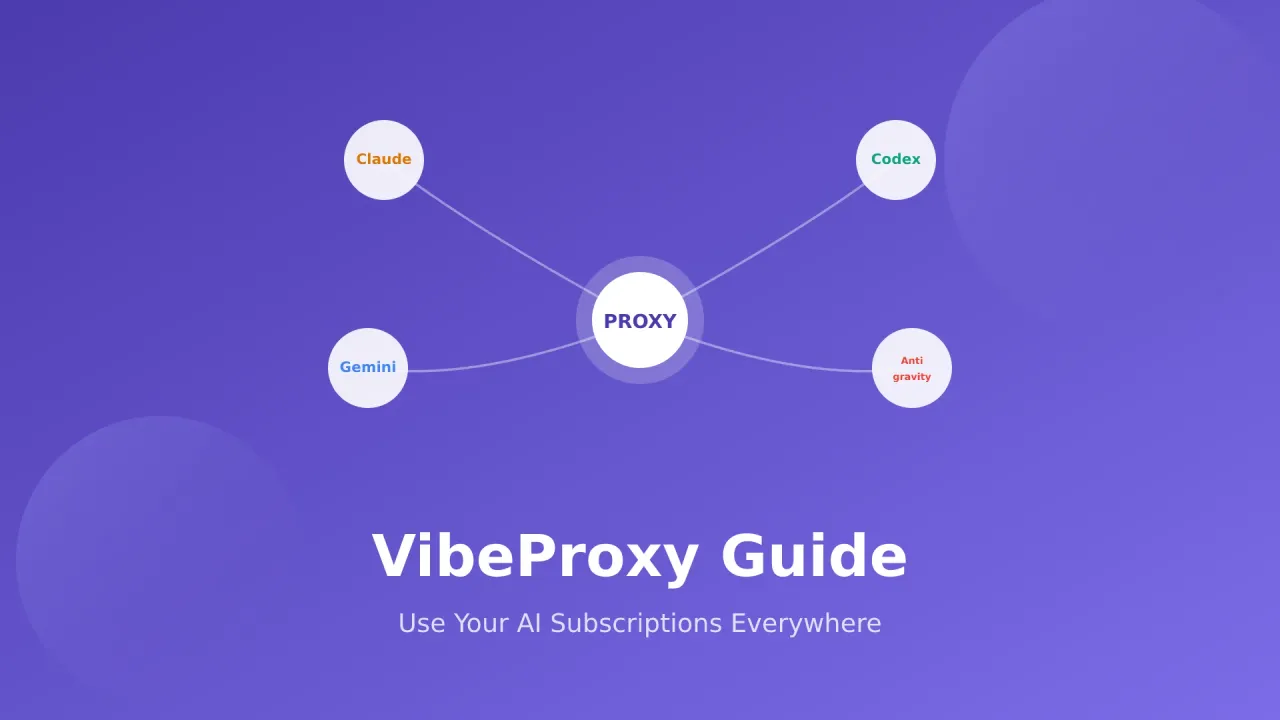
You already pay for Claude Code, ChatGPT Plus, or other AI subscriptions. Why pay again for API access? VibeProxy is a macOS menu bar app that routes your existing subscriptions to coding tools like Factory AI Droids, Amp Code, Zed, and other OpenAI-compatible applications.
What You'll Learn
- Stop paying twice for AI by reusing your existing subscriptions
- Set up VibeProxy in minutes on your Mac (Apple Silicon)
- Configure Factory Droids, Amp Code, and other tools to use your subscriptions
- Access premium models like Claude Opus 4.5, GPT-5.1, and Gemini 3 Pro
- Use extended thinking for complex reasoning tasks
If you’re new to AI coding tools, check out our AI Programming Beginners Guide for a comprehensive introduction.
What is VibeProxy?
VibeProxy is a free, open-source macOS app from Automaze that runs in the menu bar. It creates a local proxy server on port 8317 and routes API requests from your coding tools to your existing AI subscriptions.
Your Coding Tool (Factory, Amp, Zed, etc.)
    ↓
VibeProxy (Local Proxy on port 8317)
    ↓
Your Existing Subscriptions (Claude Code, ChatGPT Plus, Gemini, etc.)
Why Use VibeProxy?
- Save Money: Use your $20/month Claude Code subscription instead of paying API fees
- Multiple AI Models: Access Claude Opus 4.5, Sonnet 4.5, GPT-5.1, Gemini 3 Pro, and more
- Native macOS Experience: SwiftUI menu bar app
- OAuth Authentication: Browser-based login, no API keys to manage
- Auto Updates: Keeps itself and CLIProxyAPI up to date automatically
- Universal Compatibility: Works with OpenAI-compatible coding tools
VibeProxy uses CLIProxyAPI to handle OAuth authentication, token management, and API routing.
Supported AI Subscriptions
VibeProxy currently supports these AI subscriptions:
| Subscription | Models Available | Requirements |
|---|---|---|
| Claude Code Pro/Max | Claude Sonnet 4.5, Claude Opus 4.5, Extended Thinking | Active subscription |
| ChatGPT Plus/Pro | GPT-5, GPT-5.1, GPT-5.1 Codex, GPT-5.1 Codex Max | Active subscription |
| Google Antigravity | Gemini 3 Pro, Gemini 3 Pro Image | Google account |
| Gemini CLI | Gemini 2.5 Pro, Gemini 2.5 Flash | Google Cloud account |
| Qwen | Qwen3 Coder Plus, Qwen3 Coder Flash | Qwen account |
Already Have These Subscriptions?
If you’re using Claude Sonnet 4.6 and GPT-5.5 for free or have paid subscriptions, VibeProxy lets you use them across your coding tools.
Installing VibeProxy
System Requirements
VibeProxy requires:
- macOS 13.0 (Ventura) or later
- Apple Silicon (M1/M2/M3/M4) only
Step 1: Download VibeProxy
- Go to the VibeProxy Releases page
- Download the latest
VibeProxy.zip - Extract the ZIP file
Step 2: Install the App
# Move to Applications folder
mv VibeProxy.app /Applications/

# Or double-click to open from Downloads
The app is code signed and notarized by Apple, so Gatekeeper won’t block installation.
Step 3: Launch VibeProxy
- Open VibeProxy from
/Applications - A menu bar icon will appear
- Click the icon and select “Open Settings”
- The server starts automatically on port 8317
Connecting Your AI Subscriptions
Once VibeProxy is running, authenticate with each AI provider you want to use.
Connecting Claude Code
- Click the VibeProxy menu bar icon
- Select “Open Settings”
- Click “Connect” next to Claude Code
- Your browser opens for OAuth authentication
- Log in with your Claude Code account
- VibeProxy detects completion automatically
Connecting OpenAI Codex
- In VibeProxy settings, click “Connect” next to Codex
- Complete the browser authentication
- Wait for VibeProxy to confirm the connection
Connecting Antigravity (Gemini 3 Pro)
Gemini 3 vs Gemini 2.x
- Antigravity authentication provides access to Gemini 3 Pro models
- Gemini CLI authentication provides access to Gemini 2.x models
- Connect both to access all Gemini models
- Click “Connect” next to Antigravity
- Sign in with your Google account
- Grant permissions for AI model access
- Restart VibeProxy to activate Gemini 3 Pro access
Connecting Gemini CLI
- Click “Connect” next to Gemini
- Sign in with your Google account
- Select a Google Cloud project (or accept the default)
- VibeProxy saves your credentials automatically
Setting Up Factory AI Droids
Factory CLI (Droid) is an AI coding agent. Here’s how to configure it to use VibeProxy.
Install Factory CLI
# Install Factory CLI
curl -fsSL https://app.factory.ai/cli | sh
Configure Custom Models
Create or edit the Factory configuration file at ~/.factory/config.json:
{
  "custom_models": [
    {
      "model_display_name": "CC: Opus 4.5 (High)",
      "model": "claude-opus-4-5-20251101-thinking-32000",
      "base_url": "http://localhost:8317",
      "api_key": "dummy-not-used",
      "provider": "anthropic"
    },
    {
      "model_display_name": "CC: Sonnet 4.5",
      "model": "claude-sonnet-4-5-20250929",
      "base_url": "http://localhost:8317",
      "api_key": "dummy-not-used",
      "provider": "anthropic"
    },
    {
      "model_display_name": "GPT-5.1 Codex",
      "model": "gpt-5.1-codex",
      "base_url": "http://localhost:8317/v1",
      "api_key": "dummy-not-used",
      "provider": "openai"
    },
    {
      "model_display_name": "Gemini 3 Pro",
      "model": "gemini-3-pro-preview",
      "base_url": "http://localhost:8317/v1",
      "api_key": "dummy-not-used",
      "provider": "openai"
    }
  ]
}
Using Factory with VibeProxy
-
Launch Factory CLI:
bash droid -
Select your model with
/modeland choose from your configured options -
Start coding! Factory routes all requests through VibeProxy automatically.
Full Factory Configuration with All Models
Here’s a comprehensive configuration with all available models:
{
  "custom_models": [
    {
      "model_display_name": "CC: Opus 4.5 (High)",
      "model": "claude-opus-4-5-20251101-thinking-32000",
      "base_url": "http://localhost:8317",
      "api_key": "dummy-not-used",
      "provider": "anthropic"
    },
    {
      "model_display_name": "CC: Opus 4.5 (Medium)",
      "model": "claude-opus-4-5-20251101-thinking-10000",
      "base_url": "http://localhost:8317",
      "api_key": "dummy-not-used",
      "provider": "anthropic"
    },
    {
      "model_display_name": "CC: Opus 4.5 (Low)",
      "model": "claude-opus-4-5-20251101-thinking-4000",
      "base_url": "http://localhost:8317",
      "api_key": "dummy-not-used",
      "provider": "anthropic"
    },
    {
      "model_display_name": "CC: Sonnet 4.5 (High)",
      "model": "claude-sonnet-4-5-20250929-thinking-32000",
      "base_url": "http://localhost:8317",
      "api_key": "dummy-not-used",
      "provider": "anthropic"
    },
    {
      "model_display_name": "CC: Sonnet 4.5",
      "model": "claude-sonnet-4-5-20250929",
      "base_url": "http://localhost:8317",
      "api_key": "dummy-not-used",
      "provider": "anthropic"
    },
    {
      "model_display_name": "GPT-5.1 Codex Max",
      "model": "gpt-5.1-codex-max",
      "base_url": "http://localhost:8317/v1",
      "api_key": "dummy-not-used",
      "provider": "openai"
    },
    {
      "model_display_name": "GPT-5.1 Codex",
      "model": "gpt-5.1-codex",
      "base_url": "http://localhost:8317/v1",
      "api_key": "dummy-not-used",
      "provider": "openai"
    },
    {
      "model_display_name": "GPT-5.1",
      "model": "gpt-5.1",
      "base_url": "http://localhost:8317/v1",
      "api_key": "dummy-not-used",
      "provider": "openai"
    },
    {
      "model_display_name": "Gemini 3 Pro",
      "model": "gemini-3-pro-preview",
      "base_url": "http://localhost:8317/v1",
      "api_key": "dummy-not-used",
      "provider": "openai"
    },
    {
      "model_display_name": "Gemini 2.5 Pro",
      "model": "gemini-2.5-pro",
      "base_url": "http://localhost:8317/v1",
      "api_key": "dummy-not-used",
      "provider": "openai"
    },
    {
      "model_display_name": "Qwen3 Coder Plus",
      "model": "qwen3-coder-plus",
      "base_url": "http://localhost:8317/v1",
      "api_key": "dummy-not-used",
      "provider": "openai"
    }
  ]
}
Setting Up Amp Code
Amp Code by Sourcegraph is an AI coding agent. VibeProxy works with Amp CLI.
Configure Amp URL
Create or edit ~/.config/amp/settings.json:
{
  "amp.url": "http://localhost:8317"
}
Login to Amp Through VibeProxy
amp loginThis will:
- Open your browser to
http://localhost:8317/api/auth/cli-login - VibeProxy forwards the request to ampcode.com
- Complete the login in your browser
- Amp CLI saves your credentials
Fix the Secrets File
After login, you need to add a simple apiKey field. Edit ~/.local/share/amp/secrets.json:
# View current contents
cat ~/.local/share/amp/secrets.json
Add the apiKey field (copy value from existing keys):
{
  "apiKey@https://ampcode.com/": "sgamp_user_01XXXXX...",
  "apiKey@http://localhost:8317": "sgamp_user_01XXXXX...",
  "apiKey": "sgamp_user_01XXXXX..."
}
Or use this Python one-liner to do it automatically:
python3 << 'EOF'
import json
import os

secrets_file = os.path.expanduser('~/.local/share/amp/secrets.json')

with open(secrets_file, 'r') as f:
    data = json.load(f)

api_key = data.get('apiKey@https://ampcode.com/', data.get('apiKey@http://localhost:8317', ''))

if api_key and 'apiKey' not in data:
    data['apiKey'] = api_key
    with open(secrets_file, 'w') as f:
        json.dump(data, f, indent=2)
    print('✅ Added apiKey field to secrets.json')
EOF
Use Amp with VibeProxy
# Interactive mode
amp

# Direct prompt
amp "Write a hello world in Python"
Smart Fallback
When Amp requests a model, it checks for local VibeProxy authentication first. If authenticated, it uses your subscription. Otherwise, it uses Amp credits.
Using with Other Coding Platforms
VibeProxy works with any OpenAI-compatible tool. Here’s how to configure popular options.
Zed Editor
Zed is a fast code editor with AI features. Configure it to use VibeProxy:
- Open Zed Settings (
Cmd+,) - Navigate to AI settings
- Set the API endpoint to
http://localhost:8317/v1 - Use
dummyas the API key
OpenCode
For OpenCode or similar CLI tools, set the environment variable:
export OPENAI_API_BASE="http://localhost:8317/v1"
export OPENAI_API_KEY="dummy"
VS Code Extensions (Roo Code, Continue, etc.)
Many VS Code extensions support custom endpoints. Configure them with:
{
  "provider": "OpenAI Compatible",
  "base_url": "http://localhost:8317/v1",
  "api_key": "dummy-not-used",
  "model": "claude-sonnet-4-5-20250929"
}
Any OpenAI-Compatible Application
The general pattern for any tool is:
| Setting | Value |
|---|---|
| Base URL | http://localhost:8317/v1 (or / for Anthropic) |
| API Key | dummy (or any placeholder) |
| Model | See available models below |
Available Models Reference
Claude Models (via Claude Code subscription)
| Model ID | Description |
|---|---|
claude-opus-4-5-20251101 |
Claude Opus 4.5 (Most powerful) |
claude-sonnet-4-5-20250929 |
Claude Sonnet 4.5 (Best for coding) |
claude-opus-4-5-20251101-thinking-32000 |
Opus 4.5 with Extended Thinking (32K tokens) |
claude-sonnet-4-5-20250929-thinking-10000 |
Sonnet 4.5 with Extended Thinking |
OpenAI Models (via ChatGPT subscription)
| Model ID | Description |
|---|---|
gpt-5.1-codex-max |
GPT-5.1 Codex Max (Best for agentic coding) |
gpt-5.1-codex |
GPT-5.1 Codex |
gpt-5.1 |
GPT-5.1 Base |
gpt-5-codex |
GPT-5 Codex |
Gemini Models
| Model ID | Description | Auth Required |
|---|---|---|
gemini-3-pro-preview |
Gemini 3 Pro | Antigravity |
gemini-3-pro-image-preview |
Gemini 3 Pro with Vision | Antigravity |
gemini-2.5-pro |
Gemini 2.5 Pro | Gemini CLI |
gemini-2.5-flash |
Gemini 2.5 Flash | Gemini CLI |
Qwen Models
| Model ID | Description |
|---|---|
qwen3-coder-plus |
Qwen3 Coder Plus |
qwen3-coder-flash |
Qwen3 Coder Flash |
Extended Thinking Mode
VibeProxy supports Claude’s Extended Thinking feature. The model reasons step-by-step before answering.
How to Use Extended Thinking
Append a thinking suffix to any Claude model name:
{model-name}-thinking-{NUMBER}Presets:
-thinking-4000— ~4K tokens-thinking-10000— ~10K tokens-thinking-32000— ~32K tokens
Examples
{
  "model": "claude-sonnet-4-5-20250929-thinking-10000"
}
VibeProxy:
- Removes the
-thinking-10000suffix - Adds the thinking parameter with a 10,000 token budget
- Forwards the request to Claude
The response shows Claude’s reasoning steps.
Troubleshooting
VibeProxy Menu Bar Status
Check the menu bar icon:
- Green dot: Server is running correctly
- Red dot: Server is stopped
- Click the status to toggle on/off
Connection Issues
| Problem | Solution |
|---|---|
| Can’t connect to Claude/Codex | Re-click “Connect” in VibeProxy settings |
| Factory shows 404 errors | Ensure VibeProxy server is running (check menu bar) |
| Authentication expired | Disconnect and reconnect the service |
| Port 8317 already in use | Quit other VibeProxy or CLIProxyAPI instances |
| Gemini returns 401 | Verify Google Cloud has Gemini API enabled |
'App is damaged' Error
If macOS shows this error, remove quarantine attributes:
xattr -cr /Applications/VibeProxy.appThen try opening again.
Verification Checklist
- ✅ VibeProxy is running (menu bar icon shows green)
- ✅ Services show as “Connected” in settings
- ✅ Your tool is configured with
localhost:8317 - ✅ API key is set (any placeholder works)
- ✅ Test with a simple prompt: “what day is it?”
Security Considerations
Important Security Information
VibeProxy handles your AI credentials securely:
- Local Storage: All tokens stored in
~/.cli-proxy-api/with 0600 permissions - Localhost Only: Server binds only to 127.0.0.1 (not accessible from network)
- HTTPS Upstream: All traffic to AI providers uses HTTPS encryption
- Auto-Refresh: Tokens refresh automatically before expiration
Terms of Service Note: Using your subscriptions this way may violate provider TOS. Use at your own risk and discretion.
Use Cases and Benefits
For Professional Developers
- Cost Savings: Your $20/month Claude subscription works across tools
- Model Flexibility: Switch between Claude, GPT, and Gemini without separate API keys
- Unified Workflow: Use the same models in Factory, Amp, Zed, and other tools
- Extended Thinking: Access reasoning capabilities for complex architecture decisions
For Hobbyists and Learners
- Maximize Value: Get more from your subscriptions
- Experiment Freely: Try different coding tools without additional costs
- Learn AI Development: Understand how AI APIs work through the proxy
- Build Projects: Use premium models for side projects
For more AI programming guidance, check out:
- AI Programming Beginners Guide
- Best Open-Source LLMs as Claude Alternatives
- MCP Introduction for Beginners
Related Tools and Resources
- GitHub Copilot Complete Guide
- Amp Code Free AI Coding Agent
- Docker & Podman for AI CLI Tools
- BrightData MCP Guide
Frequently Asked Questions
Is VibeProxy free?
Yes! VibeProxy is completely free and open-source under the MIT license. You can download it from GitHub, use it indefinitely, and even contribute to its development.
Does it work on Intel Macs?
No, VibeProxy requires Apple Silicon (M1/M2/M3/M4). Intel Macs are not supported due to the underlying binary architecture.
Will this get my account banned?
There’s a risk. Using subscriptions through a proxy may violate terms of service for some AI providers. The VibeProxy documentation acknowledges this—use at your own risk and discretion.
Can I use it with Linux or Windows?
VibeProxy itself is macOS-only. However, the underlying CLIProxyAPI can be run manually on other platforms. Check the CLIProxyAPI repository for details.
How do I update VibeProxy?
Starting with v1.6, VibeProxy checks for updates daily and installs them automatically via Sparkle. You can also manually download new versions from the releases page.
What if a model isn't working?
- Ensure you’re authenticated for that provider in VibeProxy settings
- Check that the model ID is correct (see Available Models section)
- Restart VibeProxy after making changes
- Check the application logs in Console.app (search for “VibeProxy”)
Conclusion
VibeProxy lets you use your existing AI subscriptions with coding tools instead of paying separately for API access.
Key Takeaways:
✅ Stop Paying Twice — Use Claude Code, ChatGPT Plus, and Gemini subscriptions in any tool
✅ Universal Compatibility — Works with Factory AI, Amp Code, Zed, and OpenAI-compatible apps
✅ Premium Models — Access Claude Opus 4.5, GPT-5.1, Gemini 3 Pro, and more
✅ Extended Thinking — Enable deep reasoning for complex problems
✅ Native macOS App — Menu bar integration with automatic updates
Whether you’re using GitHub Copilot, Amp Code, Factory Droids, or other AI coding tools, VibeProxy extends your existing AI subscriptions.
Download VibeProxyDownload VibeProxy, connect your subscriptions, and use your AI models with any coding tool.