ASUS DC510 vs Razer Thunderbolt 5 Dock: Which One Wins?
ASUS DC510 vs Razer Thunderbolt 5 Dock Chroma compared at September 2026 street prices: ports, 2.5GbE vs 1GbE, M.2 SSD speed, fan noise, and which to buy.

Updated Published 27 min read
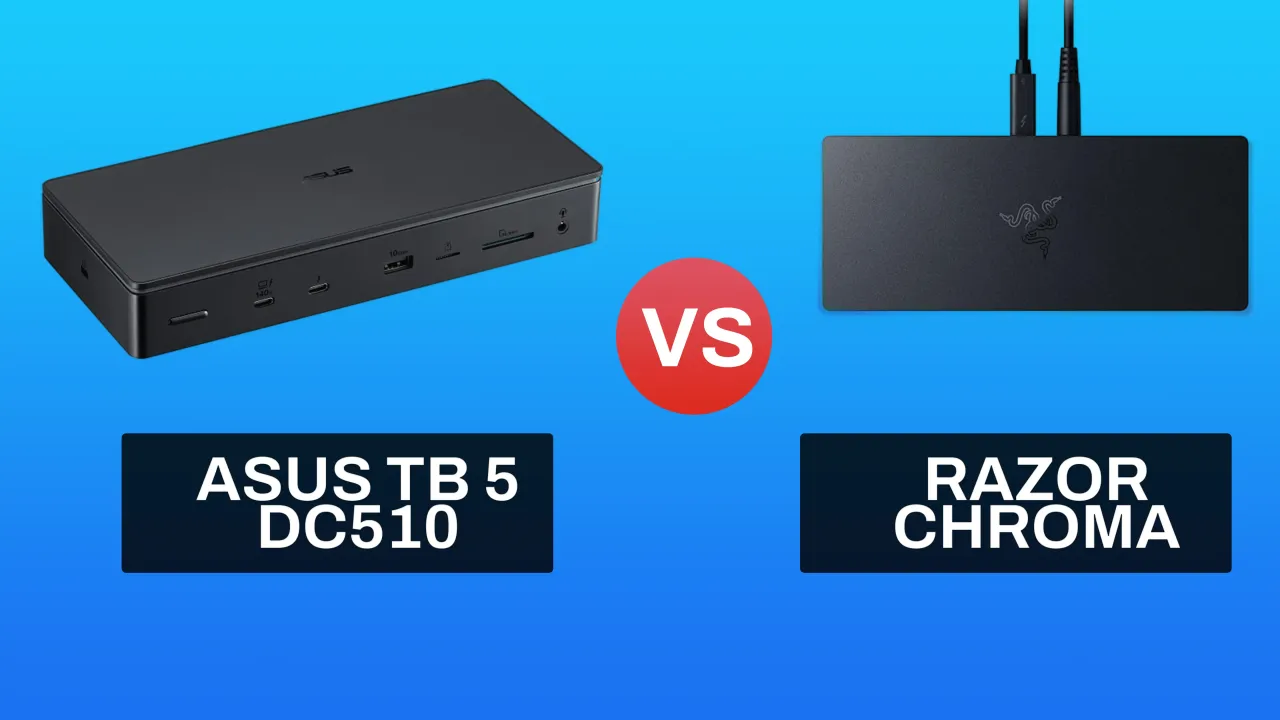
This comparison first went up in October 2025, when the ASUS DC510 was listing around €420 in Europe and the Razer Thunderbolt 5 Dock Chroma was one of the few Thunderbolt 5 docks you could actually order. In September 2026 both docks are still worth owning, but the buying decision has changed: the ASUS street price is down to roughly $350, the Razer sits around $390, and a $195 Kensington now covers most of what these two do if you can live without an M.2 slot.
Short version first: I would buy the ASUS DC510 for a desk that moves files over a network or handles camera cards, and I would only buy the Razer Chroma if Chroma RGB sync with your other Razer gear is a real requirement, or you want Thunderbolt Share between two machines. Everything else is close enough that the software and the networking decide it, not the marketing.
Affiliate Disclosure
Some links in this comparison are affiliate links. If you buy through them, we may earn a small commission at no extra cost to you. This helps us keep testing and updating these recommendations.
Quick recommendation
Default pick: ASUS DC510. 2.5GbE instead of 1GbE, four USB-A ports instead of two, SD plus microSD readers, and a toolless M.2 bay with a cooling pad. Roughly $350.
Pick the Razer Chroma if you already run Razer peripherals and want everything on one Chroma profile, or you need 7.1 surround on the audio jack and Thunderbolt Share. Roughly $390.
Pick neither if you do not need the M.2 slot. The Kensington SD5000T5 is Intel-certified Thunderbolt 5, 2.5GbE, passive cooling, and around $195 to 300.
What changed since the first version of this comparison
Not the hardware. Prices, stock, and how many machines can actually use an 80 Gbps link.
| October 2025 | September 2026 | |
|---|---|---|
| ASUS DC510 price | ~€420 in Europe, hard to find in stock | Roughly $350 at normal retailers |
| Razer Chroma price | Roughly $400 to 450 | Roughly $390 |
| Cheap tier below both | Did not exist | Kensington SD5000T5 at $195 to 300 |
| Hosts that can use 80 Gbps | M4 Pro/Max Macs and a few Intel laptops | M4/M5 Pro and Max Macs, Core Ultra Windows laptops |
| Who this comparison is for | Early adopters paying a tax | People replacing a Thunderbolt 4 dock |
Two corrections I want visible, because the first version of this page implied otherwise:
- The 5,800 MB/s SSD figure I publish for the ASUS is a Thunderbolt 5 host number. My M1 Pro MacBook is a Thunderbolt 4 machine, and on that host the same SSD caps around 2.6 to 3 GB/s. Nothing is wrong with the dock.
- The M1 Pro also drives a maximum of two external displays, so the DC510’s triple 4K claim was never testable on it. What I actually confirmed was dual 4K at 144Hz on the M1 Pro and dual 4K at 165Hz on the M4 Pro Mac mini.
Step zero: check your host before you buy either dock
This is the step that decides whether you are buying a $350 dock or a $350 paperweight. Thunderbolt 5 hosts are what unlock the 80 Gbps link, PCIe 4.0 x4 tunneling (which is what makes a dock-mounted NVMe fast) and Bandwidth Boost up to 120 Gbps toward displays. On a Thunderbolt 4 or USB4 host, both docks still work, but you get 40 Gbps, PCIe 3.0 x4, and your host’s own display limit.
Check it in 30 seconds.
macOS
# Look for the link speed on the Thunderbolt bus
system_profiler SPThunderboltDataType | grep -E "Thunderbolt|Speed|Link Status"

# How many displays this host can drive, and at what refresh
system_profiler SPDisplaysDataType | grep -E "Resolution|Refresh Rate"
Expected on a Thunderbolt 5 host: the tree shows the dock with Speed: Up to 80 Gb/s. On an M4 Pro or M5 Pro Mac this is what you will see.
What broken looks like: Speed: Up to 40 Gb/s. That is a Thunderbolt 4 host (M1, M2, M3 Macs, most Intel Macs). Everything works, the dock’s M.2 slot just runs at roughly half speed and the third display will not be there.
Windows
Get-PnpDevice -Class System | Where-Object FriendlyName -like "*Thunderbolt*" | Select-Object FriendlyName, Status
Get-PnpDevice -Class USB | Where-Object FriendlyName -like "*USB4*" | Select-Object FriendlyName, Status
Expected: the Thunderbolt controller appears with status OK, and after plugging the dock in, the Thunderbolt Control Center app asks you to approve the new device once.
What broken looks like: no Thunderbolt controller at all (you have a plain USB-C port, and both docks drop to USB 3.2 behaviour), or the device sits in Error state until you install the current Intel Thunderbolt driver.
Linux
boltctl list
lspci | grep -i thunderbolt
lsblk -o NAME,SIZE,MODEL,TRAN
Expected: boltctl list shows the dock with an authorized status, and the NVMe inside the dock shows up as a normal block device.
Note: USB4 v2 host support on Linux is still the least predictable of the three platforms. If the kernel does not bring the link up as expected, the dock falls back to working as a USB4/USB hub at reduced bandwidth. Do not buy either dock expecting to debug the link on Linux if you need it working tomorrow.
If you are on a Thunderbolt 4 host and an M.2 slot is not a hard requirement, stop here and buy the cheap end of the category. You will never touch what these two charge for. Both the best Thunderbolt 5 docks guide and my ASUS DC510 review go into the host math in more detail.
Quick comparison table (September 2026)
| Feature | ASUS DC510 | Razer Chroma | Winner |
|---|---|---|---|
| Street price | ~$350 | ~$390 | ASUS |
| Total ports | 13 | 11 | ASUS |
| Thunderbolt 5 ports | 3x (1 host, 2 downstream) | 4x (1 host, 3 downstream) | Razer |
| USB-A | 3x 10Gbps + 1x 5Gbps | 2x 10Gbps | ASUS |
| USB-C | None besides TB5 | 1x 10Gbps | Razer |
| Ethernet | 2.5 Gigabit | 1 Gigabit | ASUS |
| Card readers | SD + microSD (UHS-II) | SD only (UHS-II) | ASUS |
| M.2 SSD slot | Yes, PCIe 4.0 2280 | Yes, PCIe Gen4 x4 | Tie |
| Max SSD capacity | 8TB (2TB tested) | Up to 8TB | Tie |
| Display support | Triple 4K @144Hz, dual 8K @60Hz | Triple 4K @144Hz | Tie |
| Power delivery | 140W | 140W | Tie |
| Power supply | 180W adapter | 250W | Razer (headroom) |
| Audio | 3.5mm combo | 3.5mm with 7.1 surround | Razer |
| Thunderbolt Share | No | Yes | Razer |
| Lighting | White ambient LED | Razer Chroma, 16.8M colors | Razer |
| Cooling | Active fan, audible | Active, reportedly quieter | Razer |
| Dimensions / weight | 220 x 96.7 x 38.1mm, 765g | 205 x 85 x 30mm, 524g | Razer |
| Cable in the box | 100cm TB5 cable | 80cm TB5 cable | Tie |
| Best for | Network-heavy work, creators | Chroma users, two-PC desks | - |
Ports and expansion
ASUS DC510
Front panel:
- 1x USB-A 3.0 (5Gbps)
- 1x SD card reader (UHS-II)
- 1x microSD card reader (UHS-II)
- 1x 3.5mm audio combo jack
Rear panel:
- 3x Thunderbolt 5 (80Gbps)
- 3x USB-A 3.2 Gen 2 (10Gbps)
- 1x 2.5 Gigabit Ethernet
- 1x M.2 NVMe PCIe 4.0 slot (under the magnetic cover)
- 1x Kensington lock slot
- 1x DC power input
Total: 13 ports plus the M.2 bay.
Razer Chroma
Ports:
- 4x Thunderbolt 5 (1 host, 3 downstream)
- 2x USB-A 3.2 Gen 2 (10Gbps)
- 1x USB-C 3.2 Gen 2 (10Gbps)
- 1x 1 Gigabit Ethernet
- 1x UHS-II SD card slot
- 1x 3.5mm audio jack with 7.1 surround support
- 1x M.2 NVMe slot (PCIe Gen4 x4)
Total: 11 ports by Razer’s count, plus the M.2 bay.
The port layouts differ more than anything else here. The ASUS puts the card readers and one USB-A on the front where you can reach them, and it gives you four USB-A ports total. The Razer puts an extra USB-C port on the dock, which matters if your peripherals are USB-C native, but only two USB-A.
My take: if you hot-plug USB-C SSDs all day, the Razer’s extra USB-C is a genuine advantage. If you are plugging in a keyboard, mouse, YubiKey, audio interface and a USB-A SSD in the same session, four USB-A beats three. Neither dock has a front USB-C port with power delivery, which is the one thing I would ask both companies for.
Networking: 2.5GbE vs 1GbE is the whole argument
This is the single difference that changes what you can do at the desk.
| ASUS DC510 | Razer Chroma | |
|---|---|---|
| Link speed | 2.5 Gigabit (2500base-T) | 1 Gigabit (1000baseT) |
| Realistic throughput | ~280 MB/s | ~110 MB/s |
| 100GB over the wire | ~6 minutes | ~15 minutes |
The Razer’s 1GbE is not a design flaw, it is a market decision. Razer built this dock for gamers, and game downloads do not care much past a gigabit. But if you pull footage off a NAS, run backups to a server, or touch a big repo over the network, 1GbE is a hard wall and the dock cannot fix it with firmware.
Two footguns with the ASUS port:
- 2.5GbE only helps if the path supports it. A CAT5e run, an old 1G switch, or a cheap USB-C-to-Ethernet adapter in the middle will negotiate down and the dock gets blamed.
- Verify, do not assume. After you plug in, check the negotiated speed instead of trusting the listing:
# macOS
networksetup -listallhardwareports | grep -A 3 -i ethernet
ifconfig en6 | grep media          # en6 = the interface the previous command printed

# Linux
ip -br link                        # find the dock's interface, usually enp...
ethtool enp87s0 | grep -i speed    # swap in the name from the line above

# Windows
Get-NetAdapter | Select-Object Name, LinkSpeed
Expected: 2500base-T on macOS, Speed: 2500Mb/s from ethtool, 2.5 Gbps from Get-NetAdapter.
What broken looks like: 1000baseT or 1 Gbps. That is your cable, switch or patch panel, not the dock.
The one case where 1GbE is fine
If your internet is 1Gb or slower and your only network traffic is that internet connection, the Razer’s 1GbE port costs you nothing. The difference only shows up between machines on your own LAN: NAS transfers, local backups, VM images, container pulls from a local registry.
If you do go ASUS and want the full 2.5G path, budget for a 2.5GbE switch. Unmanaged 5-port models run roughly $40 to 80 as of this writing, which is cheap next to what a 10GbE setup costs.
Winner: ASUS DC510
Storage expansion: the M.2 slot in both docks
Both docks hide an NVMe slot for scratch storage, and this is the feature that separates them from the $195 Kensington.
| ASUS DC510 | Razer Chroma | |
|---|---|---|
| Slot | M.2 2280, PCIe 4.0 | M.2, PCIe Gen4 x4 |
| Access | Magnetic top cover, no tools | Easy access |
| Cooling | SSD cooling pad included | Shared dock cooling |
| Capacity | 8TB supported (2TB tested) | Up to 8TB |
| Tested speed | 5,800 MB/s read, 4,300 MB/s write | Not tested by me |
The ASUS numbers come from a WD_BLACK 2TB SN850X in the dock on a Thunderbolt 5 host, plus these FIO results:
| Block size | Read MB/s | Write MB/s | Total IOPS |
|---|---|---|---|
| 4k | 47.4 | 47.4 | 24,264 |
| 64k | 729.1 | 730.0 | 23,345 |
| 512k | 2,065.7 | 2,072.5 | 8,276 |
| 1m | 2,510.5 | 2,570.1 | 5,080 |
The interesting part: at large block sizes that dock-mounted drive was faster than the internal SSD in the M4 Pro Mac mini I compared it against. That is PCIe 4.0 tunneling doing its job, and it is the upgrade over Thunderbolt 4 that actually shows up in daily work.
The Thunderbolt 4 ceiling
Put the same SSD in either dock on a Thunderbolt 4 host and it stalls around 2.6 to 3 GB/s, because TB4 only tunnels PCIe 3.0 x4. If you see those numbers on an M1, M2 or M3 Mac, the dock is not the problem.
If you are buying a drive for the slot, the WD_BLACK SN850X 2TB is what I used and it has held up. Two things before you install a drive that already has data on it: macOS mounts NTFS read-only, and reformatting erases the drive. Copy anything you care about off first, then pick the filesystem on purpose (APFS for Mac only, exFAT if you move between Mac and Windows).
Winner: Tie
ASUS has the better install experience and a dedicated cooling pad. Razer officially supports up to 8TB and I have no reason to doubt it, but I have not benchmarked a drive in that dock.
Displays
On paper, identical: triple 4K at 144Hz or dual 8K at 60Hz on both, and both need Display Stream Compression to get there.
| Configuration | ASUS DC510 | Razer Chroma |
|---|---|---|
| Triple 4K @144Hz | Yes, with DSC | Yes, with DSC |
| Dual 8K @60Hz | Yes, with DSC | Yes, with DSC |
| My tested config | Dual 4K @144Hz (M1 Pro), dual 4K @165Hz (M4 Pro) | Not tested |
Worth understanding the math, because it explains most “the dock is broken” complaints. One 4K display at 144Hz and 10-bit color is roughly 36 Gbps of pixel data before overhead. Three of those is around 107 Gbps, which does not fit in an 80 Gbps link, so the spec sheet depends on DSC on the host GPU plus Bandwidth Boost. Dual 8K at 60Hz leans on DSC too.
So if a monitor drops to 60Hz or a third display refuses to wake, check the host’s maximum display count and the cable before you blame the dock. My M1 Pro drives two external displays, full stop.
If you are pairing a dock with a high refresh panel, my ASUS ROG Strix OLED XG32UCWG review covers what 4K at 165Hz feels like in daily work, and the best 32-inch OLED monitors guide has the current picks.
Winner: Tie
Power delivery and charging
| ASUS DC510 | Razer Chroma | |
|---|---|---|
| Laptop charging | 140W PD | 140W PD |
| Power supply | 180W adapter | 250W |
Both hand your laptop 140W over the single upstream cable, which is enough to charge a 16-inch MacBook Pro at full speed and covers most Windows performance laptops. The Razer’s larger supply gives it more headroom when you are running several bus-powered peripherals and hammering the internal M.2 drive at the same time; the ASUS runs closer to its budget, which is one plausible explanation for the fan behaviour below.
Winner: Tie
Design, RGB and noise
ASUS DC510
Design: black aluminium and plastic, 220 x 96.7 x 38.1mm, 765g. Rectangular, sits flat, looks like office hardware.
Lighting: a single white ambient LED strip on the underside with four brightness levels and a breathing mode, controlled from the power button. It does not sync with anything and that is fine.
Noise: active fan, audible. It spins up with a single monitor attached, runs more often with two, and is clearly audible during file transfers. There is no fan curve control in any ASUS utility I have used for this dock, so you cannot tune it away.
Razer Chroma
Design: gaming-oriented matte black, and the smaller, lighter dock of the two (205 x 85 x 30mm, 524g vs 765g for the ASUS).
Lighting: full Razer Chroma, 16.8 million colors, configurable per zone in Razer Synapse, and it syncs with the rest of your Razer gear. If you already run Chroma profiles, this is the reason to pick this dock.
Noise: active cooling is present, and reports consistently describe the Razer as the quieter of the two. I have not measured a Razer unit myself, so treat that as second-hand rather than something I benchmarked.
If the ASUS fan bothers you, the fixes are physical, in the order I would try them: give the dock airflow on both sides instead of tucking it under a monitor riser, keep the SSD’s thermal pad in place because a hot drive is what triggers the fan in the first place, and move the dock behind or under the desk edge if you record audio near it.
Winner: Razer Chroma
On RGB, unambiguously. On noise, probably, with the caveat above.
Price and value (September 2026)
| ASUS DC510 | Razer Chroma | |
|---|---|---|
| Street price | ~$350 | ~$390 |
| Ports per dollar | ~$26.90 | ~$35.45 |
| Price a year ago | €420 imported | $400 to 450 |
| Value for network-heavy work | Strong | Weak |
| Value for a Chroma desk | Irrelevant | Strong |
At these prices the ASUS is the better buy for most people, and the gap is wider than it was a year ago because the ASUS price fell and the Razer price did not. If you only care about the chassis and RGB, you are paying about $40 extra for Razer’s software ecosystem, which is a fair price if you already own Razer gear and a bad deal if you do not.
Prices move with sales, so confirm on the listing rather than taking my numbers as current.
Who should buy which
Content creators and photographers: ASUS DC510
- 2.5GbE for dumping footage to a NAS at roughly 280 MB/s instead of 110 MB/s
- SD and microSD readers in one dock, which kills two dongles on a drone or action camera workflow
- Four USB-A ports for card readers, audio interfaces and external drives
- 5,800 MB/s reads from a dock-mounted NVMe on a Thunderbolt 5 host
- Boring office look that does not scream at a client meeting
Watch out for fan noise during long exports, and remember the SSD in the dock is scratch space, not a backup.
Check ASUS DC510 PriceDevelopers and power users: ASUS DC510
- 2.5GbE matters if you pull container images or VM images from a machine on your LAN
- Two 4K displays at high refresh from one cable, on a Thunderbolt 5 host
- Fast scratch disk for VM disks, build caches and large repos
- 140W passthrough charges a 16-inch laptop from the same cable
Two things are missing if your desk is network-heavy: there is no 10GbE option, and there is no front USB-C port.
Gamers and Chroma users: Razer Thunderbolt 5 Dock Chroma
- Chroma RGB that syncs with your keyboard, mouse and headset profiles
- 7.1 surround on the 3.5mm jack, which the ASUS does not offer
- Thunderbolt Share for moving between two machines on the same desk (work laptop plus gaming PC is the obvious case)
- Quieter cooling, based on reports rather than my own measurement
- An extra USB-C 10Gbps port the ASUS does not have
You are giving up the 2.5GbE port and half your USB-A ports to get there.
Check Razer Chroma PriceMac users: it depends on the Mac, not the dock
- M4 Pro, M4 Max, M5 Pro/Max and newer: buy the ASUS DC510 and use the 80 Gbps link, the PCIe 4.0 SSD speed and the dual 4K high refresh modes
- M1, M2, M3 (any variant): you are a Thunderbolt 4 host. Buy the Kensington SD5000T5 or another cheap Thunderbolt 5 dock, or a discounted Thunderbolt 4 dock, and keep the difference
- Both docks are driverless on macOS, which is why firmware updates have to come from a Windows host
Alternatives worth a look before you spend $350
Prices below are September 2026 street ranges from my Thunderbolt 5 docks guide. They move with sales.
| Dock | Street price | Ethernet | Why you would pick it instead |
|---|---|---|---|
| Kensington SD5000T5 | ~$195 to 300 | 2.5GbE | Cheapest Intel-certified TB5 dock, passive cooling, no M.2 slot |
| Anker Prime TB5 | ~$400 | 2.5GbE | 14 ports, built-in cooling, cleaner desk design |
| OWC 11-Port TB5 | ~$450 to 550 | 2.5GbE | Quad 4K or triple 8K display options, UHS-II readers |
| iVANKY FusionDock Ultra | ~$650 to 750 | 10GbE | 26 ports, quad display, dual-chip architecture |
| CalDigit TS5 Plus | ~$650 to 700 | 10GbE | 20 ports, the maximum-connectivity pick |
If you need 10GbE, neither dock in this comparison is the answer, and I would read the iVANKY FusionDock Ultra review before spending on the CalDigit instead. The FusionDock Ultra is the dock I actually live with for multi-monitor work.
Check Kensington SD5000T5 PriceOps notes: a dock is infrastructure
Two docks, same operational reality. A few things I would think about before making either one part of a daily workflow.
It is a single point of failure for your desk. One cable and one power supply sit between you and both monitors, your network and your storage. Keep the Thunderbolt cable that came in the box as a spare, or buy a second certified one. A marginal cable presents as random display dropouts and slower-than-expected storage rather than an obvious failure, which is the worst kind of fault to debug.
The SSD in the dock is not a backup. It is a removable, dock-resident drive that a power fault, a bad unplug or a dropped bag can take out. Whatever lives on it needs a second copy somewhere else. For the offsite leg I keep pointing people at cheap S3-compatible object storage; Bunny Storage is one of the cheaper options, and Bunny vs S3 vs Backblaze compares the pricing. If you would rather keep it on your own hardware, Pluton with Restic and Rclone covers the same job.
Firmware and warranty. Before deciding a dock is defective, check the vendor support page for a firmware release. On macOS the docks are driverless, so a firmware update has to happen from a Windows host. And read the warranty term for your region before importing: a cross-border RMA on a $350 accessory takes weeks.
Monitor the things that depend on it. If the dock’s NIC or SSD matters to your work, a quick uptime check on whatever service sits at the other end of that link will tell you when the path breaks. The pattern I use is Beszel and Uptime Kuma on Dokploy.
Frequently asked questions
Is the Razer dock quieter than the ASUS DC510?
On the balance of reports, yes. I have measured the ASUS fan myself (audible across a quiet room, spins up with a single monitor attached) and I have not measured the Razer, so I am not going to put a decibel figure on either. If silence is a hard requirement, look at passively cooled docks like the Kensington SD5000T5 instead of either of these.
Can I use either dock with an M1, M2 or M3 Mac?
Yes, both work, but you get Thunderbolt 4 behaviour: 40 Gbps, PCIe 3.0 x4 tunneling (so the internal SSD caps around 2.6 to 3 GB/s), and your Mac’s display limit on top. The ports, Ethernet, card readers, charging and the M.2 slot all still function. You are just paying for bandwidth you cannot use.
Do I need to buy a Thunderbolt 5 cable?
No, both docks ship with one, and the ASUS includes a 100cm TB5 cable. Keep it. If you want a spare, buy a certified Thunderbolt 5 cable rather than a generic USB-C cable claiming 80 Gbps. An uncertified cable presents as intermittent display dropouts or storage that is slower than the reviews promised, and it is the first thing to swap when something is flaky.
Which dock is better for dual 8K?
On paper the ASUS, since it explicitly lists dual 8K at 60Hz alongside triple 4K at 144Hz. In practice both need DSC on the host GPU and an 80 Gbps host link, so if you are on a Thunderbolt 4 Mac neither one will do it. Check the host first, then the cable, then the dock.
Can I boot from the SSD in the dock?
Not something I would do on a machine I rely on. It works on some configurations, but you have just made your boot drive depend on a removable device, a single cable and a dock’s power supply. Keep the internal drive as the boot volume and treat the dock SSD as scratch space.
Does the Razer dock work with non-Razer laptops?
Yes. Chroma lighting needs Razer Synapse to configure, but the dock itself works with any Thunderbolt 4, Thunderbolt 5 or USB4 host, including Macs. You lose the RGB control, not the ports.
Do I actually need 2.5GbE?
Only if you move large files between machines on your own network. For internet-only traffic at 1Gb or below, the Razer’s 1GbE port costs you nothing. For NAS transfers, local backups and pulling VM or container images from a local registry, 2.5GbE is roughly 2.5x faster and the ASUS is the only one of these two that offers it.
Which dock should I put on a Mac mini desk setup?
If it is an M4 Pro or M5 Mac mini, the ASUS DC510, and the M.2 slot plus 2.5GbE do most of the useful work. If you are building a compact always-on box rather than a desktop, the tradeoffs are different, and the best mini PC for a home server covers that path instead of a dock.
Complete specifications
ASUS Master Thunderbolt 5 Dock DC510
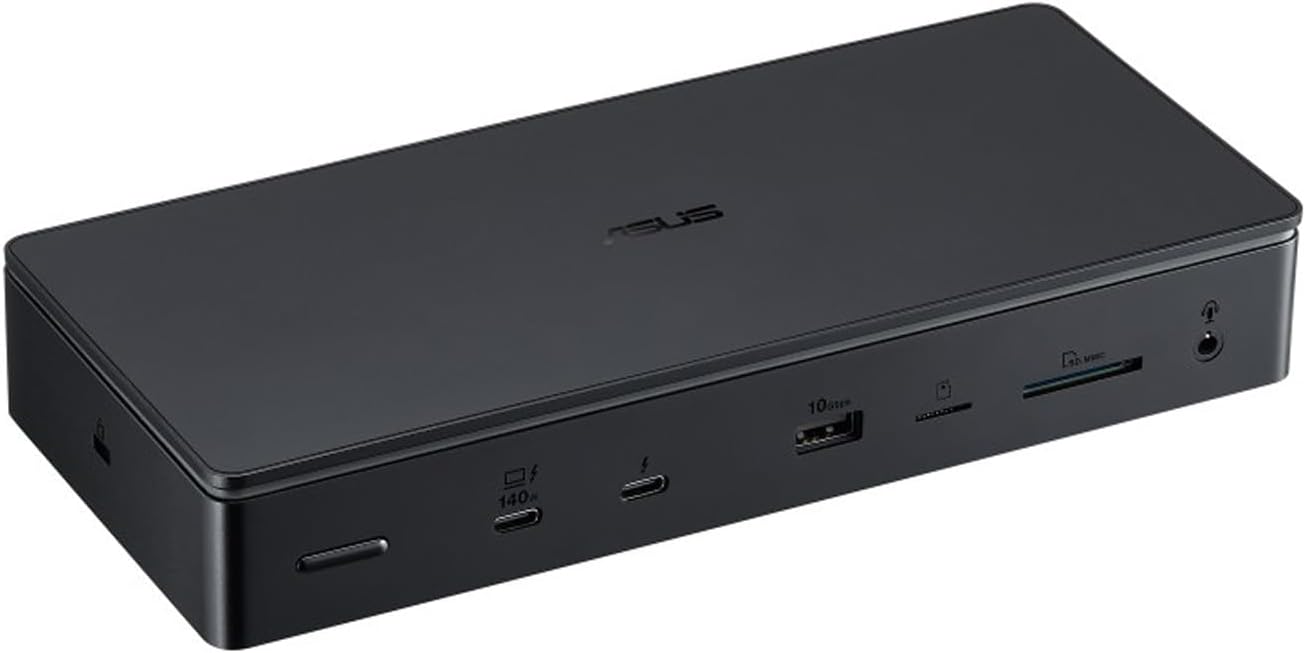
ASUS Master Thunderbolt 5 Dock DC510
13-in-1 professional Thunderbolt 5 dock with 2.5GbE, dual card readers, and a toolless M.2 NVMe slot. Roughly $350 street price in September 2026.
Price & availability at Amazon.com
Key Features
- 13 ports total
- 3x Thunderbolt 5 (80Gbps)
- 2.5 Gigabit Ethernet
- SD + microSD card readers
- 4x USB-A ports
- M.2 NVMe PCIe 4.0 slot
- 140W Power Delivery
- 180W adapter and TB5 cable included
- Ambient white LED lighting
What we like
- 2.5GbE instead of 1GbE
- SD and microSD readers
- 4 USB-A ports
- 5,800 MB/s SSD reads on a TB5 host
- Toolless SSD install with cooling pad
- Professional design
Watch out for
- Active cooling fan is audible
- No front USB-C port
- No 10GbE option
- Stock is still patchy in some regions
Disclosure: This post contains affiliate links. We may earn a commission if you purchase through these links at no additional cost to you.
Razer Thunderbolt 5 Dock Chroma

Razer Thunderbolt 5 Dock Chroma
11-port gaming-focused Thunderbolt 5 dock with Razer Chroma RGB, M.2 expansion, Thunderbolt Share, and 7.1 audio support. Roughly $390 street price in September 2026.
Price & availability at Amazon.com
Key Features
- 11 ports total
- 3x Thunderbolt 5
- Razer Chroma RGB (16.8M colors)
- M.2 PCIe Gen4 x4 slot (up to 8TB)
- 1 Gigabit Ethernet
- 7.1 surround sound support
- 140W Power Delivery
- Thunderbolt Share enabled
- 250W power supply
What we like
- Razer Chroma RGB ecosystem
- 7.1 surround audio
- Thunderbolt Share for two-machine desks
- Extra USB-C 10Gbps port
- Reportedly quieter cooling
- Wider availability
Watch out for
- Only 1GbE Ethernet
- Two USB-A ports
- No microSD reader
- Costs more than the ASUS with fewer ports
Disclosure: This post contains affiliate links. We may earn a commission if you purchase through these links at no additional cost to you.
Final verdict
Default answer: ASUS DC510. It costs less, has more ports, gives you 2.5GbE and dual card readers, and its M.2 bay is the easier one to live with. On a Thunderbolt 5 host it is a genuinely fast dock. The fan noise is the price of admission, and it is the only thing I would warn a friend about before ordering.
Razer Thunderbolt 5 Dock Chroma is the right buy for one specific desk: Razer peripherals everywhere, a Chroma profile you care about, and a network that tops out at 1Gb. Add Thunderbolt Share if you switch one desk between a work laptop and a personal machine. Outside that scenario you are paying more for fewer ports.
And if you do not need the M.2 slot: buy the Kensington SD5000T5 at $195 to 300, pocket the difference, and enjoy the passive cooling.
| Category | Winner | Why |
|---|---|---|
| Network speed | ASUS DC510 | 2.5GbE vs 1GbE |
| Port count and USB-A | ASUS DC510 | 13 vs 11 ports, 4 vs 2 USB-A |
| Card readers | ASUS DC510 | SD plus microSD vs SD only |
| Price | ASUS DC510 | ~$350 vs ~$390 |
| SSD expansion | Tie | Both take an M.2 drive up to 8TB |
| Displays | Tie | Both triple 4K @144Hz with DSC |
| Charging | Tie | 140W on both |
| RGB and audio | Razer Chroma | Chroma sync, 7.1 surround |
| Noise | Razer Chroma | Reportedly quieter |
| Two-PC desks | Razer Chroma | Thunderbolt Share |
| Boring reliability | ASUS DC510 | Fewer things to think about |
Related articles
- ASUS Master Thunderbolt 5 Dock DC510 review, real numbers from a week of testing, plus the host requirements
- Best Thunderbolt 5 docks in 2026, ten docks with port-by-port tables and current pricing
- iVANKY FusionDock Ultra review, the 26-port, 10GbE option if 2.5GbE is not enough
- ASUS ROG Strix OLED XG32UCWG review, what driving 4K at 165Hz actually feels like