
Best Web Scraping Plugins for WordPress in 2026 (Compared)
Compare the best web scraping plugins for WordPress in 2026: prices, JS support, AI features, and which WordPress scraper plugin to pick, plus a free option.
Updated Published 19 min read

Disclosure: this guide contains referral links. If you buy through them, I may earn a commission at no extra cost to you.
The best web scraping plugins for WordPress pull content from other sites and publish it automatically. News aggregators, price trackers, and product comparison sites all run on this. If you want to scrape a website to WordPress and skip the manual copy-paste, a WordPress scraper plugin is still the shortest path.
But the details move fast. Since this guide was last updated in February 2026, prices have shifted, one pick’s documentation went offline, AI rewriting features expanded to multiple models, and target sites now defend harder (2026 saw a wave of anti-AI-crawler plugins on wordpress.org, and Cloudflare launched pay-per-crawl for bots). This comparison covers the seven current options (six plugins plus one free RSS aggregator) with verified prices, JavaScript support, maintenance status, and the gotchas that get scrapers blocked. Last verified: November 2026.
Before you start scraping
Always check the target site’s terms of service and robots.txt first. In the US, scraping publicly accessible data is largely a contract question rather than a criminal one (hiQ v. LinkedIn was re-affirmed for public data after Van Buren in 2021), but ToS and copyright law still bind what you collect and republish. More sites now charge for or block automated crawling outright. If you’re pulling any real volume, use a proxy. Your server IP will get blocked without one. Bright Data residential proxies start from $2.50/GB and datacenter proxies from $0.90/IP (pricing verified 2026-11). For an AI-oriented take on the same infrastructure, see Bright Data’s MCP server for AI web scraping (5,000 free requests).
One ops note before you install anything: crawler plugins write posts on a schedule, which means a bad selector can write garbage to your live site. Take a backup first. Here are the free WordPress backup plugins I’d trust for that.
Best WordPress web scraping plugins
Last verified: 2026-11. Prices and maintenance status rotate fast in this niche; three of the six original picks hadn’t shipped updates in years. Each pick below lists what it does, what it costs, and whether the vendor is still alive.
1. Scraper - Content Crawler Plugin
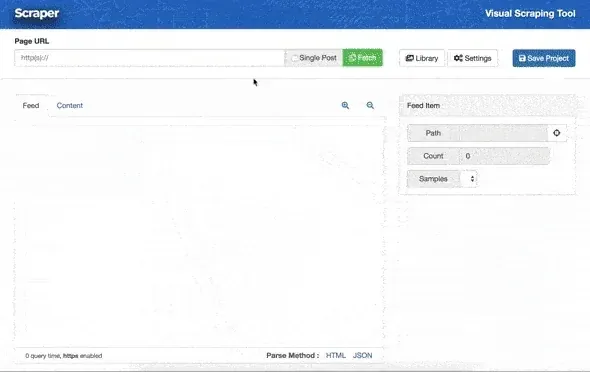
Scraper by wpBots is available on CodeCanyon. It uses XPath and regex to pull content from most sites, handles encoding issues automatically, and can translate content on import.
Features:
- Scrape any website using XPath or regex selectors
- Automatic featured image extraction
- Duplicate title detection
- Language detection and translation (requires Google Translate API key)
- WooCommerce product creation
- Proxy and cookie support
- Scheduling
Price and maintenance: $29 (regular license, 6 months support) as of the last hard data from May 2023. Verify the current price and version on the live listing. Plain Scraper can’t execute JavaScript, but the vendor sells Scraper PRO, a hosted headless-browser add-on at $9/month that enables AJAX/JS-site scraping (you enable it under the Fetch dropdown).
Maintenance status
Last verified plugin update: May 2023. wpbots.com is now a domain parking page; the documentation lives at support.wpbots.net (still up as of 2026-11, including the Scraper PRO docs). A $29 license that hasn’t updated in 3+ years is a real risk for future WordPress/PHP versions. Buy it for what it does today, not for what you hope it will do in 2027.
2. WP Content Crawler: the WordPress content scraper with a visual inspector
Vendor status: verify before buying
The author’s documentation site (turgutsaricam.com) returns HTTP 503 and wpcontentcrawler.com returns 404 as of 2026-11-10. The last archived homepage (2026-08-08) is a bare personal blog with no product links. The CodeCanyon item may still be listed, but documentation and support appear dead. Verify the item is still sold and supported before spending money here.
WP Content Crawler has a visual inspector built into the WordPress admin that helps you find CSS selectors without leaving your site. It crawls post lists, follows pagination, and handles automatic recrawling to keep content fresh. The plugin was updated with ChatGPT integration for rewriting, summarizing, and transforming scraped content before publishing.
Features:
- Visual CSS selector inspector
- Automatic URL discovery and background crawling
- Scheduled recrawl for content updates
- ChatGPT integration for content transformation and rewriting
- DeepL, Google Cloud, and other translation services
- Duplicate URL/title/content detection
- WooCommerce product support
- Social media embed conversion for 70+ domains
Price and maintenance: last archived price was $25 (July 2023); the current price is unverifiable without hitting the live listing. Last archived update: April 2023. It can’t fetch JavaScript-generated content. The “requires PHP 8.1+” requirement that used to be listed here can no longer be verified now that the docs are offline, so treat it as unconfirmed.
If you’re importing products rather than posts, you may also want WooCommerce barcode and QR code plugins for the catalog side.
3. Crawlomatic
Crawlomatic runs JavaScript using a headless browser approach (HeadlessBrowserAPI with Puppeteer/PhantomJS), which means it can scrape sites the other plugins can’t touch. Good for dynamic, JS-heavy sites. It supports CSS selectors, XPath, and regex for content parsing.
Features:
- JavaScript rendering for AJAX and dynamic sites
- Live scraping shortcode and Gutenberg block (pull content into any page, not just posts)
- Auto-updating posts when the source content changes
- WooCommerce product variations support
- Tor/.onion crawling
- Bing, Google, and DeepL translation
Price and maintenance: $29 (it was $49 for a long time; the price drop is real, last verified 2025-11 via a CodeCanyon snapshot). Rating 4.83 from 72 reviews. Last update 17 November 2025 (v2.7.0), with security fixes in May/June 2025. This is an actively maintained plugin. It’s by ValvePress, the same author as WordPress Automatic, so buyers get a shared support desk and a similar config style across both products.
One gotcha: JS execution needs the headless component, which is extra setup and an extra failure surface. If even Crawlomatic struggles with your target, an external Playwright script is the next step, covered in how to scrape a website to WordPress without a plugin.
4. WordPress Automatic Plugin
WordPress Automatic by ValvePress does more than scrape pages. It imports from YouTube, Twitter/X, Instagram, Reddit, Amazon, eBay, AliExpress, RSS feeds, and more. The vendor now brands it as an “AI content generator and auto poster plugin”, and for good reason: it generates full articles from keywords via OpenAI GPT, Google Gemini, Claude, and DeepSeek, and converts AI Markdown output to HTML.
Features:
- RSS feed import with full content
- Social media import (Facebook, Twitter/X, Instagram, Pinterest, Reddit)
- Amazon/eBay/AliExpress product import for WooCommerce
- Full article generation from keywords via GPT, Gemini, Claude, or DeepSeek
- Google Translate / DeepL / Yandex translation
- Auto-hyperlinking for affiliate links
- Image caching to your server
Price and maintenance: $39 (verified 2025-07-31). Very active: versions 3.115.0 through 3.121.0 shipped between May and July 2025 alone, and PHP 8.4 has been supported since 3.115.0. This is the best-maintained plugin in the list alongside Crawlomatic.
The $39 is not the whole cost
The license is a client for those AI APIs. OpenAI/Gemini/Claude/DeepSeek credits are billed on top of the $39, and a site generating dozens of articles a month will burn through them. Budget for the API spend, not just the plugin.
It can also be resource-intensive depending on how many sources you configure; see the troubleshooting section below before you point it at fifty feeds.
5. Octolooks Scrapes
Scrapes by Octolooks offers three modes: single-page scraping, serial scraping (follows pagination through a full site), and RSS feed aggregation. The visual selector means you don’t need to write CSS selectors by hand. The product is now titled “WordPress Scraper & WooCommerce Product Importer Plugin - Scrapes”. WooCommerce product import is a headline feature, not an afterthought.
Price and maintenance: $29 one-time (it was $25; the current price is on the vendor’s own site, verified 2026-11-10). Bulk discounts: 50% off 5+ licenses, 60% off 10+, which matters if you run client sites. The vendor site is alive and selling. It works on shared hosting with minimal resource requirements, which makes it the budget-friendly pick for a small VPS or shared plan.
6. WP Scraper (free)

WP Scraper is the free option. It’s mainly designed for migrating content from non-WordPress sites into WordPress. Paste a URL and it pulls the page content, images, title, and tags directly into a new post or page.
It’s not a full automation tool, but if you need to import pages one by one without writing any code, it does the job. Current status: v5.8.2 (updated 2025-11-18), roughly 2,000 active installs, tested up to WP 6.9.11.
7. FeedWordPress (free, for RSS aggregation)
FeedWordPress is the genuinely maintained free path for RSS-fed content: v2026.1030 was released 2026-10-30 and it’s tested up to WP 7.1.4. It syndicates RSS items into posts: you point it at a feed URL and it keeps importing new items on a schedule.
What FeedWordPress can't do
RSS only. It cannot extract a page’s body via CSS selector. If the source doesn’t publish a feed, one of the paid picks above is what you need. For RSS-fed aggregation at $0, nothing else in the free tier comes close.
The free path is now two items: FeedWordPress for RSS, WP Scraper for one-off page migrations. Skip the old free “wp-web-scraper” and “scraper” plugins; both have been closed or removed from wordpress.org.
WordPress content scrapers compared (prices, JS & AI support)
| Plugin | Price | Last verified | JS Support | AI/GPT | Visual Selector | WooCommerce | Best For |
|---|---|---|---|---|---|---|---|
| Scraper | $29 | May 2023 | No (Scraper Pro add-on $9/mo for AJAX) | No | No (XPath/regex) | Yes | Simple scraping with translation |
| WP Content Crawler | ≈$25 (2023), verify | Apr 2023 | No | Yes (ChatGPT) | Yes | Yes | Visual scraping + recrawls (vendor status warning) |
| Crawlomatic | $29 | Nov 2025 | Yes | No | No | Yes | JS-heavy dynamic sites |
| WordPress Automatic | $39 | Jul 2025 | No | Yes (GPT/Gemini/Claude/DeepSeek) | No | Yes | Multi-source aggregation + AI generation |
| Scrapes | $29 | Nov 2026 | No | No | Yes | Yes | Budget scraping, shared hosting |
| WP Scraper | Free | Nov 2025 | No | No | No | No | One-off page migration |
| FeedWordPress | Free | Oct 2026 | No | No | No | No | RSS aggregation |
Reading the table
Prices and last-update dates were verified in November 2026 via vendor pages and Wayback snapshots. Envato prices rotate; check the live listing before buying. An Envato Regular license covers one site and 6 months of support; extending support costs extra. For the AI column, remember that API credits are billed on top of the plugin license.
How to scrape a website to WordPress without a plugin
Before you pay for a plugin, consider keeping the scraping off the WordPress box entirely. A WordPress content scraper that runs inside your site couples three failure domains: target-site changes, PHP resource limits, and your production database. An external scraper that posts via the WordPress REST API (/wp-json/wp/v2/posts with an application password) handles JavaScript-heavy targets better than any plugin here and fails safely: the worst case is a rejected request, not a half-written post.
Two routes work well: a self-hosted n8n workflow, or a cron’d Python/Playwright script.
Prerequisites:
- WordPress application password created (Users → Profile → Application Passwords (your site needs HTTPS))
curlandxmllintinstalled (or Python 3 + Playwright for the script route)- Target site’s robots.txt and ToS checked
- A backup taken before the first automated post lands
n8n (no-code)
n8n gives you a visual workflow: an HTTP Request or HTML Extract node fetches and parses the target page, then a WordPress node (or a plain HTTP Request node) posts to /wp-json/wp/v2/posts. Scheduling is built in, so you don’t touch WP-Cron at all.
If you already run Docker, self-host n8n for scraping and posting workflows. It takes about ten minutes and keeps the workflow editor on your own box.
The n8n route is the one I’d pick for non-developers: you see each step, you can replay a single node for debugging, and a broken selector fails in n8n instead of publishing an empty post.
Python + Playwright (code)
For JS-heavy targets, Playwright is the honest answer: it renders the page like a real browser, waits for selectors, and extracts what you need. Keep the script out of WordPress’s document root, run it from cron, and post via the REST API.
import requests
from playwright.sync_api import sync_playwright

WP = "https://yoursite.com"
AUTH = ("admin", "xxxx-xxxx-xxxx-xxxx")  # application password

with sync_playwright() as p:
    browser = p.chromium.launch()
    page = browser.new_page()
    page.goto("https://example.com/target-page")
    page.wait_for_selector("h2.title")
    title = page.locator("h2.title").first.inner_text()
    body = page.locator("div.article-body").first.inner_html()
    browser.close()

# post as draft first; review before publishing
r = requests.post(f"{WP}/wp-json/wp/v2/posts", auth=AUTH, json={
    "title": title,
    "content": body,
    "status": "draft",
})
print(r.status_code, r.json().get("id"))
To keep the dependencies off the host, run a Python Playwright scraper in Docker and schedule the container with cron or systemd timers.
One-off cURL check
Before you configure any plugin or workflow, sanity-check that your selector matches. This one-liner fetches the page and extracts a node without any plugin involved:
curl -s -A "Mozilla/5.0" https://example.com/target-page | xmllint --html --xpath '//h2[@class="title"]/text()' - 2>/dev/null | headIf that prints nothing, your selector is wrong. Fix it here, not inside WordPress. Then create the post via the REST API with an application password:
curl -u "admin:xxxx-xxxx-xxxx-xxxx" https://yoursite.com/wp-json/wp/v2/posts \
  -H "Content-Type: application/json" \
  -d '{"title":"Scraped title","content":"<p>Body content</p>","status":"draft"}'
Verify: open wp-admin → Posts → Drafts (or GET /wp-json/wp/v2/posts?status=draft) and confirm the draft is there with the right title and body. A 401 means the application password is wrong; a 404 on the endpoint means pretty permalinks or the REST API is disabled.
Post as draft first
Always create posts with "status": "draft" until you’ve confirmed the extraction works end to end. Review one or two drafts, then flip the workflow to publish. This prevents the classic failure where a selector change publishes a stream of empty posts to your live site.
If you’d rather buy the fetching infrastructure than operate Playwright yourself, hosted web-fetch and browser APIs like TinyFish’s web fetch and browser APIs handle the fetching and rendering, and you keep only the WordPress posting step.
WordPress scraper plugin troubleshooting: WP-Cron, limits & silent failures
Every crawler plugin eventually hits the same four failure modes. None of them show up in the sales page screenshots. If you’re about to let a crawler write posts automatically, make sure you have free WordPress backup plugins in place first.
Scheduled scrapes not firing (WP-Cron)
WordPress schedules these jobs with WP-Cron, which only fires when someone visits your site. On a low-traffic site, schedules silently drift and your scraper runs at 3 PM instead of 3 AM, or not at all. The fix is to disable WP-Cron and call it from system cron:
// wp-config.php
define('DISABLE_WP_CRON', true);# crontab -u www-data -e (adjust the path to your install)
*/15 * * * * php /var/www/wordpress/wp-cron.php >/dev/null 2>&1Verify that the jobs are queued:
wp cron event list --fields=hook,next_run_relative | grep -iE 'crawl|scrape|fetch'You should see the plugin’s hooks with sensible next-run times. If the list is empty, the plugin’s schedule isn’t registered; check its settings page. If you control the box, this is easy to set up: install WordPress on Ubuntu ARM with CloudPanel or install WordPress with Docker Compose (Docker users schedule the crontab inside the compose file or the container).
Memory limits and timeouts on shared hosting
Fetching and parsing pages is heavier than serving them. On shared hosting, a crawl of 50 URLs can exhaust memory_limit or hit max_execution_time mid-run, leaving half-imported content behind. Start with 3-5 URLs per run and watch php -i for both values. If limits bite consistently, you have two options: tune caching so your PHP workers are free for the crawler (speed up WordPress with Cloudflare, Varnish and Redis), or move to a box with more headroom. A small VPS is single-digit dollars per month versus $10-30 for managed WordPress. For this, a budget Hetzner VPS is the default I’d pick, or managed WordPress hosting like Cloudways if you don’t want to manage a server at all. If you expect heavy scheduled crawls, see picking a VPS that can handle them (ARM vs x86 benchmarks).
Silent failures: empty posts when the target site changes
The #1 silent failure
The target site changes its markup, your selectors return empty strings, and the plugin cheerfully publishes an empty or half-empty post on schedule. Nothing errors. Nobody notices for two weeks. This is how scraper sites die quietly.
Three habits keep this from happening:
- Check recent posts and the plugin log weekly. It takes two minutes.
- Enable “skip publishing if content is shorter than N characters” wherever the plugin offers it (most of the paid picks do).
- Audit what the crawler published: export all your WordPress post URLs and titles and diff the list against what you expected.
Blocked fetches (403/429)
A 403 or 429 means the target is rate-limiting or blocking you. Don’t reach for a proxy first. Slow the crawl schedule, identify your crawler in the User-Agent, and fix the rate. All four paid plugins support proxies when you genuinely need them, but residential bandwidth at $2.50+/GB adds up fast, and you shouldn’t pay for proxies to fix a rate-limit problem a slower cron solves for free.
Verify-it-works checklist (first run)
- Run one manual fetch and read the resulting post body
- Confirm the featured image landed in the Media Library (not a hotlinked URL)
- Confirm tags and categories mapped correctly
- Enable scheduling at the lowest frequency available
- Check for duplicates after the first full cycle
Only after all five pass should you raise the frequency.
Which WordPress scraper plugin should you pick?
See the full comparison tableRoute by situation, not by feature count:
If your target is JavaScript-heavy, Crawlomatic is the only in-plugin option that renders JS. If it struggles, skip plugins and use the external Playwright route above. For RSS aggregation, use FeedWordPress if you want free and boring, or WordPress Automatic if you also want AI rewriting and social sources. For multi-source social or AI generation, WordPress Automatic is the pick: nothing else here imports from YouTube, Reddit, and Amazon and generates articles from keywords. For standard static-HTML scraping with a visual selector, Scrapes is the safer buy today (vendor alive, $29, shared-hosting friendly); WP Content Crawler has the nicer inspector and ChatGPT integration, but read the vendor status warning first. For one-off page migration, WP Scraper is free and enough.
Don’t buy on the feature list. Buy on whether the vendor answered support tickets this month. Crawlomatic and WordPress Automatic (both ValvePress) shipped updates through 2025; Scraper’s last hard data is from 2023; WP Content Crawler’s docs are offline. Budget accordingly.
Whichever plugin you choose, pair it with a proxy service if you’re scraping at any real volume. Bright Data covers residential from $2.50/GB and datacenter from $0.90/IP. And always check the target site’s terms of service: scraping copyrighted content without permission can create legal problems no matter which tool you use.
FAQ
Is web scraping from other sites legal?
For publicly accessible data in the US, scraping is largely a contract question rather than a criminal one. hiQ v. LinkedIn was re-affirmed by the 9th Circuit for public data after Van Buren v. United States (2021) narrowed the CFAA. The real constraints are the site’s terms of service and copyright law. Don’t republish copyrighted content wholesale; short excerpts with a link back are the boring, safe path. Check the ToS before you scrape, not after.
Do I need a proxy to scrape into WordPress?
Not at low volume with polite schedules: a few pages a day with proper delays rarely triggers anything. Yes once you start seeing 403/429 responses, and yes for any real volume. Fix the schedule first; then add proxies. Residential bandwidth starts around $2.50/GB with Bright Data; datacenter IPs are cheaper (from $0.90/IP) and fine for simple fetching.
Can WordPress scraper plugins handle JavaScript-rendered sites?
Only one does it in-plugin: Crawlomatic (headless browser). Scraper can with its PRO add-on at $9/month. Everything else in the table fetches raw HTML and nothing more. For a reliably JS-heavy target, the external Playwright script in the no-plugin section beats all of them. It renders pages like a real browser and posts via the REST API.
What's the cheapest way to scrape a website to WordPress?
$0 if the source publishes an RSS feed: FeedWordPress. $0 for one-off page imports: WP Scraper. Otherwise the paid picks are $29-39 one-time, which is the cost of two months of most SaaS scrapers. Don’t pay a monthly fee unless you need JavaScript rendering at scale.
Why is my scraper publishing empty or duplicate posts?
Empty posts usually mean the target site changed its markup and the selectors now match nothing. Duplicate posts usually mean duplicate detection is off or the source URLs changed. Both are covered in the troubleshooting section. The short version is: gate publishing on a minimum content length, and check what the crawler published every week.
Pick the maintained option. Run one manual fetch before you enable any schedule, and check the target site’s terms before the first request. A scraper that publishes reliably at a slow pace beats a fast one that gets your IP blocked or fills your site with empty posts.
Related Posts

Did this guide work for you?

Written by Dragos
Dragos is the author of Bitdoze — practical DevOps, programming, and self-hosting guides.
More guides from Dragos →Need help with Astro, VPS, or a self-hosted app? View services →