
Pinchtab: Browser Control for AI Agents via HTTP (2026)
Pinchtab is a ~30MB Go binary that gives AI agents browser control over HTTP. Covers accessibility trees, Docker deployment, MCP, and security defaults.
Updated Published 23 min read
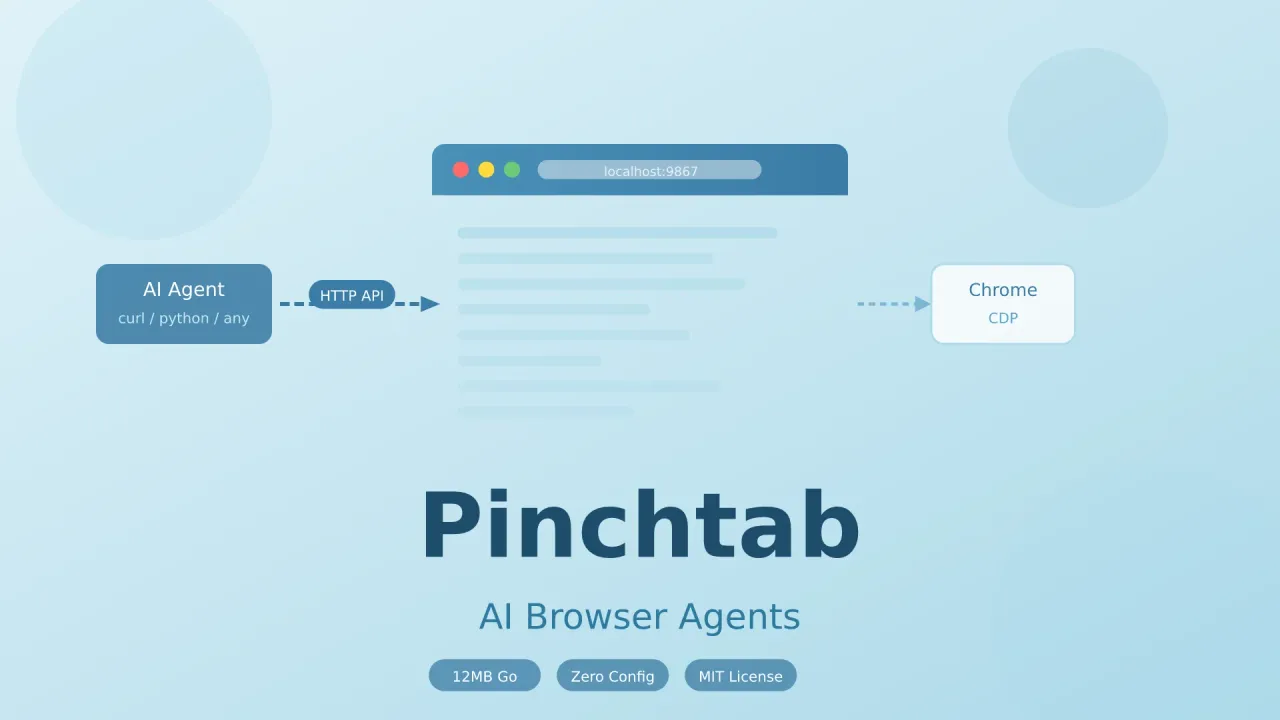
If you’ve tried giving an AI agent browser access, you already know the problem. Playwright MCP ties you to Node. Browser Use needs Python. OpenClaw’s browser backend only works inside its own ecosystem. Switch agents, or try to fire off a quick curl request to inspect a page, and you’re rewriting the integration from scratch.
Pinchtab takes a different approach: it gives you browser control for AI agents over plain HTTP. A ~30MB Go binary with no Node, no Python, no dependencies. It launches its own Chrome and exposes navigation, clicks, form fills, screenshots, and accessibility snapshots through a plain REST API. Whatever agent you’re using already speaks HTTP. That’s the whole integration story. As of v0.15.2 (Aug 2026), the project has over 10,000 GitHub stars.
Updated for v0.15.2
This is a major rewrite of the February 2026 version. The configuration system, security defaults, and Docker model have all changed since then. If you followed the old guide, jump to the migration box in the Configuring section. The BRIDGE_* environment variables no longer exist.
What is Pinchtab?
Pinchtab is a standalone Go HTTP server that gives you browser control for AI agents. It launches Chrome instances, exposes navigation, actions, snapshots, and captures over a REST API, and requires no Node or Python runtime. It’s MIT licensed, currently at v0.15.2 (released 2026-08-26), with 10,472 stars and 785 forks on GitHub. Security-supported versions are v0.14.0 and later.
Why accessibility trees over screenshots
For AI browser automation, most people reach for screenshots first because it’s obvious: take a picture, send it to a vision model, done. The problem is cost and reliability. A vision model guesses coordinates from pixels. Accessibility trees give you stable node refs (e0, e1, e2…) tied to the actual DOM elements. Click e5 and you hit the right button, regardless of how the page renders.
Since v0.15.1, refs denote a specific DOM node rather than a row index. They survive changes to filter, selector, or depth parameters and only expire when you navigate to a new document. That means you can take a filtered snapshot, interact, then take a broader snapshot without losing your place.
The cost difference compounds quickly. Pinchtab’s /text endpoint pulls readable content at around 800 tokens per page using Mozilla’s Readability library (the same thing behind Firefox Reader View). The README bills that as 5-13x cheaper than screenshots for read-heavy work. The 50-page job below shows where each method lands in raw tokens.
| Method | ~Tokens (50-page job) | Relative cost |
|---|---|---|
| Screenshots (vision) | ~100,000 | Highest |
| Full a11y snapshot | ~525,000 | High |
Pinchtab ?filter=interactive |
~180,000 | Low |
Pinchtab /text |
~40,000 | Lowest |
Pinchtab’s own benchmark against agent-browser (self-published, small sample sizes of 5/3/2 runs with ~25-30% variance, so take it as directional) shows 9.5-20.3% lower end-to-end agent-loop cost on the Anthropic API. The win comes from batching click+snapshot into a single round trip via --snap. For teams choosing models alongside their browser stack, the cheapest AI models under $1/M tokens matter just as much as the token count per page.
Pinchtab’s architecture: server, instances, and profiles
Pinchtab v0.15.x is no longer a single-bridge tool. It’s a control plane that manages multiple Chrome instances, each with its own isolated profile. Here are the four concepts you need:
- The server is the control plane on port 9867. It’s the HTTP API surface your agents talk to, and one server manages everything.
- An instance is a running Chrome process. Each instance has its own profile and its own internal port (e.g. 9868). You can run several instances side by side, one for “work” tasks and one for “scraping”, with complete cookie and session isolation.
- A profile is persistent browser state (cookies, localStorage, saved logins). Log in once through a profile and every subsequent instance using that profile keeps the session. Named profiles are managed via
POST /profilesand stored underprofiles.baseDir. - The bridge is the single-instance runtime the server spawns. You won’t interact with it directly; the server handles lifecycle.
agents / CLI / MCP
        │
        ▼
┌─────────────────────────┐
│  Pinchtab server :9867  │  ← control plane, REST API
└────────┬────────┬───────┘
         │        │
         ▼        ▼
  ┌──────────┐ ┌──────────┐
  │Instance A│ │Instance B│   ← Chrome processes
  │profile:  │ │profile:  │
  │  "work"  │ │"scraping"│
  │  :9868   │ │  :9869   │
  └──────────┘ └──────────┘
         │        │
         ▼        ▼
    ~/.pinchtab/  (state, profiles)
The primary user journey is to install Pinchtab once as a daemon so all your agents share one control plane:
pinchtab daemon install
pinchtab daemon
This runs a user-level background service. Agents connect to http://127.0.0.1:9867, and the server spawns or reuses Chrome instances as needed. Multi-instance browser control with isolated browser profiles for AI agents is the headline capability that separates Pinchtab from a simple CDP wrapper.
Getting started
- Linux, macOS, or ARM64 (Raspberry Pi works)
- No Node or Python required for the Go binary path
- Chrome or Chromium (auto-detected; Docker image bundles its own)
- Port 9867 available (configurable)
Pick your install method:
curl (macOS/Linux)
curl -fsSL https://pinchtab.com/install.sh | bashHomebrew
brew install pinchtab/tap/pinchtabnpm (Node 18+)
npm install -g pinchtabDocker
docker run -d --name pinchtab \
  -p 127.0.0.1:9867:9867 \
  -v pinchtab-data:/data \
  --shm-size=2g \
  pinchtab/pinchtab:v0.15.2
Full Docker deployment covered below.
Source (Go 1.26+)
git clone https://github.com/pinchtab/pinchtab.git
cd pinchtab
go build -o pinchtab ./cmd/pinchtab
First run and verification
Running pinchtab with no arguments triggers security setup (auto-generates an auth token) and prints status. Then install the daemon and do a smoke test:
pinchtab daemon install
pinchtab daemon

# Get the auto-generated token
export PINCHTAB_TOKEN=$(pinchtab config token --stdout)

# Smoke test: navigate and snapshot in one round trip
pinchtab nav https://pinchtab.com --snap

# Check health (requires the token)
pinchtab health
Verify each step:
pinchtab --versionprints the version. If it saysv0.15.2you’re current.pinchtab nav https://pinchtab.com --snapshould return a page snapshot. If you get a 401, the token isn’t set in your environment.pinchtab healthshould report server and Chrome status. If it saysstatus: running, you’re good.
Failure modes:
curl | bashinstall fails on unusual distros → fall back tobrewornpm.go buildfails → check you’re on Go 1.26+ (go version). The build target is./cmd/pinchtab, not the repo root.- Port 9867 already in use →
pinchtab config set server.port 9868(or whichever port is free). - macOS browser weirdness →
pinchtab doctor browsers. Prefer Chrome for Testing over your daily Chrome to avoid profile conflicts.
Configuring Pinchtab
All configuration lives in a nested JSON file at ~/.pinchtab/config.json (configVersion 0.8.0 shape). The BRIDGE_* environment variables from earlier versions are gone. See the migration note below.
Manage the config through the CLI:
pinchtab config init                # create ~/.pinchtab/config.json
pinchtab config show                # print effective config
pinchtab config get server.port     # read a single key
pinchtab config set server.token "$(openssl rand -hex 32)"
pinchtab config validate            # check for errors after edits
Only five environment variables survive, and they override the config file (env > file):
| Variable | Purpose |
|---|---|
PINCHTAB_CONFIG |
Path to the config file |
PINCHTAB_TOKEN |
Runtime override of server.token |
PINCHTAB_URL |
Base URL for CLI/MCP when targeting a remote server |
PINCHTAB_RATE_LIMIT_MAX |
Per-client request cap per 10-second window |
PINCHTAB_STATE_KEY |
Encryption key for the state file |
Common config keys:
# Server
pinchtab config set server.port "9867"
pinchtab config set server.stateDir "~/.pinchtab"

# Instance defaults (applied to new Chrome instances)
pinchtab config set instanceDefaults.mode "headless"
pinchtab config set instanceDefaults.stealthLevel light       # light | medium | full (anti-bot opt-in)
pinchtab config set instanceDefaults.blockImages true
pinchtab config set instanceDefaults.blockAds true             # new since the old BRIDGE_* era
pinchtab config set instanceDefaults.humanize false            # default: raw CDP, fast and deterministic

# Browser
pinchtab config set browser.binary "/usr/bin/chromium"

# Security gates (all default false; enable only what you need)
pinchtab config set security.allowEvaluate true
pinchtab config set security.allowedDomains '["example.com"]'  # widen IDPI allowlist deliberately

# Review posture at any time
pinchtab security
pinchtab security up    # restore recommended safe defaults
Migrating from the February 2026 version?
Everything changed. The old BRIDGE_* env vars are dead and silently ignored. Here’s the mapping:
BRIDGE_PORT → server.port · BRIDGE_TOKEN → server.token · BRIDGE_HEADLESS → instanceDefaults.mode · BRIDGE_STEALTH → instanceDefaults.stealthLevel · BRIDGE_PROFILE → named profiles (POST /profiles) · BRIDGE_BLOCK_IMAGES → instanceDefaults.blockImages · BRIDGE_BLOCK_MEDIA → instanceDefaults.blockMedia · BRIDGE_NO_ANIMATIONS → instanceDefaults.noAnimations · BRIDGE_TIMEZONE → instanceDefaults.timezone · CHROME_BINARY → browser.binary · CHROME_FLAGS → browser.extraFlags · CDP_URL → attach mode (POST /instances/attach, gated by security.attach.enabled, default false).
Also changed: humanType/humanClick action kinds no longer exist (use “humanize”: true on kind:“type” or kind:“click”); seccomp=unconfined is no longer needed for Docker; /health now requires the auth token; and query-string auth has been removed entirely.
The Pinchtab REST API
Pinchtab exposes a browser automation API over plain HTTP. Every route, including /health, requires an Authorization: Bearer <token> header. Here are the core endpoints:
| Method | Endpoint | Description |
|---|---|---|
GET |
/health |
Server and Chrome status (requires token) |
GET |
/tabs |
List open tabs |
GET |
/snapshot |
Accessibility tree as JSON or text |
GET |
/screenshot |
JPEG screenshot with quality control |
GET |
/text |
Readable page text (Readability or raw innerText) |
POST |
/navigate |
Go to a URL |
POST |
/action |
Click, type, fill, press, focus, hover, select, scroll |
POST |
/evaluate |
Run JavaScript (gated: security.allowEvaluate, default false) |
POST |
/tab |
Open or close tabs |
POST |
/lock / /unlock |
Tab-scoped locking: POST /tabs/{id}/lock / unlock |
POST |
/cookies |
Inject cookies (gated: security.allowCookies, default false) |
Tab-scoped forms exist for most routes: /tabs/{id}/snapshot, /tabs/{id}/action, etc. The flat routes (/navigate, /snapshot, /action) target the current tab and still work exactly as they always have.
Snapshot query parameters
The snapshot endpoint has several options that cut token usage significantly. All five of these still work as documented:
# Only interactive elements: ~75% fewer nodes
curl -H "Authorization: Bearer $PINCHTAB_TOKEN" \
  "localhost:9867/snapshot?filter=interactive"

# Compact one-line-per-node format: 56-64% fewer tokens than JSON
curl -H "Authorization: Bearer $PINCHTAB_TOKEN" \
  "localhost:9867/snapshot?format=compact"

# Only changes since the last snapshot
curl -H "Authorization: Bearer $PINCHTAB_TOKEN" \
  "localhost:9867/snapshot?diff=true"

# Limit to a specific section of the page
curl -H "Authorization: Bearer $PINCHTAB_TOKEN" \
  "localhost:9867/snapshot?selector=main"

# Cap output at roughly N tokens
curl -H "Authorization: Bearer $PINCHTAB_TOKEN" \
  "localhost:9867/snapshot?maxTokens=2000"
Combining filter=interactive with format=compact gives you the smallest possible payload for action-oriented tasks. Use diff=true for pages that update incrementally (polling a live dashboard, for example) so you’re only sending what changed. Since v0.15.1, node refs are tied to DOM identity and survive filter/selector/depth changes, expiring only on navigation to a new document.
Human-like actions
The old humanClick and humanType action kinds no longer exist. Human-like input is now a per-action flag on standard click and type actions:
curl -X POST localhost:9867/action \
  -H "Authorization: Bearer $PINCHTAB_TOKEN" \
  -d '{"kind":"type","ref":"e12","text":"hello world","humanize":true}'
When humanize is omitted, the behavior follows instanceDefaults.humanize, which defaults to false: raw CDP input, fast and deterministic. Turn on humanize per-action when you need realistic delays and movement patterns to get past behavioral bot detection. For stronger anti-bot evasion, instanceDefaults.stealthLevel accepts light (default, minimal normalization), medium, or full (canvas/WebGL/font spoofing, explicit opt-in).
New endpoints: captures, recordings, audits
Pinchtab’s API surface has grown a lot since February 2026. The additions worth knowing:
| Endpoint | What it does |
|---|---|
GET /capture |
Paired screenshot + accessibility snapshot in one call |
GET /annotate |
Screenshot with numbered overlays tied to actionable refs |
POST /record/start / /record/stop |
Video recording (gif, webm, mp4) |
GET /screencast |
Live screencast stream |
GET /network |
Network log; ?broken=true filters for failed requests |
POST /network/route |
Request interception |
GET /console / GET /errors |
Console messages and page errors |
GET /storage |
LocalStorage / sessionStorage inspection |
POST /state |
Save/load browser state |
POST /wait |
Wait for text/selector conditions (incl. --not-text) |
POST /frame |
Scope subsequent calls to an iframe |
POST /emulation/* |
Viewport, geolocation, offline, media emulation |
POST /solve |
Challenge solver hooks (AutoSolver, disabled by default) |
GET /pdf |
Print-to-PDF |
POST /scrape |
Structured site scrape |
GET /a11y/audit |
Accessibility audit score |
GET /timing |
Core Web Vitals |
GET /metrics |
Server metrics |
GET /openapi.json |
Machine-readable API spec |
Two CLI tools built on top of this API deserve a mention. pinchtab audit <url> --sitemap --sample-size N --output-dir ./audit produces a full site audit (report.json + screenshots) covering console errors, broken assets, a11y scores, Core Web Vitals, and rule-based security findings. And pinchtab compare <live> <staging> --fail-on-diff works as a CI gate: if staging drifts from live, the build fails.
MCP server and agent integrations
Pinchtab ships a built-in browser MCP server, so any MCP-compatible agent can use it without writing custom HTTP glue. The MCP integration includes tools like pinchtab_screenshot, pinchtab_scrape, and navigation controls (back/forward/reload since v0.15.1). If no server is running, the MCP tools auto-start one.
If you’re new to the protocol, read how the Model Context Protocol works first.
The npm package ships an agent skill and auto-copies it into detected agent homes (~/.claude/skills, ~/.cursor/skills, ~/.windsurf/skills, ~/.codex/skills, and OpenClaw). Manage skill installation with:
pinchtab skill status
pinchtab skill update --force
For OpenClaw users, there’s an official plugin. If you’re self-hosting OpenClaw on a VPS or Mac mini:
openclaw plugins install @pinchtab/pinchtabGrok Build users can install via:
grok plugin install pinchtab --trustWhen targeting a remote Pinchtab server from the CLI or MCP, set PINCHTAB_URL or use the --server flag.
Pinchtab Docker deployment
Affiliate Disclosure
Some links in this guide are affiliate links. If you buy through them, I may earn a small commission at no extra cost to you. This helps keep the guides tested and updated.
For Pinchtab Docker deployments, the official image (pinchtab/pinchtab:v0.15.2, ~334MB) bundles Chromium and runs headless-only. Headed mode refuses to launch in the container since there’s no X11. If you want to self-host Pinchtab on a server, this is the cleanest path. A €4-6/mo Hetzner Cloud VPS (CX22 class, 2 vCPU / 4GB RAM) runs Pinchtab comfortably. Chrome uses about 1 to 1.5GB with a few tabs open, so budget 2GB minimum, 4GB for multi-instance (my Ladybird test shows why: even a new engine used 2.86 GB for four tabs on a Mac). A budget Hostinger VPS with NVMe works too.
The old seccomp=unconfined requirement is gone. The container layer itself is the security boundary: the image runs as a non-root pinchtab user with HOME=/data, and the compose file drops all capabilities, uses a read-only filesystem, and keeps the default seccomp profile. Chrome runs --no-sandbox inside the container precisely because that boundary exists.
Basic docker-compose setup
# docker-compose.yml
services:
  pinchtab:
    image: pinchtab/pinchtab:v0.15.2
    container_name: pinchtab
    restart: unless-stopped
    ports:
      - "127.0.0.1:9867:9867"
    volumes:
      - pinchtab-data:/data
    environment:
      PINCHTAB_TOKEN: ${PINCHTAB_TOKEN:-}
    shm_size: "2gb"
    read_only: true
    tmpfs:
      - /tmp:size=512m,noexec,nosuid,nodev
      - /run:size=64m,noexec,nosuid,nodev
    security_opt:
      - no-new-privileges:true
    cap_drop:
      - ALL
    mem_limit: 2g
    cpus: "2.0"

volumes:
  pinchtab-data:
shm_size is not optional
Chrome tabs will crash randomly without 2GB of shared memory. The shm_size: "2gb" line is the difference between a stable deployment and mysterious renderer OOMs. Don’t remove it.
Key points about this compose file:
- The port binding
127.0.0.1:9867:9867keeps the service off the public network. The official compose uses"9867:9867". Tighten it. - The token is auto-generated on first boot. Read it with
docker exec pinchtab pinchtab config token --stdout. If you want to supply your own, use Docker Compose secrets forPINCHTAB_TOKEN. The image supports Docker secrets natively. - If you mount your own config via
PINCHTAB_CONFIG, setserver.tokenin it or pass-e PINCHTAB_TOKEN=.... Otherwise the server refuses to start. - Config persistence lives in the
pinchtab-datavolume under/data(the image setsHOME=/data, so config lands at/data/.config/pinchtab/config.json).
Verify deployment
docker exec pinchtab pinchtab healthreturns server status- Token retrieved:
TOKEN=$(docker exec pinchtab pinchtab config token –stdout) - Authenticated health check passes (see below)
- Chrome reports
“status”:“running”(not just dashboard up) - One smoke test:
nav+–snapreturns a snapshot
# Fetch the auto-generated token
TOKEN=$(docker exec pinchtab pinchtab config token --stdout)

# Authenticated health check
curl -s -H "Authorization: Bearer $TOKEN" http://127.0.0.1:9867/health

# Wait for Chrome to be ready (not just the dashboard)
until curl -sf -H "Authorization: Bearer $TOKEN" http://127.0.0.1:9867/health \
  | grep -q '"status":"running"'; do sleep 1; done
Two-stage readiness: /health returning 200 means the dashboard is up, but Chrome may not be ready yet. Before Chrome is ready, API requests return HTTP 503. Poll for .defaultInstance.status == "running" before your first navigate.
Failure modes:
- 503 on every call → Chrome isn’t ready yet. Use the readiness poll above.
- 401 → token missing or wrong. Check the
Authorizationheader. - OOM kills → raise
mem_limit. - Chrome tabs dying randomly → missing
shm_size: "2gb".
Behind a Caddy reverse proxy
If you want to expose Pinchtab over HTTPS with a domain:
# docker-compose.yml (add Caddy alongside Pinchtab)
services:
  pinchtab:
    image: pinchtab/pinchtab:v0.15.2
    container_name: pinchtab
    restart: unless-stopped
    ports:
      - "127.0.0.1:9867:9867"
    volumes:
      - pinchtab-data:/data
    environment:
      PINCHTAB_TOKEN: ${PINCHTAB_TOKEN:-}
    shm_size: "2gb"
    read_only: true
    tmpfs:
      - /tmp:size=512m,noexec,nosuid,nodev
      - /run:size=64m,noexec,nosuid,nodev
    security_opt:
      - no-new-privileges:true
    cap_drop:
      - ALL
    mem_limit: 2g
    cpus: "2.0"
    networks:
      - proxy

  caddy:
    image: caddy:2-alpine
    restart: unless-stopped
    ports:
      - "80:80"
      - "443:443"
    volumes:
      - ./Caddyfile:/etc/caddy/Caddyfile
      - caddy-data:/data
      - caddy-config:/config
    networks:
      - proxy

networks:
  proxy:
    driver: bridge

volumes:
  pinchtab-data:
  caddy-data:
  caddy-config:
# Caddyfile
pinchtab.yourdomain.com {
reverse_proxy pinchtab:9867
}Caddy handles TLS automatically. With PINCHTAB_TOKEN set, requests need an Authorization: Bearer <token> header, so the API isn’t open even with HTTPS.
Two proxy-related settings to know:
server.trustProxyHeaders: leave this off unless your proxy correctly rebuildsForwardedandX-Forwarded-*headers.server.cookieSecure: defaults toauto; forcetruebehind TLS. The dashboard warns when served over plain HTTP on a non-loopback bind.
If you prefer Traefik as an alternative reverse proxy, the pattern is the same. Just swap the Caddy service. For the dashboard specifically, see exposing an agent dashboard safely behind Caddy.
Verify through the domain:
curl -H "Authorization: Bearer $TOKEN" https://pinchtab.yourdomain.com/healthA 502 means the Pinchtab container isn’t on the proxy network.
Security concerns and mitigations
Pinchtab gives an AI agent full control of a real Chrome browser, including any accounts you’ve logged into through that browser. The project’s own framing is direct:
Think of Pinchtab like giving someone your unlocked laptop
An agent with Pinchtab access can do anything a human with that browser can do. The security posture has changed since February 2026. Pinchtab is now safe by default (bind 127.0.0.1, auto-generated token, capability gates off, IDPI strict on). The risk has moved to deliberately weakening that posture or misunderstanding what the defaults protect.
Supported security versions are v0.14.0+ only (per SECURITY.md). Run pinchtab security at any time to see your current posture; pinchtab security up restores recommended defaults.
Auth is on by default
The token is auto-generated during first-run setup. Query-string auth has been removed entirely. The dashboard uses a server-side HttpOnly session cookie with login rate limiting and re-authentication elevation for sensitive actions.
Default bind is 127.0.0.1, not 0.0.0.0. The one exception is inside Docker: the entrypoint writes bind: 0.0.0.0 into the managed config so port publishing works. Your actual exposure depends on the -p host mapping, which is why the compose above uses 127.0.0.1:9867:9867. This is also where how published Docker ports can bypass your firewall becomes relevant: Docker’s -p publishing can override your host firewall expectations.
The misconfiguration risk is setting server.bind = 0.0.0.0 and opening the firewall. If you must expose the API, do it through a reverse proxy with TLS and rate limiting. For manual token rotation:
pinchtab config set server.token "$(openssl rand -hex 32)"The most common failure mode for old readers: a 401 on /health because the Authorization header is missing. Every route requires it now.
IDPI and the navigation allowlist
Indirect Prompt Injection defense (IDPI) is on by default in strict mode. It scans extracted content for injection patterns and wraps output as untrusted. More importantly for getting started: it restricts navigation to a local-only website allowlist by default. Your agent cannot browse the public internet until you explicitly allow domains.
This changes first-run expectations. If pinchtab nav https://example.com refuses, that’s IDPI working as designed. Widen the allowlist deliberately:
pinchtab config set security.allowedDomains '["example.com", "docs.example.com"]'Your agent can't browse the public internet yet
IDPI strict mode ships with a local-only navigation allowlist. This is the single most surprising v0.15 behavior if you’re upgrading from the old version. Widen security.allowedDomains for just the domains your agents need.
Capability gates all default to false. Enable only what a workflow needs:
| Gate | What it unlocks |
|---|---|
security.allowEvaluate |
POST /evaluate (JavaScript execution) |
security.allowCookies |
POST /cookies (cookie injection) |
security.allowMacro |
Macro recording/playback |
security.allowScreencast |
Live screencast |
security.allowDownload |
File downloads |
security.allowUpload |
File uploads |
security.allowStateExport |
State export |
security.allowNetworkIntercept |
Request interception |
security.allowMemory |
Memory inspection |
security.allowClipboard |
Clipboard access |
security.allowFileScheme |
file:// URL access |
security.attach.enabled |
Remote Chrome attach (loopback allowlist default) |
autosolver.enabled |
Challenge solving (incl. Cloudflare Turnstile) |
Also relevant: PINCHTAB_RATE_LIMIT_MAX caps requests per client per 10-second window, security.trustedProxyCIDRs handles SSRF-guard bypass behind known proxies, and the dashboard ships with CSP and HSTS headers.
For server-level hardening alongside Pinchtab’s own posture, look at securing a VPS with CrowdSec.
The Chrome profile holds live sessions
When you log into a site through Pinchtab’s Chrome, that session persists in the profile directory. Cookies, auth tokens, saved state. An agent with API access can use those sessions to act as you on any site you’re logged into. This hasn’t changed. The profiles model just gives you better isolation tools.
Mitigation:
- Use dedicated profiles (via
POST /profilesorprofiles.baseDir) with only the accounts your agents need - Don’t log personal accounts (email, banking, social) into agent-managed profiles
- Treat
~/.pinchtab/as sensitive:chmod 700 ~/.pinchtab - In Docker, state persists in the
pinchtab-datavolume under/data. Don’t mount it somewhere other containers can reach
Agent trust model
An agent with Pinchtab access can do anything a human with that browser can do. If your agent takes arbitrary instructions from users or external inputs, prompt injection is a real concern: a malicious website could embed instructions that trick the agent into unintended actions. IDPI is the first line of defense, but it’s not a substitute for scoping.
Mitigation:
- Scope what your agent can do. If it only needs to read pages, don’t enable
allowEvaluateorallowCookies - Log all
/actionand/navigatecalls for auditing - Use agent sessions (
POST /sessions {agentId, grants?}) for per-agent auth scoping - Use auto-handoff (
/tabs/{id}/handoff/resume) as the human escape hatch. Paused handoff blocks action routes, and status is visible in the dashboard - Run untrusted-input agents against a sandboxed profile with no real accounts
- Rate-limit at the reverse proxy level for external agents
A typical agent workflow
The flat routes haven’t changed. Here’s a working Python example updated for v0.15.x:
import httpx
import os

BASE = "http://localhost:9867"
HEADERS = {"Authorization": f"Bearer {os.environ['PINCHTAB_TOKEN']}"}

# Wait for Chrome to be ready (not just the dashboard)
import time
for _ in range(30):
    r = httpx.get(f"{BASE}/health", headers=HEADERS)
    if r.json().get("defaultInstance", {}).get("status") == "running":
        break
    time.sleep(1)

# Navigate to a page
httpx.post(f"{BASE}/navigate", json={"url": "https://example.com"}, headers=HEADERS)

# Get only interactive elements to keep tokens low
snapshot = httpx.get(f"{BASE}/snapshot?filter=interactive&format=compact", headers=HEADERS)
refs = snapshot.json()

# Click a button by its ref
httpx.post(f"{BASE}/action", json={"kind": "click", "ref": "e5"}, headers=HEADERS)

# Read the result
text = httpx.get(f"{BASE}/text", headers=HEADERS)
print(text.text)
Note that /evaluate returns a refusal unless security.allowEvaluate=true. If your workflow needs JavaScript execution, enable the gate explicitly.
For pages that update without a full load (React, Vue SPAs), use ?diff=true to see what changed rather than re-fetching the whole tree. Node refs survive filter/selector/depth changes (since v0.15.1) and expire only on navigation.
The CLI batches action+snapshot into a single round trip with --snap and --snap-diff, which is where the cost savings come from:
pinchtab nav https://example.com --snap
pinchtab click e5 --snap
For multi-agent setups where several agents share a browser instance, use tab locking:
# Lock tab 1 for exclusive use
curl -X POST localhost:9867/tabs/1/lock \
  -H "Authorization: Bearer $PINCHTAB_TOKEN"

# ... do your work ...

# Release it
curl -X POST localhost:9867/tabs/1/unlock \
  -H "Authorization: Bearer $PINCHTAB_TOKEN"
If you want to wire Pinchtab’s HTTP API into a real agent framework, build your own AI agent with Mastra walks through the full loop.
When it fits well
Pinchtab is a good fit for AI browser automation where agents need to browse the web without being tightly coupled to a browser testing framework. Specifically:
- Web scraping and content monitoring at any scale
- Form automation (sign-ups, data entry, multi-step workflows)
- Authenticated scraping after a one-time login setup
- Agents running in bash, Go, Python, or any language with HTTP support
- Setups where you want to share one browser control plane across many agents (multi-instance + locking + sessions)
- CI quality gates using
pinchtab auditandpinchtab compare - Switching between agent frameworks without changing the browser integration
It’s not the right tool for pixel-accurate visual testing (Playwright is better there) or for sites where the accessibility tree is sparse. Some SPAs built with custom components don’t expose much ARIA data, and a full screenshot becomes the more practical option.
If you don’t want to self-host, BrightData’s MCP for AI web scraping covers scraping-heavy use cases with a managed proxy network, and Bright Data’s web data platform handles scraping at scale. For a managed browser API without any infrastructure, TinyFish’s managed browser and web-fetch APIs for AI agents give you one API key and zero server management. The tradeoff is cost per request versus a €5/mo VPS running Pinchtab 24/7.
Troubleshooting and failure modes
pinchtab doctorpasses (runpinchtab doctor browserson macOS)pinchtab healthwith token returns“status”:“running”- Readiness poll completes before first navigate
pinchtab config validatereports no errorspinchtab securityposture matches expectations- Smoke test:
pinchtab nav https://example.com –snapreturns a snapshot
Consolidated failure modes and fixes:
| Symptom | Cause | Fix |
|---|---|---|
| 401 on every route | Token required on all routes including /health |
Export PINCHTAB_TOKEN or add Authorization: Bearer header |
| 503 on all requests | Chrome not ready (dashboard up ≠ Chrome up) | Poll .defaultInstance.status == "running" before first navigate |
404 with browser_crashed |
Chrome crashed; instance auto-relaunches but all tabs are gone | Rebuild state; watch the crashes block in /health, not just status |
| 400 with “did you mean” hints | /action refuses unexpressible parameters instead of dispatching a click |
Read the hint, then fix the parameter name or kind |
Refusal with details.hint / details.remedy |
Gated capability or IDPI allowlist | Read the remedy field; enable the gate or widen security.allowedDomains |
| Agent can’t reach a public site | IDPI local-only allowlist | pinchtab config set security.allowedDomains '["domain.com"]' |
| Chrome tabs dying / renderer OOM | shm_size too low or mem_limit too low |
Set shm_size: "2gb" and mem_limit: 2g minimum |
| Config not picked up in Docker | Mounted config without server.token → server refuses to start |
Set server.token in config or pass -e PINCHTAB_TOKEN=... |
| Weird browser behavior on macOS | Profile conflict with daily Chrome | pinchtab doctor browsers; use Chrome for Testing |
FAQ
Did the old BRIDGE_* environment variables stop working?
Yes. The BRIDGE_* env vars from the early 2026 version are dead and silently ignored. Configuration is now a nested JSON file at ~/.pinchtab/config.json managed via pinchtab config get/set/show/validate, plus five PINCHTAB_* environment variables that override it. See the migration box in the Configuring section for the full old-to-new mapping.
Why does /health return 401 now?
Auth is on by default since the security overhaul. The token is auto-generated during first-run setup. Export it with export PINCHTAB_TOKEN=$(pinchtab config token --stdout) and include Authorization: Bearer $PINCHTAB_TOKEN on every request. There’s no way to disable auth and there shouldn’t be. The old “no auth by default” posture is gone.
Why can't my agent reach example.com?
IDPI (Indirect Prompt Injection defense) ships in strict mode with a local-only navigation allowlist. Your agent literally cannot browse the public internet until you widen security.allowedDomains. This is deliberate: it prevents prompt-injected pages from redirecting your agent to arbitrary sites. Widen the allowlist only for domains your agents need: pinchtab config set security.allowedDomains '["example.com"]'.
Do I still need seccomp=unconfined for Docker?
No. The seccomp=unconfined requirement has been removed entirely. The official Docker image is hardened by default: non-root user, cap_drop: ALL, read_only: true, no-new-privileges, and the default seccomp profile. Chrome runs --no-sandbox inside the container precisely because the container boundary is the security layer. The old workaround is obsolete.
What does Pinchtab cost to run?
Pinchtab itself is MIT licensed with no telemetry and no subscription. Your costs are a VPS (€4-10/mo for a 2 vCPU / 2-4GB box that runs it comfortably) plus model token costs. Accessibility trees keep token usage low: /text runs about 800 tokens per page versus thousands for screenshots, so the model bill is manageable even for heavy automation.
Pinchtab at v0.15.2 (Aug 2026) is a different tool from the one I wrote about in February. It’s now a proper browser control plane: multi-instance, safe by default, with a dashboard, MCP server, and audit tooling. The core pitch hasn’t changed: one Go binary, plain HTTP, accessibility trees that keep token costs sane. The project moves fast (15 minor releases in 8 months), so pin your version and check the release notes before upgrading.
Pinchtab on GitHub Full documentationPinchtab is MIT licensed. Source on GitHub.
Did this guide work for you?
Related Posts


Written by Dragos
DevOps engineer with 10+ years in IT. I write these guides while doing the installs in my Proxmox home lab and on real VPSes.
Need help with Astro, VPS, or a self-hosted app? View services →