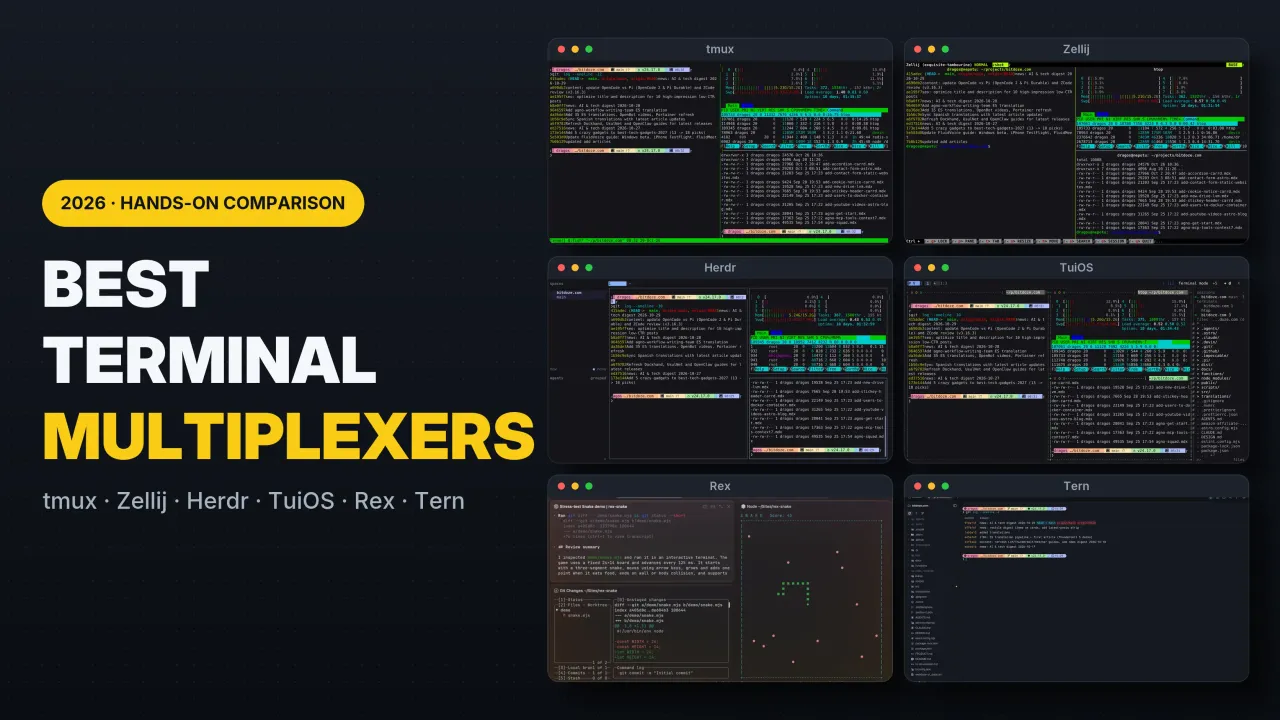
Best Terminal Multiplexers in 2026: tmux vs Zellij vs Rex vs Herdr vs Tern vs TuiOS
Hands-on comparison of the 6 best terminal multiplexers in 2026: tmux, Zellij, Rex, Herdr, Tern, and TuiOS tested for SSH sessions, AI coding agents, and remote work.
The terminal multiplexer question used to take five seconds to answer: tmux, unless you were logged into a box old enough to only have GNU screen. That answer expired around mid-2026. AI coding agents changed what a multiplexer is actually for. Keeping a shell alive over a flaky SSH link used to be the whole job; now the job is keeping six agents alive across git worktrees, knowing which one is blocked on a permission prompt, and approving it from a laptop or phone without hunting through twenty panes.
Four serious tools now compete inside your terminal emulator (tmux, Zellij, Herdr, and TuiOS), plus two more (Superlogical Rex and Stencil Tern) that argue the multiplexer should be the terminal emulator itself.
I have run all six on real projects and written standalone deep dives on most of them. This guide puts the entire field side by side: how the architectures differ, install and config snippets you can paste tonight, how each handles AI agent fleets, remote SSH and phone workflows, a keybinding translation table, and where each tool still hurts. Every screenshot below is captured from my own setup.
Versions and GitHub star counts were verified on 2026-10-29: tmux 3.8 (~49k stars), Zellij 0.45.1 (~35.7k stars), Herdr 0.9.3 (~44k stars), TuiOS 0.11.1 (~5.4k stars), Rex public testing build, and Tern 0.9.5 closed beta.
The short version
If you just want the recommendation before the deep dive:
tmux: pick it if you SSH into machines you do not administer, want a 1.2 MB binary that is already installed, or have a decade of .tmux.conf muscle memory. Still the right default for plain server and shell work.
Zellij: pick it if you want tmux’s job done with modern defaults: on-screen key hints, KDL project layouts, built-in session resurrection, first-class nested sessions (v0.45+), WebAssembly plugins, and a built-in web client.
Herdr: pick it if AI coding agents are most of what you run. The real-time agent-state sidebar (working / blocked / done / idle), Unix socket API, and mobile/web client ecosystem are why it exists.
TuiOS: pick it if you want a tiling window manager inside your terminal plus the deepest built-in agent Inbox (prompt holds, queued replies, inline diff review with notes, fan worktree runs, and a tmux shim) and can live with a fast-moving young project.
Rex: pick it if you are on macOS and want the multiplexer built into the terminal app itself, powered by libghostty from Ghostty’s creator with first-class remote system logins.
Tern: pick it if you want a cross-platform Rust terminal where panes can also be native git clients, SQLite browsers, Jupyter notebooks, kanban boards, and AI agent blocks, and you do not mind a closed-beta waitlist.
All 6 terminal multiplexers at a glance
Feature
tmux
Zellij
Herdr
TuiOS
Rex
Tern
Category
In-terminal multiplexer
In-terminal multiplexer + workspace
In-terminal AI agent multiplexer
In-terminal tiling WM + agent mux
Native terminal app + multiplexer
Native terminal app + dev workspace
GitHub stars (Oct 2026)
~49k
~35.7k
~44k
~5.4k
Closed source
Closed source
Language & license
C, ISC
Rust, MIT
Rust, Apache-2.0
Go, MIT (Bubble Tea v2)
Closed source (“free forever”)
Rust, closed source
Binary / footprint
~1.2 MB binary, tiny RAM
~18 MB binary
~11 MB single binary
~16 MB pure-Go binary
Native macOS app (libghostty)
Native Rust app (~150 ms launch)
Session owner
Background server
Background server
Background session server
Background daemon
Server owns PTYs, tees raw bytes
Daemon owns sessions + blocks
Reboot recovery
Via plugin (tmux-resurrect)
Built-in layout + commands, opt-in scrollback
Layout, dirs, agent convos, opt-in screen history
Layout, dirs, pane history, agent convos
Server-persisted sessions
Daemon-persisted sessions + scrollback
AI agent support
None (bytes in a pane)
None (bytes in a pane)
State sidebar, TOML manifests, hooks, socket API
Unified Inbox, prompt holds, diff review, fan worktrees, MCP
Why the architecture split in 2026: in-terminal TUI vs terminal-as-multiplexer
Before looking at individual tools, it helps to understand the structural split in the table above. Every tool here falls into one of two camps:
In-terminal multiplexers (tmux, Zellij, Herdr, TuiOS) sit between your terminal emulator and the shell: Terminal App → Multiplexer Server → PTY → Shell/Agent. Because the multiplexer runs inside any terminal window, it must maintain its own internal virtual terminal state machine, parse every ANSI escape sequence coming from the program, and then re-emit diffs to your outer terminal.
The upside: works over plain SSH on a headless $4/month Linux VPS, works inside Kitty, Ghostty, WezTerm, Alacritty, or an iPhone SSH client, and survives switching terminal apps.
The downside: every byte is parsed twice. If the multiplexer’s internal parser is slower than your GPU terminal or doesn’t understand a newer escape sequence (like Kitty graphics before passthrough landed), the multiplexer becomes the bottleneck.
Terminal-as-multiplexer apps (Rex, Tern) eliminate the middleman TUI. A background daemon owns the PTYs (locally or on a remote server), and the desktop, browser, or mobile app is a native client that attaches directly to that daemon.
The upside: zero double-parsing, native GPU rendering (libghostty in Rex, Rust + WebGPU in Tern), independent scrollback per attached client, and panes that don’t have to be text grids at all.
The downside: you have to use their terminal app (or web/mobile client) rather than running the multiplexer inside whatever terminal emulator you already use.
1. tmux: the incumbent
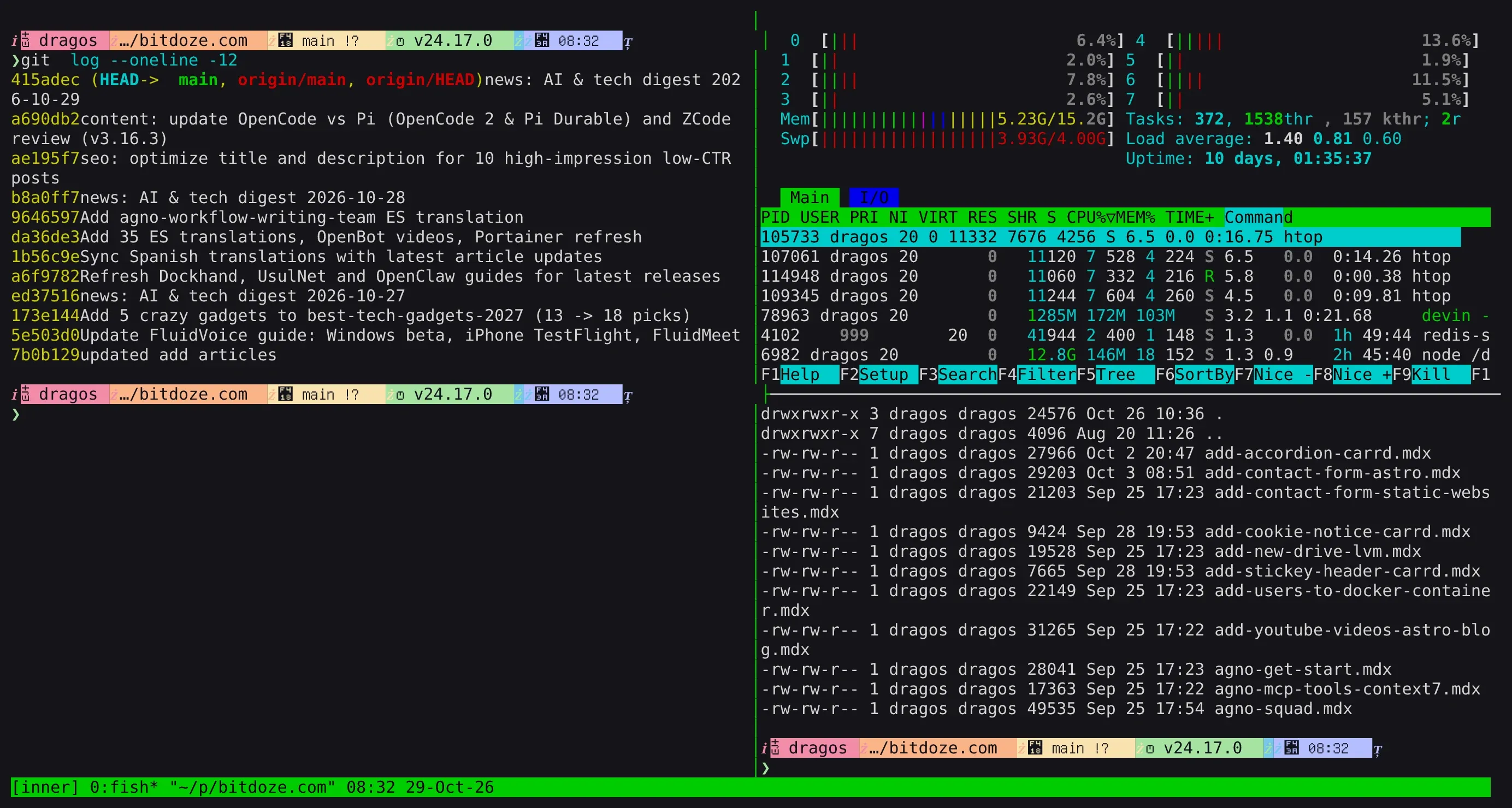
tmux 3.x running a three-pane layout: git log on the left, htop top-right and a file listing bottom-right, with the green status bar
tmux (~49k stars, C, ISC) is a ~1.2 MB binary that is either preinstalled or one apt install tmux away on every server you will ever log into. A background server owns your sessions, windows act as tabs, panes are splits inside windows, and the Ctrl+b prefix key has stayed consistent for 18 years.
What landed in tmux 3.7 and 3.8
tmux is conservative, not dead. Two recent releases modernized several rough edges:
Floating panes (3.7, completed in 3.8):Ctrl+b * opens an overlay floating pane on top of your current window without disturbing your split layout, with move/resize bindings under Ctrl+b g.
Built-in fuzzy switcher (3.8):Ctrl+b Tab opens a fuzzy finder across sessions and windows, replacing the need for an external fzf popup script just to jump sessions.
Built-in light/dark themes (3.8): tmux now detects your terminal’s background and applies a built-in theme option out of the box.
Mode-specific help and line numbers: pressing Ctrl+h inside copy mode shows only copy-mode bindings, and set -g copy-mode-line-numbers on adds line numbers for faster selection jumps.
# Enable mouse clicks, pane resizing, and wheel scrollset -g mouse on# Start window and pane numbering at 1 instead of 0set -g base-index 1setw -g pane-base-index 1set -g renumber-windows on# 24-bit true color and image passthrough (Kitty/Sixel)set -g default-terminal "tmux-256color"set -as terminal-features ",*:RGB"set -g allow-passthrough on# Larger scrollback for build and agent logsset -g history-limit 50000
The one command worth aliasing on every server is attach-or-create:
bash
tmux new -A -s dev
If the dev session already exists, tmux new -A -s dev attaches to it; if not, it creates it. Pair it with tmux -CC attach -t dev on macOS if you use iTerm2 and want remote tmux windows rendered as native macOS tabs.
Where tmux hurts in 2026
To tmux, Claude Code waiting on a destructive bash approval and tail -f /var/log/syslog are identical: bytes in a pane. There is no semantic state, no cross-session inbox, and no built-in way to orchestrate panes from an agent without gluing together tmux send-keys and tmux capture-pane shell scripts. Reboot persistence also requires third-party plugins (tmux-resurrect and tmux-continuum) via TPM, and two clients attached to the same window still share a single scroll position unless you create grouped sessions.
Best for: unmanaged remote servers, minimal VPS setups, pair programming over SSH, and anyone who wants a config that will still work unchanged in ten years.
Skip if: you want discoverable UI controls or need to supervise five AI coding agents at once.
My tmux basics guide walks through installation, sessions, windows, panes, TPM plugins, and troubleshooting protocol version mismatches after upgrades.
2. Zellij: the friendly modern multiplexer
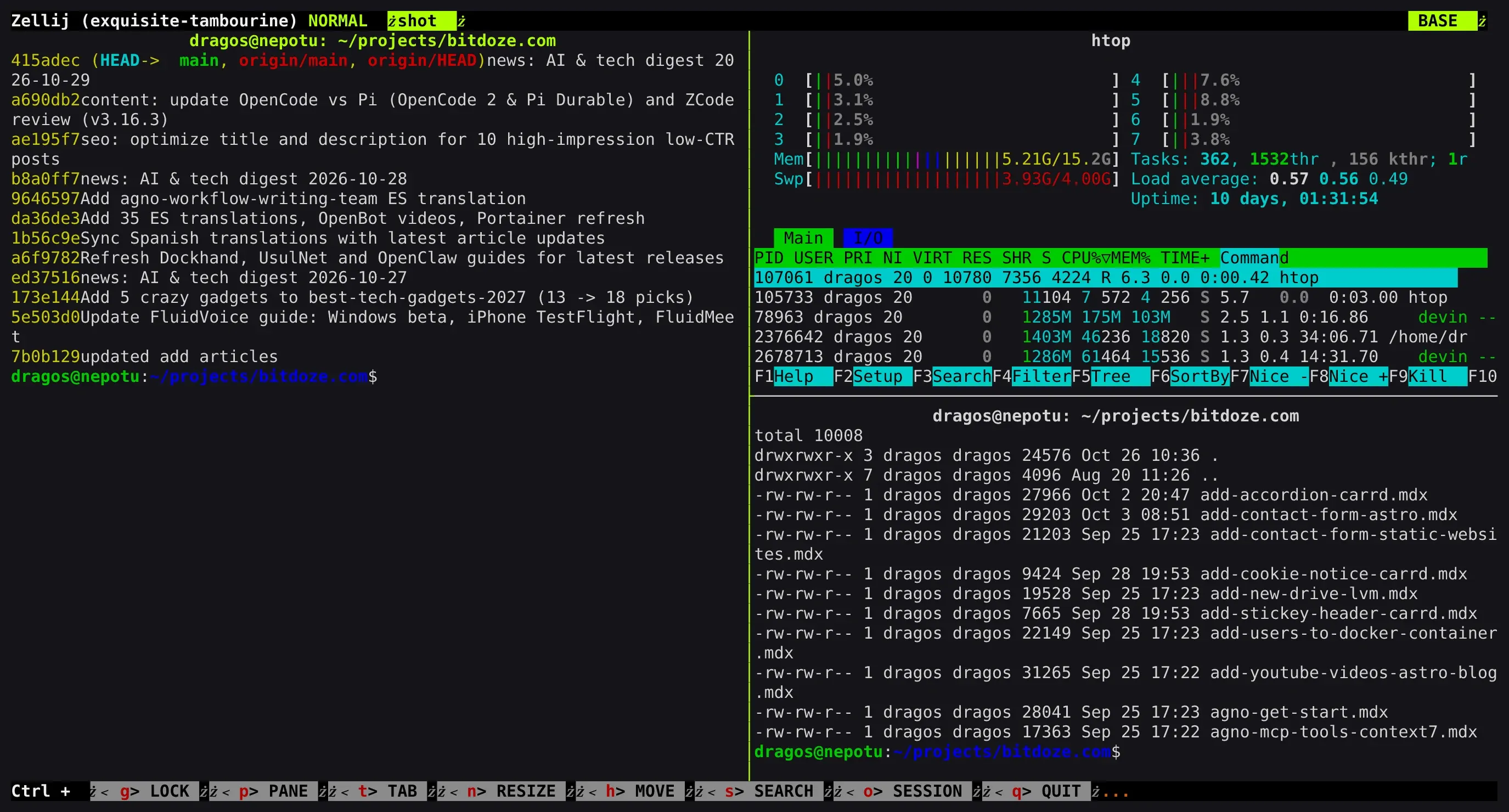
Zellij 0.45.1 with three panes (git log left, htop top-right, file listing bottom-right) plus its signature key-hint bars at the top and bottom of the screen
Zellij (~35.7k stars, Rust, MIT) is what a classic terminal multiplexer looks like when designed from scratch in Rust. Instead of hiding every command behind an invisible prefix key, Zellij renders a contextual key-hint bar showing the exact keys available in your current mode (NORMAL, PANE, TAB, RESIZE, MOVE, SEARCH, SESSION, or LOCK). You can hand Zellij to a developer who has never used a multiplexer and they will be splitting, floating, and stacking panes inside two minutes.
What makes Zellij 0.45.1 stand out
First-class nested sessions (0.45 / 0.45.1): running Zellij locally and SSHing into a remote server that also runs Zellij used to be a keybinding nightmare. In 0.45.1, nested sessions differentiate inner and outer status bars and keybindings automatically over SSH without manual environment variable forwarding.
Scroll by command: instead of scrolling line-by-line through 10,000 lines of compiler output, you can jump directly between shell command blocks.
Reproducible KDL layouts & session resurrection: layouts live in clean .kdl files. When a machine reboots or a session exits, Zellij serializes your layout and pane commands to disk; reattaching restores the exact workspace and puts dangerous commands behind a “Press ENTER to run” safety gate.
WebAssembly plugin system: plugins compile to wasm32-wasip1, meaning you can write plugins in Rust, Go, Zig, or C/C++ and run them in a capability-sandboxed runtime instead of giving shell scripts full access to your user account.
Built-in browser client (zellij web): serves your terminal sessions over HTTP/HTTPS with generated login tokens and read-only spectator tokens, making it the only classic multiplexer with a first-party web server built into the main binary.
Install, KDL layout, and daily commands
Install & Quick Start
bash
# macOS or Linux (Homebrew)brew install zellij# Rust cargo (any platform)cargo install --locked zellij# Quick launch without installing (Linux/macOS)bash <(curl -L https://zellij.dev/launch)# Start or reattachzellij -s work # new named sessionzellij attach -c work # attach if exists, create if notzellij attach -c monitor -- htop # start session running htop directlyzellij web # start built-in browser server
Launch that layout anywhere with zellij --layout dev (or zellij -n dev to force a fresh session).
Fix Zellij keybinding clashes with Neovim / Emacs
Default Zellij binds Ctrl+p (Pane), Ctrl+t (Tab), Ctrl+n (Resize), and Ctrl+o (Session), which collide with common Vim/Neovim and shell shortcuts. Either press Ctrl+g to toggle Lock mode, or switch Zellij to its Unlock-First (non-colliding) preset in zellij setup so Ctrl+g unlocks the multiplexer modes only when you ask for them.
Where Zellij falls short
Zellij has the same blind spot as tmux for AI agents: a pane running Claude Code or Codex is just an ANSI text buffer. You can script panes with zellij action and zellij run, and community WASM plugins are starting to experiment with agent helpers, but there is no built-in agent state detector or approval inbox.
Best for: developers who want a batteries-included tmux replacement with floating/stacked panes, KDL project layouts, and a built-in web client.
Skip if: you need zero-config AI agent state tracking across local and remote hosts.
3. Herdr: the AI agent control plane
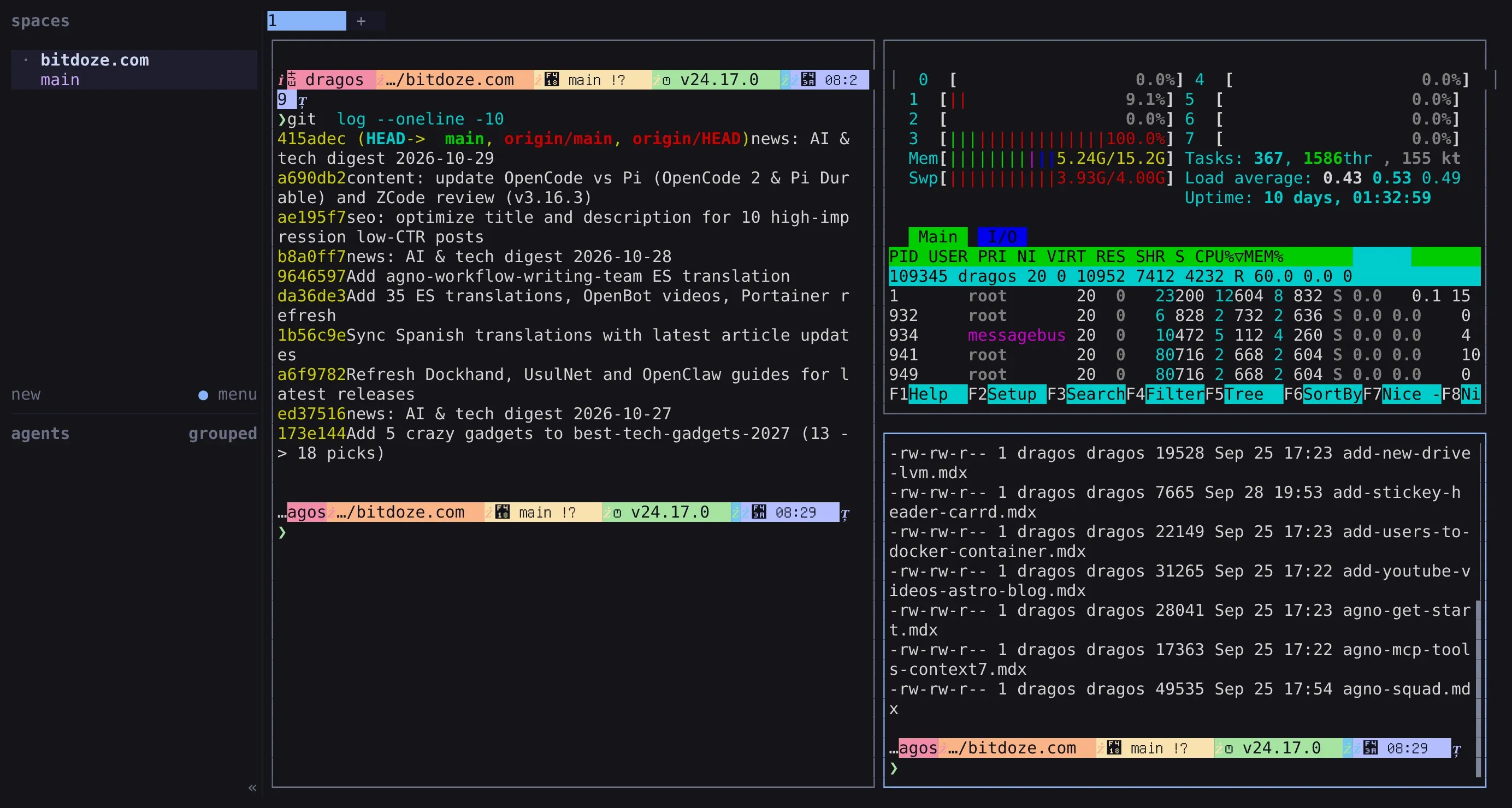
Herdr 0.9 with the spaces sidebar on the left listing the session and agent groups, and three panes running git log, htop and a file listing
Herdr (~44k stars, Rust, Apache-2.0) was the first multiplexer built specifically around the multi-agent bottleneck: when you have eight coding agents running across three repositories, which one is stuck waiting on your input right now?
Herdr runs inside your existing terminal emulator as a single ~11 MB Rust binary (herdr). A background session server owns the PTYs so sessions survive SSH drops and laptop sleep just like tmux, while the TUI adds a left-hand Spaces & Agents sidebar that rolls up real-time semantic states for every pane: working, blocked, done, idle, or unknown.
How Herdr detects and orchestrates agents
Herdr combines two detection layers out of the box for 14+ coding agents (Claude Code, Codex, Copilot CLI, Cursor Agent, OpenCode, Gemini CLI, Pi, Amp, Droid, Grok CLI, Hermes Agent, Antigravity CLI, Kimi Code, and QoderCLI):
Zero-config TOML screen manifests: Herdr inspects the child process tree and matches the live bottom buffer of each pane against per-agent screen rules to detect spinners, permission prompts, and idle prompts without touching the agent’s config.
Lifecycle hooks (herdr integration): installing the optional integration wires into the agent’s native hook system (such as Claude Code’s SessionStart, PreToolUse, and Stop hooks) for exact, zero-latency state reporting.
Underneath the TUI sits a JSON Unix socket API (~/.config/herdr/herdr.sock) and CLI that allow one lead agent to spawn worker panes, pass prompts, read sibling terminal output, and block until a worker reaches done or blocked:
bash
# Install Herdr on Linux or macOScurl -fsSL https://herdr.dev/install.sh | sh # or: brew install herdr# Optional: install exact lifecycle hooksherdr integration install claudeherdr integration install codexherdr integration install copilot# Orchestrate panes and agents from scripts or a lead agentherdr pane list # JSON list of panes and statesherdr pane split --direction right --focus # split current paneherdr agent start reviewer --kind claude # launch tracked agent in paneherdr pane run <pane-id> "cargo test" # run command in target pane
Multi-machine windows and the client ecosystem
Since v0.9, Herdr supports multi-machine windows: herdr machine add user@vps or herdr --remote user@vps lets you view local panes and remote VPS sessions inside a single sidebar, plus built-in git worktree management and automatic agent conversation resume after a host restart.
Because Herdr treats every UI as just a client attached to its socket, an entire third-party ecosystem has grown around it:
Mobile control:Moshi (iOS/Android with Mosh transport and moshi-hook lock-screen push approvals) and Heeler.
Plugin marketplace: ~1,000 indexed plugins (herdr-plugin.toml), though plugins run unsandboxed as your OS user, so never install marketplace plugins without reading their source first.
Best for: running 3 to 15 AI coding agents across local machines and headless VPS boxes, with lock-screen phone approvals and a proven ecosystem.
Skip if: you want floating panes or tiling window manager layouts (Herdr’s layout model is strictly splits, tabs, spaces, and zoom).
4. TuiOS: the tiling window manager + deepest agent Inbox
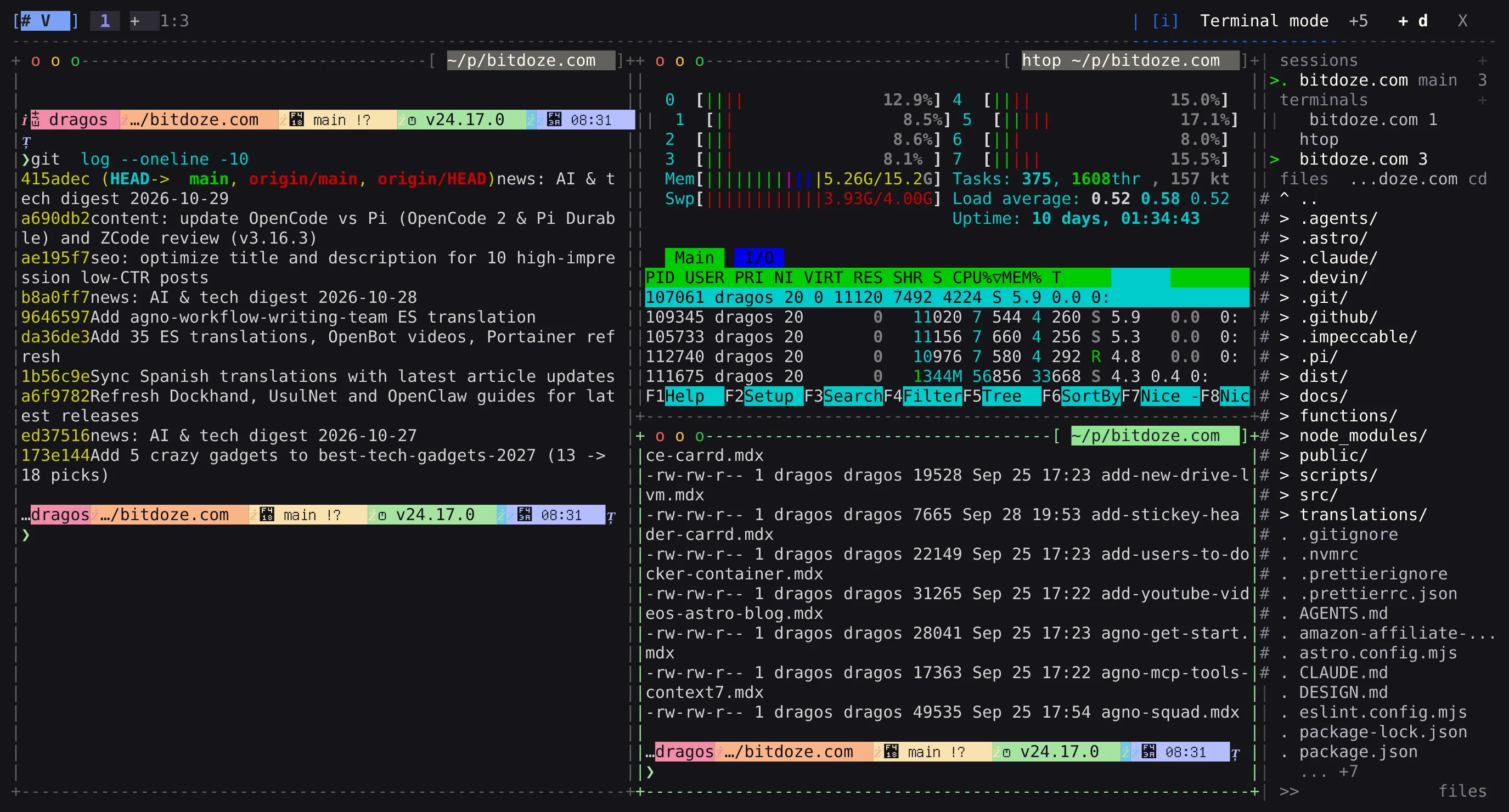
TuiOS 0.11.1 with three tiled windows (git log left, htop top-right, file listing bottom-right) plus the dock bar on top and the session rail on the right listing sessions, terminals and files
TuiOS (~5.4k stars, Go, MIT) stands for Terminal UI Operating System, and it is the boldest new in-terminal multiplexer of the year. Built on Charm’s Bubble Tea v2 and Lipgloss v2 with a background daemon, it combines two ideas that usually live in separate tools: a desktop-style tiling window manager (BSP, master-stack, and niri-style scrolling layouts, floating windows, picture-in-picture, 9 workspaces per session, top/bottom dock bar with live CPU/RAM graphs, and a right-hand session/file/agent rail) and an agent orchestration engine that goes even deeper than Herdr’s.
The Inbox, prompt holds, and worktree fan-out
Where Herdr gives you a status sidebar, TuiOS builds the entire human-in-the-loop workflow into its daemon:
The unified Inbox (Ctrl+b i or tuios list-attention): collects every blocked approval, question (tuios ask-human), plan review (ExitPlanMode), error, and unread finished turn across every session on your machine and linked remote hosts.
When you enable [agents.approvals], TuiOS intercepts single-line permission requests (PermissionRequest in Claude Code/Qwen, permission.asked in OpenCode/Kilo) and holds them in the Inbox. Press 1 (allow once), 2 (always), or 3 (reject) directly from the Inbox without switching workspaces.
Commands that match risk rules (rm -rf, force pushes, curl | sh, or writes outside the pane’s project root) are flagged with a risk badge and require a second confirmation press.
Queued replies and verified human mail: if an agent is busy mid-turn, tuios queue -w worker "run the migration tests next" holds your prompt and types it automatically the moment the agent comes to rest. Agents can also send structured mail to each other (tuios send-agent-message, tuios ask-agent) or to human, with cryptographic "verified_human": true tagging so one agent cannot spoof a human approval to another pane.
Git worktree fan-out, verification, and inline diff review: you can race multiple agents (even across different models) on the same task in isolated git worktrees, run a test suite across all of them, review their diffs with line notes, and ship the winner:
bash
# Install TuiOS (macOS / Linux)brew install tuios# or release script:curl -fsSL https://raw.githubusercontent.com/Gaurav-Gosain/tuios/main/install.sh | bash# Fan a prompt across 3 isolated git worktrees using Claude, Codex, and Geminituios fan 3 --agent 'claude,codex --model o5,gemini' 'Add exponential backoff to the HTTP client.'# Compare line changes and run your test suite across every attempttuios fan compare api-fan-add-exponential-backofftuios fan verify api-fan-add-exponential-backoff -- go test ./...# Review an attempt's diff, attach line notes, and send them back to the agenttuios review api-fan-add-exponential-backoff-2tuios review note -s api-fan-add-exponential-backoff-2 client/retry.go:42 'log the attempt count here'tuios review send -s api-fan-add-exponential-backoff-2# Keep the winning worktree, squash-merge, or open a PRtuios fan keep api-fan-add-exponential-backoff-2 --merge --squash
Herdr socket compatibility, MCP server, and the tmux shim
The smartest engineering decision in TuiOS is that it refuses to wall itself off from existing ecosystems:
Herdr socket & plugin bridge: every TuiOS pane exports HERDR_SOCKET_PATH, HERDR_PANE_ID, and HERDR_BIN_PATH. TuiOS answers 77 of Herdr’s 102 socket methods natively and runs enabled Herdr plugins (terminal-browser, herdr-nvim, herdr-sidebar) behind an explicit per-pane capability grant system (read, write, respond, fan, admin).
The tmux shim (tuios tmux-shim): tools that hardcode tmux calls (most notably Claude Code’s experimental agent teams with CLAUDE_CODE_EXPERIMENTAL_AGENT_TEAMS=1 and fzf --tmux) work inside TuiOS without installing tmux:
bash
tuios tmux-shim -- env CLAUDE_CODE_EXPERIMENTAL_AGENT_TEAMS=1 claude
Each spawned teammate opens as a native TuiOS window with its own status on the rail and in the Inbox.
Native MCP server (tuios mcp) and headless ACP:tuios mcp exposes TuiOS over stdio to any MCP-capable agent, and tuios start-agent --protocol acp 'opencode acp' can run agents headless over the Agent Client Protocol.
Remote panes & mobile: includes a built-in SSH server (tuios ssh --port 2222), remote windows running on another host rendered inside your local session (tuios new-window -s work deploy --host build), SHA-256 verified cross-host file copies (tuios cp), tuios-web, QR phone pairing (tuios pair), and ntfy/Pushover Inbox push notifications.
Where TuiOS hurts
Age and surface area. The first commit landed in September 2025, and at v0.11.1 it has a massive command surface (tuios --help lists over 90 subcommands). It ships fast, which means occasional breaking changes between minor releases and a steeper learning curve if you turn on every feature at once. (You can set [agents] enabled = false in ~/.config/tuios/config.toml if you only want the tiling multiplexer.)
Best for: power users who want i3/Hyprland-style terminal tiling, multi-agent worktree fan-out, and an Inbox that handles prompt approvals and diff reviews natively.
Skip if: you want a minimal, slow-moving tool with a small CLI surface.
5. Rex: the terminal that is the multiplexer
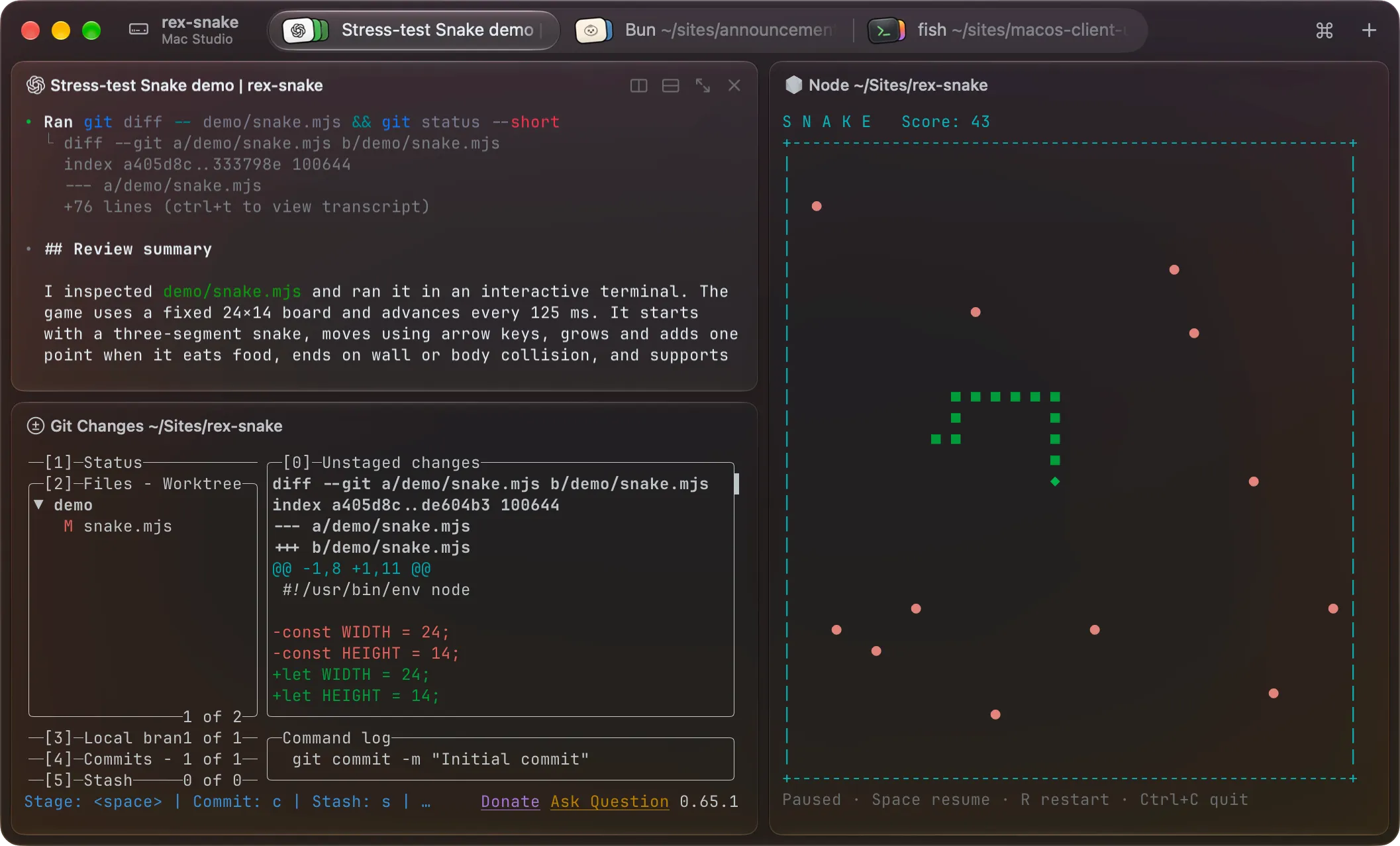
The Rex macOS app with session tabs across the top and split panes running a code review, a git diff and a game
Rex is Mitchell Hashimoto’s (HashiCorp, Ghostty) answer to a problem he ran into while building Ghostty: modern GPU terminals like Ghostty, Kitty, and Alacritty can parse terminal I/O up to 100x faster than the internal terminal emulators inside tmux or screen. Putting a traditional multiplexer in front of a fast terminal bottlenecks the entire pipeline down to the multiplexer’s parser.
So Rex flips the architecture. You do not run rex inside another terminal; Rex is the terminal application.
How Rex’s raw-byte streaming works
The server owns the PTYs. When a Rex client connects, the server briefly pauses PTY processing, sends a compact binary handshake frame (dimensions, cursor, current screen state), and immediately unlocks input.
Raw PTY bytes, not screen diffs. Instead of parsing output into a shared virtual grid and sending screen diffs, the Rex server tees raw PTY byte streams to every attached client, just like SSH. Each client runs its own embedded libghostty engine and parses at native speed.
Independent client scrollback. History backfills in the background (newest chunks first), and because each client owns its own viewport, two people attached to the same session can scroll up and inspect logs independently without yanking each other’s screen.
First-class remote logins and Lua automation
Adding a remote machine from Rex’s command palette does not just open an SSH pipe inside a local pane; it performs a real OS login on the remote Rex server (the session appears in who, loads your login shell, honors PAM/user limits, and authenticates via your existing SSH keys or Tailscale identity, inspectable via rex whoami) with Mosh-inspired responsiveness.
Every Rex terminal automatically gets rex on PATH plus REX_SESSION, REX_BLOCK, and REX_SERVER environment variables:
Rex CLI Automation
bash
rex ls # list sessions (supports --json)rex session inspect # inspect current session detailsrex split # split current blockrex send -s build -w 2 'make test' # send command to window 2 of "build"rex capture -b logs # print current screen of block "logs"rex -S studio ls # list sessions on remote host "studio"
Lua Config (~/.config/rex/init.lua)
lua
-- Keybindings (supports tmux-style prefix chords too)rex.bind("cmd+d", "pane.split", { direction = "right" })rex.bind("ctrl+b>c", "window.new")-- Custom typed action runnable from palette, keybind, or `rex do`rex.action{ name = "scratch", title = "Open Scratch Window", run = function(ctx, args) rex.session.new_window{ layout = rex.layout.block{ flavor = "com.superlogical.terminal.shell", }, } end,}rex.bind("shift+cmd+n", "scratch")
Where Rex hurts
First, platform reach: only the macOS client is in public testing right now (Linux, Windows, iOS, and browser clients exist internally at Superlogical but have not shipped to external testers yet). Second, layout model: because each split is an independent PTY connection rendered in a native container (which is how Rex will adapt cleanly to iOS and web), there is no nested in-window tmux pane tree. Third, Rex is closed source, though Superlogical pledges that the Rex client and server “is and will always be free,” requires no account, and is fully self-hostable.
If you are on macOS and want a libghostty-based terminal with an automation CLI that is already generally available without a waitlist, check out cmux. For the full deep dive on Rex’s data path and exit codes, read my Superlogical Rex briefing.
Best for: macOS developers who want native libghostty speed, persistent local/remote sessions, and Lua/CLI scriptability without a TUI wrapper.
Skip if: you need Linux or Windows desktop clients today, or want built-in AI agent state supervision.
6. Tern: the terminal that wants your whole workflow
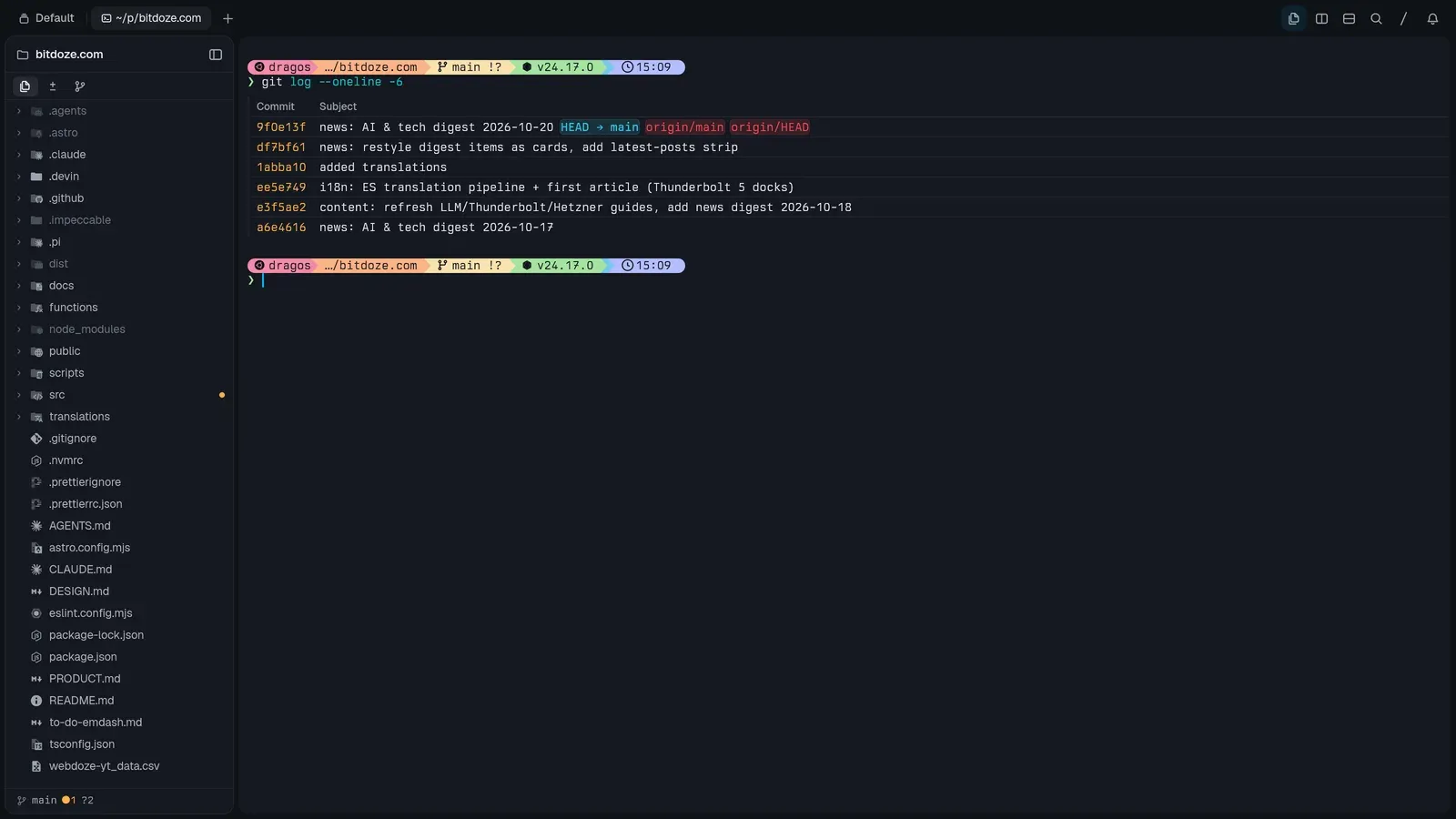
Tern’s workspace: a git-aware Files pane tracking the project on the left next to a shell running git log
Tern (built by Stencil, the team behind the omp coding agent CLI) starts from the same premise as Rex (a background daemon tern daemon owns persistent sessions while windows are disposable views) and pushes it into full workspace territory. Calling itself “a neoterminal for the Electron-weary,” Tern is a native Rust application (~150 ms cold start to a live prompt) where a terminal shell is only one kind of block.
Native blocks over the Tern Surface Protocol
Instead of embedding Chromium, Tern renders structured tools natively over its Tern Surface Protocol right beside your shell splits (or popped out as always-on-top picture-in-picture windows):
Git block (⌥⌘G): commit graph with branch/tag lanes, staged/unstaged working tree with line staging and context folding, git peek, stashes/worktrees/submodules view, and AI commit message generation.
SQLite Database block: schema browser, filterable data grid with inline cell editors (text, JSON, hex, image), SQL query tabs with completion and result plotting, and staged “Write Changes” / revert.
Kanban Board block (⌥⌘K): turns a plain TODO.md file in your repo into a drag-and-drop Todo/Doing/Done board that both you and your AI coding agents can read and update.
Jupyter Notebook block: runs code and Markdown cells directly against your local Python kernel with a variables inspector, with no Jupyter server required.
Files, Editor & Media block (⌘O / tern open): syntax-highlighted code editor with git gutter diffs, rendered Markdown toggle, SVG/PDF/image viewers, and video frame-strip previews (EDITOR='tern open --wait' works for git commit).
Browser (⇧⌘B), Task Manager, and Canvas blocks: an inspectable browser block that agents can drive and snapshot, a CPU/RAM/GPU process tree, and a freeform drawing canvas.
Native omp agent blocks, QUIC remoting, and CLI control
Because Stencil builds omp, launching an agent block renders a native UI with a model picker, thinking toggle, subagent task tree, and a 1M-token context budget breakdown (system prompt, tools, skills, messages), while routing completion alerts and bell events into Tern’s “Needs attention” inbox. Standard CLI agents (Claude Code, Codex, Devin) run in regular terminal panes, and a community Luau plugin for Herdr lets you embed Herdr panes inside Tern.
bash
# Tern workspace & automation CLItern ls # list sessions, tabs, and panestern new | split | move | pip | dock # manipulate window layout from scriptstern run 'make test' # execute command in a panetern send / capture / wait # type into, read back, or block on panestern events --filter pane_spawned # stream live daemon eventstern whoami --json # inspect user + host identity chain# Remote hosts, browser client, and headless screenshot harnesstern remote serve # expose session daemon over QUICtern web serve # serve Wasm + WebGPU client in a browser tabtern shot scenario.kdl # render offscreen UI captures
Unlike Rex, Tern already ships builds for macOS, Linux, Windows, and Android (paired via QR code from the Hosts palette, with iOS next), plus a WebAssembly + WebGPU browser client (tern web serve).
Where Tern hurts
Tern is closed source, currently in closed beta behind a waitlist (mine cleared in about two days), and Stencil has not announced final pricing or commercial tiers yet. For a full tour of every block, see my Tern terminal hands-on review.
Best for: developers who want daemon-persisted sessions, QUIC remote hosts, and native git/SQLite/kanban/notebook panes without Electron overhead.
Skip if: you only adopt open-source terminal tools or want a lightweight Unix utility that does one thing.
AI coding agent orchestration compared
Because AI coding agents are the main reason developers are rethinking their multiplexer in 2026, here is how the six tools compare specifically on agent workflows:
Agent Capability
tmux
Zellij
Rex
Tern
Herdr
TuiOS
Auto state detection (working/blocked/done)
No
No
No
omp native; others via bell/exit
Yes (14+ agents via manifests + hooks)
Yes (manifests + hooks + OSC 7501)
Cross-session approval inbox
No
No
No
Attention inbox (notifications)
Sidebar + mobile/web client inboxes
Built-in Inbox (Ctrl+b i, holds prompts & plans)
Risky command guardrails
No
Resurrection Enter gate
No
Agent-dependent
Agent-dependent
Yes (risk rules require double-press)
Queue next prompt while agent works
No
No
No
No
Via plugins / scripts
Built-in (tuios queue)
Agent-to-agent messaging / orchestration
Manual send-keys
Manual zellij action
rex send / capture
tern send / capture + subagents
Unix socket API + CLI
Built-in (ask-agent, send-agent-message, mcp)
Git worktree fan-out & test verification
Manual
Manual
Manual
Git block worktrees
Built-in worktree sessions
Built-in (tuios fan, fan compare, fan verify, ship)
Inline diff review with notes to agent
No
No
No
Git block diffs
Via plugins / clients
Built-in (tuios review, Ctrl+b v)
Herdr vs TuiOS: which agent multiplexer should you pick?
If AI coding agents occupy most of your terminal time, your real choice is Herdr vs TuiOS. Pick Herdr for proven stability (~44k stars) and the best mobile/desktop client ecosystem (especially Moshi on iPhone/Android). Pick TuiOS if you want tiling window management, built-in worktree fan-out (tuios fan), inline diff review with notes (tuios review), and Claude Code team compatibility via tuios tmux-shim, while still running Herdr plugins and speaking Herdr’s socket API.
Keybinding and vocabulary cheat sheet
Moving between these six tools is much easier once you see how their nouns and default shortcuts map to each other:
Action / Concept
tmux
Zellij
Herdr
TuiOS
Rex
Tern
Top-level group
Session
Session
Workspace / Session
Session (grouped by Space)
Session
Session
Tab layer
Window
Tab
Tab
Workspace (1–9)
Window
Tab
Split / leaf item
Pane
Pane (tiled / float / stack)
Pane
Window (tiled / float)
Block
Pane running a Block
Default prefix / mode key
Ctrl+b
Modal (Ctrl+p, Ctrl+t, Ctrl+g lock)
Ctrl+b + mouse UI
Ctrl+b + modal WM/Terminal mode
Cmd shortcuts + Ctrl+b chords
⌘K palette + remappable chords
Split right / vertical
Ctrl+b %
Ctrl+p then r (or Alt+n)
Ctrl+b v (or mouse)
Ctrl+b v / tuios split-window right
Cmd+d / rex split
tern split / shortcut
Split down / horizontal
Ctrl+b "
Ctrl+p then d
Ctrl+b s (or mouse)
Ctrl+b s / tuios split-window down
Shift+Cmd+d
tern split / shortcut
Detach session
Ctrl+b d
Ctrl+o then d
Ctrl+b q
Ctrl+b d / tuios detach-client
Close window (server persists)
Close window (daemon persists)
List sessions from CLI
tmux ls
zellij ls
herdr session list
tuios ls
rex ls
tern ls
Remote SSH, phones, and browsers compared
Tool
Remote Transport
Multi-Machine View
Phone Experience
Browser Client
Unmanaged Server Ready
tmux
Plain SSH (or Mosh + tmux attach)
Manual (ssh inside panes)
Generic SSH apps (Termius, Blink, Moshi)
Third-party only (ttyd, gotty)
Yes (preinstalled almost everywhere)
Zellij
Plain SSH (zellij attach, auto-nested in 0.45.1)
Manual (ssh inside panes)
Generic SSH apps or mobile browser
Built-in (zellij web with auth/read-only tokens)
Needs single binary install
Herdr
SSH + herdr --remote thin client
Yes (herdr machine add sidebar)
Best today (Moshi + moshi-hook push approvals, Heeler)
Community web UIs (ColliePWA, herdr-web-ui)
Needs ~11 MB binary on host
TuiOS
Built-in SSH server (tuios ssh) + linked hosts
Yes (remote panes inside local session + tuios cp)
tuios pair QR code + ntfy/Pushover Inbox push alerts
Official tuios-web companion binary
Needs ~16 MB binary on host
Rex
Built-in Rex protocol (real OS login, Mosh-style feel)
Best for servers you do not own:tmux, and nothing else comes close. It is already installed on almost every customer server, container host, and BSD box.
Best next-gen remote protocol:Rex (real system login with Mosh-like responsiveness) and Tern (tern remote serve over QUIC to desktop, WebGPU browser, and Android clients). TuiOS takes third place with its ability to mount a single remote pane from another host right inside your local workspace (tuios new-window --host build).
Best phone experience today:Herdr paired with Moshi (Mosh UDP transport + moshi-hook lock-screen Approve/Deny buttons) or Heeler, with TuiOS (tuios pair QR code + ntfy/Pushover Inbox push notifications) and Tern (Android client) right behind.
Best browser experience:Zellij (zellij web with built-in auth and read-only tokens) and Tern (tern web serve WebGPU client). tuios-web and Herdr’s community web UIs (ColliePWA, herdr-web-ui) are great over Tailscale.
Which terminal multiplexer should you actually pick?
Your situation / primary workflow
Best pick
Runner-up
Why
SSH into production or customer Linux servers
tmux
Zellij
Already installed everywhere, 1.2 MB binary, zero setup risk.
Want a modern tmux with discoverable keys & layouts
libghostty speed, independent client scrollback, real OS remote logins, and Lua automation.
Want git, SQLite, Jupyter & kanban panes next to your shell
Tern
Zellij + TUI tools
Native blocks over the Tern Surface Protocol, QUIC remoting, and native omp agent UI.
Maintain shells, builds, and logs on arbitrary Linux servers → tmux. Installed everywhere, tiny footprint, zero surprises.
Want a modern tmux replacement with discoverable shortcuts, floating panes, KDL layouts, and a web UI → Zellij.
Run 3+ AI coding agents and want a live state sidebar, socket API, and lock-screen phone approvals → Herdr.
Want a tiling window manager in your terminal plus an Inbox that holds prompts, fans out worktrees, and reviews diffs → TuiOS.
Use macOS and want a fast libghostty terminal with built-in session persistence and SSH-replacing remote logins → Rex.
Want a cross-platform Rust terminal with native git, SQLite, Jupyter, and kanban blocks beside your shell → Tern.
Real-world combinations (and the one nesting rule)
You do not have to pick just one. My own daily stack uses three:
tmux on production servers I touch once a month.
Herdr + Moshi on an always-on Hetzner VPS where long-running Claude Code and Codex sessions live.
TuiOS (or Herdr inside Tern) when I want worktree fan-out (tuios fan) or native git/SQLite blocks on my workstation.
Nesting works fine as long as you follow one rule: keep a single multiplexer layer directly above your AI coding agents. Running Herdr inside a Tern pane works because Tern renders the outer window while Herdr directly owns the agent PTYs. Putting tmuxbetween Herdr/TuiOS and your coding agent breaks automatic process-tree detection (the outer multiplexer sees tmux, not claude or codex). If a tool tries to spawn tmux panes underneath you, run it under tuios tmux-shim instead of nesting a real tmux server.
FAQ
Is tmux dead in 2026?
No. tmux still owns the “preinstalled on every server” niche, and tmux 3.8 (September 2026) added floating pane refinements, a built-in fuzzy session switcher (Ctrl+b Tab), and automatic light/dark themes. When you SSH into a machine you do not manage, tmux is what is there. What changed is local and VPS development with AI coding agents: tmux has no concept of agent state or prompt approvals, which is why Herdr and TuiOS grew so quickly.
tmux vs Zellij: which is better for normal terminal work?
If you are starting fresh today and control the machines you work on, Zellij is faster to learn thanks to its on-screen key hints, default mouse support, KDL project layouts, built-in session resurrection, first-class nested sessions (v0.45+), and zellij web browser access. If you regularly hop across customer servers, minimal containers, or BSD boxes, or rely on iTerm2’s tmux -CC integration, stick with tmux.
Can I run two terminal multiplexers together?
Yes, with one rule: keep a single multiplexer layer directly above your AI coding agents. Running Herdr inside Tern works because Tern renders the outer window while Herdr directly owns the agent PTYs. Putting tmux inside Herdr (or Herdr inside tmux) breaks automatic agent detection unless you configure explicit lifecycle hooks. TuiOS also includes tuios tmux-shim, which translates tmux CLI calls into native TuiOS windows so you do not need to nest tmux at all.
What is the best terminal multiplexer for a headless VPS?
For classic sysadmin work and long-running builds, tmux. For a headless VPS dedicated to running Claude Code, Codex, or OpenCode 24/7, use Herdr or TuiOS: both keep sessions alive on the server and give you an agent state sidebar or Inbox you can reach from your laptop or phone over Tailscale. See our phone control setup with Moshi and Herdr for the step-by-step stack.
Are all six terminal multiplexers free and open source?
Four are free and open source: tmux (ISC), Zellij (MIT), Herdr (Apache-2.0), and TuiOS (MIT). Superlogical Rex is closed source, though Superlogical pledges that the Rex client and server “is and will always be free” and self-hostable with no account required. Stencil Tern is closed source in closed beta and has not announced pricing yet.
Which terminal multiplexer is the most stable for daily driving right now?
tmux and Zellij, by a wide margin. Both are mature, stable, and predictable. Among the agent-first tools, Herdr (v0.9.3, ~44k stars) is the more proven daily driver, while TuiOS (v0.11.1) ships features at a rapid pace if you do not mind frequent updates. Rex and Tern are both still gated behind beta invites.
Verdict
There is no single winner here because the category split into three distinct jobs:
Classic shell multiplexing:tmux remains untouchable on remote servers you do not own, and Zellij is the best modern upgrade when you want KDL layouts, floating panes, nested SSH sessions, and on-screen key hints without spending a weekend writing a config file.
AI agent multiplexing:Herdr is the safest pick today for supervising a fleet of coding agents across local and remote machines, while TuiOS is the most ambitious challenger with its tiling window manager, unified Inbox, inline diff review, worktree fan-out, and Herdr/tmux compatibility shims.
Next-gen terminal apps:Rex and Tern prove that baking session persistence and remoting into the terminal emulator itself is faster and cleaner than running a TUI inside a TUI: Rex for libghostty purists on macOS, Tern for developers who want git, SQLite, kanban, and notebooks right next to their prompt.
If your terminal day is mostly shells and logs, install tmux or Zellij and get back to work. If half your panes are AI coding agents, switch to a multiplexer that knows they are in there.