Herdr Review: Open-Source Agent Multiplexer for AI Coding
Herdr review: a free open-source agent multiplexer that runs AI coding agents side by side in one terminal. Features, setup, and how it compares to tmux.

Updated Published 24 min read
Herdr
Part 1 of 4
If you’re running three, five, maybe ten AI coding agents at the same time — Claude Code in one terminal, Codex in another, Copilot CLI in a third — you already know the pain. You have terminal sessions scattered everywhere and zero visibility into which agent needs your attention right now.
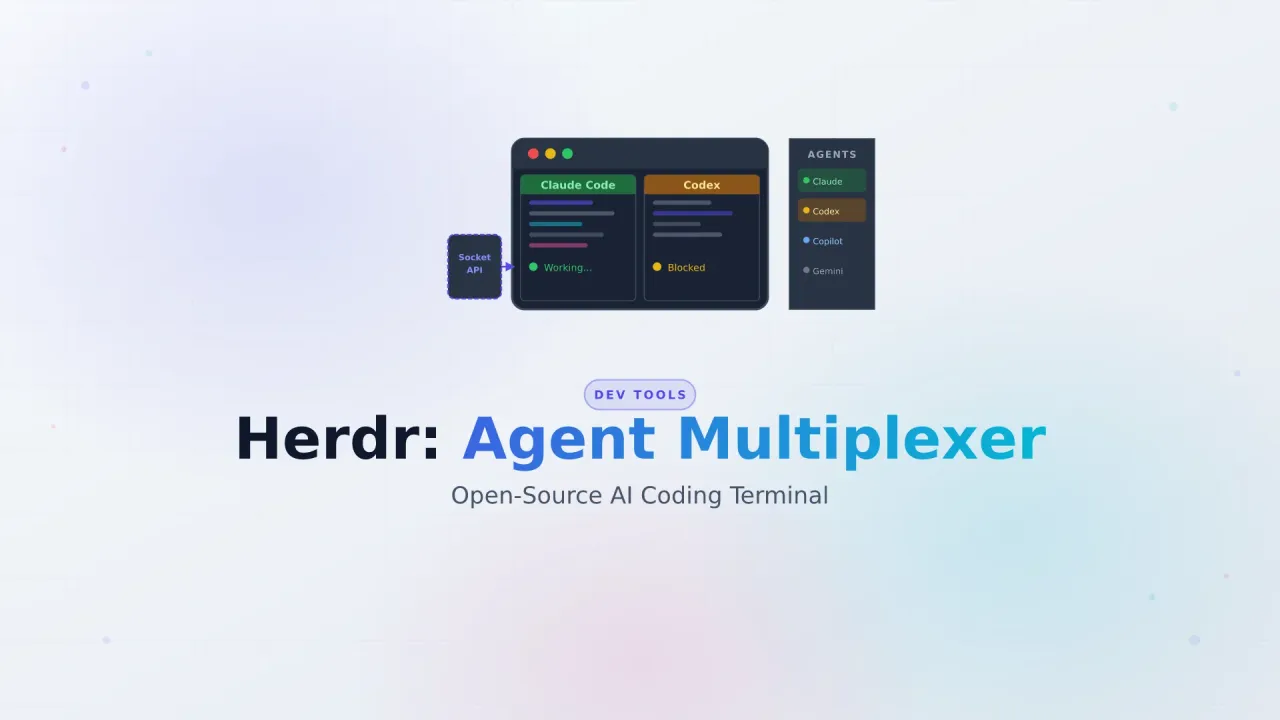
Herdr is a free, open-source agent multiplexer built in Rust that solves exactly this problem. It runs inside your existing terminal (iTerm2, Kitty, Alacritty, WezTerm, Ghostty — whatever you already use) and adds a sidebar that shows real-time agent state: blocked, working, done, idle. Think of it as tmux that actually understands AI coding agents.
The project is about 105 days old, has nearly 15,000 GitHub stars, hit #1 on GitHub Trending on June 30, 2026, and is built by a single full-time developer. That kind of traction usually means the tool solves a real problem.
What You'll Learn
This review covers what Herdr is, how it compares to tmux and Zellij, how to install and configure it, and whether it actually delivers on its promise of terminal-native agent multiplexing. It includes a hands-on video walkthrough of how I use it day to day. If you’re exploring AI coding tools and assistants, this will help you decide if Herdr fits your workflow.
What is Herdr?
Herdr positions itself as “one terminal for the whole herd.” At its core, it’s a terminal-native agent runtime and multiplexer that combines tmux-style session persistence with first-class awareness of AI coding agents.
It runs inside your existing terminal — it doesn’t replace it. You launch Herdr and get a mouse-friendly TUI where you can split panes, manage named sessions, and see which agents are active. The key difference from tmux: Herdr detects AI agents running in its panes and displays their state in a sidebar.
Here’s what that looks like in practice:
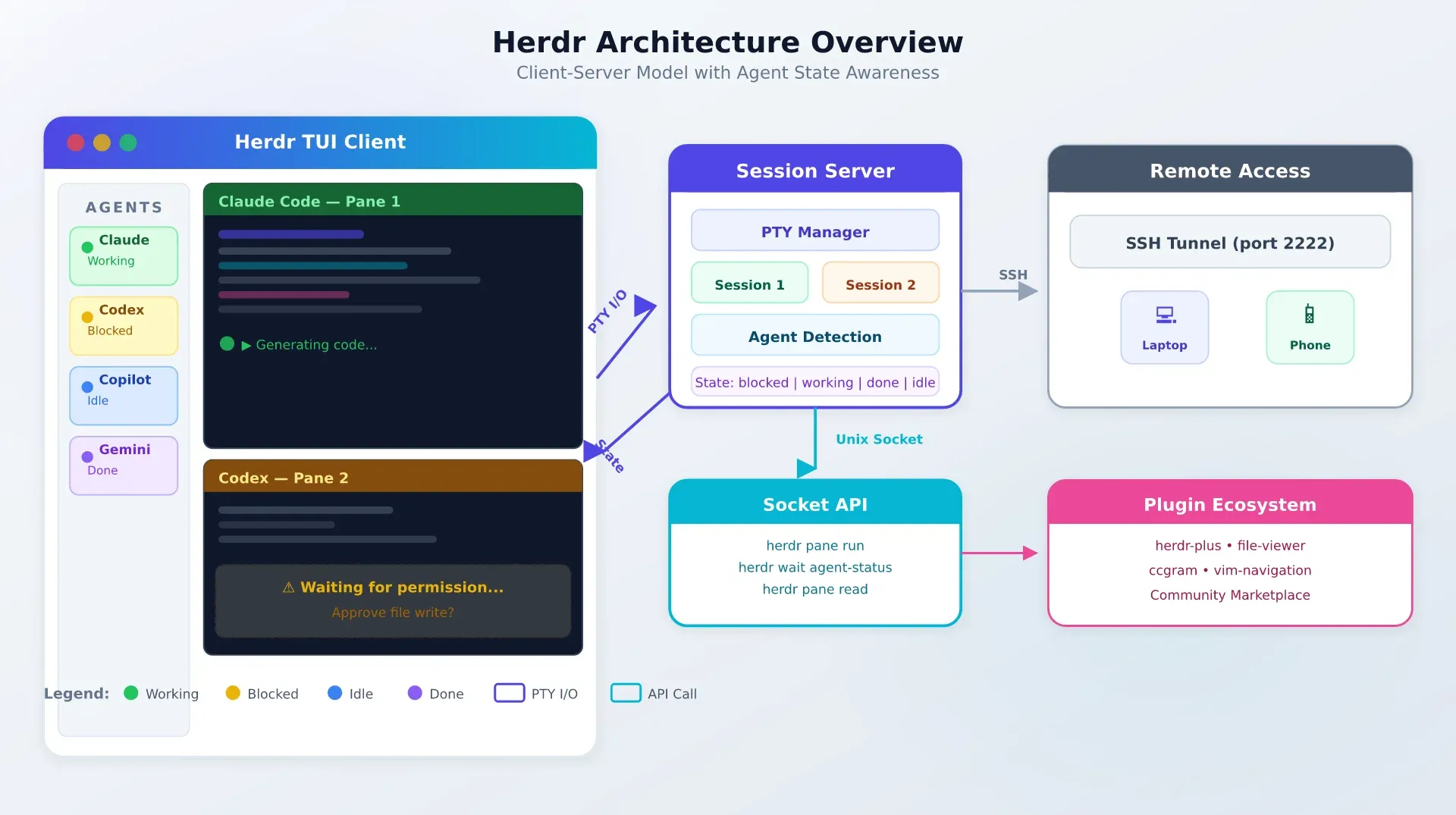
The architecture is client-server: a background session server manages PTY sessions (they survive laptop sleep, WiFi drops, SSH disconnects), and a thin client renders the TUI. Communication happens over a local Unix socket, or through an SSH tunnel for remote access.
Herdr is a single Rust binary — about 10–11 MB. No Electron, no accounts, no telemetry, no cloud dependency.
What Herdr gives you:
- tmux-style persistent sessions with detach/reattach
- Real-time agent state sidebar (blocked/working/done/idle)
- Mouse-native TUI with click, drag, split, and right-click menus
- CLI and Socket API for agent-driven orchestration
- Remote SSH attach for headless servers
- Plugin system with community marketplace
- 14+ AI coding agent support out of the box
- Zero telemetry, no account required
If you’ve looked at tools like FreeBuff or Zcode as AI coding environments, Herdr sits in a different category. Those are agent wrappers. Herdr is the terminal layer underneath — it manages the panes and sessions where agents run, and adds orchestration capabilities on top.
Why terminal-native agent multiplexing matters
The multi-agent workflow is no longer niche. In 2026, a typical developer might run Claude Code for architecture decisions, Codex for implementation, Copilot CLI for quick edits, and Gemini CLI for research — all in parallel. Each agent runs in its own terminal session, and you’re constantly context-switching between them.
The pain points are real and consistent across the community:
- No visibility. You have 10+ agent sessions open and no idea which one is blocked waiting for your input, which is still working, and which finished an hour ago.
- GUI wrappers are limiting. Most are Mac-only, Electron-based, or replace your terminal entirely. If you work on a Linux VPS or want to access your agents from your phone over SSH, you’re out of luck.
- Remote access is an afterthought. Running agents on a headless server and managing them from your laptop shouldn’t require a full desktop environment.
- Agents can’t orchestrate. In tmux, agents are isolated in their panes. There’s no way for one agent to spin up another, wait for results, or read output from a sibling pane.
Terminal-native matters for the self-hosting and VPS crowd because it means zero overhead. No Electron, no desktop dependency, no GPU requirements. You can run Herdr on a $5 Hetzner VPS and access it from your phone via SSH. If you’re interested in SSH port forwarding workflows, Herdr’s remote attach mode fits right in.
Herdr key features
Agent state tracking
This is the feature that makes Herdr more than just another terminal multiplexer.
Herdr detects agents using process-name matching plus terminal output heuristics. For most of the 14+ supported agents, detection is zero-config — launch the agent in a pane and Herdr picks it up automatically. It tracks four semantic states:
- Working — the agent is actively generating or processing
- Blocked — the agent is waiting for user input (a prompt, permission, etc.)
- Done — the agent finished its task
- Idle — a pane exists but no agent activity detected
For richer state reporting, you can install agent-specific integrations:
herdr integration install claude
herdr integration install codex
herdr integration install copilot
Integrations add hooks that report state more accurately than heuristics alone. For example, the Claude Code integration uses its SessionStart hook to report initialization, task progress, and completion states.
14+ Agents Supported
Herdr supports Claude Code, Codex, Copilot CLI, Cursor Agent, Pi, Droid, Amp, OpenCode, Grok CLI, Gemini CLI, Antigravity CLI, Kimi Code CLI, Hermes Agent, QoderCLI, Kiro CLI, and more. If your agent isn’t listed, the generic process detection usually works — it just won’t report as much detail.
Persistent sessions and detach/reattach
Like tmux, Herdr runs a background session server that manages PTY sessions. Your agent sessions survive laptop sleep, WiFi drops, and SSH disconnects.
Named sessions make it easy to organize:
# Start or attach to a named session
herdr session attach work
herdr session attach side-project

# List active sessions
herdr session list

# Kill a session
herdr session kill side-project
Detach from a session (default prefix is Ctrl+B, then D), and reattach later with herdr session attach. Your agents keep running in the background the whole time.
Mouse-native TUI
If you’ve bounced off tmux because everything requires keyboard shortcuts, Herdr might change your mind. The TUI is fully mouse-aware:
- Click to select panes
- Drag pane borders to resize
- Right-click for context menus (split, close, rename)
- Touch support works over SSH — you can manage agents from your phone
The layout adapts to narrow terminal widths, so it works reasonably well even on small screens.
Remote SSH attach
This is where Herdr gets interesting for the VPS and self-hosting crowd. You can run Herdr on a remote server and attach to it from your local machine:
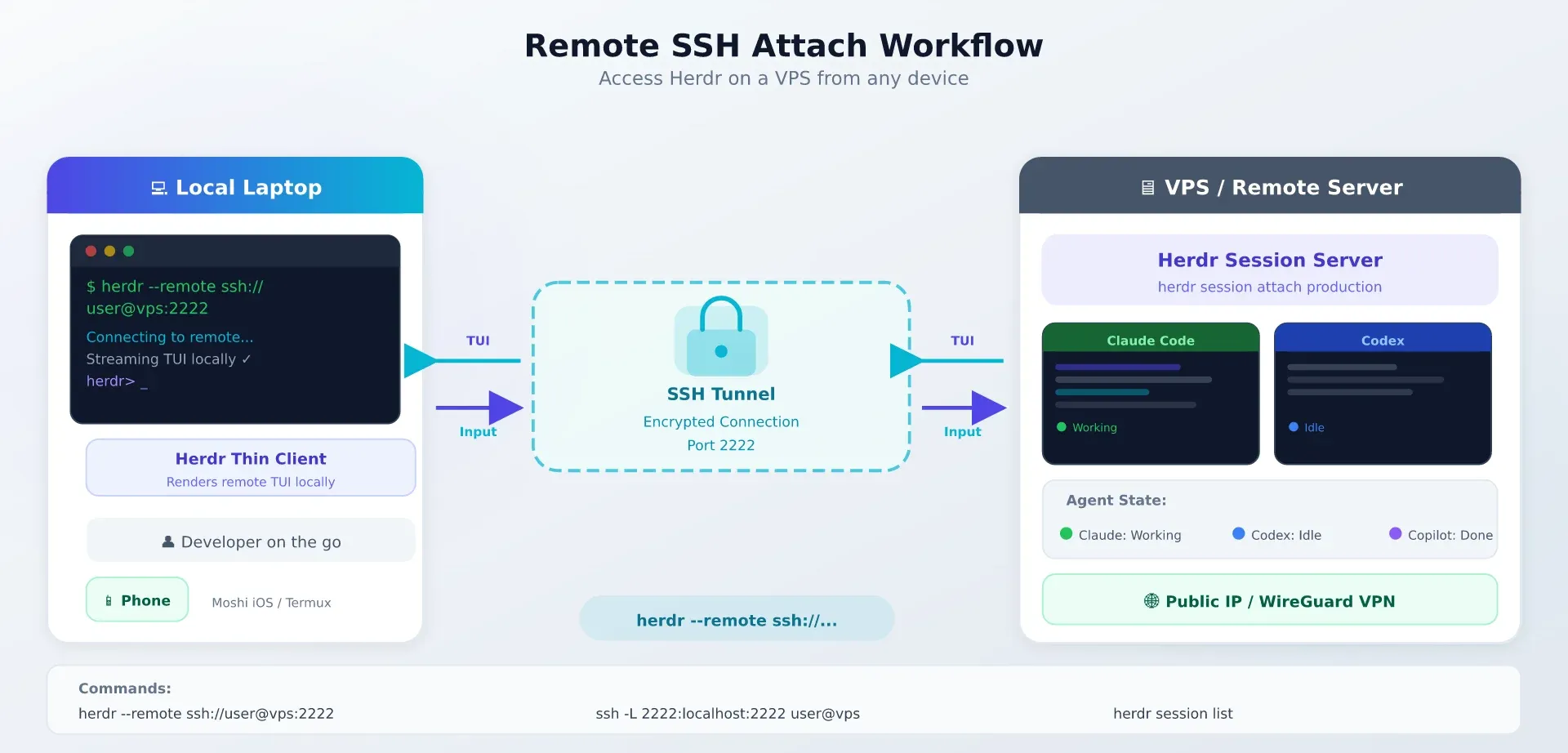
Direct SSH
# SSH into the server and launch Herdr directly
ssh user@your-server
herdr
This works but renders the full TUI over SSH — fine on good connections, laggy on slow ones.
Thin client (--remote)
# Stream the remote TUI to your local terminal
herdr --remote ssh://user@your-server:2222

# With SSH config aliases
herdr --remote ssh://myserver
The thin client mode streams only the rendering data, which is more responsive than raw SSH on slow connections.
SSH config aliases
Add to your ~/.ssh/config:
Host myserver
    HostName your-server
    User user
    Port 2222
    IdentityFile ~/.ssh/id_ed25519
Then use: herdr --remote ssh://myserver
The Moshi iOS terminal app has native Herdr support, which means you can manage your agent fleet from an iPhone or iPad over SSH.
How to install Herdr
Herdr is a single Rust binary with no runtime dependencies. Installation takes under a minute.
curl (Linux/macOS)
curl -fsSL https://herdr.dev/install.sh | shThis downloads the latest binary and places it in /usr/local/bin/.
Homebrew
brew install herdrAvailable in Homebrew core (v0.7.3 at time of writing). Installs on both Intel and Apple Silicon Macs.
Nix
nix profile install github:ogulcancelik/herdrWorks with Nix flakes. Check the repo for the latest flake.nix if you prefer pinning.
Cargo (from source)
git clone https://github.com/ogulcancelik/herdr
cd herdr
cargo build --release
Requires Rust toolchain. Build produces a single binary at target/release/herdr.
Windows (beta)
# PowerShell one-liner
iwr -useb https://herdr.dev/install.ps1 | iex
Windows Beta
Windows support is functional but still in beta. Linux and macOS are the primary platforms. If you’re on Windows, expect occasional rough edges.
The binary is about 10–11 MB. After installation, verify it works:
herdr --versionGetting started with Herdr
Before You Start
You need a terminal emulator (iTerm2, Kitty, Alacritty, WezTerm, Ghostty, or any modern terminal), Herdr installed, and at least one AI coding agent installed (Claude Code, Codex, Copilot CLI, etc.).
Your first workspace
Launch Herdr by running:
herdrYou’ll see the TUI with a single pane. Key keybindings use a prefix model (default Ctrl+B), similar to tmux:
Ctrl+B, thenV— split verticallyCtrl+B, then-— split horizontallyCtrl+B, then arrow keys — navigate between panesCtrl+B, thenD— detach from sessionCtrl+B, thenX— close current pane
You can also do all of this with the mouse — click to select panes, drag borders to resize, right-click for the context menu.
Create a named session from the start:
herdr session attach my-workspaceRunning multiple coding agents
Here’s where Herdr earns its keep. Open multiple panes and launch different agents in each:
# Pane 1: Claude Code for architecture
claude

# Pane 2: Codex for implementation
codex

# Pane 3: Copilot CLI for quick edits
copilot
The agent state sidebar on the right shows what each agent is doing in real time. When Claude Code is waiting for your input, its state flips to “blocked” with an indicator. When Codex is generating code, it shows “working.” You can glance at the sidebar and immediately know which pane needs your attention.
This is especially useful when you’re running a lead agent plus helper agents. The lead handles the main task while helpers run in parallel on subtasks — and you see all their states at once.
Installing agent integrations
For better state detection, install integrations for your agents:
herdr integration install claude
herdr integration install codex
herdr integration install copilot
herdr integration install gemini
herdr integration install grok
Integrations add hooks that report richer state information. Without integrations, Herdr uses process-name matching and terminal output heuristics — which work, but integrations give you more granular status (e.g., “generating code” vs “waiting for tool approval” vs “idle”).
How I’m actually using Herdr (video walkthrough)
I recorded a full walkthrough of my daily Herdr setup. The short version: I use a small slice of what Herdr can do, and that slice is why it stays open all day.
It replaced tmux for me — because of the mouse. I never got comfortable with tmux because I like working with the mouse, not only the keyboard. Herdr gives you spaces and panes you can add by clicking, resize by dragging, and close from a menu. Key bindings and tabs are there too, and both input styles work side by side.
I run the defaults and nothing else. The documentation covers integrations, plugins, a file viewer, Neovim bindings, workflows. I use none of it. My whole loop is: run herdr, get a clean workspace, start an agent in a pane.
Agents are detected with zero config. When I start an Oh My Pi (OMP) instance in a pane, Herdr picks it up automatically and notifies me the moment the agent needs my input.
Agents can drive Herdr itself. In the video I ask OMP to open a panel and check free disk space. It reads the Herdr skill (installed with one command), spins up its own pane, and runs the commands without me touching anything. Later in the video it opens a second OMP instance in a new panel and sends work to it. That’s the orchestration API from the next section, reached through plain conversation.
Closing the window changes nothing. This is the part I care about most: close the terminal mid-task and the agent keeps working. Run herdr again and everything is where you left it — same spaces, same panes, same agents still running.
My agents live on a VPS. I run herdr --remote with an SSH config alias (the exact setup from the remote attach section), so my projects on the server are always alive. Laptop shut, out of power, on the road — the work continues on the VPS and I attach from whatever device is in front of me. The day before recording, I burned a couple of million tokens on a project update while barely watching it run.
There’s also a desktop app. Herdr M (macOS) wraps the same sessions in a regular UI: all your spaces, file access, and remote connections in one window. Devices are linked, so when I close Ghostty mid-task I can pick the same session up in the app. I’m a terminal person so I rarely use it, but it’s the friendliest way in if the TUI isn’t your thing.
Day to day that’s Ghostty locally, and on the VPS a TUI file manager with Herdr nested inside. None of it is required — it’s just what stuck. If you use Herdr differently, especially the plugin ecosystem, tell me in the comments on the video.
Herdr socket API and agent orchestration
This is the feature that differentiates Herdr from every other terminal multiplexer. Agents can drive the terminal programmatically through a socket API.
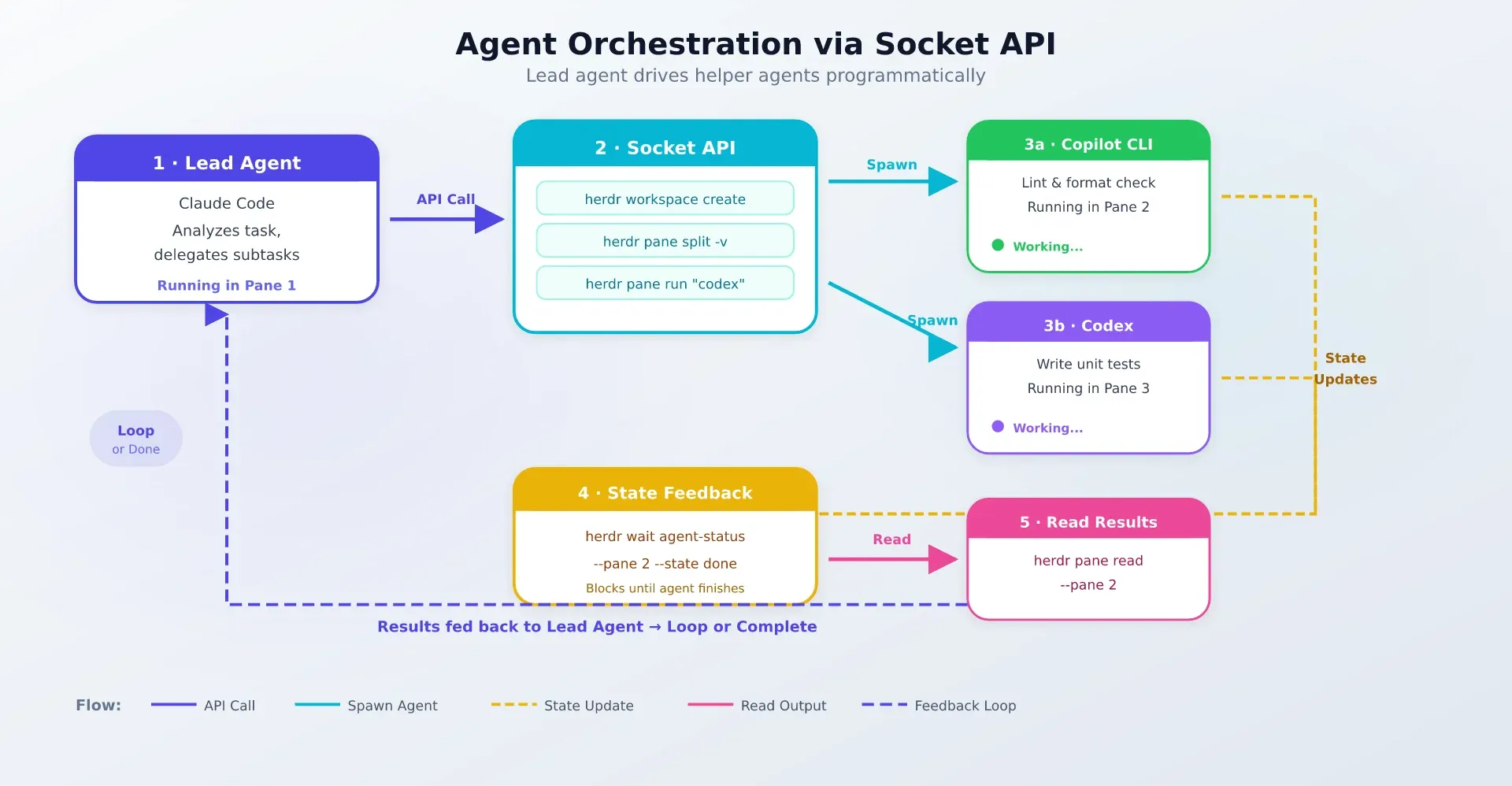
Instead of just running inside panes, agents can:
- Create new panes — spin up helper agents on demand
- Run commands — execute shell commands in any pane
- Read output — capture stdout from other panes
- Wait on state — block until another agent reaches a specific state (done, idle, etc.)
- Split and attach — manage workspace layout programmatically
Here’s what orchestration looks like from the CLI:
# Create a new pane in the current workspace
herdr pane split --vertical

# Run a command in the active pane
herdr pane run "claude --prompt 'Fix the authentication bug'"

# Read the last 50 lines of output from pane 2
herdr pane read --pane 2 --lines 50

# Wait until pane 2's agent reaches "done" state
herdr wait --pane 2 --state done

# Create a named workspace for a specific task
herdr workspace create feature-branch
Agent-Driven Orchestration
No other terminal multiplexer offers this. tmux has scripting capabilities, and Zellij has a plugin API, but neither understands agent states. Herdr’s socket API lets agents coordinate with each other — a lead agent can spin up helpers, wait for results, and proceed. If you’re interested in building your own AI agent that could integrate with this API, it opens up real orchestration workflows.
Practical use cases:
- Lead agent + helpers: One agent runs the main task, spawns helper agents for subtasks (linting, testing, documentation), and waits for them to finish.
- Automated test-and-fix loops: An agent runs tests, reads the output, fixes failures, and repeats — all through the socket API.
- Multi-repo workflows: Different agents work on different repositories in parallel, coordinated by a lead agent.
Herdr vs tmux vs Zellij
This is the comparison most people want to see. Here’s an honest breakdown:
| Feature | Herdr | tmux | Zellij |
|---|---|---|---|
| Agent state awareness | Yes (blocked/working/done/idle) | No | No |
| Mouse-native UI | Yes | Partial (needs config) | Yes |
| Agent-shaped API | Yes (read, send, wait, split) | Terminal scripting | Plugin scripting |
| SSH attach | Yes | Yes | Yes |
| Plugin ecosystem maturity | Young (~105 days) | Very mature (18 years) | Growing |
| Session resurrection | Not yet | Yes (via plugins like tmux-resurrect) | Built-in |
| Status bar widgets | Agent-focused | Battery, CPU, weather, etc. | Built-in tabs |
| Built-in sandboxing | No | No | Yes |
| Configuration complexity | Low | High | Medium |
Herdr strengths
- Agent state sidebar — the killer feature tmux and Zellij can’t match
- Socket API for agent orchestration — genuinely novel
- Mouse-first design — no config needed
- Single binary, zero dependencies
- Remote thin client mode
- Works with your existing terminal (doesn’t replace it)
tmux strengths
- 18 years of battle-tested stability
- Massive plugin ecosystem (tmux-resurrect, tmux-continuum, tmuxinator)
- Status bar widgets for everything (battery, CPU, network, weather)
- Session resurrection and auto-save
- Available on every Unix system by default or package manager
- Deep customization with
.tmux.conf
Zellij strengths
- Built-in floating panes and session management
- Layout system with YAML files
- Built-in sandboxing for plugins
- Session resurrection out of the box
- Growing plugin ecosystem with web technologies
- More intuitive default keybindings (no prefix mode)
When tmux is still the better choice: If you have a deeply customized .tmux.conf, rely on specific tmux plugins, or have 18 years of muscle memory around tmux keybindings, switching to Herdr has real costs. tmux is also the safer bet for production server management where stability matters more than features.
When Herdr wins: If you run multiple AI coding agents and want real-time visibility into what they’re doing, there’s no alternative. The agent state sidebar alone justifies the switch for multi-agent workflows. The socket API is a bonus that opens up orchestration patterns tmux simply can’t support.
Herdr plugins and community ecosystem
The plugin ecosystem is young but growing fast. There are already 83+ public repositories tagged “herdr” on GitHub.
Notable community plugins:
- herdr-plus — Adds Quick Actions (predefined command templates) and a Projects view for organizing workspaces
- herdr-file-viewer — A git-aware file viewer TUI (64 GitHub stars). Browse files, see diffs, and navigate your project without leaving Herdr
- herdr-reviewr — Code review sidebar (44 stars). Review pull requests directly in Herdr
- ccgram — Telegram bridge for Herdr (202 stars). Get notifications on Telegram when agents finish, block, or error
- vim-herdr-navigation — Vim/Neovim integration for pane navigation
- pi-bellwether — Package manager integration for Herdr management
Third-party tools are also emerging:
- Moshi — An iOS terminal app with native Herdr support. Manage your agent panes from an iPhone.
- Agentchute — Intra-agent communication layer that works with Herdr’s socket API
The ecosystem is roughly where tmux was in its first year. The plugin count is growing fast (from zero to 83 repos in ~105 days), and the quality of the top plugins is already decent. Expect this to mature quickly given the project’s growth trajectory.
Who should (and shouldn’t) use Herdr
Herdr is great if...
- You run 3+ AI coding agents simultaneously and lose track of which ones need attention
- You work on remote servers via SSH and want a terminal-native tool (not Electron, not a web UI)
- You’re on Linux or macOS and prefer tools that run inside your existing terminal
- You want zero telemetry, no accounts, and a single binary with no dependencies
- You’re interested in agent orchestration — having agents coordinate through a socket API
- You manage VPS infrastructure and want SSH-first tooling — if you’re running self-hosted server panels, Herdr fits that philosophy
Consider alternatives if...
- You’re a tmux power user with a deeply customized config and 18 years of plugin dependencies. The migration cost is real.
- You’re on Windows only. Support is beta and still has rough edges.
- You need production-grade stability for critical workflows. Herdr is 105 days old and pre-1.0.
- You need built-in sandboxing or process isolation. Herdr doesn’t sandbox agents.
- You prefer a GUI that replaces your terminal (Warp, cmux, Conductor). Herdr is terminal-native by design.
- You’re cost-conscious and want to pair Herdr with affordable AI models — this works, but the cost savings come from the models, not from Herdr itself.
Licensing and pricing
Herdr is licensed under AGPL-3.0-or-later — free for personal and commercial use. You can download, run, and modify it without paying anything.
Licensing Note
AGPL means that if you modify Herdr and distribute it (or run it as a network service), you must share your modifications under the same license. For typical use — running it locally to manage your agents — this has no practical impact. It’s free, it works, you don’t owe anyone anything.
If your organization can’t comply with AGPL (some enterprise policies prohibit it), a commercial license is available. Contact [email protected] for pricing. No public pricing page exists.
Key licensing details:
- Zero telemetry — no phone-home, no analytics, no usage tracking
- No account required — download and run. No cloud dependency.
- No vendor lock-in — it’s a standard Rust binary. If you stop using it, your terminal and agents are unaffected.
For context on the broader open-source AI ecosystem, see our guide to open source LLMs for coding — running open-source models with an open-source terminal multiplexer is about as vendor-neutral as you can get.
Risks and things to know
Pre-1.0 Software
Herdr is approximately 105 days old (as of July 2026). It’s moving fast, which means features ship quickly but breaking changes are possible. Pin an update date and revisit.
Honest caveats:
- Young project. Pre-1.0, ~105 days old. APIs and features may change. If you build workflows around the socket API, expect some adaptation as the project evolves.
- Solo developer. Bus factor is 1. Ogulcan Celik is full-time on this, but there’s no team backing it. The community (nearly 15,000 stars) helps, but core development depends on one person.
- Missing tmux features. No battery/CPU status bar widgets. No session resurrection equivalent to tmux-resurrect. No tmuxinator-style project templates (yet).
- Performance on large setups. Some users on Hacker News reported text rendering delay with many panes open. Your mileage may vary with 10+ panes.
- No built-in sandboxing. Agents run with your user permissions. If an agent does something destructive, Herdr won’t stop it.
- No public commercial pricing. Organizations need to email for a quote — no self-serve option.
- Keybinding learning curve. The prefix-based model is familiar to tmux users, but the specific bindings differ. Expect a few days of adjustment.
The rapid community growth (15,000+ stars, 83+ repos, active Discord) mitigates some of these risks. Tools that solve real problems tend to attract contributors and survive.
Verdict
Herdr is the first terminal multiplexer that actually understands AI coding agents. If you’re running multiple agents and losing track of which ones need you, the agent state sidebar alone is worth the switch.
It’s not a tmux replacement yet — not for power users with deep customization needs. tmux has 18 years of ecosystem maturity, and Herdr has 105 days. But for the specific use case of multi-agent terminal workflows, nothing else comes close.
The socket API is novel. No other terminal multiplexer lets agents coordinate programmatically — creating panes, reading output, waiting on state. This opens up orchestration workflows that aren’t possible with tmux or Zellij.
The honest recommendation: try it for your next multi-agent session. Run Herdr for a day with three or four agents, watch the state sidebar, and see if it changes how you work. If it doesn’t, tmux is still there. If it does, you’ll probably stick with it.
Try Herdr on GitHub Visit herdr.devIf you’re also exploring affordable AI models to pair with Herdr, or looking at AI coding tools and assistants more broadly, we have guides for both.
FAQ
Is Herdr free to use?
Yes. Herdr is licensed under AGPL-3.0-or-later — free for personal and commercial use. No account, no subscription, no cloud dependency. A commercial license is available for organizations that can’t comply with AGPL (contact [email protected]).
Does Herdr replace tmux?
Not yet for power users. Herdr adds agent awareness and orchestration that tmux lacks, but tmux has 18 years of plugins, configuration options, and battle-tested stability. Herdr is better for multi-agent workflows; tmux is better for established, heavily customized setups. Many developers run both — tmux for general server management, Herdr for agent sessions. Worth tracking separately: Superlogical Rex, the terminal-as-multiplexer project from Ghostty’s creator, which takes the opposite approach to Herdr (the terminal itself is the multiplexer; macOS only for now).
What AI coding agents does Herdr support?
14+ agents out of the box, including Claude Code, Codex, Copilot CLI, Gemini CLI, Grok CLI, Cursor Agent, Pi, Droid, Amp, OpenCode, Antigravity CLI, Kimi Code CLI, Hermes Agent, QoderCLI, Kiro CLI, and more. If your agent isn’t listed, generic process detection usually works — you just won’t get granular state reporting without an integration.
Can I use Herdr over SSH on a remote server?
Yes. Two options: (1) Install Herdr on the server and SSH in normally — the TUI renders over SSH. (2) Use herdr --remote ssh://user@server for thin client mode, which streams rendering data and is more responsive on slow connections. The Moshi iOS terminal app also has native Herdr support for mobile access.
Does Herdr work on Windows?
Windows support is currently in beta. Linux and macOS are the primary platforms and fully supported. If you’re Windows-only, expect occasional rough edges. The beta is functional enough for basic use but not yet at feature parity with the Unix builds.
How does Herdr detect agent states?
Two layers. First, process-name matching — Herdr recognizes the binary names of supported agents (claude, codex, copilot, etc.) and infers basic state from terminal output patterns. Second, agent integrations (herdr integration install <agent>) install hooks that report richer state information directly. Integrations give you more granular status (e.g., “waiting for tool approval” vs “generating code”) compared to heuristics alone.
Herdr pairs with coding agents covered in top AI GitHub repos (OpenCode, Pi, Cline, OpenHands).