Astro YouTube Embed: Add Responsive Videos to MDX (2026)
Learn how to add responsive YouTube embeds in Astro MDX with astro-embed. The lite-youtube facade loads on click for faster pages and better Lighthouse scores.

41 min read
Standard YouTube iframes kill page performance. They pull 1 to 2 MB of JavaScript on load, before the visitor ever clicks play. Lighthouse scores drop and everyone waits for player code they may never use.
For a fast YouTube embed in your Astro MDX, use astro-embed. It wraps lite-youtube-embed under the hood: a custom element that shows a thumbnail and loads the full player only on click. The lite-youtube README claims ~224x faster than a standard embed.
This guide covers both paths: a manual component import (my default) and automatic URL conversion. It also covers the Astro version compatibility landmine, poster privacy, and a verify step, so you can run it tonight.
If you want the wider picture of video handling on SSG and SSR, read how to add YouTube videos to your Astro blog on SSG and SSR. No site yet? Build a free Astro blog in 30 minutes first, then come back.
Why standard YouTube embeds slow down your site
A normal <iframe> pulls roughly 1.3 to 2.6 MB of JavaScript on page load (approximate, varies with what YouTube ships that month). That cost lands even if the visitor never plays the video. On a content page with two or three embeds, that is several MB of third-party code competing with your fonts and images for bandwidth and main-thread time.
The fix is a facade. You render a lightweight placeholder (a poster image plus a few KB of CSS and JavaScript) and only load the real YouTube player after the visitor clicks. That is exactly what lite-youtube-embed does, and astro-embed wraps it as an Astro component. The player iframe comes from youtube-nocookie.com, so playback is also a bit friendlier on privacy.
What a facade is
A facade is a lightweight placeholder that defers the third-party player until the visitor interacts with it. Same visual result, far less work on page load.
Here is what each approach requests:
Left: the cost lands immediately. Right: the cost lands only after a deliberate click.
Prerequisites
Before Option 1 or Option 2, you need:
- An Astro project that already builds (use whatever Node.js LTS your Astro version requires; check
node -vagainst the Astro docs for your release) - The MDX integration installed:
npx astro add mdxif it is missing - Access to
astro.config.mjs(Option 2 edits it) - Your Astro version noted down:
npx astro --version(Option 2 needs it)
There is no server cost here. This is a build-time change plus a few KB of client-side facade code. The only real “cost” is dependency and version management, and there is one landmine: the latest auto-embed integration requires Astro 7.2.4 or higher. The compatibility table in Option 2 has the details.
Option 1: add a YouTube video to Astro MDX with a manual import
This is the recommended path. It is explicit, version-tolerant, and it works on Astro 5, 6, and 7. If you want a responsive YouTube embed in Astro MDX and you do not mind typing one component tag, use this.
Install astro-embed
Umbrella package (recommended)
npm i astro-embedCurrent version: [email protected] (released 2026-08-27). This pulls in every service component (YouTube, Vimeo, and the rest).
YouTube only (smaller install)
npm i @astro-community/astro-embed-youtubeCurrent version: 0.5.10. Same <YouTube> component, no other services. Take this if you will never embed Vimeo or Bluesky and you care about keeping node_modules lean.
Import the YouTube component in your MDX file
Add the import after the frontmatter of your .mdx file:
---
title: "My Blog Post"
description: "A post with a video"
---

import { YouTube } from "astro-embed";

Your content here.

<YouTube id="https://youtu.be/NkShQ1wwiCg" />
If you installed the standalone package, import from there instead:
import { YouTube } from "@astro-community/astro-embed-youtube";The id prop accepts a bare video ID, a youtu.be short link, or a full watch?v= URL. All three work.
Verify it before you move on: run npm run dev, open the post, and confirm a clickable poster thumbnail renders. Open devtools Network tab first. If you see a youtube.com/embed request before you click play, something is wrong.
YouTube component props
The <YouTube> component accepts these props:
| Prop | Type | Default | Description |
|---|---|---|---|
id |
string | required | Video ID or full YouTube URL |
poster |
string | auto | Custom poster image URL |
posterQuality |
'low' | 'default' | 'high' | 'max' |
'default' |
Thumbnail resolution (120px to 1280px) |
params |
string | none | YouTube player parameters (e.g., start=30&end=60) |
playlabel |
string | 'Play' |
Accessible label for the play button |
title |
string | none | Overlay title text |
posterQuality maps to real thumbnail sizes: low is 120px, default is 480px, high is 640px, max is 1280px.
playlabel is the lowercase prop name (it mirrors the lite-youtube attribute). It is both the accessible label on the play button and the hook for localization.
Examples:
<!-- Basic embed -->
<YouTube id="NkShQ1wwiCg" />

<!-- Full URL also works -->
<YouTube id="https://www.youtube.com/watch?v=NkShQ1wwiCg" />

<!-- Start at 30 seconds, end at 90 -->
<YouTube id="NkShQ1wwiCg" params="start=30&end=90" />

<!-- Custom poster image -->
<YouTube id="NkShQ1wwiCg" poster="https://example.com/custom-thumb.jpg" />

<!-- With overlay title -->
<YouTube id="NkShQ1wwiCg" title="Watch the full tutorial" />

<!-- Tighter player: no controls, clip a segment, no related videos -->
<YouTube id="NkShQ1wwiCg" params="controls=0&start=10&end=30&rel=0" />
posterQuality='max' is not always available
maxresdefault.jpg does not exist for every video. Some videos return a 404 or a tiny placeholder image and the poster looks broken. Check the poster-availability test page if you plan to use max, and treat posterQuality="high" as the safe default.
Option 2: auto-embed YouTube URLs in MDX
The convenience path: paste a YouTube URL on its own line and the integration converts it into an embed. Less typing, but it adds a build integration and its version constraints. If you only embed videos occasionally, Option 1 is still my default.
Install and configure
npm i astro-embedThen edit astro.config.mjs:
// astro.config.mjs
import { defineConfig } from 'astro/config';
import mdx from '@astrojs/mdx';
import embeds from 'astro-embed/integration';

export default defineConfig({
  integrations: [embeds(), mdx()],   // embeds BEFORE mdx()
});
Integration order matters
embeds() must come before mdx(). The reverse order breaks auto-embeds. Older guides (including the first version of this one) showed embeds() after mdx() because that is what the docs said at the time. If your config looks like that, swap the order first before debugging anything else.
If you do not want the Open Graph matcher swallowing every bare https:// URL into a link preview, disable it:
export default defineConfig({
  integrations: [
    embeds({
      services: {
        LinkPreview: false,
      },
    }),
    mdx(),
  ],
});
The standalone @astro-community/astro-embed-integration package still exists and works, but the documented path is now the subpath export of astro-embed, so use astro-embed/integration unless you have a reason not to.
Astro version compatibility
This is the part that bites people. @astro-community/[email protected] (released 2026-08-27) declares a peer dependency of astro: ^7.2.4. That release added support for Astro’s new MDX processor and it is a breaking change for the auto-embed integration.
| Astro | astro-embed components | auto-embed integration |
|---|---|---|
| 7.2.4+ (current 7.3.5) | latest ([email protected]) |
latest (astro-embed/integration, 0.13.0+) |
| 7.0 to 7.2.3 | [email protected]+ (Astro 7 support landed 2026-07-02) |
pin the integration to <=0.12.x |
| 5 / 6 | works (peer range `^5 |
Astro 7.2.4 or newer
npm i astro-embedUse the config snippet above with import embeds from 'astro-embed/integration'.
Older Astro (pin it)
npm i @astro-community/astro-embed-integration@^0.12And import it as import embeds from '@astro-community/astro-embed-integration'. Keep embeds() before mdx() regardless of version.
With npm 7 or newer and --strict-peer-deps, a mismatched install hard-fails. Plain installs usually only warn, which is how a broken combo sneaks into CI. If you are on Astro 5 or 6, the <=0.12.x pin is the intended path (worth confirming on your exact project with npm ls astro-embed before you trust it in a pipeline).
Curious what the Astro 7 upgrade buys you on build speed? See the Astro 7 build benchmarks from a 743-page site.
Upgrading from the 2022 setup
If you followed the original version of this guide, re-check two things after upgrading: the integration import path (astro-embed/integration) and the integration order (embeds() before mdx()). Both changed.
Usage
Paste a YouTube URL on its own line in your MDX file. No import needed:
---
title: "My Post"
---

Check out this video:

https://youtu.be/NkShQ1wwiCg

The integration converts it to a <YouTube> component automatically.
The URL must be on its own line. A URL in the middle of a sentence is left as a plain link. The same matcher works for Vimeo, Twitter/X posts, Mastodon posts, Bluesky posts, GitHub Gists, and Open Graph link previews.
Supported services
astro-embed is more than a YouTube wrapper. Everything it exports:
- YouTube:
<YouTube> - Vimeo:
<Vimeo> - Twitter/X:
<Tweet> - Mastodon:
<MastodonPost> - Bluesky:
<BlueskyPost>(static HTML, zero client-side JS) - GitHub Gist:
<Gist> - Baseline status:
<BaselineStatus> - Open Graph:
<LinkPreview>
Import what you need from one place:
import { YouTube, Vimeo, Tweet, MastodonPost, BlueskyPost, Gist, LinkPreview } from "astro-embed";The GitHub repo moved to delucis/astro-embed (it used to live under the astro-community org). The npm scope is still @astro-community/*, so your installs and lockfile are unaffected. Update old bookmarks, then move on.
Click plays with autoplay
Clicking the facade starts playback immediately. lite-youtube forces autoplay=1 through the YouTube Player API on click. That is deliberate: it avoids the old double-click-to-play bug (fixed in lite-yt v0.3.0, 2023-10-04).
Click = autoplay
Click means play. There is no intermediate “player loaded, paused” state. If you embed long tutorials where you would rather the video wait, know this before you publish.
You can pass YouTube player parameters through params, so params="autoplay=0" looks like the obvious override. I have not verified that it defeats the forced autoplay on the current lite-yt version, so do not promise that behavior in your content. Test it locally if click-to-pause matters to you.
Poster images and privacy
The iframe is the heavy, cookie-carrying part, and the facade handles that well: playback goes through youtube-nocookie.com. The poster is a separate story.
By default the poster is hotlinked from https://i.ytimg.com/vi/<id>/hqdefault.jpg (480px). That is a Google-hosted request on every page load, before any click. youtube-nocookie.com only applies to the iframe. If you run a strict GDPR setup, self-host the thumbnail and pass it in:
<YouTube id="NkShQ1wwiCg" poster="/images/posters/NkShQ1wwiCg.webp" />Two more poster notes:
- Since lite-yt v0.3.1 (2024-03-04) the element upgrades the poster to a higher-res WebP when one is available.
posterQuality="max"pullsmaxresdefault.jpg, which does not exist for every video.highis the safe default.
GDPR note
The default hotlinked poster from i.ytimg.com is still a request to Google on page load. For strict setups, pass a self-hosted image via the poster prop and avoid the third-party request entirely.
If you would rather keep the poster on your own CDN, serve it from Bunny CDN and pass the URL to poster. And if you are ready to drop YouTube entirely, you can host videos with Bunny Stream instead of YouTube or Vimeo.
Cost/ops reality check: each embed adds one image request plus a few KB of facade CSS and JavaScript. The heavy player loads only on click. No server cost, no extra moving parts in your deploy.
Verify your embed works
The original version of this guide stopped at install. Do not. After building, confirm the facade shipped and that no YouTube iframe is sitting in the initial HTML:
npm run build
grep -l "lite-youtube" dist/**/*.html        # should match pages with embeds
grep -L "youtube.com/embed" dist/**/*.html   # iframe must NOT ship pre-click
The first command should list every page that has a video. The second lists files that do not contain a pre-click iframe; every embed page should appear there. If a page is missing from that second list, the iframe shipped in the initial HTML and you are back to the slow path.
Then click-test in the browser:
- Facade markup present in the built HTML (
lite-youtubetag found) - No
youtube.com/embedrequest in the initial page load - Poster renders with a play button
- Click loads the player from
youtube-nocookie.com(and autoplays) - Optional: Lighthouse before/after on Core Web Vitals and LCP
grep flags and ** globbing differ on Windows shells. Run this from WSL or Git Bash if the output looks wrong.
While you are in the build output: if page count and build time matter to you, there is a guide on how to optimize Astro build speed and one on how to deploy your Astro blog on Cloudflare once the output is clean.
Why this is faster than standard embeds
A normal YouTube <iframe> loads on the order of 1 to 2 MB of JavaScript on page load (approximate) even if nobody plays the video. That is what tanks Core Web Vitals on video-heavy posts.
The astro-embed approach:
- Shows a lightweight thumbnail (poster image)
- Loads zero YouTube JavaScript initially
- Loads the full iframe only when the user clicks play
- Uses
youtube-nocookie.comfor playback
The result: your page loads fast, Lighthouse stays sane, and visitors only download YouTube’s scripts if they want to watch. The ~224x figure is from the lite-youtube README (Paul Irish’s own comparison), not from a benchmark I ran.
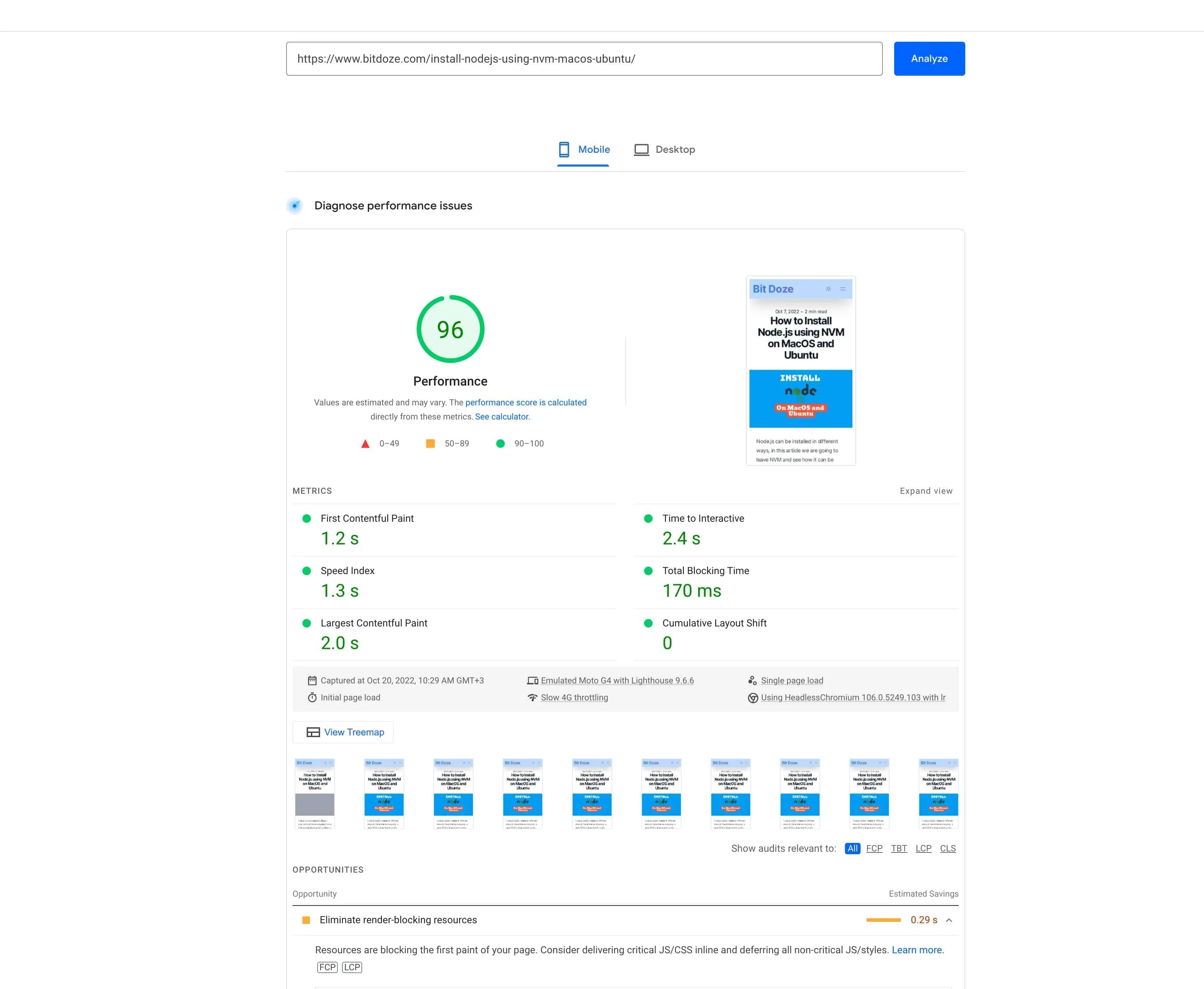
Screenshot from a 2022 measurement: facade embed vs standard iframe. Tooling and YouTube’s player have both changed since. Re-run Lighthouse on your own build for numbers that match your stack.
Using YouTube embeds in .astro files
You can use astro-embed in .astro files too, not just MDX. That is the right move for hero sections, featured-video layouts, and any reusable component where the video ID comes from props or a CMS:
---
import { YouTube } from "astro-embed";
---

<section>
  <h2>Featured Video</h2>
  <YouTube id="NkShQ1wwiCg" title="Featured tutorial" />
</section>
Alternative: use lite-youtube-embed directly
If you do not want the astro-embed dependency at all, use lite-youtube-embed as a plain web component. You include its CSS and JavaScript yourself (the README documents the exact lines for bundlers or a plain script tag), then render:
<lite-youtube videoid="NkShQ1wwiCg" playlabel="Play"></lite-youtube>The README also documents a progressive-enhancement pattern where the static markup is a real, working link before the JavaScript upgrades it.
Zero-dependency path
You skip the Astro package and the version matrix entirely. The tradeoff: you manage asset loading and upgrades yourself instead of getting them from astro-embed.
Two more pointers. justinribeiro/lite-youtube is a shadow-DOM port of the same idea and is recommended in Paul Irish’s README. React ports exist too (react-lite-youtube-embed 3.7.0, 2026-09-06, and @next/third-parties), but they are React/Next-only and irrelevant unless you leave Astro. For the Markdown side of Gatsby, see how to embed YouTube videos in Gatsby MDX.
Troubleshooting
| Symptom | Cause | Fix |
|---|---|---|
| Component renders as plain text or nothing | @astrojs/mdx not installed |
npx astro add mdx, then restart the dev server |
Cannot find module 'astro-embed' |
Package not installed, or wrong import path | Install astro-embed (or the standalone package) and match the import to what you installed |
| Auto-embed URLs stay as links | Integration order wrong | embeds() must come before mdx() in astro.config.mjs |
| Player shows YouTube “Error 153” | Old lite-youtube-embed referrer policy | Upgrade to lite-youtube-embed >= 0.3.4 (bundled in astro-embed-youtube >= 0.5.10); the referrer-policy fix shipped 2025-11-10 |
| npm peer dependency errors on Astro < 7.2.4 | Integration 0.13.x requires astro: ^7.2.4 |
Pin @astro-community/astro-embed-integration@^0.12, or use manual imports only |
posterQuality="max" shows a blank or gray box |
maxresdefault.jpg missing for that video |
Switch to posterQuality="high" |
| URL inside a sentence is not converted | Auto-embed only matches URLs on their own line | Put the URL on its own line, or use <YouTube> manually |
Wrapping up
Facade-based YouTube embeds keep pages fast and Lighthouse scores honest, and they put playback on youtube-nocookie.com. The 2026 update to this setup is mostly about three things: import from astro-embed/integration, put embeds() before mdx(), and check that your Astro version is 7.2.4 or newer before you take the latest auto-embed integration.
If you are building the site from scratch, the companion pieces are how to add YouTube videos to your Astro blog on SSG and SSR and how to build a free Astro blog in 30 minutes.
Does this work with Astro SSR?
Yes. <YouTube> is a regular Astro component, so it works with both static output and server rendering. The facade markup is the same in both cases; the only difference is when the HTML is produced.
Can I disable autoplay on click?
lite-youtube forces autoplay=1 when the visitor clicks play. Passing params="autoplay=0" looks like the fix, but I have not verified that it defeats the forced autoplay on the current lite-yt version. If click-to-pause is a hard requirement, test it on your build before relying on it.
Does auto-embed work for Vimeo too?
Yes. A Vimeo URL on its own line is converted the same way, and there is a <Vimeo> component if you prefer manual imports. The auto-embed matcher also covers Twitter/X, Mastodon, Bluesky, Gists, and Open Graph link previews.
VPS prices jumped across the board in 2026. If you’re rethinking a rented box, see what changed and when a mini PC wins.