
UsulNet Docker Install: All-in-One Container Management
UsulNet Docker install guide, updated for v26.5.2: config.yaml, the 5-service stack, Trivy scanning, multi-node agents, and the new AGPL licensing explained.
Updated Published 36 min read

Disclosure: this guide contains referral links. If you buy through them, I may earn a commission at no extra cost to you.
I first covered UsulNet, a self-hosted Docker manager, in February 2026, right after the first public beta (v26.2.0). This article is now updated for v26.5.2, released 2026-05-21, because two things changed that decide whether you should run it.
First, the licensing flipped. Since v26.5.0 the project ships one AGPL build with every feature enabled: no runtime caps, no call-home, no Community-Edition gating in the binary. The old story (free tier limited to 2 nodes and 3 users, OIDC and LDAP locked behind a paid license) no longer matches what the code does.
Second, development has gone quiet. v26.5.2 is the last release and the repository has seen no commits since May 2026. Open issues from September 2026 sit unanswered. That does not make the software bad, but it changes how you deploy it.
UsulNet also repositioned itself. The homepage now leads with privacy tooling (OSINT recon, file metadata hygiene) and calls the product a privacy control plane, with container management as one part of a broader infrastructure platform. The feature set is still the widest of any self-hosted Docker manager I’ve written about, wider than Arcane or Dockhand. This guide covers the install and the trade-off between feature breadth and maturity.
What UsulNet does: self-hosted container management in one binary
UsulNet is written in Go and compiles to a single ~50 MB binary with no runtime dependencies. No Node.js, no Python, no heavy frontend framework. The UI is server-rendered HTML using Templ templates, Tailwind CSS, Alpine.js, and HTMX.
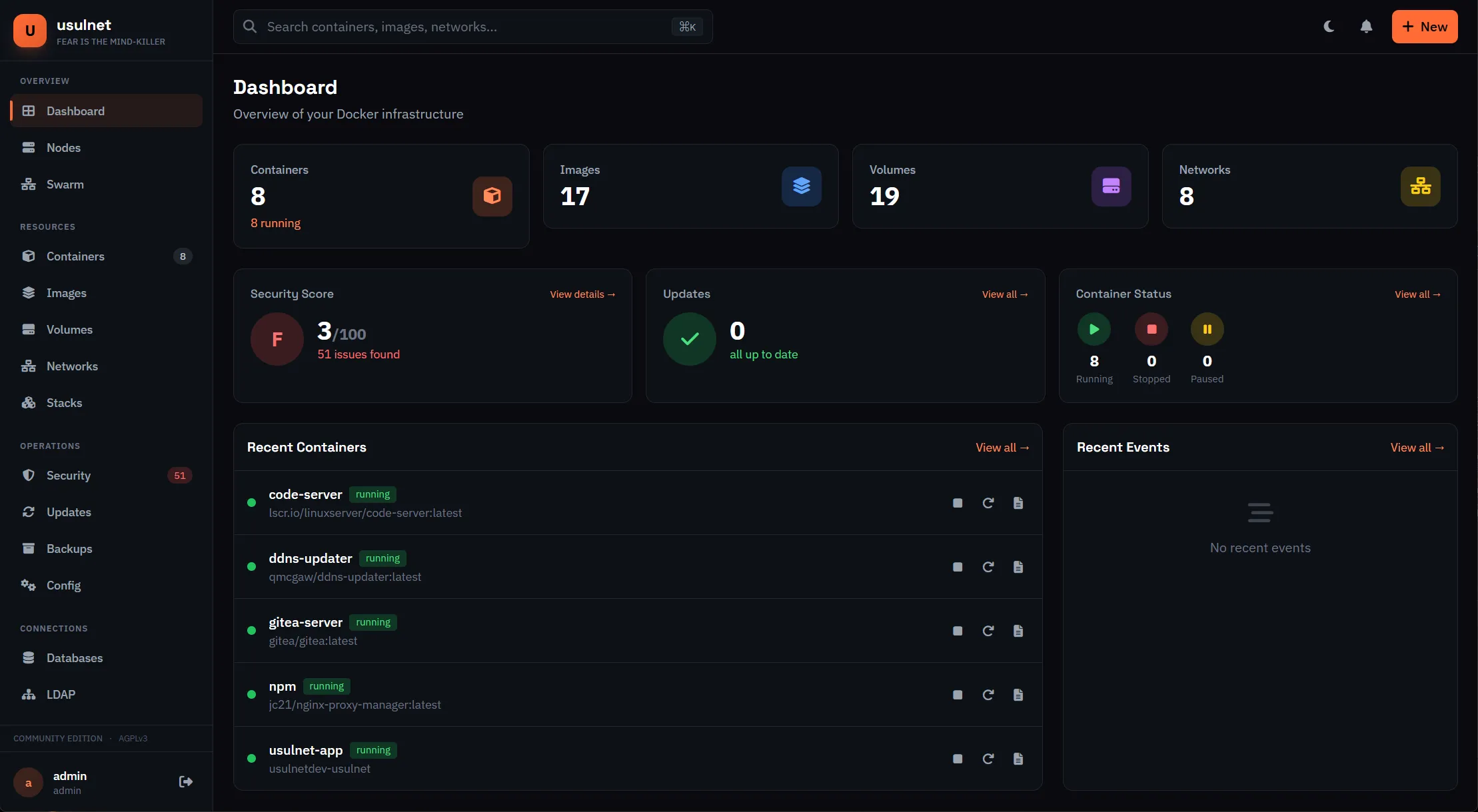
The v26.5.x build includes:
- Full container lifecycle management with bulk operations, stats, exec, filesystem browser, and drift detection (desired vs actual state)
- Docker Compose stack deployment from YAML, Git, or a built-in template catalog, with a registry browser for Docker Hub, GHCR, and OCI registries
- Trivy vulnerability scanning with 0-100 security scoring, plus YARA scanning and container forensics snapshots
- SBOM generation in CycloneDX and SPDX formats
- RBAC with granular permissions and custom roles
- 2FA/TOTP, OIDC/OAuth2, and LDAP authentication
- Monitoring with alert rules and 11 notification channels (Email, Slack, Discord, Telegram, Gotify, ntfy, PagerDuty, Opsgenie, MS Teams, webhook, custom)
- Scheduled backups to S3, MinIO, local disk, Azure Blob, GCS, Backblaze B2, or SFTP, with sandboxed restore verification
- Caddy and Nginx Proxy Manager integration for reverse proxy config
- Multi-node master/agent architecture over NATS with mTLS, plus an optional WireGuard mesh
- RDP and VNC sessions in the browser through Apache Guacamole (guacd)
- Privacy/OSINT recon, firewall management (ufw/nft/iptables), DNS provider automation, and an offline marketplace
- Monaco code editor, in-browser Neovim, SSH, database browser, LDAP browser, Git integration
- Host-side
usulnetCLI with API-key auth and JSON output - REST API with OpenAPI 3.0 docs and WebSocket streams
That list is long. I have not tested every feature. The core container management, stack deployment, and security scanning work well. The niche items (in-browser Neovim, RDP sessions, the recon toolkit) are documented in the release notes rather than something I re-verified for this update, so treat them as “shipped upstream” rather than “battle-tested here”.
Project status: late 2026
Before the install steps, the maturity picture, because it should influence how you deploy this.
The facts as of late October 2026:
- v26.5.2 shipped on 2026-05-21. That is 11 releases since February 2026, then nothing.
- The repository has 32 commits and one contributor. Last code activity: 2026-05-21, roughly five months of silence.
- Open issues include a firewall rule-creation bug (#24) and settings not being saved (#25), both from September 2026, both unanswered. Older ones (#8, a stuck update button; #3, flaky Gitea stack deploys) have been open since February.
- 133 GitHub stars. Arcane has 8,088 and Dockhand has 6,888, both with pushes in the last week.
Project status: stalled since May 2026
Fine to self-host for tinkering or a single-node homelab with working backups. Risky as a critical control plane. Pin the image tag (set USULNET_VERSION=26.5.2 in .env, do not run latest on a stalled project), keep the compose files in Git, and export backups somewhere the tool cannot touch. If you run it on an internet-facing box, isolate it and add CrowdSec on top for intrusion protection.
Quiet is not the same as dead
The velocity before the stall was real: 10 releases in 3.5 months, and the licensing flip was a deliberate generous move. Solo mega-projects going quiet after a burst is common and not necessarily fatal. But you should plan for the project never waking up again.
How UsulNet compares to other Docker managers
If you’re coming from Arcane or Dockhand, or looking at the Arcane vs Dockhand comparison, here’s where UsulNet sits in late 2026:
| UsulNet | Arcane | Dockhand | |
|---|---|---|---|
| License | AGPL-3.0 | BSD-3-Clause | BSL 1.1 |
| Backend | Go (single binary) | Go | Bun + SvelteKit |
| Frontend | Templ + HTMX + Alpine.js | SvelteKit | SvelteKit 2 / Svelte 5 |
| Vuln scanning | Trivy (built-in) | No | Grype/Trivy |
| RBAC | Yes (granular permissions) | No | Enterprise tier only |
| Multi-node | NATS + mTLS agents, WireGuard mesh | arcane-headless | Hawser |
| Reverse proxy | Caddy + NPM integration | No | No |
| Backups | S3, local, Azure, GCS, B2, SFTP | No | No |
| Monitoring/alerts | Built-in, 11 notification channels | No | No |
| New since Feb 2026 | Recon, firewall, WireGuard, DNS, marketplace, host CLI | - | - |
| GitHub stars (Oct 2026) | 133 | 8,088 | 6,888 |
| Status | Beta (v26.5.2) | Stable (since 2022) | v1 (since Dec 2025) |
| Last release | May 2026 (no commits since) | Active | Active |
| Pricing | AGPL, all features free | Free | Free homelab, $499/host/yr SMB |
UsulNet has the widest feature set of the three and it is also the youngest and least proven. Arcane has been around since 2022 with a large contributor base. That gap matters when you hit an edge case at 2am and the issue tracker is silent.
If stability is the priority
Arcane and Dockhand are both actively maintained as of October 2026. UsulNet’s feature list is longer, but a shorter list that gets patched beats a longer list that does not.
Prerequisites
Before you start, you need:
- A Linux server: Ubuntu 22.04+, Debian 12+, or RHEL 9+
- Docker Engine 24.0+ and Docker Compose v2.20+
- 2 GB RAM minimum, 4 GB recommended
- 20 GB free disk minimum (the Trivy database alone is a few hundred MB)
- Port 7443 available. That is the only published port by default; 8080 stays internal to the Docker network
- Optional: a domain name if you want TLS from a reverse proxy instead of the self-signed cert
The five-container stack sets its own resource limits in the compose file: 1 GB RAM / 2 CPU for the app, 512 MB for guacd and PostgreSQL, 300 MB for Redis, 256 MB for NATS. That is why 2 GB is the floor and 4 GB is comfortable.
VPS prices jumped across the board in 2026. If you’re rethinking a rented box, see what changed and when a mini PC wins, and which VPS provider fits a 5-container stack.
Hetzner VPS Hostinger VPS DigitalOcean $100 Free Vultr $100 FreeOr run it at home on a compact mini PC for a home server. Any recent mini PC works for this workload; the stack is mostly idle after boot.
Install Docker
If you don’t have Docker yet:
sudo apt-get update
sudo apt-get install ca-certificates curl gnupg
sudo install -m 0755 -d /etc/apt/keyrings
curl -fsSL https://download.docker.com/linux/ubuntu/gpg | sudo gpg --dearmor -o /etc/apt/keyrings/docker.gpg
sudo chmod a+r /etc/apt/keyrings/docker.gpg
echo "deb [arch=$(dpkg --print-architecture) signed-by=/etc/apt/keyrings/docker.gpg] https://download.docker.com/linux/ubuntu $(. /etc/os-release && echo "$VERSION_CODENAME") stable" | sudo tee /etc/apt/sources.list.d/docker.list > /dev/null
sudo apt-get update
sudo apt-get install docker-ce docker-ce-cli containerd.io docker-compose-plugin
sudo usermod -aG docker $USER
Only docker-compose-plugin is needed for Compose v2. The legacy docker-compose package is not. Log out and back in so the group change applies.
Full walkthrough: Install Docker & Docker-compose for Ubuntu.
Install UsulNet with Docker Compose
UsulNet needs five services: the app itself, PostgreSQL, Redis, NATS, and guacd for browser-based RDP/VNC. That is heavier than Arcane (one container) or Dockhand (one container with optional PostgreSQL). The trade-off is proper session management, caching, inter-node messaging, and a remote-desktop gateway baked into the stack.
The compose file deploys this:
Quick install (one command)
The fastest way to get running:
curl -fsSL https://raw.githubusercontent.com/fran-olivares/usulnet/main/deploy/install.sh | sudo bashNote the repo owner: the project moved from fr4nsys/usulnet to fran-olivares/usulnet. Use the new URL; the old one still redirects but do not build automation on redirects. The script downloads the production compose file, generates the secrets (including the config.yaml you’ll read about below), and starts everything. First run shows an onboarding wizard. Log in at https://your-server-ip:7443 with admin / usulnet and change the password immediately.
I’d still recommend the manual method below so you know what is in the compose file and where the secrets live.
Manual Docker Compose install (recommended)
Create a directory for UsulNet:
mkdir -p /opt/usulnet && cd /opt/usulnetDownload the compose file (it now lives at the repo root), the environment template, and the NATS config it expects:
curl -fsSL https://raw.githubusercontent.com/fran-olivares/usulnet/main/docker-compose.yml -o docker-compose.yml
curl -fsSL https://raw.githubusercontent.com/fran-olivares/usulnet/main/deploy/.env.example -o .env
curl -fsSL https://raw.githubusercontent.com/fran-olivares/usulnet/main/deploy/nats-server.conf -o nats-server.conf
Generate the database password and pin the image version:
sed -i "s|CHANGE_ME_GENERATE_RANDOM_PASSWORD|$(openssl rand -base64 24 | tr -dc 'a-zA-Z0-9' | head -c 32)|" .env
sed -i "s|USULNET_VERSION=.*|USULNET_VERSION=26.5.2|" .env
grep -E "DB_PASSWORD|USULNET_VERSION" .env   # confirm both are set, no CHANGE_ME left
Pinning matters more than usual here. The project is stalled, so latest can only surprise you.
Now create config.yaml (next section) and start the stack:
docker compose up -dVerify before you move on
docker compose ps should show all five services as healthy or running. Then curl -sf http://localhost:8080/health should return 200 (that runs inside the Docker network; the port is not published). If a service is restarting, stop here and read the logs with docker compose logs usulnet before going further.
Open https://your-server-ip:7443. UsulNet generates a self-signed TLS certificate on first start, so your browser will warn. Log in with admin / usulnet, change the password, and enable 2FA.
Three failures you’ll hit if you skip steps. If port 7443 is already in use, set USULNET_HTTPS_PORT in .env to something free and run docker compose up -d again. If config.yaml is missing, the container exits immediately: the compose file mounts it read-only at /app/config/config.yaml. If DB_PASSWORD is still CHANGE_ME, PostgreSQL refuses the connection. Regenerate it and recreate the database volume if you already started once with the placeholder.
Config.yaml and secrets
Since v26.5 the app-level secrets moved out of .env into a mounted config.yaml. The split is:
.envholds the database password plus optional ports, version, mode, and terminal settings.config.yamlholds everything the application itself needs: JWT secret, encryption key, service URLs, scanning, storage, proxy integrations.
Generate both secrets with openssl and put them in the security block:
# config.yaml (mounted :ro at /app/config/config.yaml)
server:
  http_port: 8080
  https_port: 7443

database:
  url: postgres://usulnet:YOUR_DB_PASSWORD@postgres:5432/usulnet?sslmode=disable

redis:
  url: redis://redis:6379/0

nats:
  url: nats://nats:4222

security:
  jwt_secret: "<openssl rand -hex 32>"
  config_encryption_key: "<openssl rand -hex 32>"   # 64 hex chars

trivy:
  enabled: true
  cache_dir: /var/lib/usulnet/trivy
  timeout: 5m
  severity: CRITICAL,HIGH,MEDIUM
  ignore_unfixed: false
  update_db_on_start: true

storage:
  type: local
path: /app/dataopenssl rand -hex 32 # run twice: once for jwt_secret, once for config_encryption_keyThe quickest way to get a complete template is to let install.sh generate one and copy its structure, or read docs/installation.md in the repo. The sections above are the ones you must not leave as placeholders.
The encryption key gotcha
Before v26.2.5 the app generated a new random encryption key on every restart unless you set one explicitly. That silently scrambled SSH credentials, TOTP seeds, and Nginx Proxy Manager tokens. Now the key is derived from the JWT secret (SHA-256) or set explicitly. The new footgun: changing the JWT secret later breaks every piece of previously encrypted data. Set both values once, store config.yaml somewhere safe, and never rotate the JWT secret without a restore plan. If you lose config_encryption_key, that data is gone. Back up config.yaml next to your database dumps.
Secrets in Compose files
If you want to understand what belongs in env files, what belongs in Docker secrets, and what does not, read how Docker Compose secrets work and secure alternatives.
What the compose file includes
The file you download is long. Here is the shape of it (abbreviated; grab the real one from the repo root):
services:
  usulnet:
    image: usulnet/usulnet:${USULNET_VERSION:-latest}   # Docker Hub, multi-arch amd64/arm64
    ports:
      - "${USULNET_HTTPS_PORT:-7443}:7443"
      # - "${USULNET_HTTP_PORT:-8080}:8080"   # internal only by default
    volumes:
      - /var/run/docker.sock:/var/run/docker.sock      # read-write, not :ro
      - ./config.yaml:/app/config/config.yaml:ro
      - usulnet_data:/app/data
      - trivy_cache:/var/lib/usulnet/trivy
    pid: "host"
    cap_add:
      - SYS_PTRACE
      - SYS_ADMIN
    healthcheck:
      test: ["CMD-SHELL", "curl -sf http://localhost:8080/health"]
    depends_on:
      postgres:
        condition: service_healthy
    restart: unless-stopped

  guacd:
    image: guacamole/guacd:1.5.5        # RDP/VNC web gateway (added v26.2.2)

  postgres:
    image: postgres:16-alpine           # tuned flags, --data-checksums
  redis:
    image: redis:8-alpine               # --appendonly yes
  nats:
    image: nats:2.12-alpine             # nats-server.conf, healthz on :8222

volumes:
  usulnet_data:
  trivy_cache:
  postgres_data:
  redis_data:
  nats_data:

networks:
  usulnet-backend:                      # internal: true, no egress
  usulnet-frontend:
Five containers. PostgreSQL stores application data, Redis handles sessions and caching with AOF persistence, NATS is the messaging layer (used even in standalone mode), and guacd terminates browser RDP/VNC sessions. The backend network is marked internal: true, so those services have no internet egress.
Security blast radius
The upstream compose file mounts the Docker socket read-write, runs the container with pid: "host", and adds SYS_PTRACE and SYS_ADMIN. Together that is root-equivalent access to the host. This is not a tool to run next to untrusted workloads. Give it a dedicated VPS or VM, firewall 7443 to your IP or put it behind a proxy with auth, and enable 2FA on every account. Read securing a Docker server exposed to the internet and remember why Docker bypasses your firewall rules before you publish that port.
New modules in v26.5: recon, firewall, WireGuard, DNS
Between February and May 2026 the project added more surface area than the original beta had. This is where the “all-in-one” claim got real. Release notes for v26.2.1 through v26.5.2 document:
| Module | What it does | Since | Needs |
|---|---|---|---|
| Privacy/OSINT recon | SpiderFoot-driven scans, ownership verification, HIBP bring-your-own key, 90-day retention on a dedicated usulnet-recon network |
v26.5.0 | amd64 only (see below) |
| File metadata hygiene | mat2/exiftool strip metadata in a sandboxed toolkit | v26.5.0 | - |
| Firewall | Manage ufw/nftables/iptables rules from the UI | v26.5.1 | NET_ADMIN plus ufw/nft/iptables on the host |
| WireGuard mesh | Encrypted overlay between master and agents | v26.5.1 | WireGuard kernel module, NET_ADMIN, USULNET_ENCRYPTION_KEY |
| DNS providers | Cloudflare, Route53, DigitalOcean, RFC2136 with ACME DNS-01 | v26.5.1 | Outbound egress and the encryption key set |
| Backup verification | Sandboxed restore tests | v26.5.1 | - |
| Automated rollback | Revert failed stack deploys | v26.5.1 | - |
| SSL observatory | Certificate visibility across services | v26.5.1 | - |
| Docker engine config | Atomic daemon.json edits |
v26.5.1 | /etc/docker mounted read-write |
| Image builder | Build images with a cosign signing hook | v26.5.1 | - |
| Marketplace | Offline catalog (go:embed), honeypots (Cowrie, Dionaea, Endlessh), Tor SOCKS5 app | v26.5.1-26.5.2 | - |
| Drift detection | Desired vs actual container state | v26.2.4 | - |
| Registry browser | Browse Docker Hub, GHCR, OCI registries | v26.2.4 | - |
| RDP web sessions | Browser RDP/VNC via Guacamole | v26.2.2 | guacd service (in the default compose) |
| Host CLI | usulnet containers ls, stack deploy, recon scan, API-key auth, --json |
v26.5.2 | - |
Two caveats worth knowing before you enable things:
recon-toolkit is amd64-only
The privacy/OSINT recon toolkit ships for amd64 only. On arm64 boxes (Raspberry Pi, Ampere, Graviton) it will not run. The rest of UsulNet is multi-arch (amd64 + arm64).
The firewall module touches host-level ufw/nftables/iptables and needs NET_ADMIN, which is more privilege than a container UI normally gets. Understand why Docker bypasses your firewall rules before you let a web UI edit them. The WireGuard mesh is interesting for multi-host setups; see how UsulNet’s WireGuard mesh compares to Tailscale, Headscale, and NetBird before choosing it over a dedicated mesh VPN.
All of the above is documented in the release notes, not something I re-tested module by module. Enable what you need, verify it, and leave the rest off. Fewer enabled modules is a smaller blast radius.
Container and stack management
Container management works the way you’d expect: a list of all containers with real-time CPU and memory stats, and start/stop/restart/pause/kill/remove individually or in bulk. v26.2.1 added container rename; v26.2.4 added drift detection, which flags containers that no longer match their declared state.
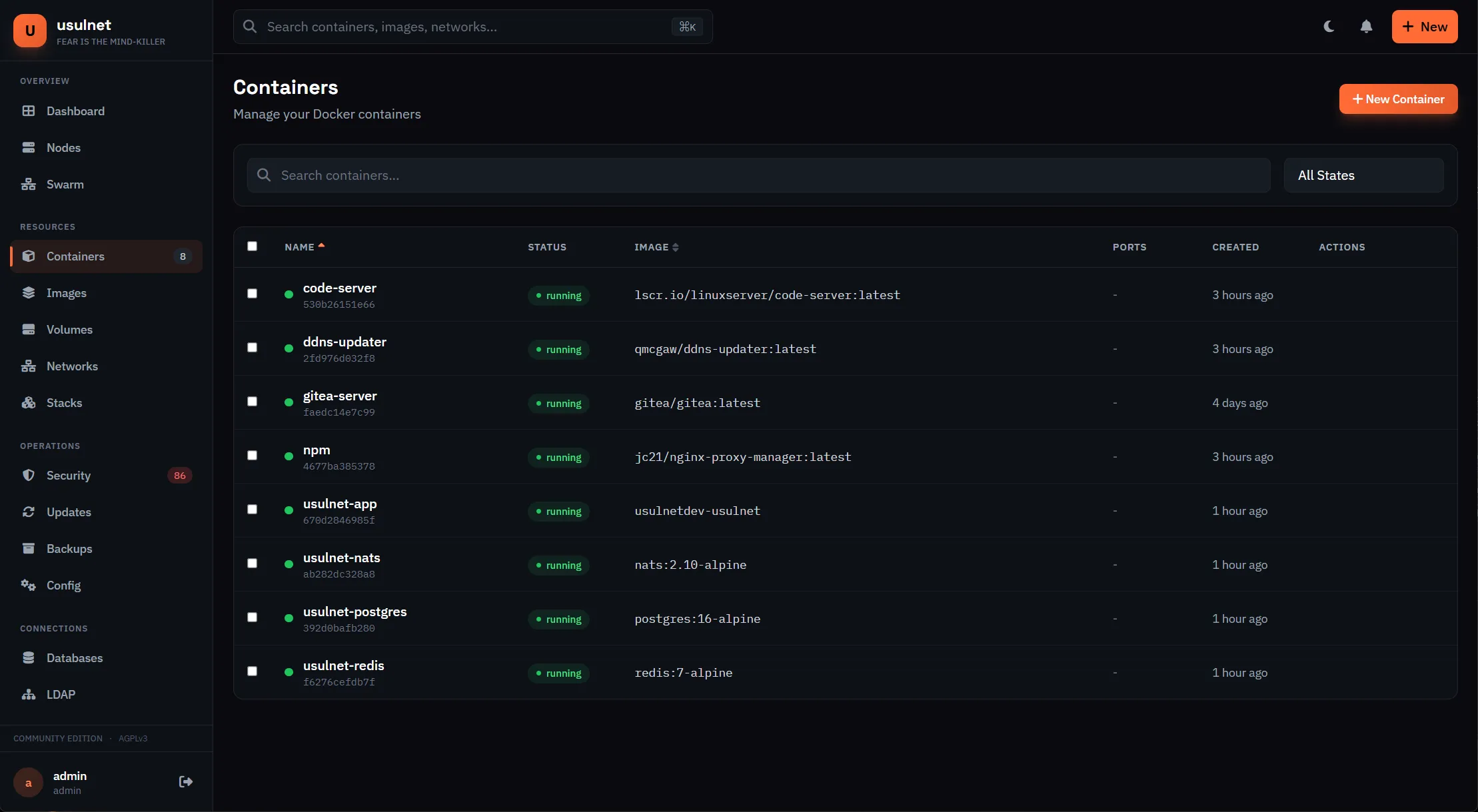
Stack deployment is the more interesting half. You can deploy compose stacks three ways:
From YAML
Paste or write a compose file in the web editor. UsulNet validates the YAML before deploying. The editor is Monaco (the one VS Code uses), so you get syntax highlighting and autocomplete.
From Git
Connect a Git repository (Gitea, GitHub, or GitLab) and deploy compose files from it. Auto-deploy rules redeploy when you push to a branch. Note: Gitea stack deploys have a long-standing bug (#3) that makes them unpredictable.
From catalog
A built-in template catalog with pre-configured apps. Pick one, adjust settings, deploy. v26.5.2 extended this into an offline marketplace with honeypots and a Tor SOCKS5 app.
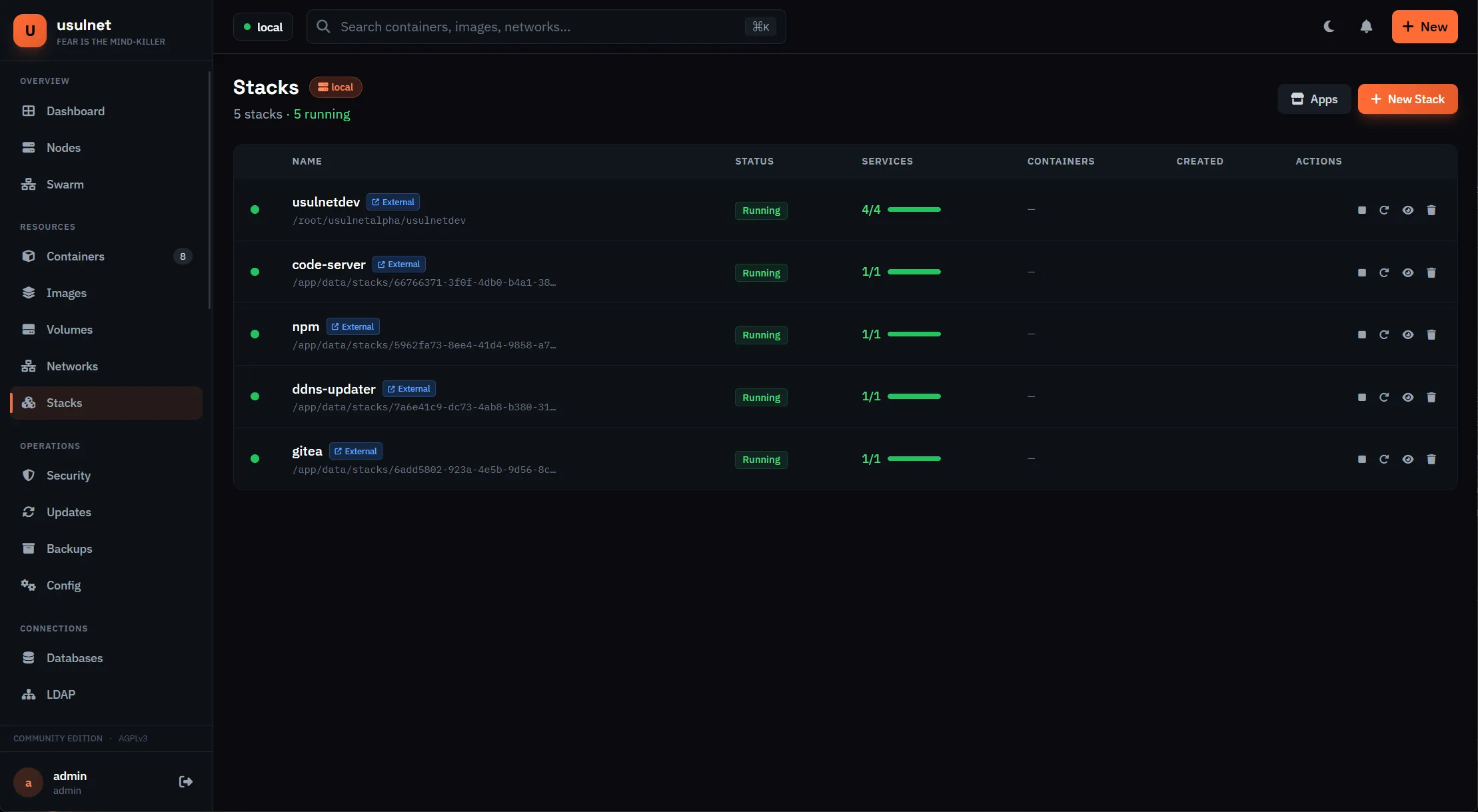
The container filesystem browser and web terminal both work. You can browse files inside running containers, edit them with Monaco, and open exec sessions through xterm.js. v26.5.2 added a first-run onboarding wizard, so a fresh install walks you through the basics instead of dropping you into an empty dashboard.
Security scanning with Trivy
UsulNet integrates Trivy for vulnerability scanning. It runs locally on your server and does not send data to external services.
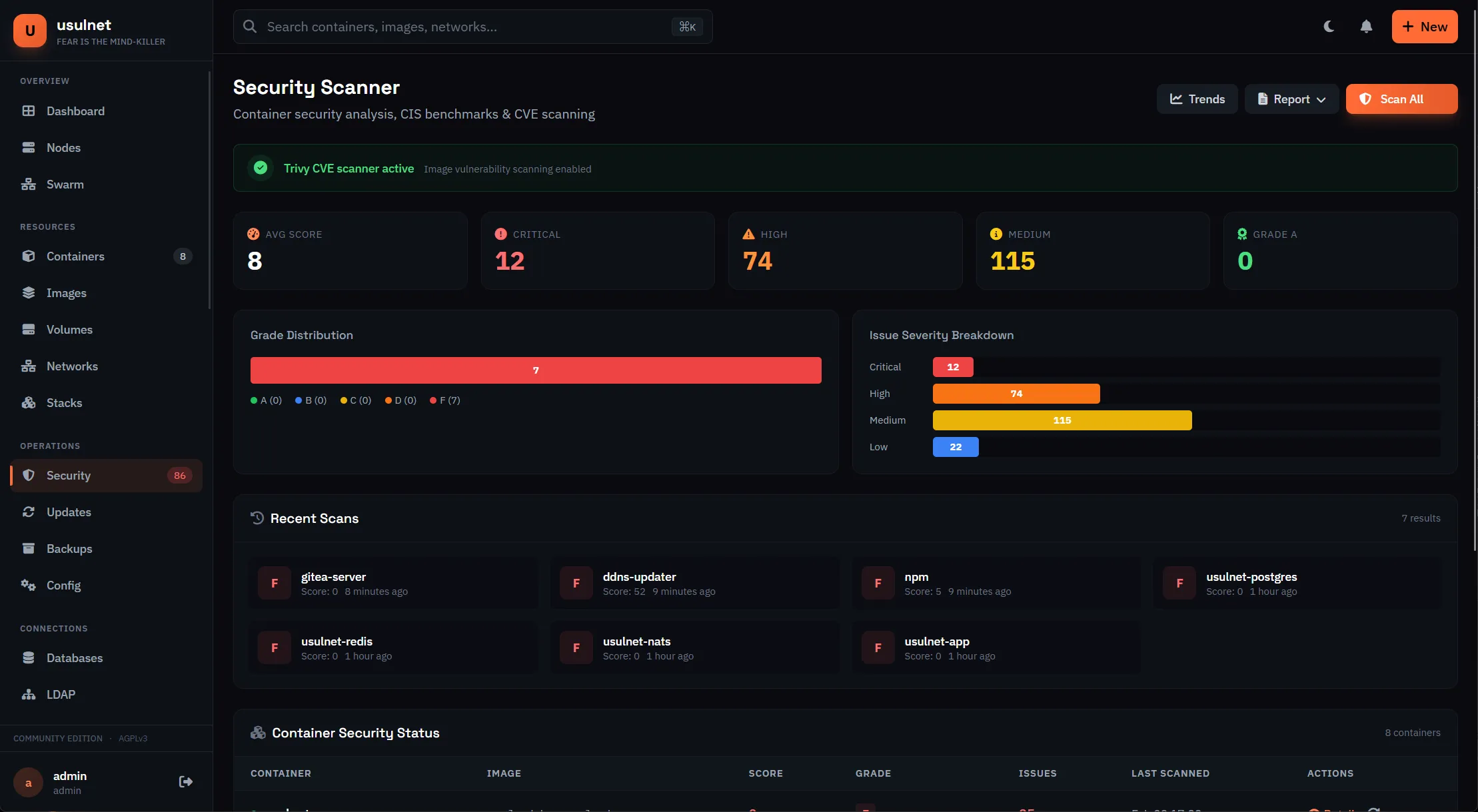
Scanning is configured in config.yaml:
trivy:
  enabled: true
  cache_dir: /var/lib/usulnet/trivy
  timeout: 5m
  severity: CRITICAL,HIGH,MEDIUM
  ignore_unfixed: false
  update_db_on_start: true
The compose file keeps the Trivy database in its own trivy_cache volume so it survives container recreation.
What sets this apart from Dockhand’s scanning is the scoring. Each container gets a 0-100 score from the scan results, plus an aggregate score across your infrastructure and trend tracking over time. UsulNet also generates SBOMs in CycloneDX and SPDX formats, and v26.5.2 added YARA scanning and container forensics snapshots on top of the Trivy layer.
First scan takes a while
The first vulnerability scan downloads the Trivy database, a few hundred MB. Subsequent scans reuse the cached copy in the trivy_cache volume. If the first scan times out, raise the timeout value in config.yaml. The container needs outbound internet access for the download; behind a proxy, set HTTP_PROXY and HTTPS_PROXY on the UsulNet container.
Setting up authentication
UsulNet supports TOTP 2FA, OIDC/OAuth2, and LDAP. The catch is a documentation split you need to know about.
Verify in your build
The v26.5.0 and v26.5.1 release notes say all auth modules (OIDC, LDAP, custom roles) moved into the one AGPL build with no edition gating. The usulnet.com pricing page and docs/licensing.md still describe them as Business features. Both cannot be right. Check your build’s Settings page before writing an access-control plan that depends on either claim.
2FA/TOTP
Every user can enable TOTP two-factor auth from profile settings. Works with any authenticator app (Google Authenticator, Authy, Aegis). Backup codes are generated at setup, so store them somewhere that is not the same browser you log in with.
OIDC/OAuth2
SSO login shipped in v26.2.1. Point it at Authentik, Keycloak, GitHub, Google, or Microsoft with a client ID, client secret, and issuer URL. Users are auto-provisioned on first login and you can map IdP groups to UsulNet roles. If your build gates this behind a license, you’ll see it in Settings.
LDAP/Active Directory
Authenticate against LDAP directories with bind DN, search base, and attribute mappings. There’s a built-in LDAP browser for debugging your directory config. Same licensing caveat as OIDC: per release notes it’s in the AGPL build; verify on your install.
Multi-node management
UsulNet uses a master/agent architecture for managing Docker across hosts. Agent-to-master traffic runs over NATS with JetStream persistence and mTLS. v26.5.1 added an optional WireGuard mesh over the same messaging layer.
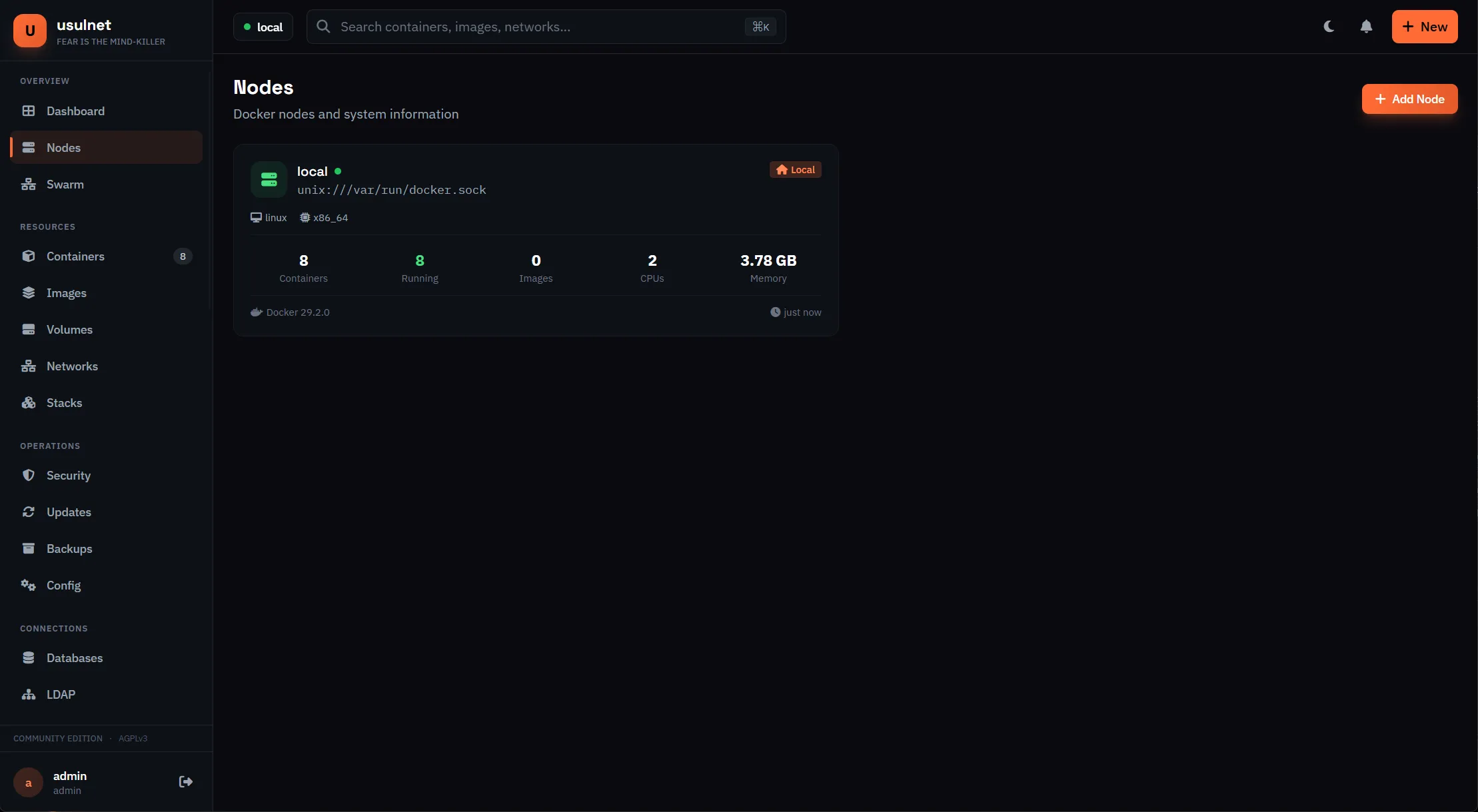
USULNET_MODE takes three values: standalone (a single node, the default), master (a control plane that manages agents), and agent (a worker node that connects to a master).
The agent image is usulnet/usulnet-agent on Docker Hub, with a Cobra-based CLI (run, version, validate-config) and a USULNET_AGENT_DOCKER_HOST env var for non-standard socket paths.
Deploying agents
You can deploy agents from the web UI: Nodes > Add Node, enter SSH credentials for the remote machine, Deploy Agent. UsulNet SSHs in, installs the agent container, and configures it. Set AGENT_TOKEN in the master’s .env first and use the same token on the agent.
Or deploy manually on the remote host:
# config.yaml on the agent
mode: agent
agent:
  master_url: nats://master-host:4222
  name: worker-01
  token: your-agent-token
  heartbeat_interval: 30s
  metrics_interval: 1m
The agent sends heartbeats and metrics at those intervals; when one drops, the dashboard shows it. Agents connect outbound to the master, so you normally do not need to publish NATS (4222) on the master to the internet. Keep it internal and let agents reach it over a VPN or the WireGuard mesh.
This differs from Arcane’s arcane-headless (lightweight outbound agent) and Dockhand’s Hawser (NAT traversal). The NATS approach is more moving parts but gives persistent messaging, which matters when you grow past a handful of hosts.
Reverse proxy integration
This is something neither Arcane nor Dockhand offers: UsulNet can configure Caddy or Nginx Proxy Manager directly from its UI.
Caddy
Enable the integration in config.yaml:
caddy:
  enabled: true
  admin_url: http://caddy:2019
  acme_email: [email protected]
You can then create proxy hosts, manage certificates, and configure routes from the UsulNet dashboard. Caddy handles automatic HTTPS with Let’s Encrypt.
Nginx Proxy Manager
Full Nginx Proxy Manager integration. Manage proxy hosts, SSL certificates, redirections, TCP/UDP streams, and access lists from inside UsulNet. v26.5.1 extended this to authoritative proxy state stored in Postgres (locations, redirections, streams).
To put UsulNet itself behind a reverse proxy, remember the port story: 7443 (HTTPS) is the only published port by default, and 8080 (HTTP) is internal. Either uncomment the 8080 publish line in the compose file and proxy to it, or proxy to 7443 and disable upstream TLS verification. WebSocket support is required for live logs, terminal, and real-time metrics.
Nginx
Publish 8080 first (uncomment USULNET_HTTP_PORT in the compose ports), then:
server {
    listen 443 ssl http2;
    server_name usulnet.yourdomain.com;

    ssl_certificate /path/to/cert.pem;
    ssl_certificate_key /path/to/key.pem;

    location / {
        proxy_pass http://127.0.0.1:8080;
        proxy_http_version 1.1;
        proxy_set_header Upgrade $http_upgrade;
        proxy_set_header Connection "upgrade";
        proxy_set_header Host $host;
        proxy_set_header X-Real-IP $remote_addr;
        proxy_set_header X-Forwarded-For $proxy_add_x_forwarded_for;
        proxy_set_header X-Forwarded-Proto $scheme;
    }
}
Traefik
Add labels to the UsulNet service. Traefik reaches the container over the Docker network on 8080 without publishing it:
labels:
  - "traefik.enable=true"
  - "traefik.http.routers.usulnet.rule=Host(`usulnet.yourdomain.com`)"
  - "traefik.http.routers.usulnet.entrypoints=websecure"
  - "traefik.http.routers.usulnet.tls.certresolver=letsencrypt"
  - "traefik.http.services.usulnet.loadbalancer.server.port=8080"
Full Traefik setup: How to use Traefik as a reverse proxy in Docker.
Cloudflare Tunnels
Point the tunnel at http://localhost:8080 if you publish that port. Otherwise use https://localhost:7443 and disable origin TLS verification, since the cert is self-signed. SSL and WebSocket support are handled automatically, and no ports need opening.
Backup configuration
UsulNet can back up containers, volumes, or entire stacks on a schedule. Storage backends: local filesystem, AWS S3, MinIO, Azure Blob, Google Cloud Storage, Backblaze B2, and SFTP. Compression is gzip or zstd.
Configure storage in config.yaml:
storage:
  type: s3
  s3:
    endpoint: s3.amazonaws.com
    bucket: usulnet-backups
    region: us-east-1
    access_key: YOUR_KEY
    secret_key: YOUR_SECRET
  backup:
    compression: zstd
    compression_level: 3
    default_retention_days: 30
Local storage (the default the installer writes):
storage:
  type: local
  path: /app/data
The in-container data path is /app/data now. If you used /var/lib/usulnet/backups from the beta docs, update it.
Backup verification is built in
v26.5.1 added sandboxed restore tests and automated rollback for failed deploys. Useful, but do not make it your only copy. On a stalled project, run a plain pg_dump of the usulnet database on a cron job and push it to storage the tool cannot delete. That is your real exit path.
Environment variables and config reference
Two files control the deployment. .env is consumed by Compose:
| Variable | Default | Purpose |
|---|---|---|
DB_PASSWORD |
none (required) | PostgreSQL password |
DB_USER |
usulnet |
PostgreSQL user |
DB_NAME |
usulnet |
PostgreSQL database |
USULNET_VERSION |
latest |
Image tag. Pin it: 26.5.2 |
USULNET_HTTP_PORT |
8080 |
Host HTTP port (not published by default) |
USULNET_HTTPS_PORT |
7443 |
Host HTTPS port |
USULNET_MODE |
standalone |
standalone or master |
HOST_TERMINAL_ENABLED |
true |
Host web terminal |
HOST_TERMINAL_USER |
nobody |
User for host terminal commands. See running containers as a non-root user before changing this |
AGENT_TOKEN |
change-me |
Agent auth token for multi-host setups |
config.yaml holds the application config (mounted read-only at /app/config/config.yaml):
| Key | Purpose |
|---|---|
security.jwt_secret |
JWT signing secret, 32+ chars. Also derives the encryption key |
security.config_encryption_key |
Explicit AES-256 key, 64 hex chars |
database.url / redis.url / nats.url |
Service connection strings |
trivy.enabled, trivy.timeout, trivy.severity |
Vulnerability scanning behavior |
storage.type, storage.path, storage.s3.* |
Backup targets and retention |
caddy.enabled, caddy.admin_url, caddy.acme_email |
Caddy integration |
npm.* |
Nginx Proxy Manager integration |
Environment overrides still work for some app settings (USULNET_CADDY_ENABLED, USULNET_CADDY_ADMIN_URL, and friends), but config.yaml is the primary interface. For the socket path there is USULNET_DOCKER_SOCKET / DOCKER_SOCKET (v26.2.2 added rootless Docker auto-detection).
Upgrade and rollback
Upgrades are the standard Compose dance:
cd /opt/usulnet
docker compose pull
docker compose up -d
docker compose ps- Back up first:
pg_dumpthe usulnet database and copyconfig.yamlsomewhere safe - Pin
USULNET_VERSIONin.envto the exact version you want, then pull - Run
docker compose up -dso the new image starts with the existing volumes - Verify:
docker compose ps(all healthy) andcurl -sf http://localhost:8080/health - Check the migrations ran:
usulnet migrate status(host CLI, v26.5.2)
Migrations are additive on upgrade, so upgrades are low-risk. Downgrades are not.
Always migrate down before downgrading
If you need to roll back to an older image, run usulnet migrate down <N> first (v26.5.2 ships migrate up/down/status subcommands). v26.5.1 alone added 11 migrations. Skip this and you get a schema mismatch and an app that refuses to start. And if the JWT secret changed between versions, encrypted data (SSH credentials, TOTP seeds, proxy tokens) is unrecoverable either way.
If you lock yourself out, the host binary has admin, config, and migrate subcommands, and docs/cli.md documents a password reset path. Keep a note of where the binary lives before you need it at 3am.
Licensing and pricing: what changed with AGPL
This is the headline change since February. v26.5.0 and v26.5.1 replaced the old edition limits (license.CELimits()) with license.OpenLimits(): one AGPL build, every feature, no runtime caps, no call-home. The old CE caps (2 nodes, 3 users, 1 team) are gone from the binary.
| Tier | Cost | What you get |
|---|---|---|
| AGPL build | Free | Everything: container management, scanning, RBAC, OIDC, LDAP, multi-node, backups |
| Business | €79/node/year | Support and legal rights (redistribution outside AGPL terms). Includes 5 users per node, master node free, extra packs at €19 per 10 users/year |
| Managed Cloud | Monthly/Annual/5-year (Polar.sh) | Hosted UsulNet with recon and a HIBP key included |
| Enterprise | Custom | SAML SSO, HA, audit retention beyond 90 days, signed SBOM, Tor egress (documented for v26.6) |
Pricing page vs binary
The release notes say nothing is gated. usulnet.com/pricing and docs/licensing.md still sell OIDC, LDAP, and custom roles as Business features. The code is the source of truth for what runs; the license is the source of truth for what you may do with it. Verify what your build gates in Settings before budgeting, and if you need a commercial relationship, get it in writing.
AGPL copyleft
AGPL is stricter than MIT or BSD. If you modify UsulNet and make it available over a network, you must release your changes under the same license. Fine for personal and internal use. Read it before you build a product on top.
Troubleshooting
Start every debugging session with the same triad: docker compose ps, docker compose logs usulnet, curl -sf http://localhost:8080/health. If you need more command-line basics, keep essential Docker commands for debugging handy.
UsulNet won't start - PostgreSQL connection errors
Make sure the database container is healthy before UsulNet connects. The depends_on: condition: service_healthy in the compose file handles ordering, but check it anyway:
docker exec usulnet-postgres pg_isready -U usulnetIf it returns “accepting connections”, the database is fine and the issue is in your connection string in config.yaml. A leftover CHANGE_ME DB_PASSWORD in .env produces the same symptom.
config.yaml not mounted or missing
The container exits immediately with no useful error. The compose file mounts ./config.yaml read-only at /app/config/config.yaml; if the file is absent, Docker creates an empty directory in its place and the app fails to parse it.
ls -la /opt/usulnet/config.yaml
docker compose logs usulnet
Encryption key changed and data looks scrambled
SSH credentials, TOTP seeds, and proxy tokens decrypt with security.config_encryption_key (or the key derived from jwt_secret). If either value changed since the data was written, decryption produces garbage and nothing recovers it. Restore config.yaml from backup and re-add the affected credentials. To avoid this, treat the JWT secret as write-once.
Port already in use
Something else owns 7443 or 8080. Change the host ports in .env:
USULNET_HTTPS_PORT=8443
docker compose up -d
Then open https://your-server-ip:8443.
Self-signed certificate warnings
UsulNet generates a self-signed certificate on first start for 7443. The browser warning is expected. For production, put a reverse proxy with Let’s Encrypt in front (see the reverse proxy section) or supply your own certificates:
server:
  tls:
    enabled: true
    cert_file: /path/to/cert.pem
    key_file: /path/to/key.pem
Trivy scans fail or timeout
The first scan downloads the vulnerability database, which is large. Raise the timeout in config.yaml:
trivy:
  timeout: 10m
Verify the container has outbound internet access. Behind a proxy, set HTTP_PROXY and HTTPS_PROXY on the UsulNet container.
NATS connection issues
Check the NATS logs first:
docker logs usulnet-natsNATS runs from nats-server.conf with a healthcheck on :8222/healthz. If NATS is up and UsulNet still cannot connect, confirm both containers share the usulnet-backend network and that the nats.url in config.yaml matches the service name.
Docker socket permission denied
The socket is mounted read-write at /var/run/docker.sock. On rootless Docker the path differs; v26.2.2 added auto-detection, and USULNET_DOCKER_SOCKET / DOCKER_SOCKET overrides it. If container management shows “permission denied”, check the actual socket path with docker context ls and set the variable to match.
My take after testing
UsulNet is the most feature-complete Docker manager I’ve written about, and the AGPL flip made it generous: every feature, no caps, no telemetry. The container management, stack deployment, and Trivy scanning work. The UI is fast, and the Go backend feels solid.
Eight months of hindsight changes the rest of the picture. The feature velocity was real (10 releases in 3.5 months) and then it stopped. It has one contributor, 32 commits, 133 stars, and unanswered issues since September. Compare that to Arcane (8,000+ stars, active) or Dockhand (nearly 7,000 stars, active). The maturity gap widened instead of closing.
The five-container stack is heavier than Arcane’s single container. On a 2 GB box that overhead is noticeable; on 4 GB it’s fine.
My rule of thumb: run UsulNet for homelab tinkering and single-node setups where you have working backups and can rebuild in an afternoon. Do not make it the critical control plane of anything you cannot afford to lose. If you want stability and a proven track record, Arcane is the safer pick. If security scanning in a lighter package is the priority, look at Dockhand. For the wider market, see the Portainer alternatives roundup.
The exit plan
Keep your compose files in Git. Run regular Postgres dumps of the usulnet database to storage outside the tool. Do not store irreplaceable state only inside UsulNet. And don’t rely solely on its built-in monitoring: pair it with standalone tools like Beszel and Uptime Kuma for standalone server monitoring. If the project never ships again, you want a boring afternoon of migration, not a fire.
Related articles
- Best Portainer alternatives in 2026 - five Docker management UIs compared
- Install Arcane - open-source Docker manager with GitOps
- Install Dockhand - security-focused Docker manager
- Arcane vs Dockhand - comparison of two other Docker management UIs
- Install Dockge - another Docker management UI
- Best Docker containers for home server - what to run once your manager is set up
- Best self-hosted panels - server management panels compared
- Traefik reverse proxy for Docker - proper reverse proxy setup
- Docker auto-update with Tugtainer - keep containers updated
- Server monitoring tools - monitoring your Docker host
- Docker Compose secrets - what works and secure alternatives
- Securing a Docker server - hardening a Docker host exposed to the internet
- WireGuard mesh VPN comparison - NetBird vs Headscale vs Tailscale
Related Posts
Did this guide work for you?

Written by Dragos
Dragos is the author of Bitdoze — practical DevOps, programming, and self-hosting guides.
More guides from Dragos →Need help with Astro, VPS, or a self-hosted app? View services →